
1. Produktua amaitu daview
The DOOGEE V30 PRO is a robust 5G rugged smartphone designed for durability and high performance. It features a powerful MediaTek Dimensity 7050 Octa Core processor, a large 10800mAh battery, and an advanced 200MP AI triple camera system. Built to withstand harsh environments, it meets IP68/IP69K and MIL-STD-810H standards for water, dust, and drop resistance.
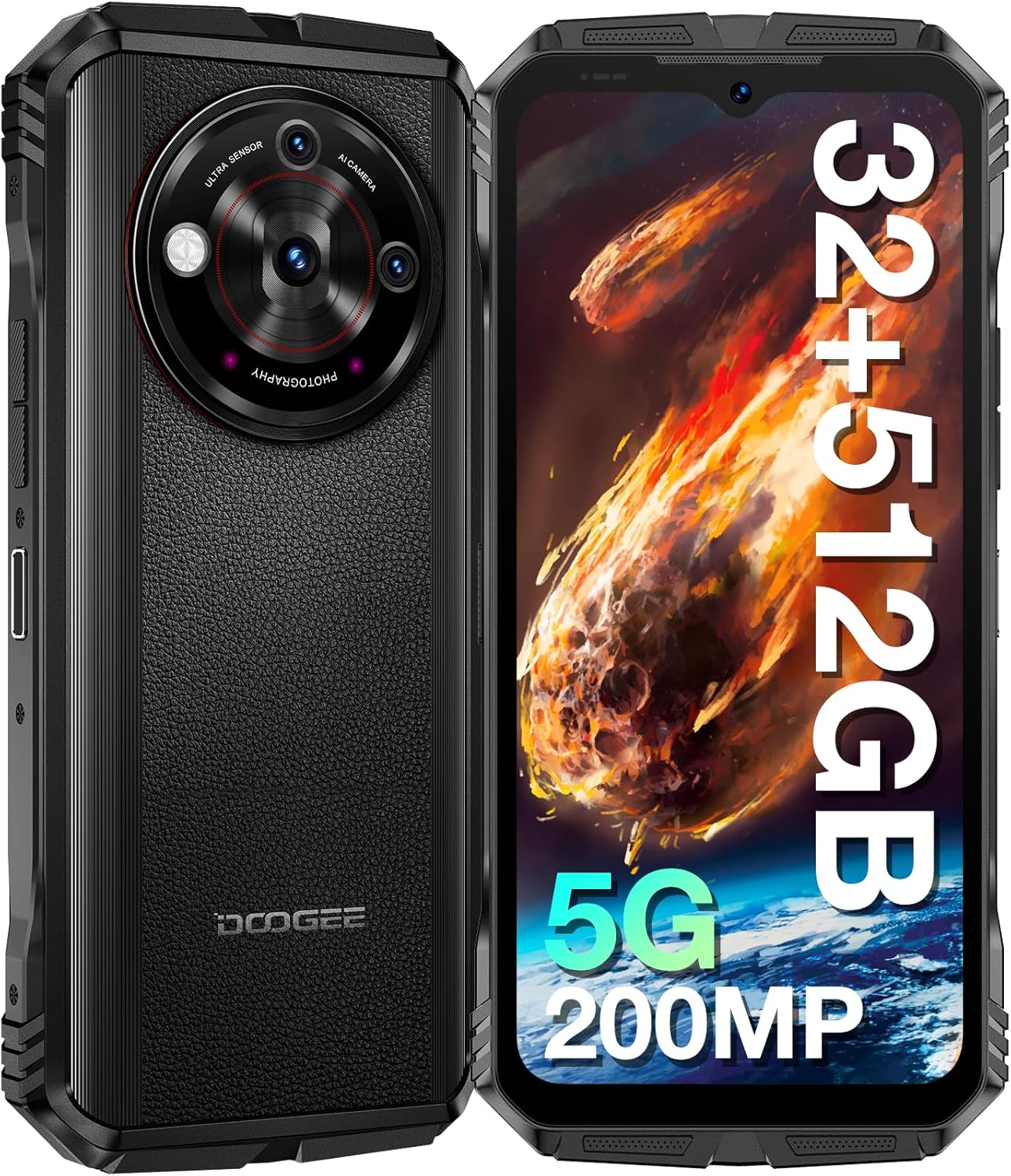
Irudia: Aurrealdea eta atzealdea view of the DOOGEE V30 PRO 5G Rugged Smartphone, highlighting its robust design and camera module.

Irudia: Gehiagoview of the DOOGEE V30 PRO's key features, including its 200MP camera, 120Hz display, Dimensity 7050 processor, and 10800mAh battery.
2. Konfigurazio gida
2.1 Paketearen edukia
Hasi aurretik, ziurtatu elementu guztiak daudela kutxan:
- DOOGEE V30 PRO Smartphone
- 33W-ko kargagailu super azkarra
- USB kablea (C mota)
- SIM erretilua ateratzeko tresna
2.2 SIM txartelaren eta TF txartelaren instalazioa
The DOOGEE V30 PRO supports dual Nano SIM cards or one Nano SIM card and one TF (microSD) card for expanded storage.
- Bilatu SIM txartelaren erretilua gailuaren alboan.
- Sartu SIM txartelaren erretilua ateratzeko tresna erretiluaren ondoko zulo txikian eta sakatu astiro erretilua atera arte.
- Place your Nano SIM card(s) and/or TF card into the designated slots on the tray, ensuring correct orientation.
- Kontu handiz bultzatu erretilua zirrikituan berriro, gailuaren gorputzarekin berdindu arte.

Image: Diagram illustrating the Nano SIM1 and Nano-SIM2/TF card slot for proper installation.
2.3 Hasierako kargatzea eta piztea
- Connect the USB cable to the 33W Super Fast Charger and then to the Type-C port on your phone.
- Plug the charger into a power outlet. It is recommended to fully charge the device before first use.
- To power on, press and hold the Power button (usually on the side) until the DOOGEE logo appears on the screen.
- Follow the on-screen prompts to complete the initial Android 13.0 setup, including language selection, Wi-Fi connection, and Google account setup.
3. Zure gailua funtzionatzea
3.1 Pantaila eta elkarrekintza
The DOOGEE V30 PRO features a 6.58-inch FHD+ IPS display with a 120Hz refresh rate for smooth visuals and responsiveness.
- Ukipen-pantailako nabigazioa: Interact with the device by tapping, swiping, pinching, and long-pressing on the screen.
- Botoi fisikoak: Utilize the Power button for screen lock/unlock and power options, and Volume buttons for audio control.
- Custom Key Button: The device includes a customizable side button that can be programmed for quick access to specific functions or applications.

Image: The 6.58-inch FHD+ IPS display with 120Hz refresh rate, showcasing its vibrant visuals.
3.2 Kameraren Ezaugarriak
Atera kalitate handiko argazkiak eta bideoak kamera sistema polifazetikoarekin.
- 200MP-ko AI kamera nagusia: For detailed and high-resolution images.
- 24MP gaueko ikusmen kamera: Enables clear photography in low-light or complete darkness.
- 32MP-ko aurrealdeko kamera: Selfieetarako eta bideo-deietarako aproposa.
- 4K bideo-harrapaketa: Grabatu bereizmen handiko bideoak.

Image: The AI Triple Camera setup on the DOOGEE V30 PRO, featuring the 200MP main sensor.

Image: A comparison demonstrating the clarity of the 24MP Night Vision Camera in dark conditions.
3.3 Konektibitatea
The device offers advanced connectivity options:
- 5G sarea: Provides fast and stable mobile data connectivity.
- Wi-Fi 6: For high-speed wireless internet access with lower latency.
- Bluetooth 5.2: For connecting wireless accessories like headphones and speakers.
- NFC (Near Field Communication): Supports mobile payments and quick pairing with compatible devices.
- Nabigazioa: Integrated GPS, GLONASS, Galileo, Beidou, and AGPS for accurate positioning.
3.4 Segurtasun Ezaugarriak
Secure your device and data:
- Alboko hatz-marken ezagutza: Unlock your phone quickly and securely using the side-mounted fingerprint sensor.
- Aurpegi-aitorpena: Use your face to unlock the device.
3.5 Bateriaren kudeaketa
The 10800mAh battery provides extended usage time.
- Egonean denbora luzea: Gehienez 720 ordu.
- 33W karga azkarra: Quickly recharge your device using the included charger.
- OTG (On-The-Go) Function: Use your phone to charge other electronic devices in emergencies.

Image: Illustration of the 10800mAh battery capacity and 33W fast charging capability.
3.6 Biltegiratzea eta errendimendua
The DOOGEE V30 PRO offers ample storage and smooth performance:
- 32 GB RAM: (12GB physical + 20GB virtual RAM) for seamless multitasking.
- 512 GB-ko ROMa: Internal storage for apps and data.
- 2TB TF Card Expansion: Expand storage further using a microSD card.

Image: Visual representation of the Dimensity 7050 Octa Core processor, highlighting its 32GB RAM and 512GB ROM with 2TB expandable storage.
3.7 Rugged Features and Toolbag
Designed for extreme conditions, the V30 PRO is IP68/IP69K and MIL-STD-810H certified, making it resistant to:
- 1.5M Drop-Test: 1.5 metroko erorketak jasaten ditu.
- 1.5M Water Deep: 1.5 metroko sakoneraraino uretan murgil daiteke 30 minutuz.
- Hautsaren aurkakoa: Hautsaren sarreratik guztiz babestuta.
The device also includes a suite of practical tools:
- Protraktora
- SoundMeter
- AltueraNeurria
- Argazkiak zintzilikatzea
- Lupa
- Iparrorratza
- Gradientea
- Plumb Bob
- Ispilua

Image: Demonstrates the solid and waterproof structure of the DOOGEE V30 PRO, highlighting its resistance to drops, water, and dust.

Image: Icons representing the various built-in toolbag applications available on the DOOGEE V30 PRO.
3.8 Underwater Mode
The DOOGEE V30 PRO supports an Underwater Mode, allowing you to capture photos and videos while submerged. Ensure the device is properly sealed before entering water.

Image: A person using the DOOGEE V30 PRO in Underwater Mode to capture images beneath the surface.
4. Mantentzea
4.1 Gailua garbitzea
To maintain the ruggedness and appearance of your DOOGEE V30 PRO:
- Garbitu gailua leun batekin, damp oihal.
- Zikinkeria egoskorrerako, xaboi leun baten disoluzioa erabili eta ur garbiarekin ondo garbitu.
- Ensure all ports and covers are dry before charging or using in wet conditions.
4.2 Bateria zaintzea
Bateriaren iraupena luzatzeko:
- Saihestu gailua muturreko tenperaturen eraginpean jartzea.
- Erabili emandako jatorrizko kargagailua eta kablea soilik.
- Ez deskargatu bateria guztiz aldizka.
4.3 Software eguneraketak
Regularly check for and install software updates to ensure optimal performance, security, and access to new features. Updates are typically found in the device's settings menu under 'System' or 'About phone'.
5. Arazoak
This section addresses common issues you might encounter with your DOOGEE V30 PRO.
5.1 Ohiko arazoak eta irtenbideak
- Gailua ez da pizten:
- Ziurtatu bateria kargatuta dagoela. Konektatu kargagailua gutxienez 10 minutuz pizten saiatu aurretik.
- Berrabiarazteko, sakatu eta eutsi pizteko botoia 10-15 segundoz.
- Poor network connectivity (calls/data):
- Check if the SIM card is correctly inserted. Re-insert if necessary.
- Ensure you are within network coverage.
- Hegazkin modua piztu eta itzali.
- Berrabiarazi gailua.
- Aplikazioak huts egiten edo blokeatzen:
- Clear the cache of the problematic app (Settings > Apps > [App Name] > Storage > Clear cache).
- Ziurtatu aplikazioa azken bertsiora eguneratuta dagoela.
- Berrabiarazi gailua.
- Bateria azkar agortzen da:
- Murriztu pantailaren distira.
- Itxi erabiltzen ez diren atzeko planoan dauden aplikazioak.
- Desgaitu Wi-Fi, Bluetooth edo GPSa erabiltzen ez dituzunean.
- Bateriaren erabilera egiaztatu Ezarpenetan energia asko kontsumitzen duten aplikazioak identifikatzeko.
- NFC not working (e.g., with CGMs):
- Ensure NFC is enabled in Settings.
- Verify compatibility with the specific NFC device or system you are trying to use. Not all NFC applications are universally supported.
5.2 Fabrika berrezarri
Arazoak konpontzen ez badira, fabrika berrezartzeak softwarearekin lotutako arazo asko konpondu ditzake. Abisua: Honek telefonoko datu guztiak ezabatuko ditu. Jarraitu aurretik, egin datu garrantzitsuen babeskopia.
- Joan Ezarpenak > Sistema > Berrezarri aukerak atalera.
- Hautatu 'Ezabatu datu guztiak (fabrika berrezartzea)'.
- Berretsi zure erabakia eta idatzi zure PINa/eredua eskatzen bazaizu.
6. Zehaztapenak
| Ezaugarri | Zehaztapena |
|---|---|
| Ereduaren izena | V30PRO |
| Sistema eragilea | Android 13.0 |
| Prozesadorea | MediaTek Dimensity 7050 Octa Core (2.6 GHz) |
| RAM | 32 GB (12 GB fisikoa + 20 GB birtuala) |
| Barne biltegiratzea (ROM) | 512 GB |
| Biltegiratze zabalgarria | Gehienez 2 TB (TF txartela) |
| Bistaratzeko tamaina | 6.58 hazbete |
| Bistaratzeko ebazpena | 1080 x 2408 (FHD+) |
| Freskatze tasa | 120 Hz |
| Kamera Nagusia | 200 MP AI Main Camera |
| Gaueko Ikusmen Kamera | 24 MP |
| Aurrealdeko kamera | 32 MP |
| Bateria Edukiera | 10800 mAh |
| Kargatzen | 33W Super Fast Charge (Type-C) |
| Konektibitatea | 5G, Wi-Fi 6, Bluetooth 5.2, NFC |
| Nabigazioa | GPS, GLONASS, Galileo, Beidou, AGPS |
| Iraunkortasun Arauak | IP68 / IP69K / MIL-STD-810H |
| Segurtasuna | Side Fingerprint Recognition, Face Recognition |
| Neurriak | 7.48 x 4.06 x 3.27 hazbete |
| Elementuaren pisua | 1.46 kilo |
7. Bermea eta Laguntza
The DOOGEE V30 PRO Rugged Smartphone comes with a two-year quality guarantee.
For technical assistance, warranty claims, or general inquiries, please contact DOOGEE customer service. Our personal customer service provides a friendly and fast response within 24 hours.
You can also visit the official DOOGEE store for more information and support resources: DOOGEE denda Amazonen