
Sarrera
The summina TONIVENT Cassette to MP3 Converter is an innovative device designed to digitize your favorite audio cassettes into MP3 files. This manual provides detailed instructions on how to set up, operate, and maintain your converter, ensuring a seamless experience.
Ezaugarri nagusiak hauek dira:
- Direct conversion of cassette tapes to MP3 files USB flash drive batean.
- Plug and play functionality, requiring no computer for conversion.
- Automatic reverse function for continuous recording.
- Bi energia aukera: bateria edo USB.
- Integrated playback function to review grabatu files.
- Can also function as a standalone MP3 player from a USB drive.

Image: A person relaxing and listening to music using the TONIVENT Cassette to MP3 Converter with headphones.
Paketearen edukia
Mesedez, egiaztatu paketea elementu hauek dituen:
- 1 x Cassette Recorder (TONIVENT Cassette to MP3 Converter)
- 1 x entzungailu
- 1 x USB kablea
- 1 x ingelesezko eskuliburua

Irudia: Xehetasun zehatza view of the TONIVENT Cassette to MP3 Converter, showing its white casing and silver trim.
Konfigurazioa
Gailua piztea
The TONIVENT Cassette to MP3 Converter can be powered in two ways:
- Bateria Potentzia: Insert two 1.5V AA batteries (not included) into the battery compartment. Ensure correct polarity.
- USB Power: Connect the device to a USB power source (e.g., a computer USB port or a USB wall adapter) using the provided USB cable. The device requires USB 5V/0.5A or 3V DC input.
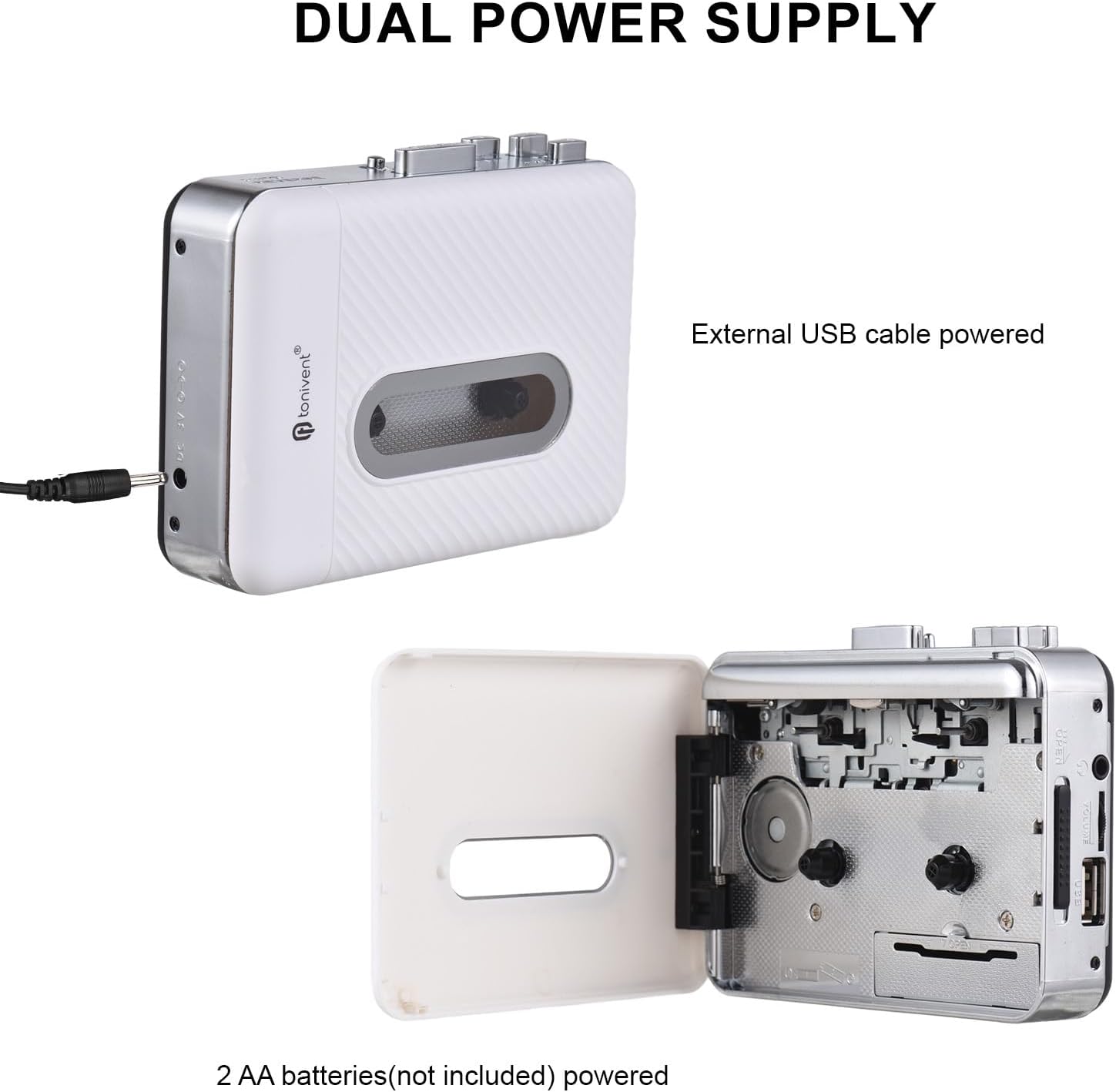
Image: Illustration of the dual power supply options: external USB cable power and 2 AA batteries (not included).
Inserting a Cassette Tape
Open the cassette compartment door and carefully insert your audio cassette. Close the door securely.
USB Flash Drive bat konektatzea
Insert a USB flash drive into the designated USB port on the device. The USB flash drive should be formatted to FAT, FAT32, or exFAT. NTFS format is not supported. The recommended maximum capacity is 32GB.
Funtzionamendu-argibideak
Converting Cassette to MP3
Follow these steps to convert your cassette tape audio to MP3 files:
- Ensure a cassette tape is inserted and a compatible USB flash drive is connected.
- When the cassette is playing and the USB flash drive is connected, the device will be in standby mode (the blue indicator light will remain on).
- Sakatu Grabaketa button. The device will begin converting the playing music to MP3 format. The blue indicator light will flash quickly to indicate recording is in progress. If the light does not flash, re-plug your USB flash drive and try again.
- Grabaketa gelditzeko, sakatu Grabaketa button again. The recorded MP3 file will be saved to your USB flash drive.
- The device will create a new folder named "REC-MP3" on your USB disk, and each saved MP3 file will be named sequentially (e.g., "AUX0001" to "AUX9999").

Image: Visual guide detailing the "Convert and Playback" process, showing how to record from cassette to USB.
Playing Back Recorded MP3s or Other MP3s
The device has a playback function, allowing you to listen to the recorded MP3 files or other MP3 files copied to the USB drive.
- Ensure a USB flash drive containing MP3 files txertatzen da.
- Connect the included earphones to the earphone jack.
- Use the playback controls (e.g., Play/Pause, Next/Previous track) on the device to navigate and listen to your MP3s. Note that only files within the "REC-MP3" folder can be played back directly by the device if you've copied other MP3s to the drive.
Mantentzea
To ensure the longevity and optimal performance of your TONIVENT Cassette to MP3 Converter, follow these maintenance guidelines:
- Mantendu gailua garbi eta hautsik gabe. Erabili zapi leun eta lehor bat garbitzeko.
- Saihestu gailua muturreko tenperatura, hezetasun edo eguzki-argia zuzenaren eraginpean jartzea.
- Ez erabili garbitzaile edo disolbatzaile urratzailerik.
- Denbora luzez erabiltzen ez duzunean, kendu bateriak isuriak saihesteko.
- Handle cassette tapes carefully to prevent damage to the tape and the device's playback mechanism.
Arazoak konpontzea
Gailuarekin arazoak badituzu, jo ezazu honako arazo eta irtenbide ohikoenei:
- Gailua ez da pizten:
- Egiaztatu bateriak behar bezala sartuta dauden eta ez dauden agortuta.
- Ziurtatu USB kablea ondo konektatuta dagoela funtzionatzen duen energia-iturri batera.
- Recording does not start or blue indicator light does not flash:
- Verify that a USB flash drive is properly inserted.
- Ensure the USB flash drive is formatted to FAT, FAT32, or exFAT (not NTFS).
- Check if the USB flash drive has sufficient free space.
- Try re-inserting the USB flash drive.
- Poor audio quality during recording or playback:
- Ensure the cassette tape is clean and in good condition.
- Check the earphone connection.
- Clean the tape heads if necessary (refer to general cassette player maintenance).
- Ezin da MP3 erreproduzitu files copied to USB drive:
- Ziurtatu MP3a files are located within the "REC-MP3" folder on the USB drive.
Zehaztapenak
| Materiala | ABS |
| Convert Format | MP3 |
| USB flash unitateen laguntza | FAT, FAT32, exFAT (NTFS not supported). Max 32GB. |
| Audio kanala | Estereoa L/R |
| Bit-tasa | 128 Kbps |
| Irteera Potentzia | 0.15 W |
| USB irteera | USB 2.0 |
| Energia iturria | 2 x 1.5V AA Batteries (not included), USB Port Power (USB 5V/0.5A), 3V DC |
| Elementuaren neurriak | 118 x 88 x 33 mm (4.65 x 3.46 x 1.30 hazbete) |
| Elementuaren pisua | 188 g (6.65 oz) |
| Modelo zenbakia | GNP0484722486638HF |

Image: Diagram showing the physical dimensions of the TONIVENT Cassette to MP3 Converter.
Bermea eta Laguntza
Bermeari buruzko informazioa edo laguntza teknikoa lortzeko, kontsultatu erosketarekin batera emandako dokumentazioa edo jarri harremanetan fabrikatzailearekin zuzenean. Gorde erosketa-agiria erosketaren frogagiri gisa.
Manufacturer: summina
Laguntza gehiago lortzeko, bisita dezakezu summina brand store on Amazon.