
1. Sarrera
This instruction manual provides comprehensive guidance for the setup, operation, and maintenance of your WOOX R6118-4P Smart Wi-Fi Plugs. Please read this manual carefully before using the product to ensure safe and optimal performance. Keep this manual for future reference.
2. Segurtasun informazioa
Your WOOX Smart Wi-Fi Plugs are designed with safety as a priority. Adhere to the following guidelines:
- TÜV Ziurtagiria: The product is TÜV certified, guaranteeing high safety and quality standards.
- Suaren aurkako materialak: Constructed from acrylonitrile butadiene styrene (ABS) and polycarbonate (PC), which are flame-retardant materials, to minimize fire hazards.
- Gainkarga babesa: Equipped with overload protection to prevent damage to connected appliances and the plug itself from excessive current. Do not exceed the maximum load of 16A / 3680W.
- Haurren Segurtasuna: Features child safety mechanisms to prevent accidental access to live parts.
- Instalazio egokia: Ensure the plug is fully inserted into a compatible wall socket. Do not use in wet environments.
- Memoria modua: The plug includes a memory mode that restores the previous operating state after a power outage, enhancing safety and convenience.

2.1. irudia: The WOOX Smart Wi-Fi Plug is designed with multiple safety features, including TÜV certification, flame-retardant materials, safe heat dissipation, overload protection, and child safety mechanisms, ensuring reliable and secure operation.
3. Produktua amaitu daview
The WOOX R6118-4P Smart Wi-Fi Plug is a smart home device designed to make your electrical appliances intelligent and controllable. It allows for remote control, voice commands, scheduling, and energy consumption monitoring. This package includes four smart plugs.

3.1. irudia: Diagrama honek gainbegirada zabala eskaintzen duview of the WOOX Smart Wi-Fi Plug's main functionalities, including energy monitoring, remote app control, voice command compatibility, safety features, and scheduling options.
4. Konfigurazioa
4.1 Aplikazioaren instalazioa
To control your WOOX Smart Wi-Fi Plugs, you need to install the WOOX Home app (or Tuya Smart app, as WOOX products often integrate with the Tuya platform) on your smartphone or tablet.
- Bilatu "WOOX Home" or "Tuya Smart" in the Apple App Store (for iOS devices) or Google Play Store (for Android devices).
- Deskargatu eta instalatu aplikazioa.
- Ireki aplikazioa eta erregistratu kontu berri bat lortzeko edo hasi saioa dagoeneko baduzu.
4.2 Gailuen parekatzea
Follow these steps to pair your WOOX Smart Wi-Fi Plug with the app:
- Plug the WOOX Smart Wi-Fi Plug into a power outlet.
- Ziurtatu zure telefonoa konektatuta dagoela 2.4 GHz Wi-Fi sarea. The plugs do not support 5 GHz Wi-Fi.
- Open the WOOX Home app. Tap the "+" icon in the top right corner to add a device.
- Select "Electrical" or "Socket (Wi-Fi)" from the device list.
- Follow the on-screen instructions to put the plug into pairing mode (usually by pressing and holding the power button on the plug until the indicator light blinks rapidly).
- Egiaztatu adierazle-argia azkar keinuka ari dela aplikazioan.
- Sartu zure 2.4 GHz-ko Wi-Fi sarearen pasahitza.
- The app will then attempt to connect to the device. Once connected, you can rename the plug for easier identification.
Bluetooth Pairing (for faster connection): The plug supports Bluetooth for a quicker initial connection to the app. Ensure Bluetooth is enabled on your phone during the pairing process. This facilitates the Wi-Fi setup but the plug operates primarily over Wi-Fi.

4.1. irudia: The WOOX Smart Wi-Fi Plug supports local control via Bluetooth, allowing you to manage devices through the app even if your Wi-Fi network is unstable or temporarily disconnected, provided you are within range (approximately 30ft).
5. Funtzionamendu-argibideak
5.1 Urrutiko kontrola aplikazioaren bidez
Once paired, you can control your smart plugs from anywhere using the WOOX Home app:
- Tap on the device name in the app to access its control interface.
- Use the on/off toggle to switch the connected appliance's power.
- Access other features like timers, schedules, and energy monitoring from this interface.
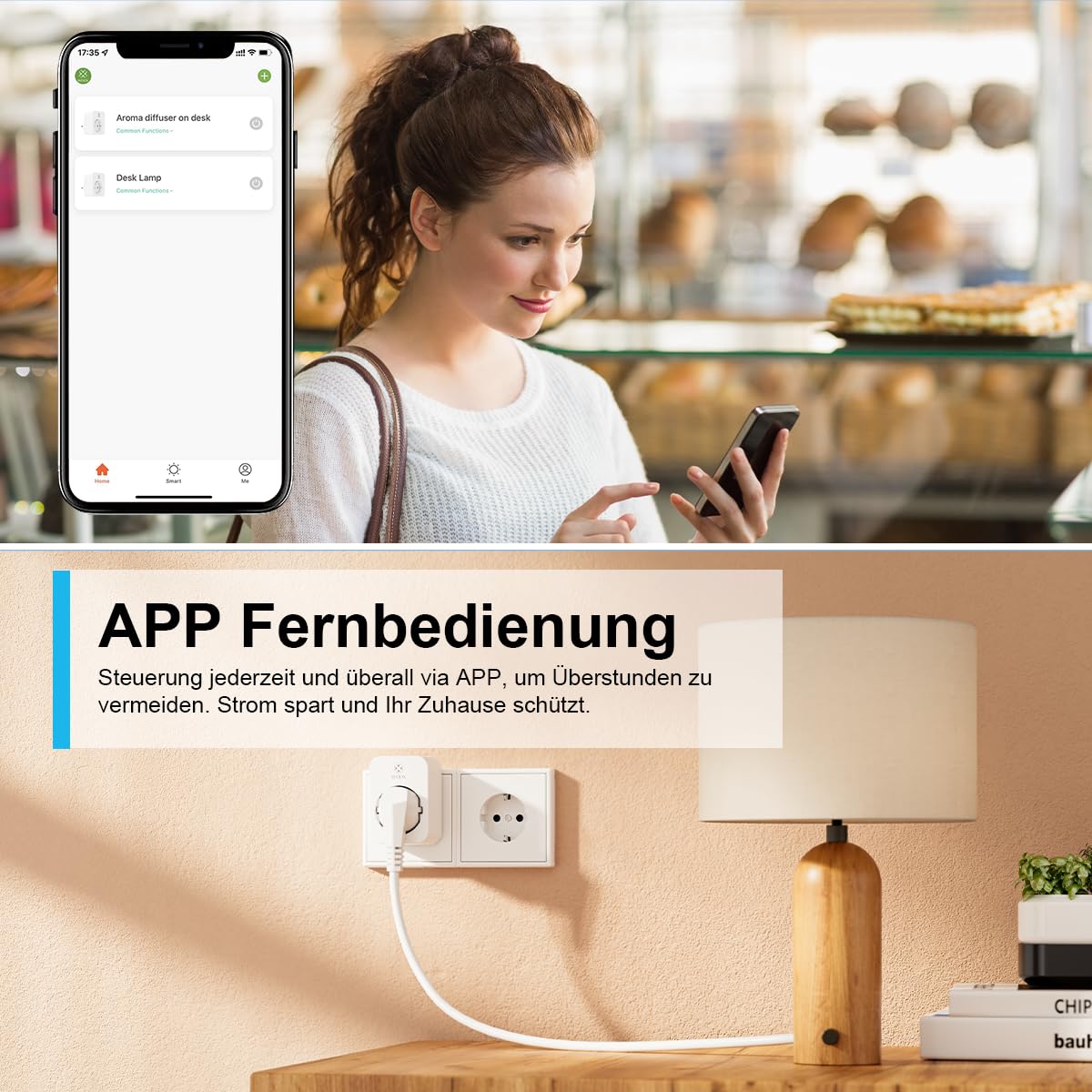
5.1. irudia: Manage your WOOX Smart Wi-Fi Plugs remotely from anywhere using the dedicated mobile application. This feature allows you to turn devices on or off, set schedules, and monitor energy consumption even when you are away from home.
5.2 Ahots-kontrola (Alexa eta Google Home)
Integrate your WOOX Smart Wi-Fi Plugs with Amazon Alexa or Google Home for hands-free control:
- In the WOOX Home app, navigate to "Me" > "More Services" (or similar) and link your Alexa or Google Home account.
- Follow the instructions in the Alexa or Google Home app to discover new devices.
- Once discovered, you can use voice commands such as:
- "Alexa, turn on [device name]"
- "Hey Google, turn off [device name]"
- "Alexa, set [device name] to [on/off]"

5.2. irudia: Control your WOOX Smart Wi-Fi Plugs using voice commands through Amazon Alexa or Google Home. Simply connect the plug to your smart home assistant and use phrases like 'Alexa, turn on the TV' for convenient operation.
5.3 Timer and Scheduling Functions
The app offers 6 different modes for automating your devices:
- Atzerako kontaketa: Set a timer for the device to turn on or off after a specified duration.
- Ordutegia: Create daily or weekly schedules for automatic power on/off at specific times.
- Zikloa: Set the device to repeatedly turn on and off for defined intervals.
- Ausazko: Randomly turn the device on and off within a set timeframe, useful for simulating occupancy.
- Astronomikoa: Automate based on sunrise and sunset times in your location.
- Inching: Set the device to turn on for a very short, specific duration and then automatically turn off.

5.3. irudia: Automate your devices with the WOOX Smart Wi-Fi Plug's versatile timer and scheduling functions. Set countdowns, create daily or weekly schedules, implement cyclical operations, or use random and astronomical timers for enhanced home automation.
5.4 Energiaren monitorizazioa
The WOOX Smart Wi-Fi Plug provides real-time and historical energy consumption data:
- In the device's control interface within the app, look for the "Energy Monitoring" or "Statistics" section.
- View daily, monthly, or yearly electricity usage (kWh) and current power draw (W).
- This feature helps you understand and manage the energy consumption of your appliances, potentially leading to energy savings.

5.4. irudia: The WOOX Smart Wi-Fi Plug allows you to monitor the electricity consumption of connected devices. The accompanying app provides detailed statistics, helping you track usage and identify opportunities for energy savings.
5.5 Group Control and Device Sharing
- Taldearen kontrola: In the app, you can create groups of smart plugs to control multiple devices simultaneously with a single command. This is useful for controlling all lights in a room or multiple appliances at once.
- Gailua partekatzea: Share control of your smart plugs with family members. They will need to download the WOOX Home app and create an account. You can then invite them to control specific devices.
6. Mantentzea
- Garbiketa: Deskonektatu entxufea entxufetik garbitu aurretik. Erabili zapi lehor eta leun bat gainazala garbitzeko. Ez erabili garbitzaile likidorik edo material urratzailerik.
- Firmware eguneraketak: Periodically check the WOOX Home app for available firmware updates. Keeping your device's firmware up-to-date ensures optimal performance, security, and access to new features.
- Biltegiratzea: When not in use for extended periods, store the plugs in a cool, dry place away from direct sunlight and moisture.
7. Arazoak
| Arazoa | Kausa posiblea | Irtenbidea |
|---|---|---|
| Gailua ezin da Wi-Fi sarera konektatu. | Incorrect Wi-Fi password, 5 GHz Wi-Fi network, plug too far from router, router issues. |
|
| Ahots-kontrola ez dabil. | Not linked to Alexa/Google Home, incorrect device name, internet connection issues. |
|
| Entxufeak ez du erantzuten. | No power, network issue, device malfunction. |
|
8. Zehaztapenak
| Ezaugarri | Xehetasuna |
|---|---|
| Modelo zenbakia | R6118-4P |
| Fabrikatzailea | WOOX |
| Neurriak (L x W x H) | 7.2 x 5.1 x 7.8 cm |
| Pisua | Approx. 410 grams (package weight) |
| Materiala | Akrilonitrilo butadieno estirenoa (ABS), polikarbonatoa (PC) |
| Gehienezko potentzia | 3680 Watt |
| Korronte maximoa | 16 Amperes |
| Bolumen eragileatage | 230 voltio (AC) |
| Haririk gabeko konexioa | Wi-Fi 2.4 GHz (IEEE 802.11b/g/n), Bluetooth |
| Aldatu mota | Push-button, 1-way |
| Ziurtagiriak | CE, TÜV, RoHS, WEEE |
| Funtzionamendu modua | Piztu/Desaktibatu |
| Osagaiak barne | Power plug (4 units in package) |
| Beharrezko bateriak | Ez |
9. Bermea eta Laguntza
WOOX provides a 24 hilabeteko bermea for the R6118-4P Smart Wi-Fi Plugs from the date of purchase. This warranty covers manufacturing defects and ensures the product meets its specified performance standards under normal use.
For technical assistance, troubleshooting, or warranty claims, please contact WOOX customer support. They offer 24/7 phone service to assist you with any inquiries.
Please refer to the official WOOX website or your purchase documentation for specific contact details and the full warranty policy.