1. Sarrera
The Trevi DAB 7F80 R is a portable digital radio offering DAB, DAB+, and FM reception, along with Bluetooth connectivity. It features a high-readability Dot Matrix display, a programmable alarm clock, and a headphone jack. This manual provides instructions for the proper setup, operation, and maintenance of your device.
2. Segurtasun informazioa
- Irakurri arretaz argibide guztiak gailua erabili aurretik.
- Ez jarri gailua uraren, hezetasunaren edo muturreko tenperaturen eraginpean.
- Use only the specified power source (4 x AAA batteries or a compatible 5V DC adapter, not included).
- Do not attempt to disassemble, repair, or modify the device. Refer all servicing to qualified personnel.
- Tokiko araudien arabera bota bateriak arduraz.
- Mantendu gailua eremu magnetiko indartsuetatik urrun.
3. Paketearen edukia
Mesedez, egiaztatu elementu hauek zure paketean sartuta daudela:
- Trevi DAB 7F80 R Main Unit
- Erabiltzailearen eskuliburua (dokumentu hau)
- Berme Ziurtagiria
4. Produktua amaitu daview
Familiarize yourself with the components and controls of your Trevi DAB 7F80 R radio.
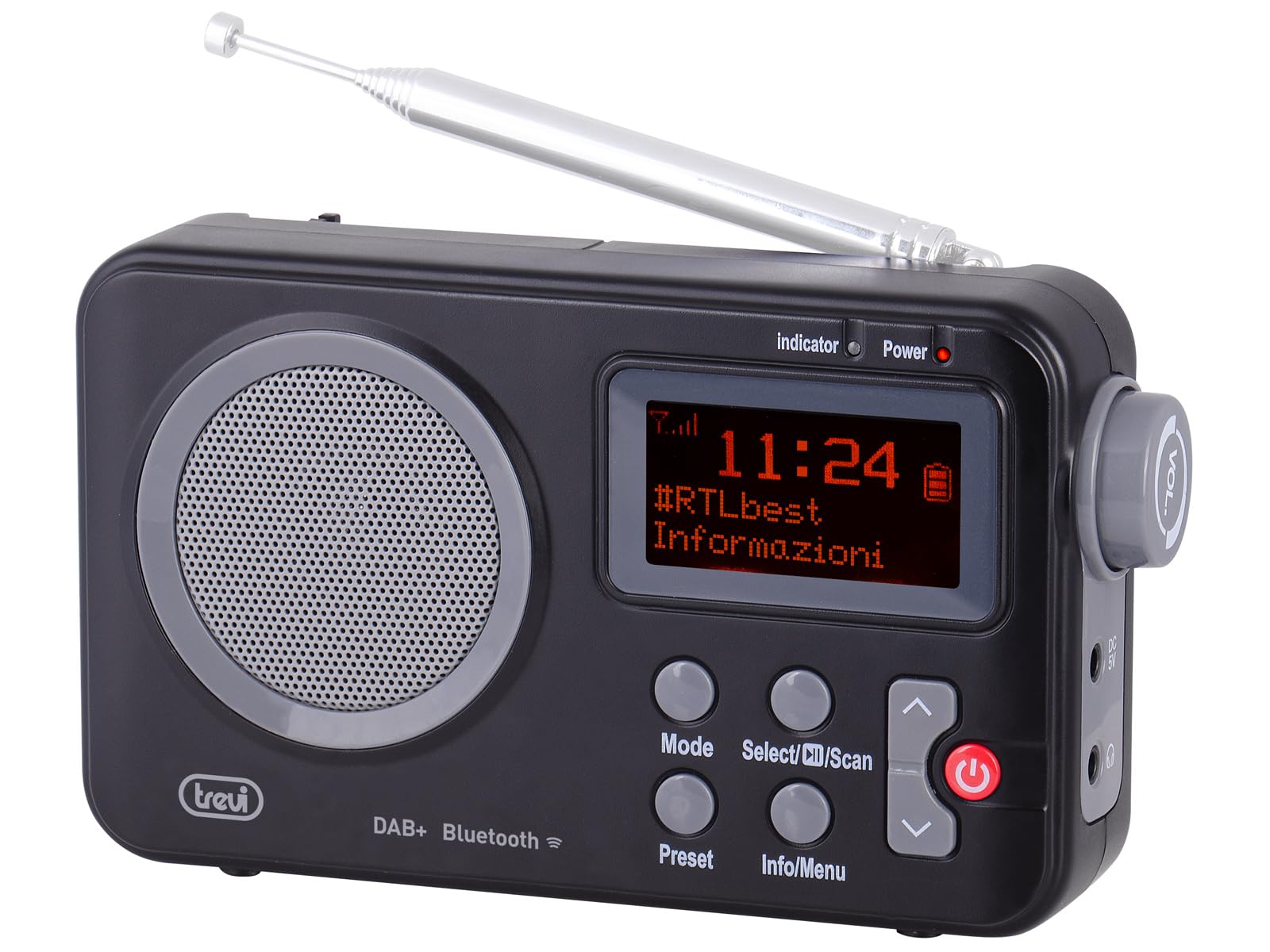
1. irudia: Aurrealdea view of the Trevi DAB 7F80 R radio. This image displays the Dot Matrix screen, the main speaker grille, and the primary control buttons including Mode, Select/Scan, Preset, Info/Menu, and Power. The extendable telescopic antenna is visible at the top.
Kontrolak eta Ezaugarriak:
- Pantaila: High-readability Dot Matrix screen for station information, time, and menu navigation.
- Hizlaria: Audio irteerarako bozgorailu integratua.
- Pizteko botoia: Irratia pizten edo itzaltzen du.
- Modu botoia: Switches between DAB/DAB+, FM, and Bluetooth modes.
- Select/Scan Button: Confirms selections in menus, initiates station scans.
- Aurrez ezarritako botoia: Accesses and stores favorite radio stations.
- Info/Menu botoia: Displays station information and accesses system settings.
- Gora/Behera gezi-botoiak: Navigates through menus, adjusts volume, changes stations.
- Aurikularrak Jack: 3.5 mm-ko irteera entzute pribaturako.
- Antena: Extendable telescopic antenna for improved radio reception.
5. Konfigurazioa
5.1 Gailua piztea
The Trevi DAB 7F80 R can be powered by batteries or an external AC adapter.
- Bateriaren instalazioa: Open the battery compartment cover on the back of the unit. Insert 4 x AAA batteries (not included), ensuring correct polarity (+/-). Close the cover securely.
- Korronte alternoko egokitzailea (aukerakoa): For continuous power, connect a compatible 5V DC, 1A AC adapter (not included) to the DC IN port on the side of the radio.
Abisu garrantzitsua: Do not use batteries in the device when it is connected to an AC adapter for extended periods. This may lead to battery leakage or damage to the unit. If using the AC adapter, remove the batteries. If using batteries, disconnect the AC adapter.
5.2 Hasierako piztea eta estazioen eskaneatzea
- Extend the telescopic antenna fully for optimal reception.
- Sakatu Boterea botoia irratia pizteko.
- Upon first use, the radio may prompt you to select a language. Use the Gora / behera gezia nabigatzeko botoiak eta Select/Scan baieztatzeko.
- The radio will automatically perform a full scan for DAB/DAB+ stations. This process may take a few minutes. Once complete, the first available station will begin playing.
6. Funtzionamendu-argibideak
6.1 Radio Mode (DAB/DAB+, FM)
- Aldaketa moduak: Sakatu Modua button repeatedly to cycle between DAB, FM, and Bluetooth modes.
- Geltokiak eskaneatzen:
- In DAB mode, a full scan is usually performed on first use. To perform a new scan, press and hold Select/Scan.
- FM moduan, sakatu Select/Scan eskuragarri dagoen hurrengo geltokia automatikoki bilatzeko.
- Geltokiak hautatzea: Erabili Gora / behera gezia buttons to browse through available stations.
- Aurrezarpenak gordetzea: The radio can store up to 20 DAB/DAB+ and 20 FM stations.
- Sintonizatu nahi duzun geltokia.
- Eduki sakatuta Aurrez ezarritakoa botoia sakatu pantailan 'Preset Store' agertu arte.
- Erabili Gora / behera gezia botoiak aurrezarritako zenbaki bat (1-20) hautatzeko.
- Sakatu Select/Scan geltokia berresteko eta gordetzeko.
- Aurrezarpenak gogoratzen: Sakatu Aurrez ezarritakoa button briefly. Use the Gora / behera gezia buttons to select the desired preset number, then press Select/Scan.
- RDS/DLS Information: In FM or DAB mode, press the Info/Menu button repeatedly to cycle through available information such as station name, program type, time, and song title (if broadcast).
6.2 Bluetooth modua
- Sakatu Modua button until 'Bluetooth' appears on the display. The radio will enter pairing mode, indicated by a flashing Bluetooth icon.
- Zure telefonoan, tabletan edo ordenagailu eramangarrian, gaitu Bluetooth eta bilatu eskuragarri dauden gailuak.
- Select 'Trevi DAB 7F80 R' from the list of devices to pair. Once connected, the Bluetooth icon will stop flashing.
- You can now play audio from your connected device through the radio. Use your device's controls for playback and the radio's volume controls for audio level.
6.3 Erlojuaren eta alarmaren funtzioak
The radio features an integrated clock and two programmable alarms.
- Ordua ezartzea:
- Eduki sakatuta Info/Menu botoia menu nagusian sartzeko.
- Erabili Gora / behera gezia buttons to navigate to 'Time/Date' and press Select/Scan.
- Select 'Set Time/Date' and adjust the hour, minute, day, month, and year using the Gora / behera gezia botoiak erabiliz eta urrats bakoitza berretsiz Select/Scan.
- Setting Alarms (Alarm 1 / Alarm 2):
- From the main menu, navigate to 'Alarm' and press Select/Scan.
- Select 'Alarm 1 Setup' or 'Alarm 2 Setup'.
- Configure the alarm settings: 'On Time' (hour/minute), 'Duration', 'Source' (Buzzer or last used radio station), 'Volume', and 'Frequency' (Daily, Weekdays, Weekends, Once). Use Gora / behera gezia buttons to adjust values and Select/Scan ezarpen bakoitza berresteko.
- Ensure the alarm is set to 'On' in the alarm setup menu.
- Deactivating a sounding alarm: Sakatu Boterea alarma itzaltzeko botoia.
6.4 Entzungailuen erabilera
To listen privately, insert standard 3.5mm headphones into the headphone jack located on the side of the radio. The internal speaker will automatically mute.
7. Mantentzea
- Garbiketa: Garbitu irratia zapi leun, lehor eta lihorik gabeko batekin. Ez erabili garbitzaile urratzailerik, argizaririk edo disolbatzailerik.
- Bateria ordezkatzea: When the low battery indicator appears on the display, replace all four AAA batteries with new ones.
- Biltegiratzea: If the radio will not be used for an extended period, remove the batteries to prevent leakage and potential damage. Store the device in a cool, dry place.
8. Arazoak
If you encounter issues with your Trevi DAB 7F80 R, please refer to the following common problems and solutions:
- Irratia ez da pizten:
- Egiaztatu bateriak behar bezala sartuta daudela eta ez daudela agortuta. Beharrezkoa bada, ordezkatu itzazu.
- Korronte-egokitzaile bat erabiltzen baduzu, ziurtatu behar bezala konektatuta dagoela eta entxufea funtzionatzen duela.
- Soinurik ez edo soinuaren kalitate eskasa:
- Egokitu bolumena.
- Ensure headphones are not connected if you want sound from the speaker.
- Check radio reception. Extend and adjust the antenna. Try moving the radio to a different location.
- For Bluetooth, ensure the device is paired and audio is playing from the source.
- Clock resets after power loss or battery change:
- This model does not feature a backup battery for the clock. It is normal for the time to reset when power is completely removed (e.g., batteries removed or AC adapter unplugged). You will need to re-set the time manually as described in section 6.3.
- Bateriaren iraupen laburra:
- Battery life can vary depending on usage and battery quality. Use high-quality alkaline batteries for best performance.
- For prolonged use, consider using a compatible 5V DC AC adapter (not included).
- Difficulty with setup or navigation (e.g., station search, alarm setup):
- The radio uses a limited number of buttons for various functions. Refer to the specific operating instructions in section 6 for detailed, step-by-step guidance. Some functions may require pressing buttons multiple times or holding them down.
- Radio turns off when switching between battery and AC power:
- This is expected behavior. The radio will power cycle when changing its primary power source. Ensure you have saved any settings or presets before switching.
9. Zehaztapenak
| Marka | Trevi |
| Eredua | DAB 7F80 R |
| Kolorea | Beltza |
| Doikuntza Teknologia | DAB/DAB+, FM |
| Onartutako irrati-bandak | DAB, DAB+, FM (3 bands) |
| Bluetootha | Bai |
| Bistaratzea | High-readability Dot Matrix |
| Alarmak | 2 alarma programagarri |
| Aurrez ezarriak | 20 DAB/DAB+, 20 FM |
| Energia iturria | 4 x AAA batteries (not included) or 5V DC adapter (not included) |
| Gailu bateragarriak | Smartphone, tablet, laptop |
| Produktuaren neurriak (L x W x H) | 14 x 3.5 x 8.5 cm |
| Dakarten osagaiak | Main unit, user manual, warranty certificate |
10. Bermea eta Laguntza
This product is supplied with a warranty certificate. For detailed information regarding warranty terms and conditions, please refer to the certificate included in your package.
For technical support, troubleshooting beyond this manual, or warranty claims, please contact your retailer or the manufacturer's customer service using the contact information provided with your purchase.