
Sarrera
Thank you for choosing MANKIW D06 Wireless Earbuds. This manual provides essential information for setting up, operating, and maintaining your earbuds to ensure optimal performance and longevity. Please read these instructions carefully before use.
Kutxan dagoena

Image: Contents of the MANKIW D06 Wireless Earbuds package.
The MANKIW D06 Wireless Earbuds package includes the following items:
- Wireless Earbuds (1 pair)
- Kargatzeko kaxa (unitate 1)
- C motako kargatzeko kablea (unitate 1)
- Erabiltzailearen eskuliburua (unitate 1)
- Belarri-puntak (3 bikote: Txikia, Ertaina, Handia)
Produktua amaituview

Image: MANKIW D06 Wireless Earbuds and charging case.
The MANKIW D06 Wireless Earbuds are designed for a superior audio experience with convenience and durability. Key features include:
- Bluetooth 5.3 teknologia: Ensures faster speed and more stable connections up to 10 meters.
- LED Digital Power Display: Shows the battery level of both the charging case and individual earbuds.
- Murgiltze-soinu estereoa: Delivers enhanced bass and crystal-clear audio.
- Smart Touch Control: Ukipen-sentsore intuitiboak musika erreprodukzioa, deiak eta ahots-laguntzaileak kudeatzeko.
- Bateriaren iraupen luzea: Up to 8 hours of continuous playback per charge, extending to 32 hours with the charging case.
- IPX5 Uraren Erresistentzia: Protects against sweat and splashes, suitable for workouts and outdoor activities.
- Diseinu trinkoa eta arina: Easy to carry and comfortable for extended wear.
- Mikrofono integratua: Esku libreko dei garbietarako.
Konfigurazioa
1. Entzungailuak eta zorroa kargatzea
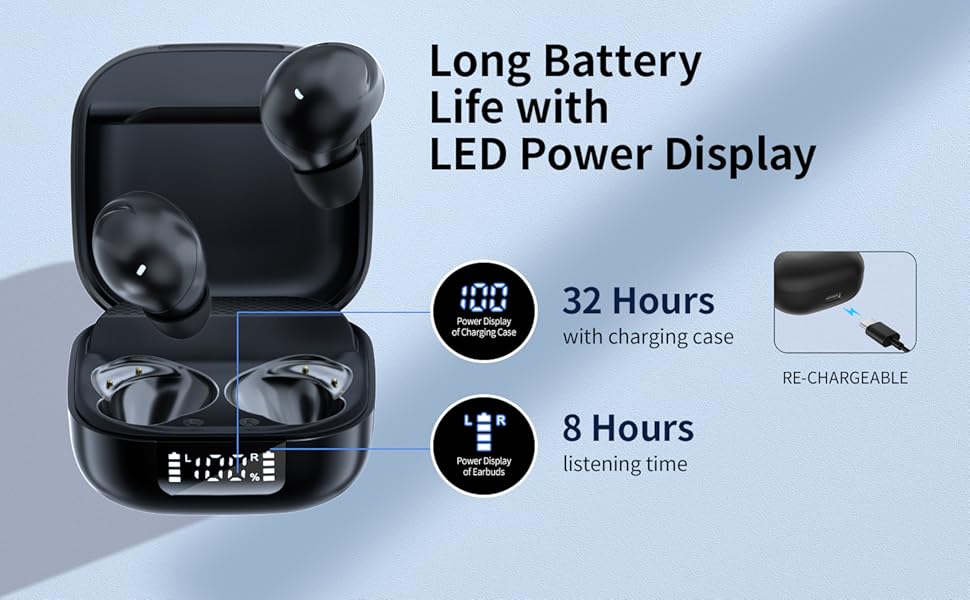
Image: Charging the earbuds and case.
- Lehenengo aldiz erabili aurretik, kargatu guztiz entzungailuak eta kargatzeko zorroa.
- Jarri entzungailuak kargatzeko zorroan. Ziurtatu ondo sartuta daudela.
- Connect the provided Type-C charging cable to the charging port on the case and plug the other end into a USB power source (e.g., wall adapter, computer).
- The LED digital display on the case will show the current battery percentagKaxaren e eta entzungailu bakoitzaren kargatze-egoera.
- Once fully charged, the display will show 100%.
2. Zure gailuarekin parekatzea (urrats bakarreko parekatzea)
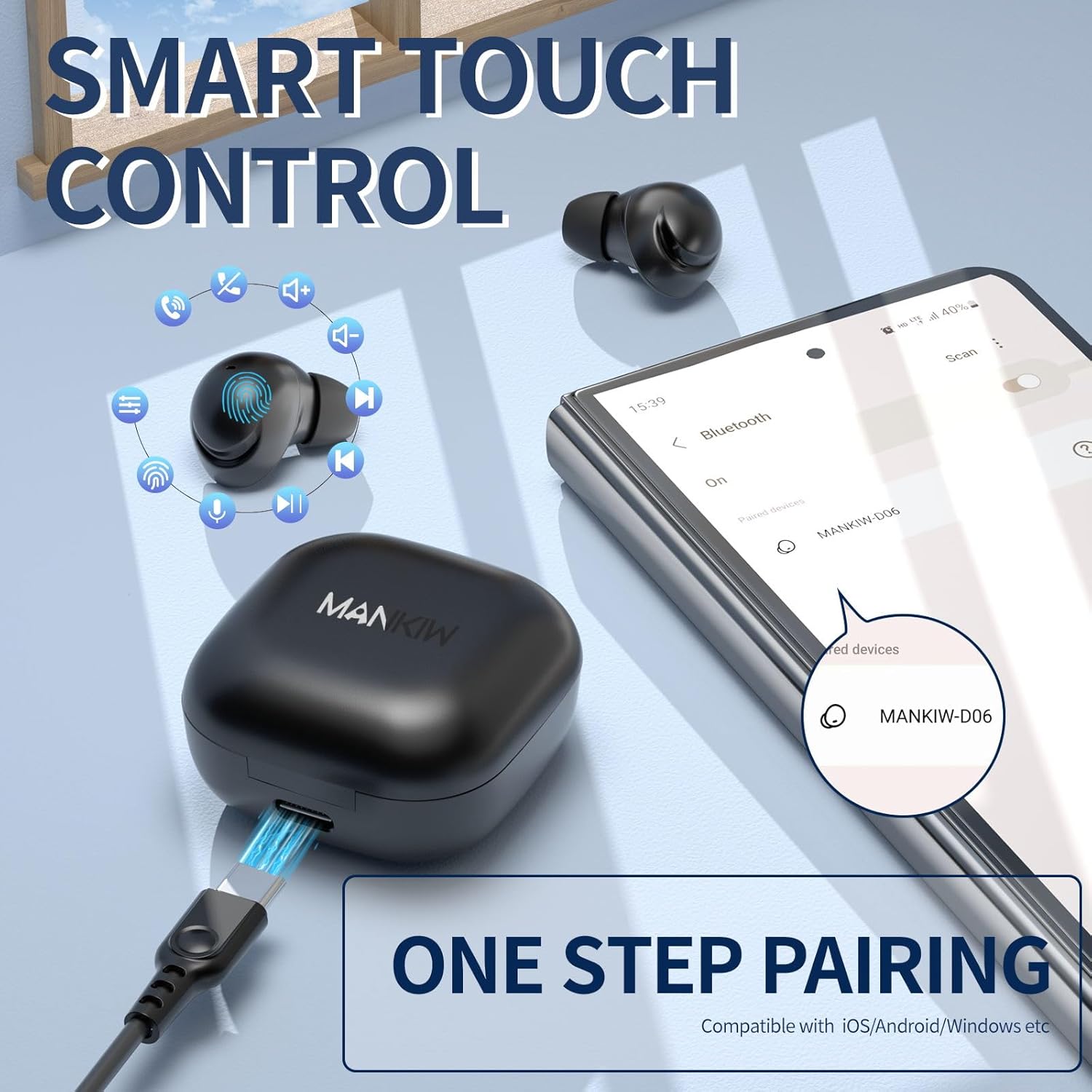
Irudia: Urrats bakarreko parekatze prozesua.
The MANKIW D06 earbuds feature one-step automatic pairing:
- Ireki kargatzeko zorroa. Aurikularrak automatikoki sartuko dira parekatze moduan.
- On your device (smartphone, tablet, TV, computer), go to Bluetooth settings.
- Bilatu available devices and select "MANKIW-D06" from the list.
- Behin konektatuta, baieztapen-tonu bat entzungo duzu, eta entzungailuak erabiltzeko prest egongo dira.
- Aurikularrak iOS, Android eta Windows gailuekin bateragarriak dira.
3. Belarri-punta egokiak aukeratzea

Image: Selecting the correct ear tip size.
For optimal sound quality and comfort, choose the ear tips that best fit your ears. Three sizes (Small, Medium, Large) are provided. A snug fit helps with noise isolation and bass response.
Funtzionamendu-argibideak
Ukitu Kontrolak

Image: MANKIW D06 Earbuds touch control guide.
| Funtzioa | Ekintza |
|---|---|
| Bolumena + | Ukitu L (Left) earbud touch area twice in a row. |
| Bolumena - | Ukitu R (Right) earbud touch area twice in a row. |
| Erreproduzitu/Pausatu | Ukitu L/R earbud touch area once. |
| Aurreko Abestia | Ukitu L (Left) earbud touch area three times in a row. |
| Hurrengo Pista | Ukitu R (Right) earbud touch area three times in a row. |
| Erantzun deia | Ukitu L (Left) earbud touch area twice in a row. |
| Zintzilikatzeko deia | Ukitu R (Right) earbud touch area twice in a row. |
| Call Siri / Voice Assistant | Eduki sakatuta L button for 3 seconds when not in music mode. |
Single and Dual Earbud Mode
You can use both earbuds together for stereo sound or use a single earbud independently for mono audio. Simply remove one earbud from the case to use it in single mode. The other earbud can remain in the case or be used later.
Mantentzea
Garbiketa
- Garbitu aldizka entzungailuak eta kargatzeko zorroa oihal leun, lehor eta lihorik gabeko batekin.
- Ez erabili produktu kimiko gogorrak, garbiketa-disolbatzaileak edo garbigarri indartsuak.
- Gently remove ear tips and clean them with water if necessary, ensuring they are completely dry before reattaching.
- Garbitu entzungailuen eta zorroaren kargatzeko kontaktuak kotoi-zapi lehor batekin, behar bezala kargatzen direla ziurtatzeko.
Urarekiko erresistentzia (IPX5)
The MANKIW D06 earbuds are IPX5 water-resistant, meaning they can withstand sweat and light splashes. They are not designed for swimming, showering, or submersion in water. Ensure the charging port is dry before charging.
Zehaztapenak
| Ezaugarri | Xehetasuna |
|---|---|
| Modelo zenbakia | D06 |
| Bluetooth bertsioa | 5.3 |
| Bluetooth barrutia | Gehienez 10 metro (33 oin) |
| Bateriaren iraupena (entzungailuak) | 8 ordu arteko erreprodukzio jarraitua |
| Jolas-denbora osoa (zorroarekin) | Gehienez 32 ordu |
| Kargatzeko ataka | USB C motakoa |
| Uraren Erresistentzia Balorazioa | IPX5 (Izerdi eta Urarekiko Erresistentea) |
| Kontrol-metodoa | Ukitu Kontrola |
| Mikrofono integratua | Bai |
| Gailu bateragarriak | Smartphones, Tablets, TVs, Computers (iOS, Android, Windows) |
| Elementuaren pisua | 2.89 ontza |
| Paketearen neurriak | 4.09 x 2.76 x 1.46 hazbete |
Arazoak konpontzea
If you encounter any issues with your MANKIW D06 Wireless Earbuds, please refer to the following common solutions:
- Entzungailuak ez dira parekatzen edo konektatzen:
- Ziurtatu bi entzungailuak kargatuta daudela.
- Itzali Bluetooth-a zure gailuan, eta gero piztu berriro.
- Delete "MANKIW-D06" from your device's Bluetooth list and attempt to re-pair.
- Place earbuds back in the charging case, close the lid, wait a few seconds, then open to re-initiate pairing mode.
- Entzungailu bakarra funtzionatzen du:
- Ziurtatu bi entzungailuak kargatuta daudela.
- Try placing both earbuds back into the charging case, closing the lid, and then taking them out again.
- Reset the earbuds (refer to the full user manual for specific reset instructions if available).
- Bolumen baxua edo soinu-kalitate eskasa:
- Doitu bolumena bai zure gailuan bai entzungailuetan.
- Ensure the ear tips are clean and provide a snug fit in your ears.
- Garbitu entzungailuen bozgorailuetako hondakin guztiak.
- Ziurtatu ez dagoela oztoporik zure gailuaren eta entzungailuen artean.
- Kargatzeko arazoak:
- Kargatzeko kablea eta egokitzailea kaltetuta dauden egiaztatu.
- Ziurtatu entzungailuen eta zorroaren kargatzeko kontaktuak garbi eta hondakinik gabe daudela.
- Saiatu beste USB energia-iturri batekin.
Produktuaren bideo ofiziala
Video: MANKIW D06 Wireless Bluetooth Earbuds product overview. This video demonstrates the features and design of the earbuds.
Bermea eta Laguntza
MANKIW products are designed with quality and reliability in mind. For specific warranty information, please refer to the documentation included with your purchase or visit the official MANKIW website. If you require further assistance or have questions not covered in this manual, please contact MANKIW customer support.
Informazio gehiagorako, bisitatu MANKIW Store on Amazon.