
1. Sarrera
This manual provides essential information for the safe and efficient use of your Amazon Basics 24 Inch FHD 100Hz Monitor. Please read these instructions carefully before operating the device and retain them for future reference.
The Amazon Basics 24 Inch Monitor features a 23.8-inch viewable IPS panel with Full HD (1080p) resolution and a maximum refresh rate of 100Hz. It includes built-in speakers and is VESA compatible for flexible mounting options. The monitor is designed for various uses, including office work, entertainment, and gaming.

Aurrealdea view of the Amazon Basics 24 Inch FHD 100Hz Monitor.
2. Paketearen edukia
Egiaztatu elementu guztiak paketean daudela:
- Amazon Basics 24 Inch Monitor
- Oinarria
- Zutik Lepoa
- Elikatze-moldagailua
- HDMI kablea

Image showing the monitor's package contents: stand base, stand neck, power adapter, and HDMI cable.
3. Konfiguratzeko argibideak
3.1 Standa lotzea
- Insert the stand neck into the stand base until it clicks securely into place.
- Align the assembled stand with the mounting slot on the back of the monitor. Push the stand into the slot until it locks. Ensure it is firmly attached.
3.2 Konektatzeko kableak
The monitor features multiple input ports for connectivity:
- DP 1.2: DisplayPort input for high-resolution video and audio.
- HDMI1.4: HDMI input for video and audio from compatible devices.
- VGA: VGA input for analog video signals.
- AUDIOA: 3.5mm audio input for external audio sources.
- AUDIOA: 3.5 mm-ko audio irteera entzungailuetarako edo kanpoko bozgorailuetarako.
- Connect the provided HDMI cable from your computer's video output port to the HDMI input port on the monitor. Alternatively, use a DisplayPort or VGA cable if your device supports those connections.
- Connect the power adapter to the monitor's power input port, then plug the power adapter into a wall outlet.
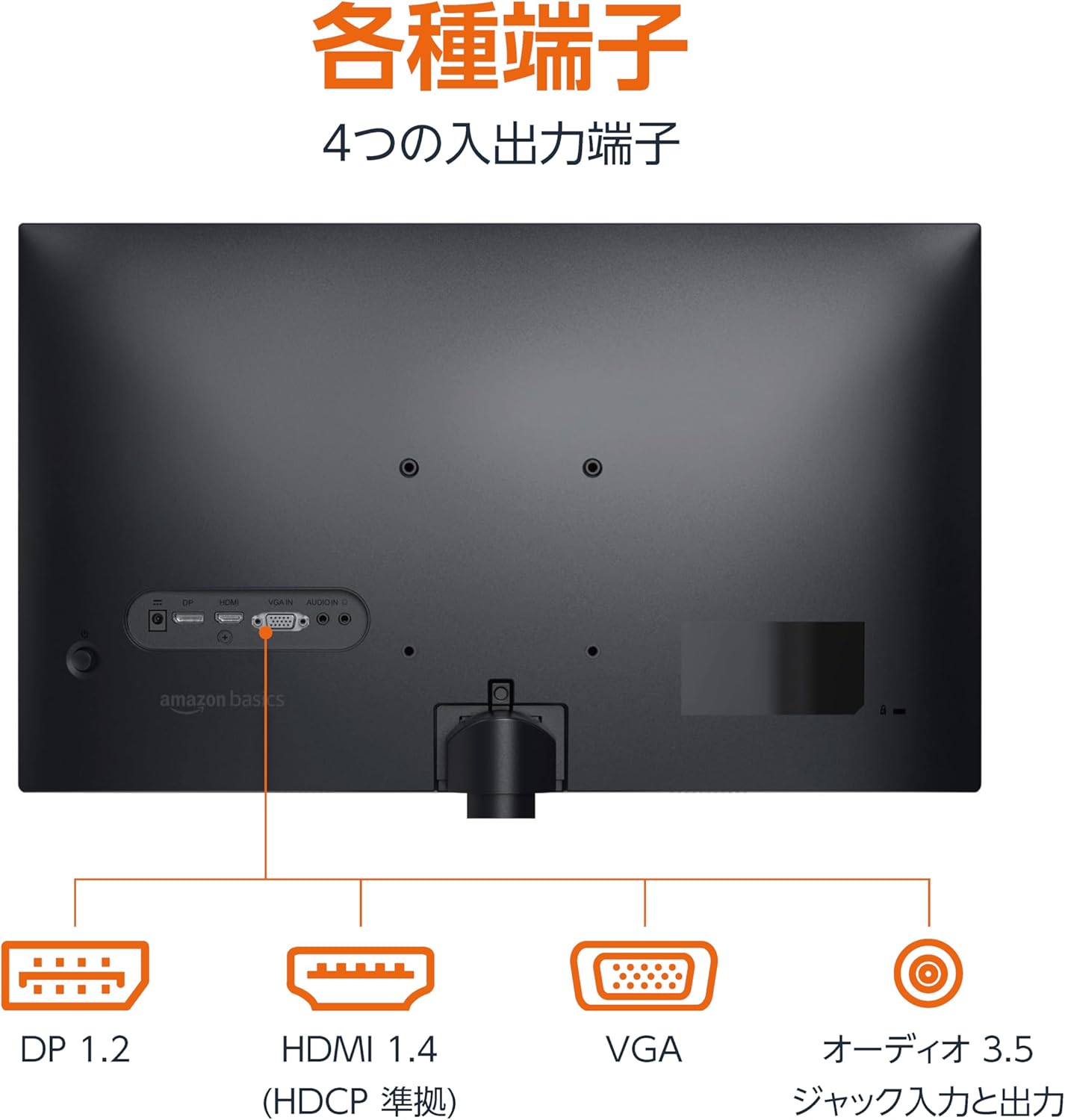
Atzekoa view monitorearen sarrera eta irteera ataka desberdinak erakusten ditu.
3.3 Piztea
Press the power button located on the back or bottom of the monitor to turn it on. The monitor will automatically detect the active input signal.
3.4 Inklinazioa doitzea
The monitor allows for tilt adjustment to achieve an optimal viewing angle. Gently hold the top and bottom edges of the monitor and tilt it forward or backward. The tilt range is approximately -5° to 20°.

Monitor demonstrating its tilt adjustment capability.
3.5 Optional: VESA Mounting and Cable Lock
The monitor is VESA compatible, allowing it to be mounted on a wall or an adjustable arm (mounting hardware sold separately). Refer to the VESA mount's instructions for installation.
An optional cable lock slot is available on the rear of the monitor to secure it to a stable object, preventing theft.
3.6 Konfigurazio bideo gida
For a visual guide on setting up your Amazon Basics monitor, please watch the video below:
This video demonstrates the assembly of the stand, connecting cables, and basic adjustments for the Amazon Basics monitor.
4. Funtzionamendu-argibideak
4.1 Pantailan bistaratzeko (OSD) menua
The monitor features an On-Screen Display (OSD) menu for adjusting various settings. Use the buttons located on the back or bottom of the monitor to navigate the menu. Common settings include:
- Distira/Kontrastea: Doitu pantailaren luminantzia eta kontraste mailak.
- Kolore ezarpenak: Aldatu kolore-tenperatura, ñabardura eta saturazioa.
- Sarrera hautatzea: Manually switch between DP, HDMI, and VGA inputs.
- Audioa: Adjust volume for built-in speakers or connected headphones.
- Irudi modua: Select from preset display modes (e.g., Standard, Game, Movie).
4.2 Using Built-in Speakers
The monitor includes integrated speakers. Audio will be played through these speakers when connected via HDMI or DisplayPort. If using a VGA connection, ensure an audio cable is connected to the 'AUDIO IN' port on the monitor and your computer's audio output.
5. Zehaztapenak
| Ezaugarri | Zehaztapena |
|---|---|
| Marka | Amazon Oinarrizkoak |
| Modelo zenbakia | 24M2020DJP |
| Pantailaren tamaina | 24 Inches (23.8 inch viewgai) |
| Panel mota | IPS |
| Ebazpena | FHD 1080p (1920 x 1080) |
| Freskatze tasa | Gehienez 100 Hz |
| Aspektu-erlazioa | 16:9 |
| Bozgorailu integratuak | Bai |
| VESA bateragarritasuna | Bai |
| Sarrerako Portuak | 1x DisplayPort 1.2, 1x HDMI 1.4, 1x VGA, 1x Audio In (3.5mm) |
| Irteera Portuak | 1x Audio Out (3.5mm) |
| Produktuaren pisua | 2.8 kg |
| Bezel lodiera | 1.44 mm (slim bezel) |
| Bermea | 1 urteko berme mugatua |
5.1 Neurriak
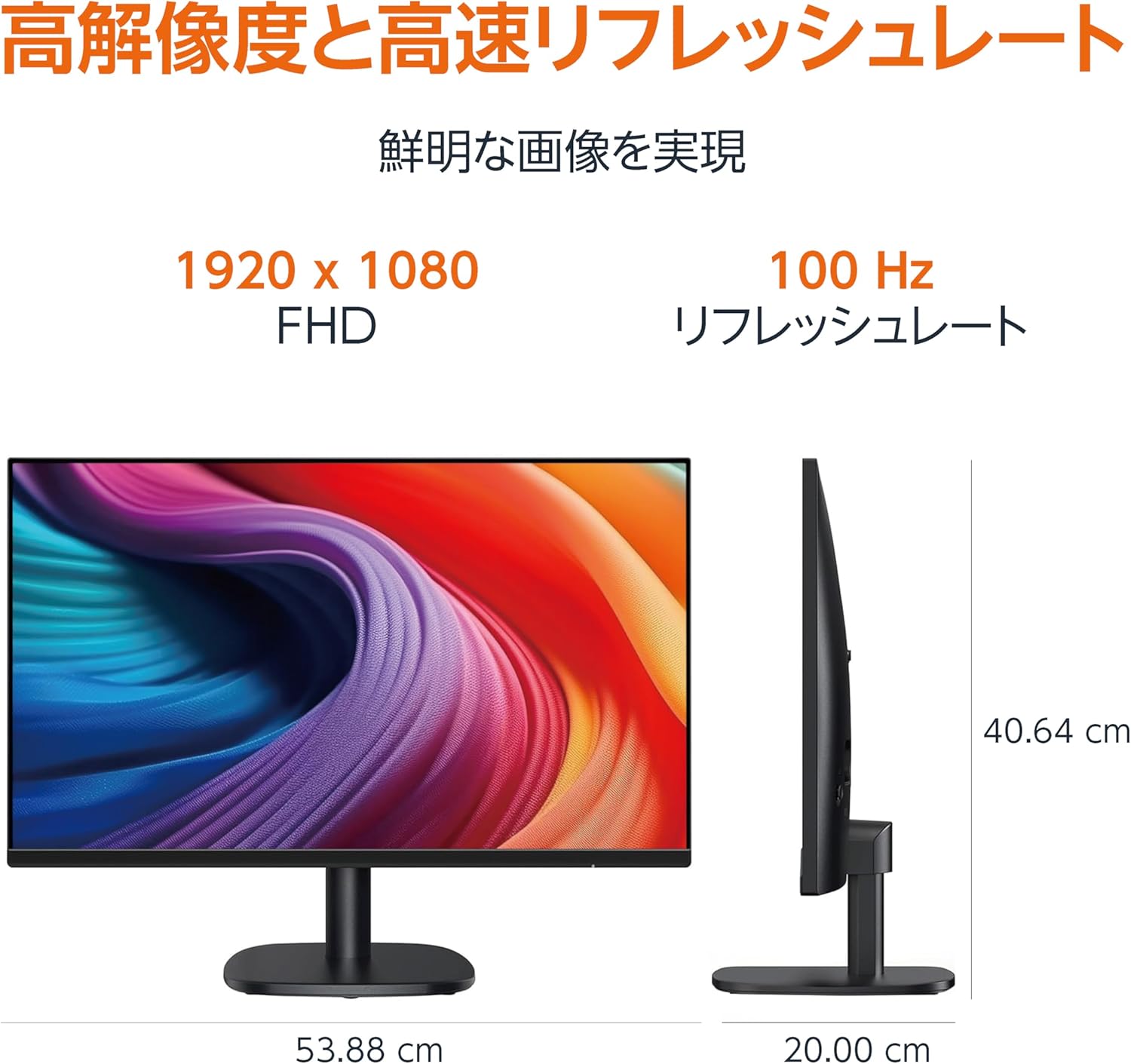
Diagram showing the monitor's dimensions (Width: 53.88 cm, Height: 40.64 cm, Depth: 20.00 cm).
5.2 Slim Bezel Design

Detail showing the monitor's slim bezel design, measuring 1.44 mm.
6. Arazoak
Monitorearekin arazoak badituzu, jo ezazu ohiko irtenbide hauetara:
- Potentziarik gabe: Ensure the power cable is securely connected to both the monitor and a working power outlet. Check if the power adapter's indicator light is on.
- Seinalerik ez: Verify that the video cable (HDMI, DP, or VGA) is firmly connected to both the monitor and your computer. Ensure the correct input source is selected in the monitor's OSD menu. Try restarting your computer.
- Pantaila keinukaria: Check the video cable for damage or loose connections. Ensure your computer's graphics driver is up to date. Adjust the refresh rate in your computer's display settings.
- No Audio from Speakers: If using HDMI or DisplayPort, ensure the audio output is set to the monitor in your computer's sound settings. If using VGA, confirm the 3.5mm audio cable is connected. Check the volume level on both the monitor and your computer.
- Irudiaren kalitate-arazoak: Adjust brightness, contrast, and color settings via the OSD menu. Ensure the display resolution on your computer matches the monitor's native resolution (1920 x 1080).
Urrats hauek probatu ondoren arazoa konpontzen ez bada, jarri harremanetan bezeroarentzako arreta-zerbitzuarekin.
7. Mantentzea
Proper maintenance helps ensure the longevity and performance of your monitor:
- Pantaila garbitzea: Garbitu pantaila astiro-astiro zapi leun eta pelusik gabeko batekin. Orbanik egoskorrak izanez gero, garbitu astiro-astiro.ampGarbitu zapi bat urarekin edo pantaila-garbitzaile espezializatu batekin. Saihestu produktu kimiko gogorrak, alkohola edo material urratzaileak erabiltzea.
- C garbiketaasing: Erabili zapi leun eta lehor bat monitorearen gainazala garbitzeko.asing.
- Aireztapena: Ziurtatu monitorearen aireztapen-irekidurak ez daudela blokeatuta gehiegi berotzea saihesteko.
- Itzali erabiltzen ez denean: Itzali monitorearen iraupena denbora luzez erabiltzen ez duzunean energia aurrezteko eta luzatzeko.
8. Bermea eta Laguntza
This Amazon Basics monitor comes with a 1 urteko berme mugatua erosketa-datatik aurrera. Berme honek fabrikazio-akatsak eta erabilera normalaren pean egindako lana estaltzen ditu.
For warranty claims, technical support, or further assistance, please refer to the Amazon Basics support page or contact Amazon customer service directly. Keep your proof of purchase for warranty validation.