
1. Sarrera
This manual provides detailed instructions for the installation, operation, and maintenance of your EVTSCAN Digital Thermoregulator. This device is designed to precisely control heating equipment, such as wall-mounted boilers and gas boilers, ensuring a stable and energy-efficient temperature environment. Please read this manual thoroughly before installation and use to ensure proper function and safety.
2. Segurtasun informazioa
Bete beti segurtasun neurri hauek gailuari kalterik edo lesio pertsonalik ez eragiteko:
- Ziurtatu elikadura hornidura deskonektatuta dagoela instalazioa edo mantentze-lanak egin aurretik.
- Kableatu elektrikoari buruz ziur ez bazaude, instalazioa profesional kualifikatu batek egin beharko luke.
- Ez jarri gailua uraren edo hezetasun gehiegizkoaren eraginpean.
- Use only the specified battery type (2 AA batteries) and ensure correct polarity.
- Mantendu gailua material sukoietatik urrun.
3. Produktua amaitu daview
The EVTSCAN Digital Thermoregulator features a clear LCD display for easy monitoring and a simple interface for temperature control. Its compact design allows for discreet integration into your living space.

3.1. irudia: Aurrealdea view of the Digital Thermoregulator. The LCD screen displays current settings and room temperature, with a rotary knob below for adjustments.
Funtsezko osagaiak:
- LCD pantaila: Shows set temperature, room temperature, time, and operational icons.
- Control Knob/Button: Menuetan nabigatzeko eta ezarpenak doitzeko erabiltzen da.
- Bateriaren konpartimendua: Located on the rear or side for 2 AA batteries.
- Kableatu terminalak: For connection to the heating system.
4. Zehaztapenak
| Ezaugarri | Zehaztapena |
|---|---|
| Eredua | EVTSCANok0g9ct2zq |
| Potentzia modua | 2 AA bateria (ez dago barne) |
| Screen Accuracy | 0.5 ℃ |
| Zunda-sentsorea | NTC (10k) %1 |
| Harremanetarako edukiera | Greater than 30-230 V DC working voltage, lower current. Reference: 5 A 30 V (HF relay) or 2 A 30 V (NEC relay) |
| Tenperatura bistaratzeko tartea | 1 eta 40 ℃ artean |
| Tenperatura doikuntza-tarte lehenetsia | 5 eta 35 ℃ artean |
| Funtzionamendu-tenperatura-tartea | 0 eta 50 ℃ artean |
| Korrika Programa | Set once a week |
| Irteera | Kommutazio-errelea |
| Materiala | Suaren aurkako polikarbonatoa |
| Pisua | 170 g |
5. Konfigurazioa eta instalazioa
The EVTSCAN Digital Thermoregulator is designed for simple installation. Follow these steps carefully:
5.1. Desontziratzea eta ikuskatzea
Carefully remove all components from the packaging. Verify that all items listed in the package contents are present and undamaged.
- 1 Digital Temperature Controller
- 2 Torlojuak
5.2. Bateriaren instalazioa
The device requires 2 AA batteries for operation. These are not included in the package.
- Locate the battery compartment on the back of the thermoregulator.
- Ireki bateriaren konpartimenduaren estalkia.
- Sartu 2 AA bateria, polaritate zuzena ziurtatuz (+/-).
- Itxi bateriaren konpartimenduaren estalkia ondo.

5.1. irudia: Angeludun view of the thermoregulator, illustrating its compact size and potential location for battery access or mounting points.
5.3. Muntaketa eta kableatua
The thermoregulator is designed for wall mounting. Ensure the power to your heating system is turned off before proceeding with wiring.
- Choose a suitable location on an interior wall, away from direct sunlight, drafts, or heat sources that could affect temperature readings.
- Mount the backplate (if detachable) to the wall using the provided screws.
- Connect the thermoregulator to your boiler or heating system according to the wiring diagram provided with your boiler and the thermoregulator's terminal markings. This typically involves connecting the switching relay output to the boiler's control input.
- Secure the thermoregulator onto the mounted backplate.
Oharra: For wiring, consult a qualified electrician if you are unfamiliar with electrical installations.
6. Funtzionamendu-argibideak
The EVTSCAN Digital Thermoregulator uses a microcomputer control technology to maintain your desired temperature efficiently.
6.1. Powering On and Initial Display
Once batteries are installed, the LCD display will illuminate, showing the current room temperature, set temperature, and time.
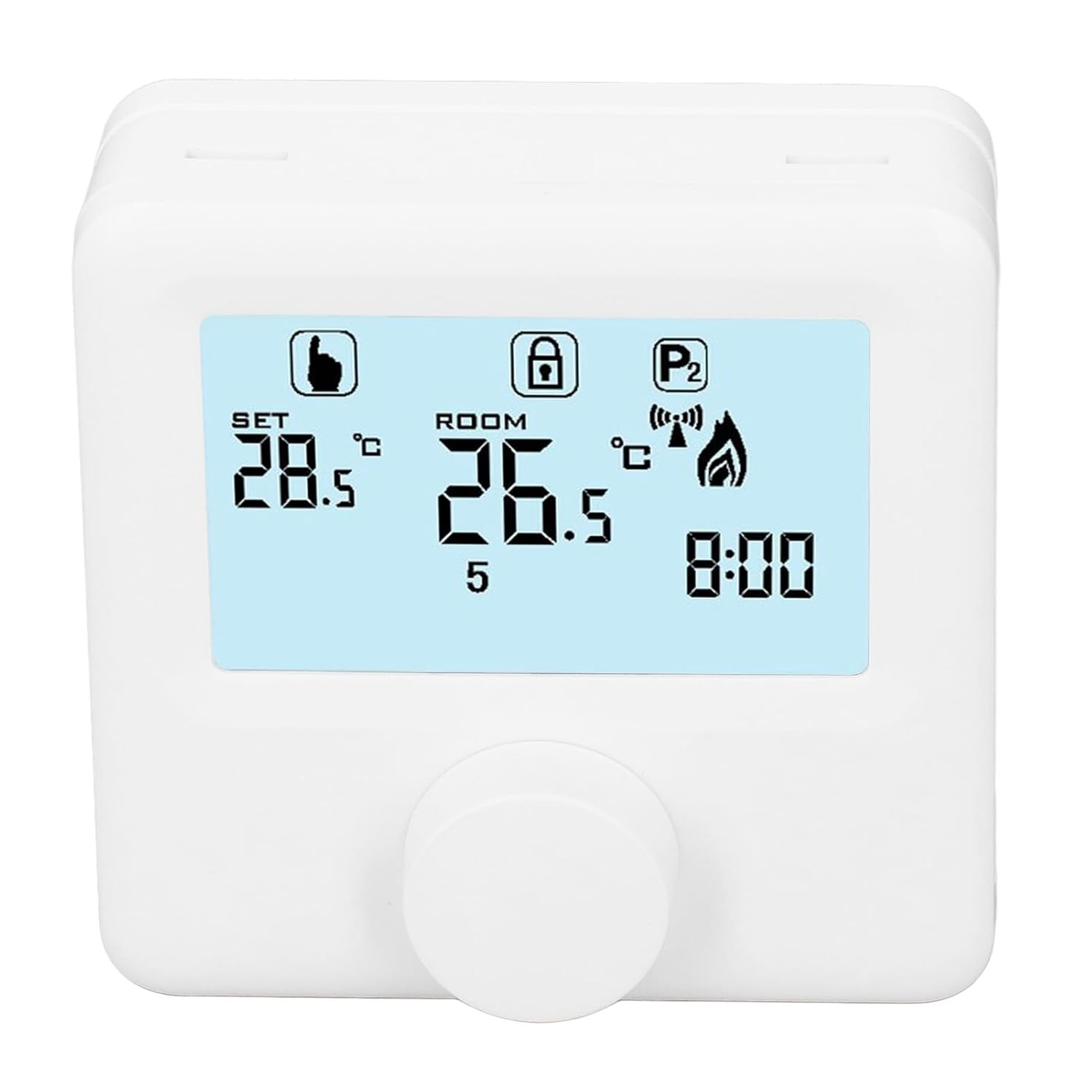
6.1. irudia: Xehetasuna view of the LCD display. It shows the set temperature (SET), room temperature (ROOM), a lock icon, a program icon (P2), a signal icon, a flame icon indicating heating, and the current time.
6.2. Tenperatura ezartzea
Nahi den tenperatura doitzeko:
- Rotate the control knob to increase or decrease the set temperature. The "SET" value on the display will change accordingly.
- The device will automatically activate or deactivate the heating system to maintain the set temperature within the range of 1 to 40 ℃. The default adjustment range is 5 to 35 ℃.
6.3. Asteko programazio ordutegia
The thermoregulator supports a weekly programming schedule. This allows you to set different temperatures for various times of the day across the week.
- Press and hold the control knob (or a designated button, if available) to enter programming mode.
- Use the control knob to navigate through days of the week and time slots.
- Adjust the desired temperature for each programmed period.
- Confirm your settings to save the weekly program. The device will then operate according to this schedule.
6.4. Understanding Display Icons
- SET: Indicates the target temperature you have set.
- GELA: Uneko giro-tenperatura erakusten du.
- Sugarraren ikonoa: Berokuntza-sistema aktibo dagoenean piztuta dago.
- Blokeoaren ikonoa: May indicate a keypad lock feature to prevent accidental changes.
- P1/P2 Icon: Indicates the current program mode (e.g., P1 for comfort, P2 for economy, or specific weekly program segments).
- Seinalearen ikonoa: May indicate wireless communication status if applicable.
7. Mantentzea
Regular maintenance ensures the longevity and optimal performance of your thermoregulator.
- Garbiketa: Garbitu gailua zapi leun eta lehor batekin. Ez erabili garbitzaile edo disolbatzaile urratzailerik.
- Bateria ordezkatzea: Replace batteries when the low battery indicator appears on the display. Always replace both batteries simultaneously with new AA batteries.
- Sentsorearen eremua: Ensure the temperature sensor area (usually a small vent on the device) is free from dust and obstructions for accurate readings.
8. Arazoak
If you encounter issues with your EVTSCAN Digital Thermoregulator, refer to the following common problems and solutions:
- Pantaila hutsik dago:
- Egiaztatu bateriak behar bezala instalatuta dauden.
- Ordeztu bateria zaharrak berriekin.
- Berokuntza-sistemak ez du erantzuten:
- Ensure the thermoregulator is powered on and the flame icon is displayed when heating is expected.
- Verify wiring connections to the boiler are secure and correct.
- Check the boiler's power supply and status.
- Ensure the set temperature is higher than the current room temperature.
- Tenperatura-irakurketa okerrak:
- Ensure the device is not exposed to direct sunlight, drafts, or heat sources.
- Clean any dust or debris from the sensor area.
- Cannot change settings:
- Check if the lock icon is displayed. If so, refer to the operating instructions to unlock the keypad.
Arazoak jarraitzen badu, jarri harremanetan bezeroarentzako laguntzarekin.
9. Bermea eta Laguntza
Specific warranty information for this product is not provided in the available data. Please refer to the product packaging or the retailer's webgunea bermearen xehetasunak lortzeko.
For technical support or further assistance, please contact EVTSCAN customer service through their official channels or the retailer from whom you purchased the product.
You can visit the EVTSCAN store on Amazon for more information: EVTSCAN Store