
1. Sarrera
Eskerrik asko erosketagatik.asing the Sanyo 20W Bluetooth Speaker. This portable speaker is designed to deliver high-quality audio with versatile connectivity options. Please read this manual carefully before using the product to ensure proper operation and to maximize its lifespan. Keep this manual for future reference.
Ezaugarri nagusiak hauek dira:
- Bluetooth 5.3 for stable wireless connection.
- 20W audio output for clear and powerful sound.
- Multiple connectivity options: Bluetooth, AUX, USB.
- MP3 playback capability.
- Karaoke function.
2. Segurtasun informazioa
Funtzionamendu segurua bermatzeko eta kalteak saihesteko, jarraitu segurtasun neurri hauek:
- Ez jarri bozgorailua uraren, hezetasunaren edo muturreko tenperaturen eraginpean.
- Ez saiatu bozgorailua desmuntatzen edo aldatzen. Horrek bermea baliogabetuko du.
- Mantendu bozgorailua bero-iturrietatik, eguzki-argitik eta material sukoietatik urrun.
- Erabili zehaztutako kargatzeko kablea eta korronte-egokitzailea (barne badago) gailua kargatzeko.
- Garbitu bozgorailua zapi leun eta lehor batekin. Ez erabili garbitzaile edo disolbatzaile urratzailerik.
- Mantendu haurren eskura.
3. Paketearen edukia
Mesedez, egiaztatu paketea elementu hauek dituen:
- Sanyo 20W Bluetooth Speaker Unit
- USB kargatzeko kablea
- AUX Audio kablea
- Erabiltzailearen eskuliburua
4. Produktua amaitu daview
Familiarize yourself with the speaker's components:
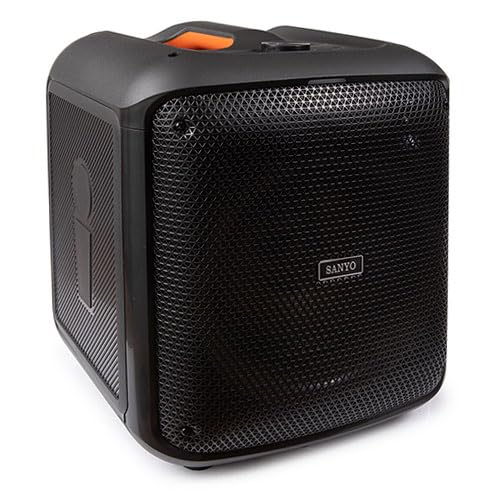
Aurrealdea erakusten duen irudia view of the Sanyo 20W Bluetooth Speaker, highlighting its compact design and speaker grille. The speaker appears to have a handle on top for portability.
Note: Specific button layouts and port locations may vary slightly. Refer to the image for general reference.
- Pizteko botoia: Eduki sakatuta pizteko/desaktibatzeko.
- Modu botoia: Switch between Bluetooth, AUX, and USB modes.
- Bolumen kontrolak: Adjust volume up/down.
- Erreproduzitu/Pausatu botoia: Kontrolatu audio erreprodukzioa.
- Aurreko/Hurrengo pistaren botoiak: Nabigatu pistetan.
- USB ataka: USB unitate batetik MP3 erreproduzitzeko.
- AUX sarrera: Kanpoko audio gailuak 3.5 mm-ko audio kable baten bidez konektatzeko.
- Kargatzeko ataka: USB kargatzeko kablea konektatzeko.
- Mikrofonoaren sarrera: For karaoke function (if applicable).
5. Konfigurazioa
5.1 Bozgorailua kargatzea
- Konektatu USB kargatzeko kablearen mutur txikia bozgorailuaren kargatzeko atakara.
- Konektatu USB kargatzeko kablearen mutur handia USB elikatze-egokitzaile batera (ez dago barne) edo ordenagailuaren USB ataka batera.
- Kargatzeko adierazlearen argia piztuko da (kolorea alda daiteke) bozgorailua kargatzen ari dela erakusteko.
- Guztiz kargatuta dagoenean, adierazle-argia kolorez alda daiteke edo itzali egin daiteke. Deskonektatu kargatzeko kablea.
5.2 Piztu/Itzaltzea
- Pizteko: Sakatu eta eutsi pizteko botoia 3 segundo inguru. Soinu-abisu bat entzungo duzu.
- Itzaltzeko: Sakatu eta eutsi pizteko botoia 3 segundo inguru. Soinu-abisu bat entzungo duzu.
5.3 Bluetooth parekatzea
- Ensure the speaker is powered on and in Bluetooth mode. If not, press the Mode button until you hear the Bluetooth pairing prompt. The Bluetooth indicator light will flash.
- Gaitu Bluetooth-a zure gailu mugikorrean (smartphone-a, tableta, etab.).
- Bilatu available Bluetooth devices. The speaker will appear as "Sanyo Speaker" or a similar name.
- Select the speaker from the list to pair. Once paired, you will hear a confirmation sound, and the Bluetooth indicator light will stop flashing and remain solid.
- Orain zure gailuko audioa bozgorailuaren bidez erreproduzitu dezakezu.
Oharra: Bozgorailuak automatikoki saiatuko da azken parekatutako gailura berriro konektatzen pizten denean, gailu horren Bluetooth-a aktibo badago eta bere irismenaren barruan badago.
5.4 AUX konexioa
- Connect one end of the 3.5mm AUX audio cable to the AUX input port on the speaker.
- Connect the other end of the AUX audio cable to the headphone jack or audio output port of your external audio device (e.g., MP3 player, computer).
- Press the Mode button on the speaker to switch to AUX mode.
- Erreproduzitu audioa zure kanpoko gailutik.
5.5 USB erreprodukzioa
- Sartu MP3 audioa duen USB flash unitate bat filebozgorailuen USB atakan konektatu.
- Press the Mode button on the speaker to switch to USB mode.
- The speaker will automatically begin playing the MP3 files USB unitatetik.
6. Funtzionamendu-argibideak
6.1 Bolumen kontrola
- Bolumena igo: Sakatu bolumena igotzeko botoia.
- Bolumena jaitsi: Sakatu Bolumena Jaisteko botoia.
6.2 Music Playback (Bluetooth/USB)
- Erreproduzitu/Pausatu: Sakatu Erreproduzitu/Pausa botoia erreprodukzioa txandakatzeko.
- Hurrengo ibilbidea: Sakatu Hurrengo pista botoia.
- Aurreko pista: Sakatu Aurreko pista botoia.
6.3 Karaoke funtzioa
If your speaker model includes a microphone input:
- Connect a compatible microphone (not included) to the microphone input port.
- Ensure music is playing via Bluetooth, AUX, or USB.
- Adjust the microphone volume and echo effects (if available on your speaker) using the dedicated controls.
7. Mantentzea
7.1 Garbiketa
- Wipe the speaker's exterior with a soft, dry, lint-free cloth.
- Ez erabili garbitzaile likidorik, aerosolik edo disolbatzailerik.
- Saihestu hezetasuna irekiduretan sartzea.
7.2 Biltegiratzea
- Gorde bozgorailua leku fresko eta lehor batean, eguzki-argitik eta muturreko tenperaturetatik babestuta.
- Denbora luzez gordetzen baduzu, kargatu bateria aldian-aldian bere egoera onean mantentzeko.
7.3 Bateria zaintzea
- Saihestu bateria maiz erabat deskargatzea.
- Ez utzi bozgorailua denbora luzez korrontera konektatuta guztiz kargatu ondoren.
8. Arazoak
| Arazoa | Kausa posiblea | Irtenbidea |
|---|---|---|
| Bozgorailuak ez du pizten. | Bateria baxua. | Kargatu bozgorailua guztiz. |
| Soinurik ez. | Volume too low; incorrect mode; device not connected properly. | Increase volume; ensure correct mode (Bluetooth, AUX, USB); re-pair Bluetooth or re-connect cables. |
| Bluetooth parekatzeak huts egiten du. | Bozgorailua ez dago parekatze moduan; gailua Bluetooth itzalita dago; bozgorailutik urrunegi. | Ensure speaker is in pairing mode; enable Bluetooth on device; move device closer to speaker (within 10 meters). |
| Soinu distortsionatua. | Volume too high; weak signal; audio source issue. | Reduce volume on speaker and device; move device closer; try a different audio source. |
9. Zehaztapenak
| Ezaugarri | Xehetasuna |
|---|---|
| Marka | Sanyo |
| Modelo zenbakia | 8432068023011 |
| Potentzia Irteera | 20 Watt |
| Konektibitate Teknologia | AUX, Bluetooth, USB |
| Bluetooth bertsioa | 5.3 |
| Neurriak (L x W x H) | 30.5 x 33 x 38 cm (12 x 13 x 15 hazbete gutxi gorabehera) |
| Elementuaren pisua | 5.46 Kilograms (12.04 lbs approx.) |
| Kolorea | Kolore anitzekoa |
| Kanal kopurua | 2 |
| Ezaugarri bereziak | Karaoke, MP3 Playback |
10. Bermea eta Laguntza
Sanyo products are manufactured to the highest quality standards. This product is covered by a limited warranty from the date of purchase. Please refer to the warranty card included in your package for specific terms and conditions.
For technical support, warranty claims, or further assistance, please contact Sanyo customer service through their official webgunea edo erosketa-dokumentazioarekin batera emandako harremanetarako informazioa.
Gorde erosketaren egiaztagiria bermearen ondorioetarako.