
1. Sarrera
This manual provides essential information for the installation, operation, and maintenance of your SYLVOX 43-inch Outdoor Signage TV (Model SS43A0KAGD). Please read this manual thoroughly before using the product to ensure proper function and safety. This television is designed for commercial outdoor use, offering high brightness and robust weather protection.
2. Segurtasun informazioa
Produktuari kalterik ez egiteko eta erabiltzailearen segurtasuna bermatzeko, jarraitu segurtasun neurri hauek:
- Elikatze-iturria: Ziurtatu elikadura iturria bolumenarekin bat datorrelatagproduktuaren etiketan zehaztutako baldintzak.
- Ura eta hezetasuna: While the TV is IP55 waterproof, avoid direct high-pressure water jets. Ensure all port covers are securely closed when not in use.
- Aireztapena: Do not block ventilation openings. Adequate airflow is necessary to prevent overheating.
- Muntaketa: Use appropriate mounting hardware and follow VESA standards (400 x 200 mm) for secure installation. Professional installation is recommended for outdoor environments.
- Garbiketa: Deskonektatu korrontea garbitu aurretik. Erabili eskuila leun eta lehorra.amp oihal. Saihestu produktu kimiko gogorrak.
- Tenperatura: Operate the TV within the specified temperature range (-4°F to 113°F).
3. Paketearen edukia
Egiaztatu elementu guztiak paketean daudela:
- SYLVOX 43-inch Outdoor Signage TV
- Urrutiko agintea (2 AAA bateria barne)
- Elikatze kablea
- Erabiltzailearen eskuliburua
- Berme Txartela
- Screws for mounting (BM8X14MM for full motion cantilever mount, BM8X28MM & Gasket for fixed wall mount)

Figure 3.1: Included accessories with the SYLVOX 43-inch Outdoor Signage TV.
4. Produktua amaitu daview
4.1 Ezaugarri nagusiak
- Pantaila: 43-inch 4K UHD (3840x2160) LED display with 1000 nits brightness and 1.07 Billion Colors.
- Iraunkortasuna: IP55 waterproof rating, corrosion-resistant and scratch-resistant metal casing. Designed for 7x24 hour operation with temperature protection.
- Sistema eragilea: Linux-based system with pre-installed applications (Netflix, Pandora, Facebook, YouTube, Twitter). Note: Signage 1.0 series does not support downloading additional apps.
- Konektibitatea: Built-in ATSC & NTSC tuners, Bluetooth, 2.4G WiFi.
- Audioa: Built-in speakers.

Figure 4.1: SYLVOX 43-inch Outdoor Signage TV in a commercial setting, showcasing its bright 4K display.

Figure 4.2: The TV's IP55 waterproof and wide temperature range capabilities.

Figure 4.3: Visual representation of 4K UHD picture quality and color depth.

4.4 Irudia: Gainetikview of the Linux system and integrated features.
4.2 Portuak eta konexioak
The TV offers a variety of input and output ports for versatile connectivity:
- RS232
- USB Input x 2 (USB 1.0, USB 2.0, USB 3.0 compatible)
- RJ45 (Ethernet)
- HDMI x 3
- Irteera Optikoa
- Audio L/R In
- YPbPr In
- Antenna In (ATSC/NTSC Tuner)
- Aurikularrak atera
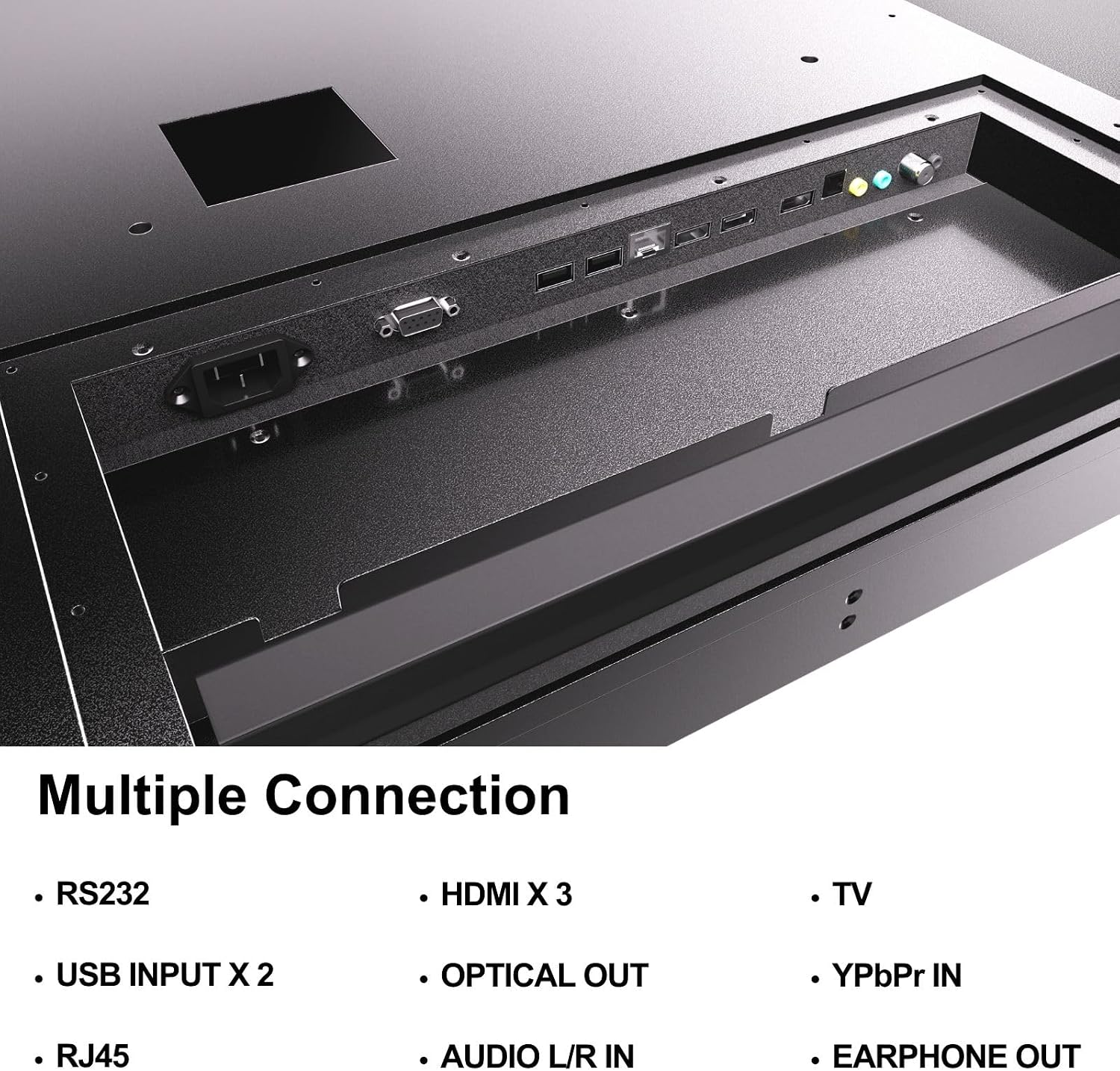
Figure 4.5: Rear panel connections of the SYLVOX Outdoor Signage TV.
5. Konfigurazioa
5.1 Telebista muntatzea
The SYLVOX Outdoor Signage TV supports wall mounting. Ensure the mounting surface is sturdy enough to support the TV's weight and is suitable for outdoor conditions.
- Aukeratu kokapena: Aukeratu kokapen optimoa eskaintzen duen bat viewing and protection from extreme weather, even with the TV's waterproof rating.
- Instalatu hormako muntaia: Attach a VESA-compatible wall mount (400 x 200 mm) to the desired location according to the mount manufacturer's instructions. Use the provided screws (BM8X14MM for full motion, BM8X28MM with gasket for fixed mount).
- Attach TV to Mount: Carefully lift the TV and secure it to the installed wall mount. Ensure all connections are tight and secure.
5.2 Hasierako piztea
- Konektatu energia: Plug the power cord into the TV's power input and then into a grounded outdoor-rated power outlet.
- Sartu bateriak: Open the remote control battery compartment and insert the two AAA batteries, observing polarity.
- Piztu: Sakatu urrutiko agintean edo telebistan pizteko botoia.
- Hasierako konfigurazio morroia: Follow the on-screen instructions to select language, time zone, and perform initial channel scanning.
5.3 Sareko konexioa
To access smart TV features and streaming applications, connect the TV to your network.
- Wi-Fi konexioa: Navigate to the TV's settings menu, select 'Network', then 'Wi-Fi'. Choose your network from the list and enter the password.
- Ethernet konexioa: Connect an Ethernet cable from your router to the RJ45 port on the TV. The TV will automatically detect the wired connection.
- Bluetootha: For connecting audio devices, go to the Bluetooth settings, enable Bluetooth, and pair with your desired device.
6. Funtzionamendu-argibideak
6.1 Oinarrizko telebista funtzioak
- Potentzia: Sakatu Boterea button on the remote to turn the TV on or off.
- Sarrera iturria: Sakatu Sarrera button to cycle through available input sources (HDMI 1/2/3, TV, YPbPr, USB).
- Bolumena: Erabili +/- bolumena botoiak soinu-maila doitzeko.
- Kanala: Erabili Kanala +/- buttons to change channels when using the built-in tuner.
- Nabigazioa: Erabili norabide-geziak eta OK menuetan nabigatzeko botoia.
6.2 Telebista adimendunaren ezaugarriak
The TV runs on a Linux operating system and comes with several pre-installed applications:
- Access the home screen to view and launch applications like Netflix, Pandora, Facebook, YouTube, and Twitter.
- Use the remote control's dedicated app buttons (if available) for quick access.
- Note that the Signage 1.0 series does not support downloading additional applications.
6.3 Screencasting (Android Only)
The TV supports screencasting from Android mobile phones:
- Ensure your Android device and the TV are connected to the same Wi-Fi network.
- On your Android phone, enable the screen mirroring or screencasting feature (names may vary by device, e.g., 'Smart View', 'Cast', 'Wireless Display').
- Select your SYLVOX TV from the list of available devices.
6.4 Vertical/Horizontal Display
The TV can be installed and operated in both horizontal (landscape) and vertical (portrait) orientations. When using the screen vertically, the display direction is adjusted by the input device or content source.
7. Mantentzea
Proper maintenance ensures the longevity and performance of your outdoor TV:
- Pantaila garbitzea: Garbitu pantaila astiro-astiro zapi leun eta pelusik gabeko batekin. Orba egoskorrak izanez gero, garbitu apur batampGarbitu zapi bat urarekin. Ez bota garbitzailerik zuzenean pantailan.
- C garbiketaasing: Erabili biguna, damp cloth to clean the metal casing. Saihestu garbitzaile edo disolbatzaile urratzaileak.
- Portuko estalkiak: Regularly check that all unused port covers are securely sealed to maintain the IP55 waterproof rating.
- Ingurumen-egiaztapenak: Periodically inspect the TV and mounting hardware for any signs of wear, corrosion, or damage, especially after severe weather conditions.
- Software eguneraketak: Check for available software updates through the TV's settings menu to ensure optimal performance and security.
8. Arazoak
If you encounter issues with your SYLVOX Outdoor Signage TV, refer to the following common problems and solutions:
| Arazoa | Kausa posiblea | Irtenbidea |
|---|---|---|
| Botererik ez | Power cord disconnected; no power from outlet; remote batteries dead. | Check power cord connection; test outlet; replace remote batteries. |
| Ez dago irudirik, baina soinua badago | Hautatutako sarrera-iturri okerra; kanpoko gailuaren arazoa. | Press 'Input' button to select correct source; check external device connections. |
| Soinurik ez, baina irudia badago | Bolumena isilarazita edo baxuegia; kanpoko audio gailuaren arazoa. | Unmute volume or increase level; check audio cables for external devices. |
| Wi-Fi connection unstable or disconnected | Router issue; TV too far from router; incorrect password. | Restart router; move TV closer or use a Wi-Fi extender; re-enter Wi-Fi password. |
| Urruneko kontrola ez dabil | Pilak agortuta edo gaizki sartuta; urrutiko agintearen eta telebistaren arteko oztopoa. | Replace batteries; ensure clear line of sight to TV's IR receiver. |
Irtenbide hauek probatu ondoren arazoa konpontzen ez bada, jarri harremanetan SYLVOX bezeroarentzako arreta-zerbitzuarekin.
9. Zehaztapenak
| Ereduaren izena | SS43A0KAGD |
| Pantailaren tamaina | 43 hazbete |
| Bistaratzeko Teknologia | LED |
| Ebazpena | 4K (3840x2160) |
| Freskatze tasa | 60 Hz |
| Maximum Display Brightness | 1000 nit |
| Kontraste-erlazioa | 3000:1 |
| Erantzun Denbora | 8 milisegundo |
| Iragazgaitzaren balorazioa | IP55 |
| Sistema eragilea | Linux |
| Konektibitate Teknologia | Wireless (Bluetooth, Wi-Fi), Wired (HDMI, USB, RJ45, RS232) |
| Audio Sarrera | HDMI, Optical, USB, Audio L/R In |
| Seinalearen formatua | ATSC, NTSC |
| Total Number of HDMI Ports | 3 |
| USB portuak guztira | 2 |
| Produktuaren neurriak (L x W x H) | 3.4" L x 38.6" W x 22.4" H |
| VESA muntaketa estandarra | 400 x 200 mm |
| Wattage | 120 watt-ordu |
| Fabrikatzailea | Kontech Electronics Co., Ltd. |
| UPC | 810079224838 |
10. Bermea eta Laguntza
10.1 Bermearen informazioa
SYLVOX provides a 2 urteko fabrikatzailearen bermea for this product. This warranty covers defects in materials and workmanship under normal use. Please retain your proof of purchase for warranty claims.
10.2 Bezeroarentzako laguntza
If you require assistance with installation, operation, troubleshooting, or warranty service, please contact SYLVOX customer support. We recommend checking the product upon receipt to ensure it is in good condition and functions normally.
For further support, please visit the official SYLVOX website or refer to the contact information provided on your warranty card.


