
Sarrera
Thank you for choosing the RAZEAK Portable 60% Mechanical Gaming Keyboard. This manual provides detailed instructions for the proper setup, operation, and maintenance of your new keyboard. Please read this manual thoroughly before use to ensure optimal performance and longevity of your device.
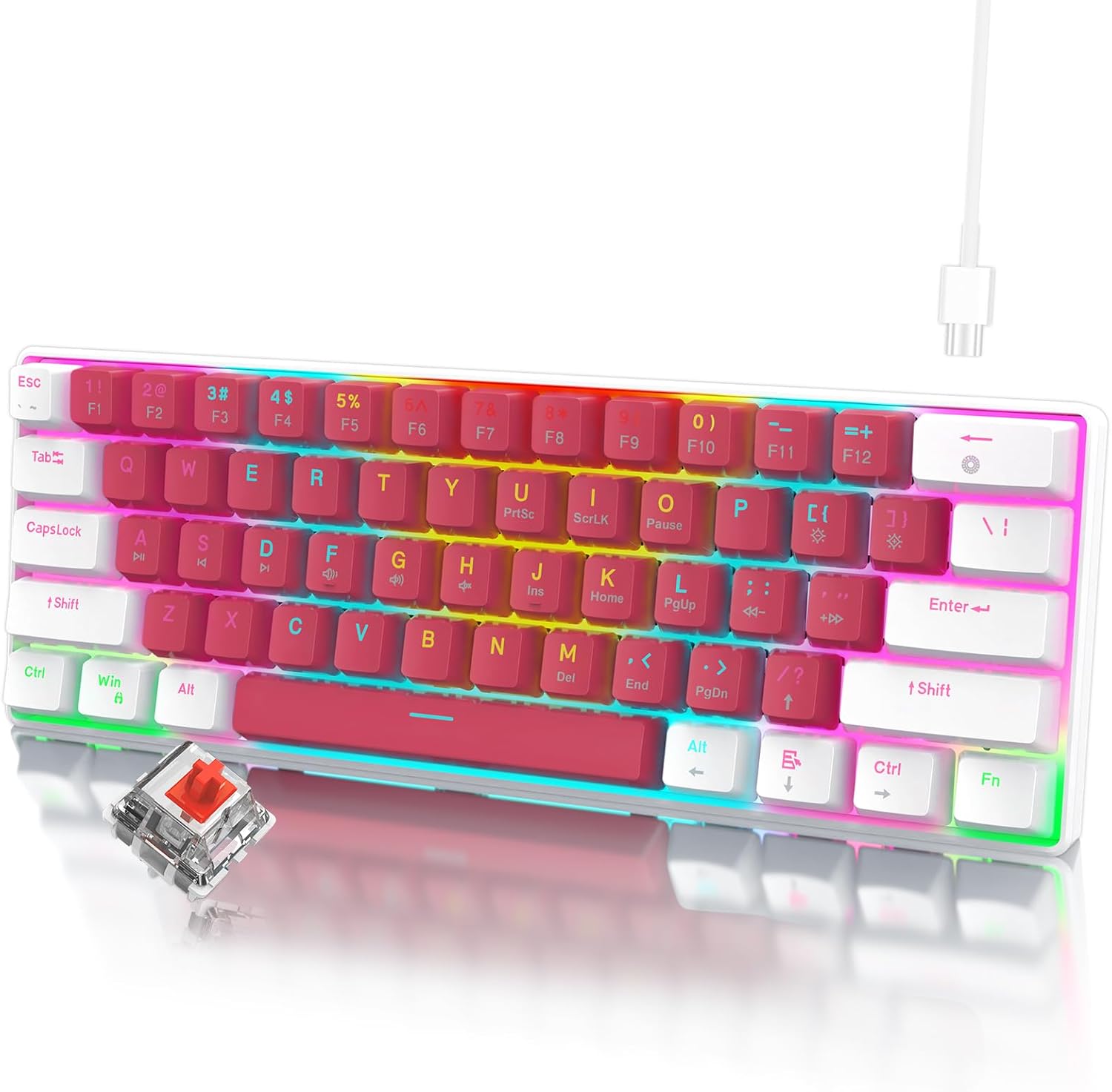
Image: The RAZEAK Portable 60% Mechanical Gaming Keyboard in Pink-White, showcasing its compact design and included USB-C cable. A single red switch is visible in the foreground.
Konfigurazio Gida
1. Paketearen edukia
Ziurtatu elementu guztiak paketean daudela:
- RAZEAK Portable 60% Mechanical Gaming Keyboard
- USB-C kablea
2. Teklatua konektatzea
- Locate the USB-C port on the back or side of the keyboard.
- Konektatu emandako USB-C kablearen mutur bat teklatuaren USB-C atakara.
- Connect the other end of the USB-C cable to an available USB port on your computer (Windows PC or Laptop).
- Teklatua automatikoki ezagutuko du zure sistema eragileak. Oinarrizko funtzionalitaterako ez da normalean beharrezkoa izaten gidari gehigarririk.
Funtzionamendu-argibideak
%60eko diseinu trinkoa
The RAZEAK keyboard features a compact 60% layout with 61 keys, designed to save desk space while retaining full functionality through key combinations. Many standard keys (e.g., F-keys, navigation keys) are accessed via the Function (Fn) key.

Image: A diagram illustrating the 60% ultra-compact 61-key layout of the keyboard, highlighting its space-saving design.
Key Combinations (Fn Key Functions)
To access secondary functions printed on the keycaps, press and hold the Fn key, then press the desired key.
- Fn + 1-0, -, =: Access F1-F12 keys.
- Fn + P, {, }, |, :, ", <, >, ?, /: Access various navigation and editing keys (e.g., Print Screen, Scroll Lock, Pause, Insert, Home, Page Up, Delete, End, Page Down).
- Fn + W, A, S, D: Swap arrow key functions with W, A, S, D for gaming.
- Consult the keycap legends for specific secondary functions.
N-teklaren birjartzea
The keyboard features N-Key Rollover (NKRO), meaning all 61 keys can be pressed simultaneously and registered correctly. This prevents ghosting and ensures precise input, especially beneficial for fast-paced gaming.
Atzeko argiztapenaren kontrola
The keyboard offers multi-colored LED backlighting with 19 different modes. Use the following key combinations to adjust the lighting:
- Fn + \ |: Cycle through 19 backlight modes.
- Fn + [ {: Atzeko argiaren distira txikitu.
- Fn + ] }: Atzeko argiaren distira handitu.
- Fn + ; :: Decrease backlight speed/animation.
- Fn + ' ": Increase backlight speed/animation.

Irudia: Gertutik view of the keyboard highlighting the backlit key legends and the Red mechanical switches visible beneath the keycaps.
Diseinu Ergonomikoa
The keyboard features ergonomic curved keycaps and two adjustable height angles to suit different user preferences and promote comfortable typing during extended use.

Irudia: Alboko profesional batfile of the RAZEAK keyboard demonstrating its ergonomic high and low key design and adjustable feet for varied typing angles.
Mantentzea
Teklatua garbitzea
Garbiketa erregularrak teklatuaren itxura eta funtzionaltasuna mantentzen laguntzen du.
- Deskonektatu teklatua ordenagailutik garbitu aurretik.
- Erabili lipurrik gabeko zapi leun bat dampGarbitu urarekin edo garbiketa-soluzio leun batekin teklak eta gainazala garbitzeko.
- Teklen arteko hautsa eta hondakinak lortzeko, erabili aire konprimatua.
- Avoid using harsh chemicals, abrasive cleaners, or spraying liquids directly onto the keyboard.
Tekla-tapoien zaintza
The dual-color injection molded keycaps are designed for durability and to prevent legends from fading. If you need to remove keycaps for deeper cleaning or replacement, use a keycap puller to avoid damage.
Arazoak konpontzea
If you encounter issues with your RAZEAK keyboard, refer to the following common solutions:
- Teklatuak ez du erantzuten:
- Ziurtatu USB-C kablea ondo konektatuta dagoela teklatura eta ordenagailura.
- Saiatu teklatua ordenagailuko beste USB ataka batera konektatzen.
- Disconnect and reconnect the USB-C cable.
- Berrabiarazi ordenagailua.
- Backlighting not working or incorrect:
- Check if the backlight brightness is set to maximum using Fn + ] }.
- Atzeko planoaren moduen artean txandakatu, erabiliz Fn + \ | to see if it resolves the issue.
- Tekla espezifikoak ez dira funtzionatzen:
- Ziurtatu ez dagoela hondakinik teklaren azpian.
- If using secondary functions, ensure you are pressing the Fn tekla aldi berean.
Zehaztapenak
| Modelo zenbakia | X44-WTRD-RS_W |
| Produktuaren neurriak | 11.5 x 4.02 x 1.57 hazbete |
| Elementuaren pisua | 1.39 kilo |
| Fabrikatzailea | WINSTAR TECHNOLOGY INDUSTRIAL LIMITED |
| Gailu bateragarriak | Windows gailuak |
| Konektibitate Teknologia | USB-C |
| Teklatuaren deskribapena | Jokoak, Mekanikoa |
| Ezaugarri Berezia | Portable, Backlit |
| Kolorea | Arrosa-Zuria |
| Atzeko argiztapenaren koloreen laguntza | RGB |
| Materiala | Plastikoa |
| Dakarten osagaiak | USB kablea |
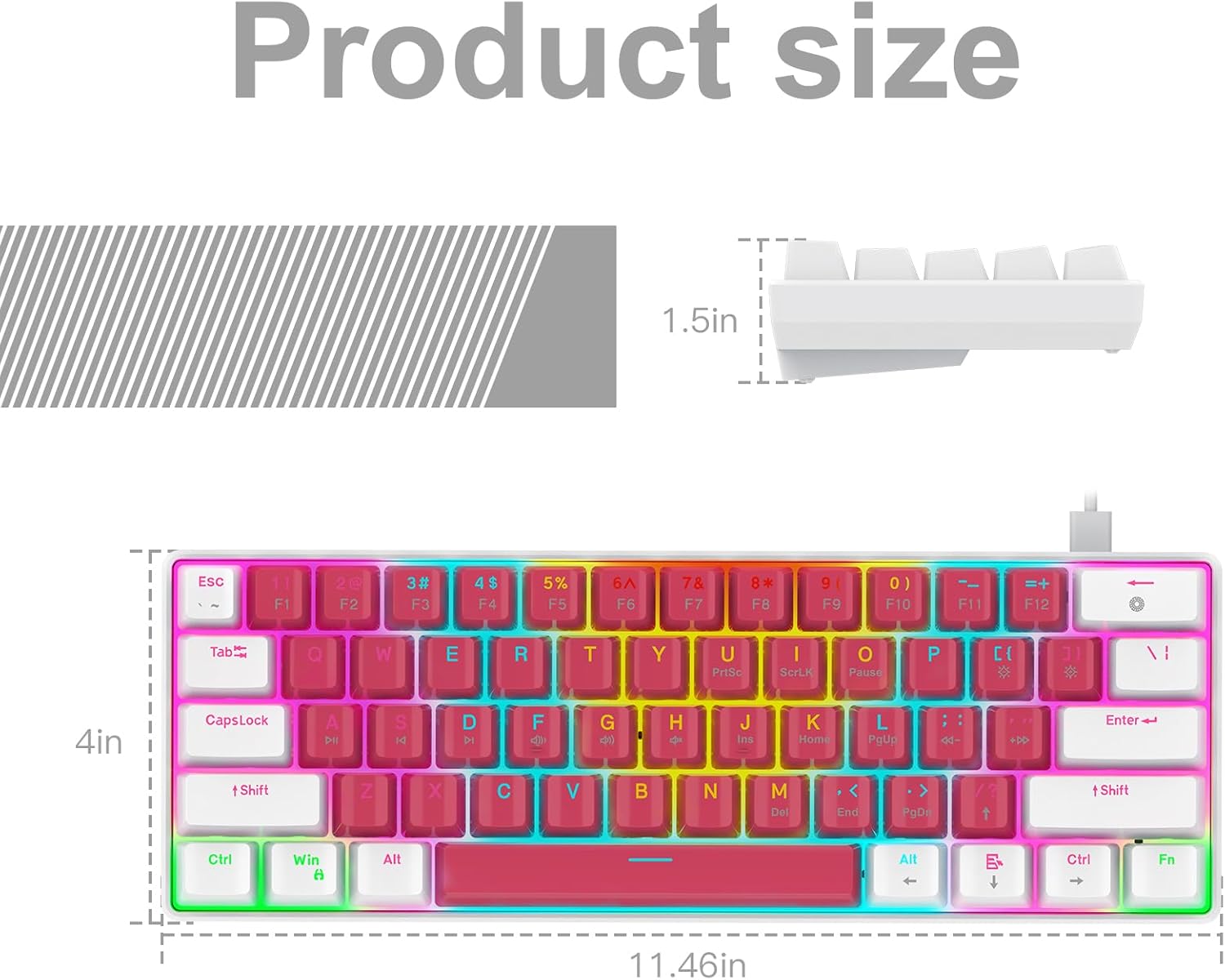
Image: A technical diagram illustrating the product dimensions (length, width, height) of the RAZEAK Portable 60% Mechanical Gaming Keyboard.
Bermearen informazioa
Specific warranty details for the RAZEAK Portable 60% Mechanical Gaming Keyboard are typically provided with your purchase documentation or can be found on the official RAZEAK webgunea. Gorde erosketaren egiaztagiria bermearen erreklamazioetarako.
Bezeroarentzako Arreta
For further assistance, technical support, or inquiries regarding your RAZEAK keyboard, please visit the official RAZEAK store or contact their customer service through the details provided on their webgunea.
You can visit the RAZEAK store at: RAZEAK Store on Amazon