
1. Sarrera
This manual provides comprehensive instructions for the proper setup, operation, and maintenance of the Sartorius GL2202i-2S Gold Scale. Adhering to these guidelines will ensure accurate and reliable performance of your precision weighing instrument.
2. Segurtasun informazioa
Jarraitu segurtasun neurri hauek gailuari lesioak eta kalteak saihesteko:
- Operate the scale only in a stable, level environment free from excessive vibrations, drafts, and extreme temperature fluctuations.
- Do not expose the scale to corrosive chemicals or liquids.
- Ensure the power supply matches the specifications indicated on the device.
- Saihestu balantza erortzea edo kolpe handien eraginpean jartzea.
- Only qualified personnel should perform repairs or internal adjustments.
3. Produktua amaitu daview
The Sartorius GL2202i-2S is a precision gold scale designed for accurate weighing applications. Key components include the weighing pan, digital display, and control panel.
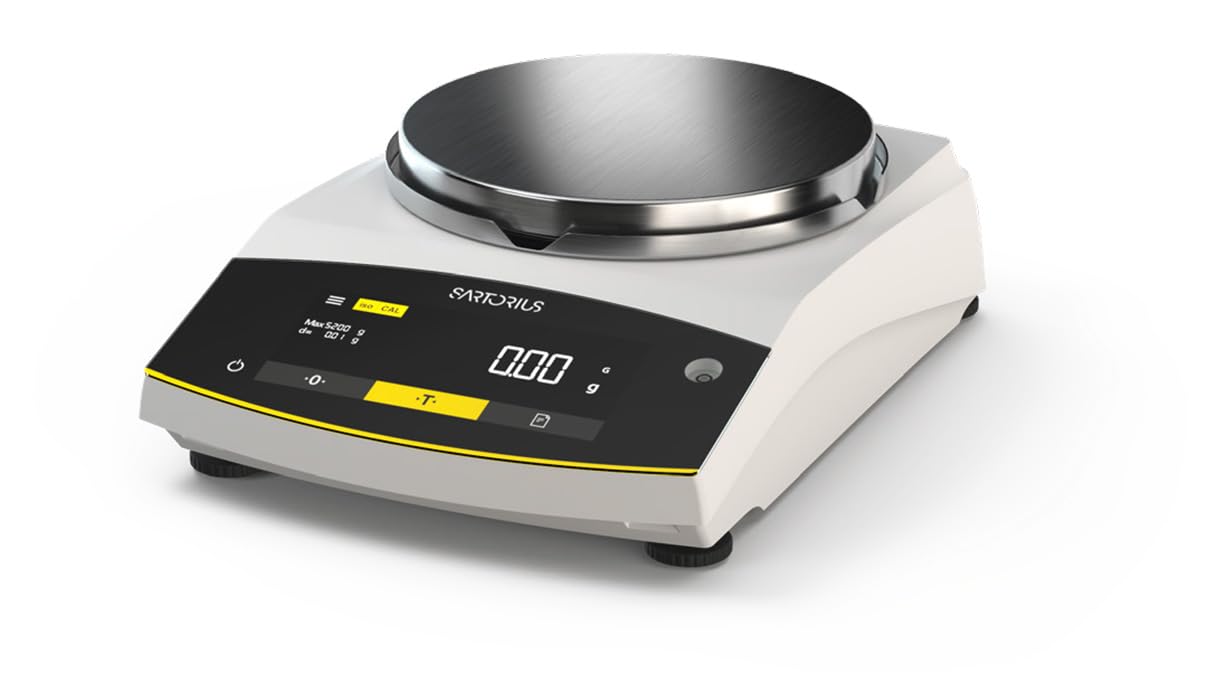
Figure 1: Sartorius GL2202i-2S Gold Scale. This image shows the scale's stainless steel weighing pan, the digital display, and the control buttons for operation.
Osagai nagusiak:
- Pisatzeko platera: Stainless steel platform for placing items to be weighed.
- Bistaratze digitala: Hybrid display (LED and touch technology) showing weight readings and operational status.
- Kontrol-panela: Buttons for power, tare, calibration, and menu navigation.
- Oinak berdintzea: Adjustable feet to ensure the scale is perfectly level.
4. Konfigurazioa
4.1 Paketatzea
Carefully remove the scale and all accessories from the packaging. Retain the original packaging for future transport or storage.
4.2 Jartzea
Place the scale on a firm, stable, and level surface. Avoid locations subject to:
- Direct sunlight or heat sources.
- Strong air currents (drafts from doors, windows, or air conditioning).
- Vibrations from machinery or heavy traffic.
- Rapid temperature changes.
4.3 Eskala berdintzea
Adjust the leveling feet located at the bottom of the scale until the air bubble in the level indicator (usually located near the display) is centered. This ensures accurate weighing results.
4.4 Energia-konexioa
Connect the provided power adapter to the scale's power input and then to a suitable electrical outlet. Allow the scale to warm up for at least 30 minutes after initial power-on for optimal stability.
5. Funtzionamendu-argibideak
5.1 Piztu/Itzali
Sakatu Boterea button (often marked with a circle and a vertical line) to turn the scale on or off. The display will show a self-test sequence before settling at zero.
5.2 Oinarrizko pisatzea
- Ensure the display reads 0.00 g before placing any item on the pan.
- Kontu handiz jarri pisatu beharreko elementua pisatzeko platera erdian.
- Wait for the reading to stabilize. The stable reading will be displayed.
- Kendu elementua zartaginetik.
5.3 Tara funtzioa
The tare function allows you to weigh items in a container by subtracting the container's weight.
- Jarri ontzi hutsa pisatzeko platera gainean.
- Sakatu Tara button (often marked with a 'T' or '->0<-'). The display will reset to 0.00 g.
- Gehitu pisatu beharreko elementua ontzira. Pantailak elementuaren pisu garbia erakutsiko du.
- Remove both the item and container from the pan.
6. Kalibrazioa
The Sartorius GL2202i-2S features an automatic, built-in calibration and adjustment function. Regular calibration ensures the highest level of accuracy. Refer to the on-screen prompts or the scale's specific menu for initiating the automatic calibration process. Ensure the scale is stable and free from any load during calibration.
7. Mantentzea eta Garbiketa
7.1 Garbiketa
To maintain the scale's performance and appearance:
- Deskonektatu balantza korronte-iturritik garbitu aurretik.
- Garbitu kanpoko gainazalak leun batekin, damp oihala eta detergente leun bat.
- Ez erabili garbitzaile urratzailerik, disolbatzailerik edo produktu kimiko gogorrik, hauek akabera edo barneko osagaiak kaltetu baitezakete.
- Ensure no liquids enter the scale's housing or display area.
- The stainless steel weighing pan can be removed and cleaned separately with appropriate cleaning agents.
7.2 Biltegiratzea
If storing the scale for an extended period, ensure it is clean, dry, and stored in its original packaging or a protective container in a stable environment.
8. Arazoak
Atal honek aurki ditzakezun arazo ohikoenak jorratzen ditu. Hemen zerrendatzen ez diren arazoetarako, jarri harremanetan bezeroarentzako arreta-zerbitzuarekin.
| Arazoa | Kausa posiblea | Irtenbidea |
|---|---|---|
| Display shows "Err" or unstable readings. | Scale not level, vibrations, drafts, overload, or internal error. | Check leveling, move to a stable location, ensure no load exceeds capacity, restart the scale. |
| Scale does not power on. | Power cable disconnected, faulty outlet, or power adapter issue. | Verify power cable connection, try a different outlet, check power adapter. |
| Irakurketa okerrak. | Needs calibration, environmental factors, or dirty pan. | Perform calibration, ensure stable environment, clean weighing pan. |
9. Zehaztapenak
- Eredua: GL2202i-2S
- Marka: Sartorius
- Capacity x Readability: 2200 gx 0.01 g
- Pantaila tamaina: 180 mm (Diameter)
- Pisua: 12.00 lb (5.44 kg) gutxi gorabehera
- Bistaratzeko mota: Hybrid (LED and Touchscreen)
- Ezaugarri berezia: Automatic, built-in calibration and adjustment function
- Kolorea: Zuria
10. Bermea eta Laguntza
For warranty information, technical support, or service inquiries, please refer to the documentation provided with your purchase or contact Sartorius customer service directly. Keep your purchase receipt and model number readily available when contacting support.