
1. Sarrera
This manual provides essential instructions for the safe and efficient operation, maintenance, and troubleshooting of your VEVOR OCS-D Digital Crane Scale. Please read this manual thoroughly before using the device to ensure proper function and to prevent damage or injury. Keep this manual for future reference.

1. irudia: VEVOR OCS-D Digital Crane Scale. This image shows the complete crane scale unit with its main hook, lower hook, and LED display.
2. Segurtasun informazioa
- Always ensure the scale is securely mounted and the load is properly attached to the hook before weighing.
- Do not exceed the maximum weighing capacity of 6600 lbs (3000 kg). Overloading can cause damage to the scale and potential injury.
- Avoid sudden impacts or dropping the scale.
- Do not attempt to disassemble or repair the scale yourself. Contact qualified personnel for service.
- Keep the remote control and scale away from water and extreme temperatures.
- Ensure batteries are inserted with correct polarity. Remove batteries if the scale will not be used for an extended period.
3. Produktuaren osagaiak
The VEVOR OCS-D Crane Scale package includes the following items:
- 1 x Digital Crane Scale
- 1 x Urruneko kontrola
- 1 x Erabiltzailearen eskuliburua (Dokumentu hau)
- 2 x 1.5V AA Batteries (for remote control)
- 1 x Power Adapter (for scale charging)

2. irudia: Crane Scale with Remote Control and Power Adapter. This image displays the main crane scale unit alongside its remote control and power adapter, illustrating the complete set of components.
4. Konfigurazioa
4.1. Bateriaren instalazioa (urrutiko agintea)
- Kokatu bateriaren konpartimendua urrutiko agintearen atzealdean.
- Ireki bateriaren estalkia.
- Sartu bi 1.5 V-ko AA pila, polaritate zuzena (+/-) ziurtatuz.
- Itxi bateriaren estalkia ongi.
4.2. Charging the Crane Scale
The crane scale has a built-in rechargeable battery. Before first use, fully charge the scale using the provided power adapter.
- Connect the power adapter to the charging port on the scale.
- Entxufatu egokitzailea korronte-hartune egoki batera.
- Allow the scale to charge until the charging indicator shows a full charge (refer to the scale's display for battery status).
4.3. Mounting the Scale
Attach the upper hook of the crane scale to a secure lifting mechanism (e.g., crane, hoist). Ensure the connection is stable and capable of supporting the maximum load capacity.

3. irudia: Crane Scale in Operation. This image shows the VEVOR OCS-D crane scale suspended from a lifting mechanism, weighing a package in a warehouse environment.
5. Funtzionamendu-argibideak
5.1. Piztu/Itzali
- Pizteko: Sakatu botoia ON/OFF button on the scale or the remote control.
- Itzaltzeko: Sakatu eta eutsi botoiari ON/OFF button on the scale or the remote control until the display turns off.
5.2. Oinarrizko pisaketa
- Ensure the scale is powered on and displays "0.0" before attaching any load.
- Carefully attach the item to be weighed to the lower hook of the scale.
- Allow the load to stabilize. The weight will be displayed on the LED screen.

4. irudia: Bright LED Display. This close-up image highlights the clear, 5-digit LED display of the crane scale, showing a weight reading and unit indicators (kg/lb).
5.3. Urruneko kontrol funtzioak
The remote control allows for convenient operation from up to 5 meters away. Refer to the diagram below for button functions.

5. irudia: Remote Control Layout. This image illustrates the remote control for the crane scale, with labels pointing to various buttons and their corresponding functions such as Zero, Tare, Hold, and Unit Switch.
- ON/OFF: Balantza pizten edo itzaltzen du.
- ZERO: Sets the current display to zero. Use this before weighing to ensure accuracy or to zero out small initial weights.
- URTEA: Subtracts the weight of a container or previous load, allowing you to weigh additional items accurately. Press once to tare, press again to clear tare.
- EUTSI: Freezes the displayed weight reading, even if the load fluctuates or is removed. Press again to release.
- UNIT (kg/lb): Switches between kilograms (kg) and pounds (lb) measurement units.
- ACC (Accumulation): Used for summing multiple weight readings.
- DEL (Delete): Used to clear accumulated data.
- F1/F2 (Function Keys): May have additional functions depending on the scale's mode or calibration settings. Refer to advanced settings if applicable.
5.4. Gainkargaren alerta
If the load exceeds the maximum capacity, the display will show an "OVERLOAD" warning. Immediately remove the excess weight to prevent damage to the scale.
5.5. Itzaltze automatikoaren funtzioa
The scale is equipped with an auto-off feature to conserve battery power. If no operation is performed for a set period, the scale will automatically power off. This setting can typically be adjusted in advanced settings (not covered in basic operation).
6. Mantentzea
6.1. Garbiketa
Garbitu eskala leun batekin, damp oihalik. Ez erabili garbitzaile urratzailerik eta ez murgildu balantza uretan.
6.2. Bateria zaintzea
- Recharge the scale's internal battery when the low battery indicator appears.
- Replace remote control batteries when they are depleted.
- If the scale or remote will not be used for an extended period, remove the batteries to prevent leakage.
6.3. Biltegiratzea
Store the scale in a dry, cool place, away from direct sunlight and extreme temperatures. Ensure the hooks are protected from damage.

6. irudia: Durable Cast Aluminum Construction. This image highlights the robust cast aluminum housing of the VEVOR crane scale, emphasizing its resistance to heat, rust, and corrosion compared to plastic alternatives.
6.4. Hook Inspection
Regularly inspect the main hook and the lower hook for any signs of wear, cracks, or deformation. Ensure the security latch on the lower hook operates correctly to prevent accidental load release.

7. irudia: Steel Hook with Security Latch. This image demonstrates the secure design of the crane scale's steel hook, featuring a safety latch to prevent loads from slipping off during weighing.
7. Arazoak
| Arazoa | Kausa posiblea | Irtenbidea |
|---|---|---|
| Scale does not power on. | Bateria gutxi; Pizteko botoia ez da behar bezala sakatu. | Charge the scale's internal battery. Press and hold the ON/OFF button firmly. |
| Irakurketa okerrak. | Scale not zeroed; Unstable load; Overload. | Press ZERO before weighing. Ensure load is stable. Check for OVERLOAD warning and reduce weight. |
| Urruneko kontrola ez dabil. | Dead batteries; Out of range; Obstruction. | Replace remote batteries. Ensure remote is within 5 meters of the scale. Remove any obstructions between remote and scale. |
| "OVERLOAD" displayed. | Kargak gehienezko edukiera gainditzen du. | Immediately remove excess weight. Do not exceed 6600 lbs (3000 kg). |
8. Zehaztapenak
| Ezaugarri | Xehetasuna |
|---|---|
| Elementuaren eredu-zenbakia | OCS-D |
| Max Weighing Capacity | 6600 lb / 3000 kg |
| Min Weighing Capacity | 40 lb / 18.1 kg |
| Zehaztasuna | 1 lb / 0.5 kg |
| Neurketa Unitateak | kg / lb |
| Produktuaren pisua | 12 libra (gutxi gorabehera 10.5 kg) |
| Produktuaren neurriak | 21.06 x 9.53 x 7.4 hazbete (53.5 x 24.2 x 18.8 cm) |
| Bistaratzeko mota | LED (5-digit, 4 cm digit height) |
| Urruneko Kontrolaren barrutia | Gehienez 5 metro |
| Funtzionamendu-tenperatura | -10℃-tik 40℃-ra (14°F-tik 104°F-ra) |
| Etxebizitza Materiala | Aluminioa |
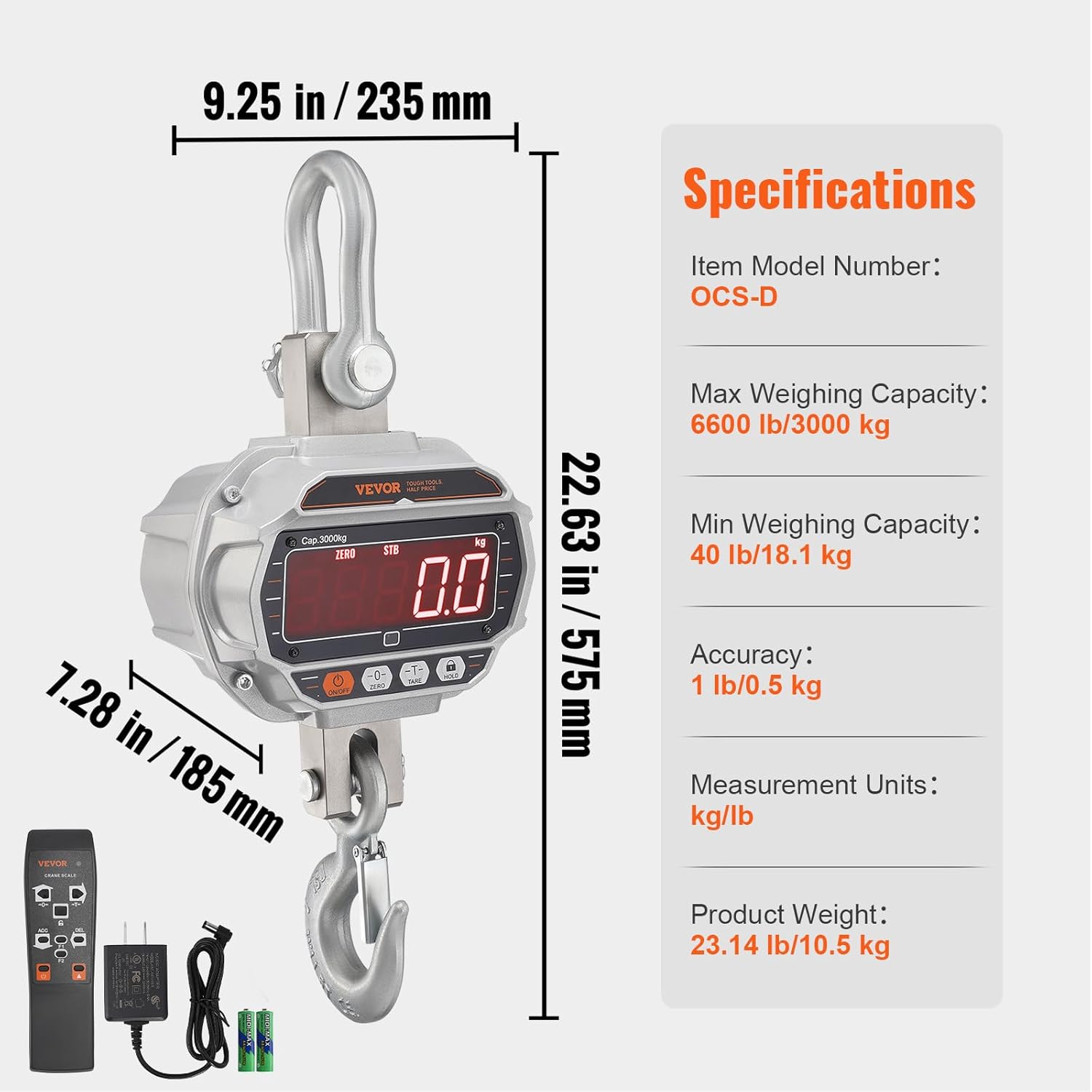
8. irudia: Detailed Specifications and Dimensions. This image provides a visual representation of the crane scale's physical dimensions and lists key specifications such as model number, capacity, accuracy, and measurement units.
9. Bermea eta Laguntza
Bermeari buruzko informazioa, laguntza teknikoa edo zerbitzu-kontsultak egiteko, jo VEVOR ofizialera. webwebgunean edo jarri harremanetan VEVOR bezeroarentzako arreta-zerbitzuarekin zuzenean. Gorde erosketa-agiria erosketaren frogagiri gisa.
VEVOR Ofiziala Webgunea: www.vevor.com