Sarrera
This manual provides detailed instructions for the setup, operation, and maintenance of your Rapoo M300G Silent Wireless Mouse. Please read this guide thoroughly to ensure proper use and to maximize the performance of your device. The Rapoo M300G offers versatile connectivity options, silent clicking, and adjustable DPI settings for an optimized user experience.
Paketearen edukia
Egiaztatu elementu guztiak paketean daudela:
- Rapoo M300G Wireless Mouse x 1
- AA bateria x 1
- USB Receiver x 1 (typically stored inside the mouse)
- Produktuaren eskuliburua x 1
Produktua amaituview
Familiarize yourself with the components of your Rapoo M300G mouse:

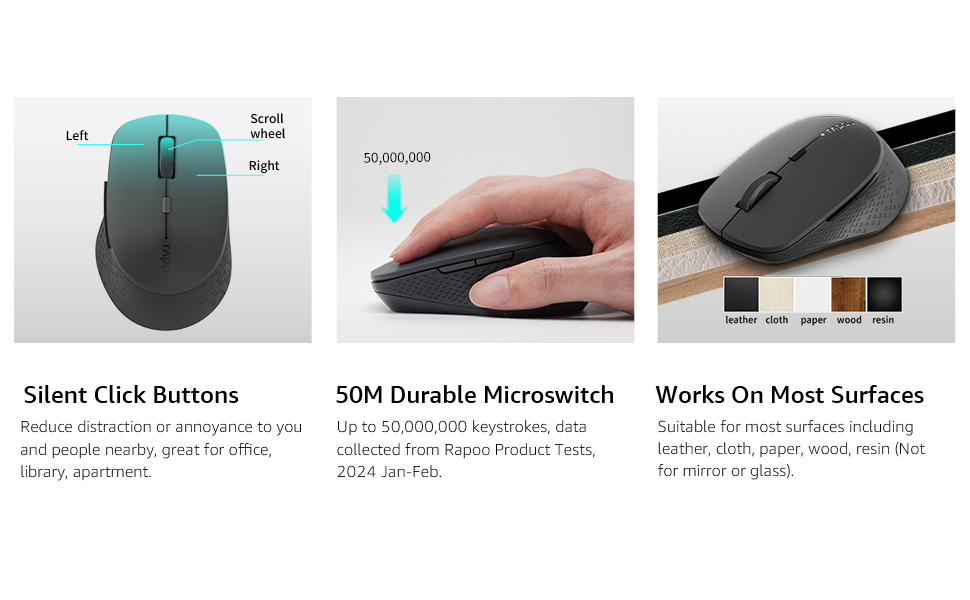
- Ezkerreko botoia: Klik egiteko funtzio estandarra.
- Eskuineko botoia: Eskuineko botoiarekin klik egiteko funtzio estandarra.
- Korritzeko gurpila: Dokumentuetan zehar nabigatzeko eta web orrialdeak. Erdiko botoiarekin klik egiteko funtzionalitaterako ere sakatu daiteke.
- DPI aldatzeko botoia: Saguaren sentikortasuna (DPI) doitzen du.
- Aurrera egiteko botoia: Aurrera nabigatzen du web nabigatzaileak edo file esploratzaileak.
- Atzera botoia: Atzeraka nabigatzen du web nabigatzaileak edo file esploratzaileak.
- Multi-function Button Switch (Underside): Used to switch between 2.4GHz and Bluetooth modes, and for Bluetooth pairing.
Konfigurazioa
1. Bateriaren instalazioa
The Rapoo M300G mouse requires one AA battery (included).
- Bilatu bateriaren konpartimentuaren estalkia saguaren azpialdean.
- Lerratu estalkia ireki.
- Insert the AA battery, ensuring the positive (+) and negative (-) terminals align correctly with the markings inside the compartment.
- Itxi bateriaren konpartimenduaren estalkia ondo.

2. 2.4 GHz-ko haririk gabeko konexioa
To connect via the 2.4GHz USB receiver:
- Remove the USB receiver from its storage slot inside the mouse's battery compartment.
- Konektatu USB hargailua zure ordenagailuko USB ataka erabilgarri batean.
- Piztu sagua azpiko aldean dagoen pizteko etengailua erabiliz.
- Set the multi-function button switch on the underside of the mouse to the 2.4G mode (indicated by a small icon).
- Your computer should automatically detect and install the necessary drivers. The mouse is ready for use.
3. Bluetooth konexioa
The Rapoo M300G supports Bluetooth 5.0 and 4.0. To connect via Bluetooth:
- Piztu sagua azpiko aldean dagoen pizteko etengailua erabiliz.
- Set the multi-function button switch on the underside of the mouse to the Bluetooth mode (indicated by a Bluetooth icon).
- Press and hold the multi-function button switch for 3-5 seconds until the indicator light on the mouse starts blinking, indicating it is in pairing mode.
- Zure ordenagailuan edo gailuan, ireki Bluetooth ezarpenak eta bilatu gailu berriak.
- Select "Rapoo M300G" from the list of available devices to pair.
- Once paired, the indicator light on the mouse will stop blinking and remain solid for a few seconds, then turn off. The mouse is now connected.

Funtzionamendua
1. DPI doikuntza
The Rapoo M300G features 5 adjustable DPI levels: 800, 1000, 1200, 1600, and 2400. To change the DPI:
- Sakatu DPI aldatzeko botoia located behind the scroll wheel.
- Each press cycles through the available DPI settings. The mouse cursor speed will change accordingly.

2. Gailu anitzeko kommutazioa
The M300G supports connection to two devices simultaneously (one via 2.4GHz, one via Bluetooth). To switch between connected devices:
- Sakatu labur Multi-function Button Switch on the underside of the mouse.
- The mouse will switch between the 2.4GHz connection and the Bluetooth connection.

3. Gainazalen bateragarritasuna
The advanced optical tracking technology allows the Rapoo M300G to operate effectively on various surfaces without a mouse pad, including leather, cloth, paper, wood, and resin. Performance may vary on glass or mirrored surfaces.
Mantentzea
- Garbiketa: Erabili zapi leun eta lehor bat sagua garbitzeko. Saihestu produktu kimiko gogorrak edo material urratzaileak erabiltzea.
- Bateria ordezkatzea: Replace the AA battery when the mouse performance degrades or the indicator light signals low power.
- Biltegiratzea: When not in use for extended periods, turn off the mouse to conserve battery life. Store the USB receiver in its dedicated slot to prevent loss.

Arazoak konpontzea
| Arazoa | Kausa posiblea | Irtenbidea |
|---|---|---|
| Sagua ez du erantzuten | Low battery; Mouse turned off; Incorrect connection mode; USB receiver not connected (2.4GHz); Bluetooth not paired (Bluetooth). | Replace battery; Turn on mouse; Switch to correct mode (2.4G or BT); Plug in USB receiver; Re-pair Bluetooth. |
| Kurtsorearen mugimendua irregularra da | Sentsore optiko zikina; Gainazal desegokia; Bateria baxua. | Clean optical sensor; Use on a suitable surface or mouse pad; Replace battery. |
| Ezin da gailuen artean aldatu | Incorrect button press; Device not properly paired. | Ensure a brief press of the multi-function button; Verify both devices are correctly paired/connected. |
| Side buttons not working (Mac OS) | Limited Mac OS compatibility for side buttons. | This is a known limitation. Side buttons may not function on Mac OS. |
Zehaztapenak
- Eredua: M300G
- Konektibitatea: Bluetooth 5.0, Bluetooth 4.0, 2.4GHz Wireless
- DPI ezarpenak: 800, 1000, 1200, 1600, 2400 (erregulagarria)
- Botoiak: 6 (Ezkerra, Eskuina, Gurpila, DPI etengailua, Aurrera, Atzera)
- Potentzia: 1 x AA bateria
- Bateriaren iraupena: Up to 12 months (under normal conditions)
- Neurriak: 4.09 x 2.57 x 0.04 hazbete (103.91 x 65.43 x 37.29 mm)
- Pisua: 2.46 ounces (70g approx.)
- Bateragarritasuna: Windows, Mac OS, Linux, iOS, Android, Chrome OS
Bermea eta Laguntza
Your Rapoo M300G Silent Wireless Mouse comes with a Urtebeteko bermea erosketa-datatik aurrera. Gainera, 30-day return and refund or replacement policy is offered. For technical support or warranty claims, please refer to the contact information provided on the Rapoo official webgunea edo zure dendariaren laguntza-kanalak.