
YESWELDER FLUX-135PRO
YESWELDER FLUX-135 PRO 3-in-1 Welding Machine User Manual
Comprehensive guide for setup, operation, and maintenance of your YESWELDER FLUX-135 PRO.
Produktua amaituview
The YESWELDER FLUX-135 PRO is a versatile 3-in-1 welding machine designed for Gasless Flux Core MIG, Stick, and Lift TIG welding. This compact and portable unit is suitable for a wide range of welding applications, offering both ease of use for beginners and advanced features for experienced users.

Figure 1: YESWELDER FLUX-135 PRO Welding Machine with included accessories.
Ezaugarri nagusiak
- Multi-Process Capability: Supports Gasless Flux Core MIG, Stick, and Lift TIG welding.
- Irteera handia: 135 Amp output capable of welding mild steel up to 2/5 inches thick.
- Kontrol Sinergikoa: Bolumen automatikoatage matching with adjustable wire feeding speed for optimized welding.
- Bistaratze digitala: Advanced interface for clear monitoring of real-time current and settings.
- Diseinu eramangarria: Weighs just 11.4 lbs, making it easy to transport with its integrated carrying handle.
- Segurtasun Ezaugarriak: Includes automatic compensation for voltage fluctuation, robust protections against over-current, over-load, and over-heating.
Konfigurazioa eta Instalazioa
Despaketatzea eta ikuskatzea
Carefully unpack all components from the packaging. Verify that all items listed in the accessories section are present and undamaged. If any items are missing or damaged, contact customer support immediately.
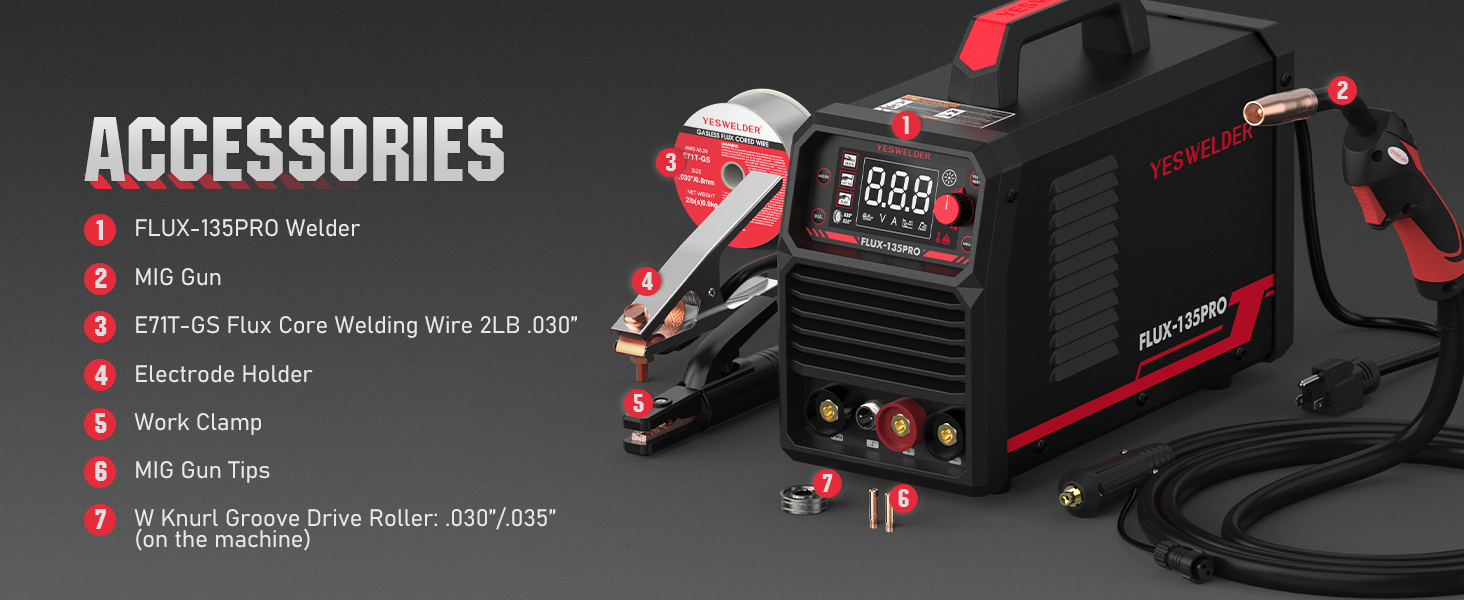
Figure 2: Included accessories for the FLUX-135 PRO. These typically include the welder unit, MIG gun, flux core welding wire, electrode holder, work clamp, and MIG gun tips.
Makina konektatzea
- Potentzia-konexioa: Ensure the welder is connected to a stable 110V power source.
- Lan Clamp Konexioa: Lotu lana clamp cable to the appropriate output terminal on the front panel. For Flux Core MIG and Stick welding, connect the work clamp to the negative (-) terminal. For Lift TIG, connect to the positive (+) terminal.
- MIG Gun/Electrode Holder Connection:
- For Flux Core MIG, connect the MIG gun to the MIG gun socket.
- For Stick welding, connect the electrode holder cable to the positive (+) output terminal.
- For Lift TIG, connect the TIG torch (not included) to the negative (-) output terminal and the control switch socket.
- Wire Spool Installation (for Flux Core MIG): Open the wire feeder compartment. Install the 2LB flux core welding wire spool onto the spindle. Ensure the wire feeds smoothly through the drive roller and liner to the MIG gun.
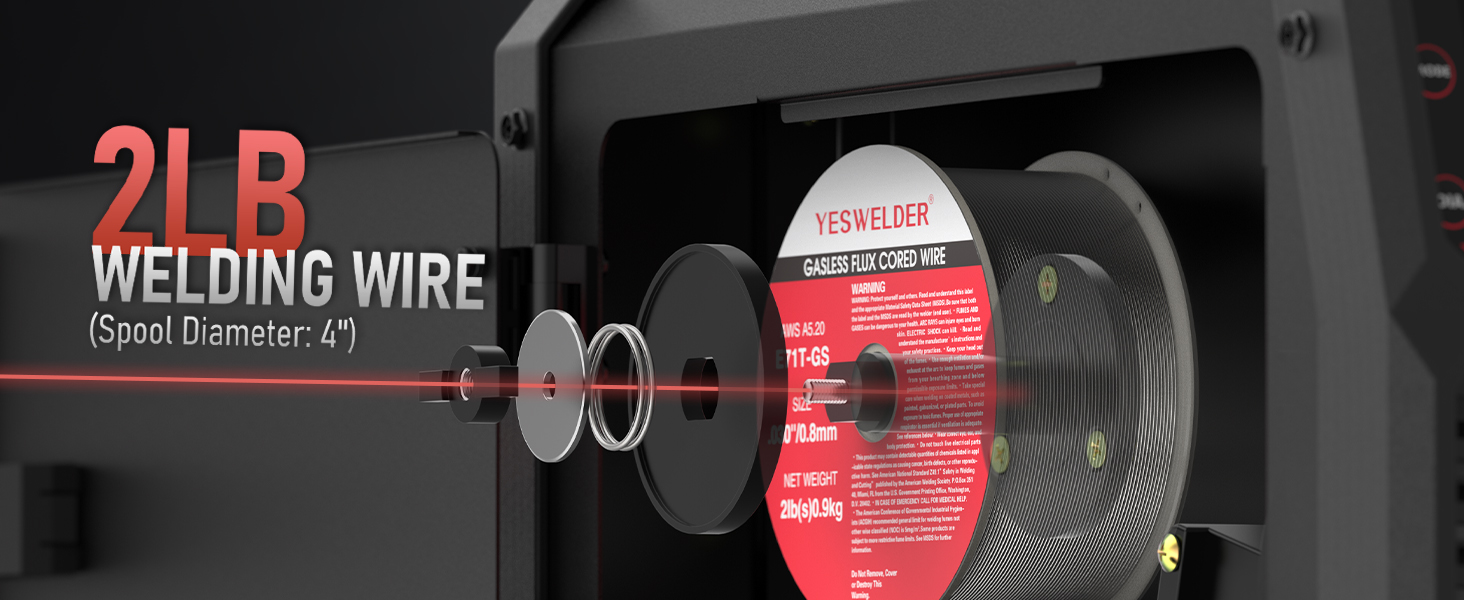
Figure 3: Proper installation of the 2LB welding wire spool within the machine's wire feeder compartment.
Funtzionamendu-argibideak
Kontrol-panela amaitu daview

Figure 4: Front panel controls and digital display of the FLUX-135 PRO.
- Modu aldaketa: Selects welding process (Stick, Lift TIG, Flux Core).
- Wire Diameter Switch: Sets wire diameter for Flux Core mode (.030" or .035").
- Feed Wire Button: Manually feeds welding wire without activating the arc.
- Value Knob: Adjusts welding current (Amps) or wire feeding speed.
- Parameter Switch: Toggles between adjustable parameters like Hot Start and Arc Force in Stick mode, or fine-tuning voltage in Synergic MIG mode.
- Bistaratze digitala: Shows selected mode, current settings, and real-time welding parameters.
Soldadura moduak

Figure 5: The FLUX-135 PRO supports Stick, Lift TIG, and Flux Cored welding processes.
Flux Core MIG Welding
- Select "FLUX" mode using the Mode Switch.
- Set the correct wire diameter (.030" or .035") using the Wire Diameter Switch.
- Adjust the wire feeding speed using the Value Knob. The voltage will automatically adjust in synergic control. Fine-tune voltage if necessary using the Parameter Switch.
- Ensure proper polarity: Work clamp to negative (-), MIG gun to positive (+).
Stick Welding (SMAW)
- Select "STICK" mode using the Mode Switch.
- Connect the electrode holder to the positive (+) terminal and the work clamp (-) terminal negatibora.
- Adjust the welding current (Amps) using the Value Knob.
- Adjust Hot Start and Arc Force parameters as needed via the Parameter Switch for improved arc ignition and stability.
Lift TIG Welding (GTAW)
- Select "LIFT TIG" mode using the Mode Switch.
- Connect the TIG torch (not included) to the negative (-) terminal and the work clamp (+) terminal positibora.
- Adjust the welding current (Amps) using the Value Knob.
- Note: An additional Lift TIG torch (e.g., B08BXGGNFL) is required for this process.
Welding Parameters Guide
Refer to the following table for recommended welding parameters based on workpiece thickness and welding process. These are starting points and may require fine-tuning based on material, joint type, and operator skill.
| Prozesua | Hariaren Diametroa | Piezen lodiera | Wire Feeding Speed (in/min) | Soldadura Voltage (V) | Soldadura Korrontea (A) |
|---|---|---|---|---|---|
| Flux MIG | 030" (0.8 mm) | 040" (1.0 mm) | 196 | 14.5 | 63 |
| 059" (1.5 mm) | 292 | 15.3 | 94 | ||
| 5/64" (2.0 mm) | 358 | 16.3 | 115 | ||
| 3/32" (2.5 mm) | 420 | 16.5 | 135 | ||
| Flux MIG | 035" (0.9 mm) | 040" (1.0 mm) | 144 | 14 | 63 |
| 059" (1.5 mm) | 216 | 15.6 | 94 | ||
| 5/64" (2.0 mm) | 262 | 16.6 | 115 | ||
| 3/32" (2.5 mm) | 308 | 16.9 | 135 | ||
| TIG | Tungsten Needle | 040" (1.0 mm) | N/A | N/A | 20-40 |
| 1/16" (1.6 mm) | N/A | N/A | 50-80 | ||
| 5/64" (2.0 mm) | N/A | N/A | 90-135 | ||
| MAKILA | Welding Rod | 059" (1.5 mm) | N/A | N/A | 60 |
| 3/16" (3.2 mm) | N/A | N/A | 100-135 |
Mantentzea
Regular maintenance ensures the longevity and optimal performance of your YESWELDER FLUX-135 PRO. Always disconnect the welder from the power supply before performing any maintenance.
Eguneko mantentze-lanak
- Clean the exterior of the machine with a dry, soft cloth.
- Inspect all cables and connections for wear, damage, or loose fittings. Replace or tighten as necessary.
- Check the MIG gun nozzle and contact tip for spatter buildup and wear. Clean or replace as needed.
Hileko Mantenua
- Use compressed air to blow out dust and debris from the cooling vents and internal components. Ensure the air is dry and oil-free.
- Inspect the wire feeder mechanism for proper tension and cleanliness. Clean any debris from the drive rollers.
- Check the condition of the ground clamp and electrode holder.
Arazoak konpontzea
This section provides solutions to common issues you might encounter with your welding machine. For problems not listed here, contact customer support.
| Arazoa | Kausa posiblea | Irtenbidea |
|---|---|---|
| Makinari ez dago energiarik | Power switch off, loose power cord, tripped circuit breaker | Turn on power switch, check power cord connection, reset circuit breaker |
| No arc when welding | Incorrect welding mode, poor work clamp connection, worn contact tip, incorrect polarity | Verify mode selection, ensure good work clamp contact, replace contact tip, check polarity settings |
| Wire not feeding smoothly (MIG) | Wire spool tangled, incorrect drive roller tension, clogged liner, wrong drive roller size | Untangle wire, adjust drive roller tension, clean or replace liner, ensure correct drive roller for wire diameter |
| Overheat warning light on | Exceeded duty cycle, blocked cooling vents, high ambient temperature | Allow machine to cool down, clear vents, operate in a cooler environment |
Zehaztapenak
Detailed technical specifications for the YESWELDER FLUX-135 PRO welding machine.
- Eredua: FLUX-135PRO
- Sarrera boltage: 110V
- Energia iturria: DC
- Irteera-korrontea: 135 Amps (gehienez)
- Welding Processes: Flux Core MIG, Lift TIG, Stick
- Soldatzeko ahalmena (altzairu biguna): Up to 2/5 inches thick
- Compatible Wire: 2LB .030'' and .035'' flux core welding wire
- Elementuaren pisua: Gutxi gorabehera 11.4 lb (5.17 kg)
- Fardelaren neurriak: 45.2 x 34.29 x 19.4 cm
- Hozte modua: Fan hoztea
- Isolamendu-maila: F
- Protection Standard: IP21S
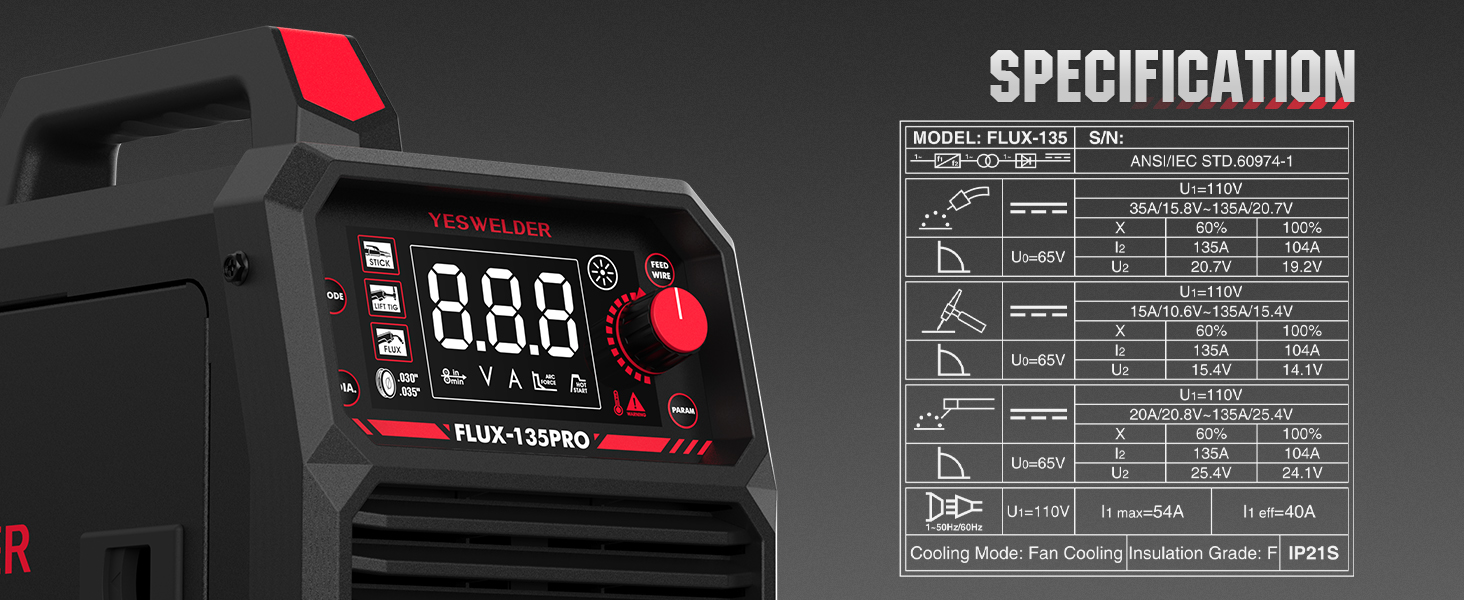
Figure 6: Detailed electrical specifications and duty cycle information for the FLUX-135 PRO.
Bermea eta Laguntza
Itzultzeko politika
This product is subject to a 30-day return policy for refund or replacement. Please refer to the retailer's specific return guidelines for full details.
Bezeroarentzako Arreta
For technical assistance, warranty claims, or any questions regarding your YESWELDER FLUX-135 PRO, please contact YESWELDER customer service. Contact information can typically be found on the manufacturer's official webgunea edo zure erosketa plataformaren bidez.
Visit the official YESWELDER Store for more information: YESWELDER Store
Ask a question about this manual
Ask about setup, troubleshooting, compatibility, parts, safety, or missing instructions. Manuals+ will review the question and use this page’s manual context to help answer it.