
1. Sarrera
Eskerrik asko erosketagatik.asing the Kaiser Professional 15-inch Speaker System, Model GEM-9520. This manual provides essential information for the safe and efficient operation of your new speaker system. Please read it thoroughly before use and retain it for future reference.
2. Segurtasun informazioa
- Energia iturria: Erabili zehaztutako energia-egokitzailea soilik. Ziurtatu bolumenatage zure tokiko elikadura hornidura bat dator.
- Ura eta hezetasuna: Do not expose the speaker to water, rain, or high humidity. Avoid placing liquid-filled objects on the speaker.
- Aireztapena: Ensure adequate ventilation around the speaker. Do not block any ventilation openings.
- Beroa: Mantendu bozgorailua bero-iturrietatik urrun, hala nola erradiadoreetatik, bero-erregistroetatik, sukaldeetatik edo beroa sortzen duten beste aparatu batzuetatik.
- Garbiketa: Deskonektatu korrontea garbitu aurretik. Erabili zapi lehor eta leun bat. Ez erabili garbitzaile likidorik edo aerosol-garbitzailerik.
- Zerbitzua: Ez saiatu produktu hau zuk zeuk ematen. Bidali zerbitzu guztiak zerbitzu kualifikatuko langileengana.
- Lekua: Place the speaker on a stable, flat surface or securely mount it on the provided tripod. Avoid placing it in direct sunlight or near strong magnetic fields.
3. Paketearen edukia
Egiaztatu elementu guztiak paketean daudela:
- Kaiser GEM-9520 Professional 15-inch Speaker System
- Kablezko Mikrofonoa
- Bozgorailuaren tripodea
- Elikatze-kablea
- Erabiltzailearen eskuliburua (dokumentu hau)

Image: Kaiser GEM-9520 speaker system with included microphone and tripod stand.
4. Produktua amaitu daview
The Kaiser GEM-9520 is a versatile 15-inch professional speaker system designed for various audio applications. It features multiple input options, LED lighting, and a robust design.
Aurrealdeko panela
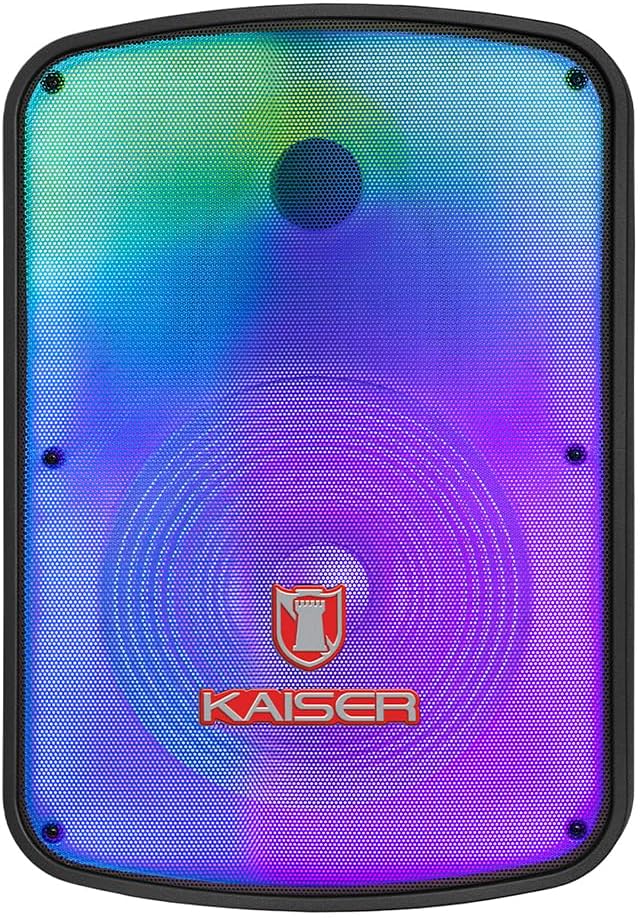
Irudia: Aurrealdea view of the Kaiser GEM-9520 speaker, showcasing the 15-inch driver and integrated LED lighting.
Atzeko kontrol panela
The rear panel houses all input/output connections and control knobs.

Irudia: Atzealdea view of the Kaiser GEM-9520 speaker, displaying the control panel with various inputs and adjustments.

Irudia: Xehetasun handikoa view of the control panel, showing the display, volume, equalizer, and input ports.
Included Microphone and Tripod

Image: The wired microphone included with the Kaiser GEM-9520 speaker system.
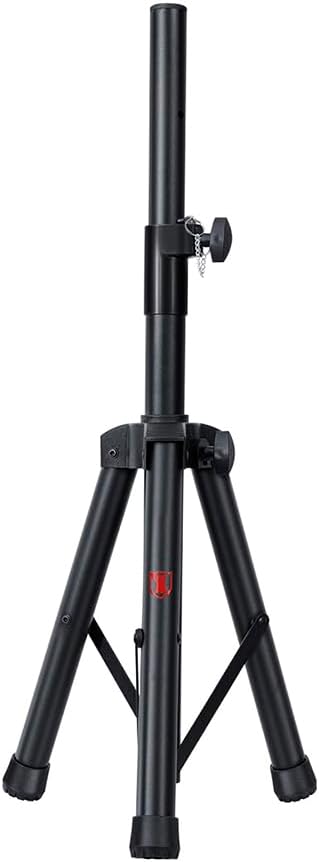
Image: The adjustable tripod stand for mounting the speaker.
5. Konfigurazioa
5.1 Desontziratzea eta hasierako kokapena
- Kontu handiz kendu osagai guztiak ontzitik.
- Place the speaker on a flat, stable surface or prepare for tripod mounting.
5.2 Tripod Assembly and Speaker Mounting
- Unfold the tripod legs and extend them to a stable position. Ensure all locking mechanisms are secure.
- Adjust the height of the tripod to your desired level and secure the locking pin and knob.
- Carefully lift the speaker and place its bottom mounting hole onto the tripod pole. Ensure it is seated firmly.

Image: Close-up of the tripod stand, showing its adjustable components.
5.3 Power Connection and Initial Charge
- Connect the provided power cable to the speaker's power input port on the rear panel.
- Entxufatu kablearen beste muturra entxufe elektriko egoki batera.
- For optimal battery life, fully charge the speaker before its first use. The charging time is approximately 3 hours.
6. Funtzionamendu-argibideak
6.1 Piztu/Itzali
Locate the power switch on the rear control panel. Flip it to the 'ON' position to power on the speaker. Flip it to 'OFF' to power off.
6.2 Modu hautaketa
Press the 'MODE' button on the control panel to cycle through available input modes: Bluetooth, USB, Micro SD, AUX, and FM Radio.
6.3 Volume and Equalizer Controls
- Bolumena: Rotate the 'VOLUME' knob to adjust the overall output volume.
- Treble (Agudos): Use the 'AGUDOS' knob to adjust the high-frequency response.
- Bass (Bajos): Use the 'BAJOS' knob to adjust the low-frequency response.
6.4 Bluetooth konexioa
- Switch the speaker to Bluetooth mode. The display will show 'BLUE' and a pairing indicator will flash.
- Zure gailu mugikorrean (smartphone-a, tableta, ordenagailu eramangarria), gaitu Bluetooth-a eta bilatu eskuragarri dauden gailuak.
- Select 'Kaiser GEM-9520' (or similar name) from the list.
- Once paired, the speaker will emit a confirmation sound, and the Bluetooth indicator will stop flashing.
6.5 USB/Micro SD erreprodukzioa
- Sartu USB flash unitate bat edo Mikro SD txartel bat (aurrez MP3 audioarekin kargatuta) files) dagokion portuan.
- The speaker will automatically switch to USB/Micro SD mode and begin playback. If not, press the 'MODE' button.
- Use the playback controls (Play/Pause, Next/Previous Track) on the control panel to manage your music.
6.6 AUX sarrera
- Connect an external audio device (e.g., MP3 player, computer) to the 'AUX' input port on the speaker using a 3.5mm audio cable.
- Switch the speaker to AUX mode using the 'MODE' button.
- Kontrolatu erreprodukzioa eta bolumena konektatutako gailutik.
6.7 Mikrofonoaren erabilera
- Connect the wired microphone to the 'MIC' input port on the rear panel.
- Adjust the microphone volume using the 'VOL MIC' knob.
- Adjust the echo effect using the 'ECO' knob.

Image: Close-up of the wired microphone, showing its ON/OFF switch.
6.8 Microphone Audio Priority Function
This function automatically lowers the background music volume when the microphone is in use, making the voice clearer and more prominent. To activate/deactivate this function, refer to the specific button or switch on the control panel labeled for 'Mic Priority' or similar.

Image: Diagram illustrating the microphone audio priority function, which lowers music volume when the microphone is active.
6.9 KSR-LINK Function
The KSR-LINK function allows you to wirelessly connect two compatible Kaiser speakers for a stereo sound experience. Refer to the specific instructions for KSR-LINK pairing, usually involving pressing a dedicated button on both speakers simultaneously.
7. Mantentzea
- Garbiketa: Wipe the speaker's exterior with a soft, dry cloth. Do not use abrasive cleaners, waxes, or solvents.
- Biltegiratzea: Denbora luzez erabiltzen ez baduzu, gorde bozgorailua leku fresko eta lehor batean, eguzki-argitik eta muturreko tenperaturetatik urrun.
- Bateria zaintzea: Bateriaren iraupena luzatzeko, saihestu bateria maiz erabat deskargatzea. Kargatu bozgorailua aldizka, erabiltzen ez bada ere.
8. Arazoak
| Arazoa | Kausa posiblea | Irtenbidea |
|---|---|---|
| Botererik ez | Kablea ez dago konektatuta; Bateria deskargatuta; Etengailua itzalita. | Ziurtatu kablea ondo konektatuta eta entxufatuta dagoela. Kargatu bateria. Jarri etengailua 'ON' posizioan. |
| Soinurik ez | Volume too low; Incorrect input mode; External device not playing. | Increase the master volume. Select the correct input mode. Ensure the connected device is playing and its volume is up. |
| Bluetootha ez da konektatzen | Speaker not in pairing mode; Device too far; Previously paired device connected. | Ensure speaker is in Bluetooth pairing mode. Move device closer to speaker. Disconnect from other Bluetooth devices. |
| Mikrofonoa ez dabil | Microphone not connected; Microphone volume too low; Microphone switch off. | Ensure microphone is securely plugged in. Increase 'VOL MIC' knob. Turn the microphone's ON/OFF switch to 'ON'. |
| FM irratiaren harrera eskasa | Weak signal; No external antenna. | Reposition the speaker. Extend any built-in antenna or connect an external one if available. |
9. Zehaztapenak
| Ezaugarri | Zehaztapena |
|---|---|
| Eredua | GEM-9520 |
| Irteera Wattage | 25000 watt (PMPO) |
| Bozgorailuaren tamaina | 15 hazbetekoa |
| Energia iturria | Bateria |
| Bateriaren iraupena (batez bestekoa) | 6 ordu |
| Kargatzeko Denbora | 3 ordu |
| Konektibitate Teknologia | AUX, Bluetooth, USB |
| Audio Sarrerak | Microphone, USB, Micro SD, 3.5 mm, 6.3 mm |
| Ezaugarri bereziak | High-resolution audio, LED light, USB port, Microphone Audio Priority, KSR-LINK |
| Muntatze Mota | Floor Mount (Tripod included) |
| Materiala | Plastikoa |
| Produktuaren neurriak (L x W x H) | 45 x 35 x 64 cm |
| Produktuaren pisua | 10.85 kg |
10. Bermea eta Laguntza
This Kaiser product is covered by a manufacturer's warranty. For specific warranty terms and conditions, please refer to the warranty card included in your product packaging or contact Kaiser customer support. For technical assistance or service inquiries, please visit the official Kaiser webwebgunean edo jarri harremanetan bere bezeroarentzako arreta zerbitzuarekin.