
1. Sarrera
This manual provides essential information for the safe and efficient operation of your Sharp GX-BT190 Portable Bluetooth Speaker. Please read it thoroughly before using the device and retain it for future reference.
2. Segurtasun informazioa
- Ez jarri bozgorailua tenperatura altuen, eguzki-argiaren eraginpean edo hezetasun handiaren eraginpean.
- Do not disassemble, repair, or modify the speaker. This may void the warranty and pose safety risks.
- Ensure the charging port cover is securely closed when using the speaker near water to maintain its IP67 rating.
- Erabili emandako kargatzeko kablea edo baliokide ziurtatu bat soilik.
- Mantendu bozgorailua haurrengandik eta maskotakengandik urrun.
- Saihestu bolumen maila altuetan entzutea denbora luzez, entzumenaren kalteak saihesteko.
3. Paketearen edukia
- Sharp GX-BT190 Portable Bluetooth Speaker
- USB kargatzeko kablea
- Korrila
- Argibide eskuliburua
4. Produktua amaitu daview

Aurrealdea view of the Sharp GX-BT190 speaker, showing the central speaker grille with the Sharp logo and the LED light ring.

Aldea view of the Sharp GX-BT190 speaker, highlighting the textured speaker grille and the integrated lanyard.
Atzekoa view of the Sharp GX-BT190 speaker, showing the control buttons and the sealed charging port cover.
Kontrolak eta adierazleak:
- Pizteko botoia: Eduki sakatuta pizteko/desaktibatzeko.
- Bolumena igotzeko / Hurrengo abestiaren botoia (+): Sakatu labur bolumena igotzeko, sakatu luze hurrengo abestia ikusteko.
- Bolumena Jaisteko / Aurreko Pistaren Botoia (-): Sakatu labur bolumena jaisteko, sakatu luze aurreko abestira joateko.
- Play/Pause / Call Button (►||): Short press to play/pause, answer/end calls. Long press to reject calls.
- Mode / Light Button (M): Short press to cycle through LED light modes. Long press to turn off LED lights.
- USB-C kargatzeko ataka: For charging the speaker. Ensure the rubber cover is sealed when not charging.
- LED adierazlea: Kargatze-egoera eta Bluetooth parekatze-egoera erakusten ditu.
5. Konfigurazioa
5.1 Bozgorailua kargatzea
- Open the rubber cover on the back of the speaker to access the USB-C charging port.
- Konektatu emandako USB kargatzeko kablea bozgorailuaren USB-C atakara.
- Konektatu USB kablearen beste muturra USB elikatze-egokitzaile batera (ez dago barne) edo ordenagailuaren USB ataka batera.
- The LED indicator will illuminate during charging and turn off once fully charged.
- Close the rubber cover securely after charging to maintain the speaker's waterproof rating.
5.2 Piztu/Itzaltzea
- Pizteko: Press and hold the Power button for approximately 3 seconds. You will hear an audible prompt, and the LED indicator will flash.
- Itzaltzeko: Press and hold the Power button for approximately 3 seconds. You will hear an audible prompt, and the LED indicator will turn off.
5.3 Bluetooth parekatzea
- Ensure the speaker is powered on and the LED indicator is flashing, indicating it is in pairing mode.
- Zure gailu mugikorrean, gaitu Bluetootha eta bilatu eskuragarri dauden gailuak.
- Select "GX-BT190" from the list of devices.
- Once paired, the LED indicator will stop flashing and remain solid, and you will hear a confirmation tone.
- Bozgorailuak automatikoki konektatuko da azken parekatutako gailura piztean, gailua irismen-eremuan badago eta Bluetooth-a gaituta badago.
5.4 Benetako Haririk gabeko Estereoa (TWS) Parekatzea
TWS allows you to pair two GX-BT190 speakers together for a stereo audio experience.

Two Sharp GX-BT190 speakers, one red and one blue, positioned together, illustrating the True Wireless Stereo (TWS) pairing feature.
- Ensure both GX-BT190 speakers are powered on and not connected to any Bluetooth device.
- Bozgorailuetako batean (hau izango da bozgorailu nagusia), sakatu bi aldiz pizteko botoia. Bozgorailua TWS parekatze moduan sartuko da.
- The two speakers will automatically search for and connect to each other. You will hear a confirmation tone once TWS pairing is successful.
- Once TWS paired, connect your mobile device to the primary speaker via Bluetooth as described in section 5.3.
- TWS deskonektatzeko, sakatu bi aldiz bozgorailuetako edozeinetako pizteko botoia.
6. Funtzionamendua
6.1 Audioa erreproduzitzea
- Erreproduzitu/Pausatu: Sakatu labur Erreproduzitu/Pausatu botoia.
- Bolumena igo: Sakatu labur '+' botoia.
- Bolumena jaitsi: Sakatu labur '-' botoia.
- Hurrengo ibilbidea: Sakatu luze '+' botoia.
- Aurreko pista: Sakatu luze '-' botoia.
6.2 Eskurik gabeko deiak
- Erantzun deia: Sakatu labur Erreproduzitu/Pausatu botoia sarrerako dei batek jotzen duenean.
- Amaitu deia: Sakatu labur Erreproduzitu/Pausatu botoia dei batean zehar.
- Deia baztertu: Sakatu luze Erreproduzitu/Pausatu botoia sarrerako dei batek jotzen duenean.
6.3 LED Mood Lights
- Short press the 'M' (Mode/Light) button to cycle through the 6 available LED mood light modes.
- Long press the 'M' button to turn off the LED lights.
6.4 Iragazgaitza eta hautsaren aurkako erabilera (IP67)

The Sharp GX-BT190 speaker partially submerged in water, demonstrating its IP67 waterproof and dustproof capabilities.
The GX-BT190 speaker is rated IP67, meaning it is protected from dust ingress and can withstand immersion in water up to 1 meter for 30 minutes. To ensure this protection:
- Always ensure the rubber cover for the charging port is fully and securely sealed before exposing the speaker to water or dust.
- Do not intentionally submerge the speaker for extended periods or beyond the specified depth.
- After exposure to water, wipe the speaker dry with a soft cloth before charging.
7. Mantentzea
7.1 Garbiketa
- Garbitu bozgorailua leun batekin, damp oihal.
- Ez erabili garbitzaile urratzailerik, alkoholik edo disolbatzaile kimikorik.
- Ensure the speaker is dry before charging or storing.
7.2 Biltegiratzea
- Gorde bozgorailua leku fresko eta lehor batean, eguzki-argitik eta muturreko tenperaturetatik babestuta.
- Denbora luzez gordetzen baduzu, kargatu bateria aldian-aldian (adibidez, 3 hilabetero) bateriaren osasuna mantentzeko.
8. Arazoak
| Arazoa | Irtenbidea |
|---|---|
| Bozgorailuak ez du pizten. | Ziurtatu bateria kargatuta dagoela. Konektatu bozgorailua energia-iturri batera USB kablea erabiliz. |
| Ezin da Bluetooth bidez parekatu. | Ensure the speaker is in pairing mode (LED flashing). Turn off and on Bluetooth on your device. Move the speaker closer to your device. Clear previous Bluetooth connections on your device. |
| Soinurik ez edo bolumen baxua. | Increase the volume on both the speaker and your connected device. Ensure the speaker is properly paired. |
| Soinu kalitate txarra. | Move the speaker closer to your device. Ensure there are no obstructions between the speaker and your device. Try playing a different audio source. |
| TWS parekatzeak huts egin du. | Ensure both speakers are GX-BT190 models and are not connected to any other Bluetooth device. Try powering both speakers off and on, then re-attempt TWS pairing. |
9. Zehaztapenak

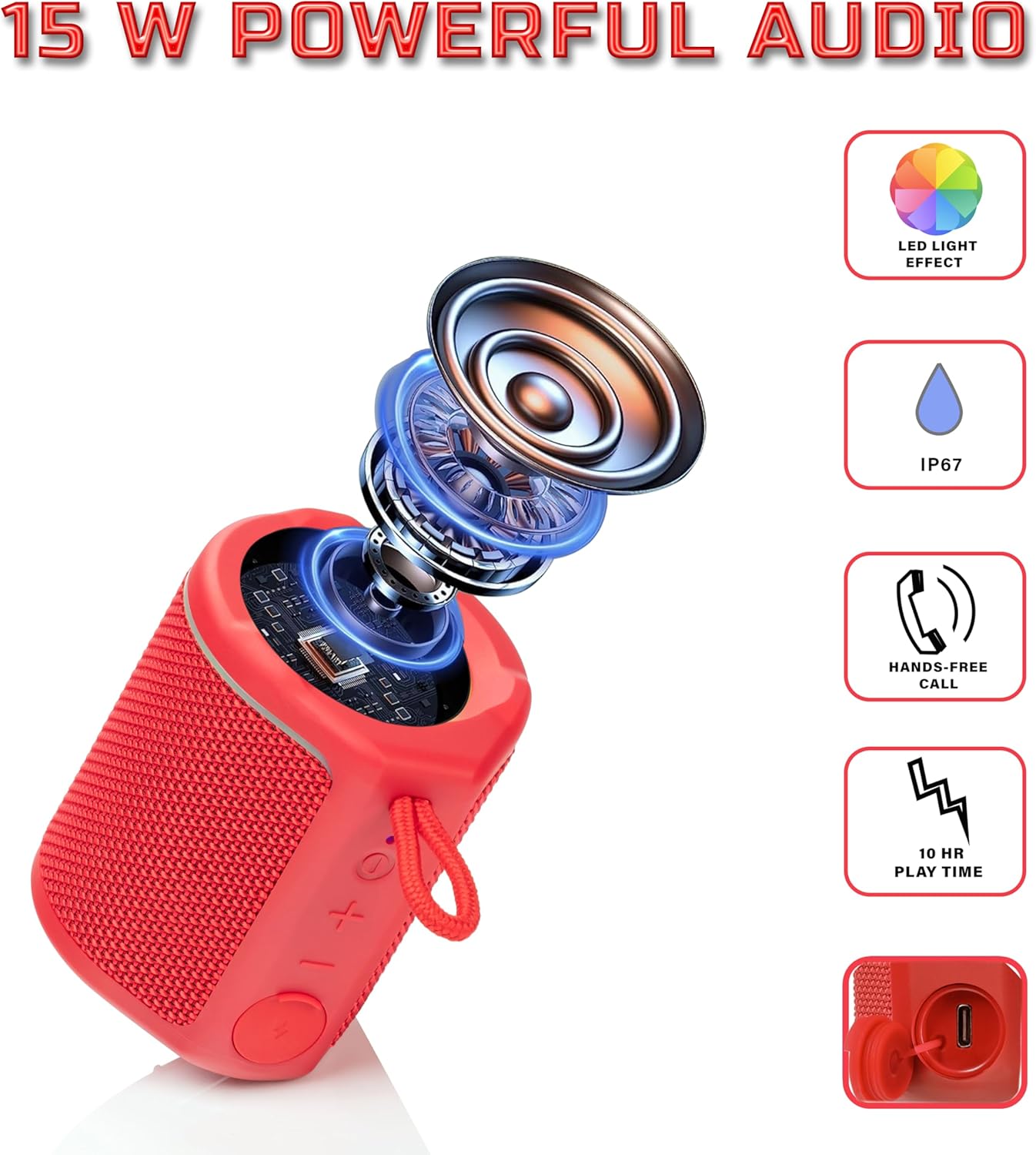
Diagram illustrating the internal components of the Sharp GX-BT190 speaker, including the speaker driver, and highlighting features like LED light effect, IP67 rating, hands-free call function, and battery life.
| Ezaugarri | Xehetasuna |
|---|---|
| Modelo zenbakia | GX-BT190 |
| Konektibitate Teknologia | Bluetootha |
| Bozgorailuaren irteera-potentzia maximoa | 10 Watt |
| Iragazgaitzaren balorazioa | IP67 |
| Bateriaren iraupena | Gehienez 15 ordu |
| Bateria mota | 1 litio ioi (barne) |
| Bateria Edukiera | 1200 mAh |
| Produktuaren neurriak (L x W x H) | 7.5 x 7.5 x 7.5 cm (gutxi gorabehera) |
| Elementuaren pisua | 226.8 g (8 ontza) |
| Wireless Range | Gehienez 33 oin |
| Ezaugarri gehigarriak | LED Light, True Wireless Stereo (TWS), Hands-Free Calling |
10. Bermea
The Sharp GX-BT190 Portable Bluetooth Speaker comes with a 1-Year Limited Warranty from the date of purchase. This warranty covers manufacturing defects under normal use. It does not cover damage caused by misuse, accidents, unauthorized modifications, or normal wear and tear. Please retain your proof of purchase for warranty claims.
11. Laguntza
For technical assistance, warranty inquiries, or further information regarding your Sharp GX-BT190 speaker, please contact Sharp Inc. customer support:
- Fabrikatzailearen kontaktua: Sharp Inc
- Telefonoa: 1-800-BE-SHARP