
1. Sarrera
The OSD Audio DAC-X200 is a powerful 2-channel Class D stereo amplifier designed to deliver high-fidelity audio. It features a built-in Hi-Res 24bit/192khz DAC, offering superior digital audio conversion. With versatile input options including USB, Optical, and RCA, and A/B speaker switching, this amplifier is suitable for various home audio setups, from driving bookshelf speakers to powering floorstanding units.
2. Segurtasun-argibideak
- Energia iturria: Konektatu unitatea zehaztutako elikatze-iturrira soilik.tage.
- Aireztapena: Ziurtatu aireztapen egokia dagoela. Ez blokeatu aireztapen-irekidurak.
- Ura eta hezetasuna: Ez jarri unitatea euripean, hezetasunean edo gehiegizko hezetasunean.
- Bero iturriak: Mantendu unitatea bero-iturrietatik urrun, hala nola erradiadoreetatik, bero-erregistroetatik, sukaldeetatik edo beste beroa sortzen duten gailuetatik.
- Garbiketa: Garbitu zapi lehor batekin bakarrik.
- Zerbitzua: Ez saiatu produktu hau zuk zeuk ematen. Bidali zerbitzu guztiak zerbitzu kualifikatuko langileengana.
- Lekua: Place the unit on a stable, flat surface. Avoid placing heavy objects on top of the ampbiziagoa.
3. Paketearen edukia
Egiaztatu elementu guztiak paketean daudela:
- OSD Audio DAC-X200 Ampbiziagoa
- Hasierako gida azkarra
- Elikatze-kablea
- Urrutiko agintea (zure modeloarekin batera badago)
4. Produktua amaitu daview
4.1 Aurreko panela
The front panel provides access to essential controls for daily operation.

4.1. irudia: Aurrealdea view of the DAC-X200 amplifier, showing the power button, speaker selectors, balance, and volume controls.

4.2. irudia: Detail of the front panel, highlighting the Power button and Speaker A/B selection buttons.

4.3. irudia: Detail of the front panel, showing the Balance and Volume control knobs.
4.2 Atzeko panela
The rear panel houses all input and output connections for audio sources and speakers.
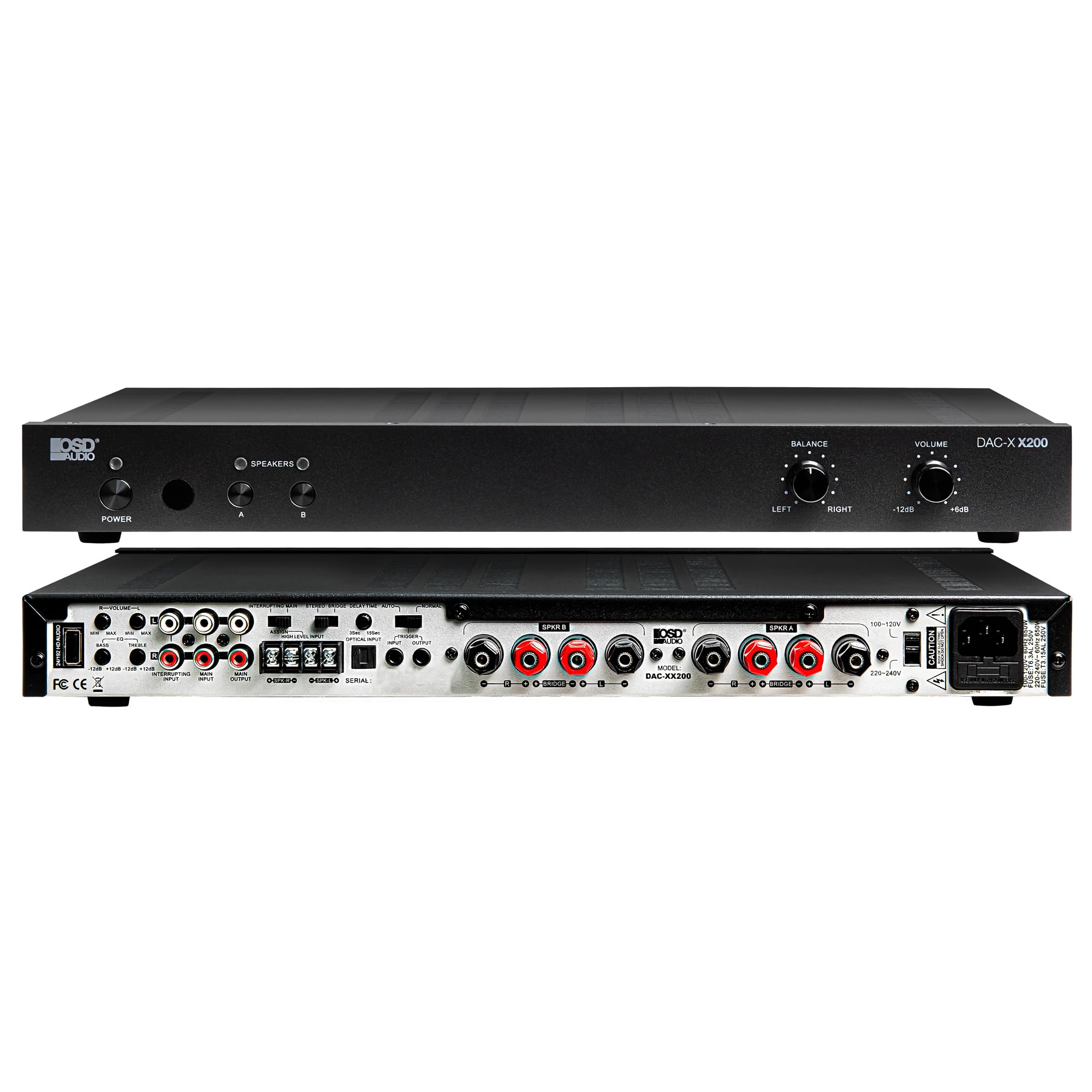
4.4. irudia: Atzekoa view of the DAC-X200 amplifier, displaying various audio inputs (USB, Optical, RCA), speaker outputs, and power input.

4.5. irudia: Detail of the rear panel inputs, including USB, Optical, and RCA connections.

4.6. irudia: Detail of the rear panel speaker output terminals for Speaker A and Speaker B.
5. Konfigurazioa
5.1 Jartzea
Place the DAC-X200 on a flat, stable surface with adequate space around it for ventilation. Avoid enclosed cabinets or areas with poor airflow to prevent overheating.
5.2 Bozgorailuak konektatzea
- Ziurtatu ampLifagailua itzalita eta deskonektatuta dago.
- Konektatu zure bozgorailu pasiboak HITZALARIA A eta/edo B HITZALARIA terminals on the rear panel. Observe correct polarity (+ to + and - to -).
- For optimal performance, use high-quality speaker wire.
5.3 Audio iturriak konektatzea
The DAC-X200 supports multiple input types:
- USB Sarrera: Connect a computer or other USB audio source using a Type A to Type A USB 2.0 cable.
- Sarrera optikoa: Connect digital audio sources like TVs or CD players using an optical cable.
- RCA sarrerak: Connect analog audio sources such as music streamers, turntables (with a pre-amp), or other devices using RCA cables.
5.4 Energia-konexioa
After all audio and speaker connections are made, connect the supplied power cable to the ampLikidatzailearen elikatze-sarrerara eta gero korronte alternoko entxufe egoki batera.
6. Funtzionamendu-argibideak
6.1 Piztu/Itzali
Sakatu BOTEREA aurrealdeko paneleko botoia pizteko amplifier on or off. The power indicator light will illuminate when the unit is on.
6.2 Sarrera hautatzea
The DAC-X200 features smart source switching, automatically detecting and switching to an active input. If multiple inputs are active, you may need to manually select the desired input using the remote control (if applicable) or by cycling through inputs.
6.3 Bolumen kontrola
Doitu irteerako bolumen orokorra erabiliz BOLUMENA knob on the front panel. Rotate clockwise to increase volume and counter-clockwise to decrease it.
6.4 Tonu-kontrolak
Erabili OREKA knob to adjust the left/right channel balance. The DAC-X200 also includes bass and treble adjustment knobs (located on the rear panel or accessible via remote, depending on model variation) to fine-tune the sound to your preference or room acoustics.
6.5 A/B Speaker Switching
Sakatu A or B buttons on the front panel to select which set of speakers (Speaker A, Speaker B, or both) are active. This allows for multi-room audio configurations.
7. Mantentzea
- Garbiketa: Erabili zapi leun eta lehor bat kanpoaldea garbitzeko ampEz erabili garbitzaile likidorik edo aerosolik.
- Aireztapena: Aldian-aldian egiaztatu aireztapen-irekiduretatik hautsik eta hondakinik gabe daudela.
- Biltegiratzea: Unitatea denbora luzez gordetzen baduzu, deskonektatu entxufetik eta gorde leku fresko eta lehor batean.
8. Arazoak
| Arazoa | Kausa posiblea | Irtenbidea |
|---|---|---|
| Botererik ez | Power cable not connected; Power outlet not active; Amplifier off. | Check power cable connection; Test power outlet; Press the Power button. |
| Soinurik ez | Incorrect input selected; Speaker cables loose; Volume too low; Speakers A/B not selected. | Select correct input; Check speaker connections; Increase volume; Ensure Speaker A or B is active. |
| Soinu distortsionatua | Input signal too high; Speaker impedance mismatch; Faulty cable. | Reduce source volume; Verify speaker impedance (8̣ or 4̣); Replace audio cables. |
| Input not switching automatically | Multiple active sources; Specific source not detected. | Manually select input; Ensure only one source is playing if auto-switching is desired. |
9. Zehaztapenak
- Eredua: DAC-X200
- Irteera potentzia: 100W RMS per channel at 8̣; 225W RMS per channel at 4̣; 450W bridged mono
- Kanal kopurua: 2
- DAC: Hi-Res 24bit/192khz, DSD formats supported
- Sarrerak: USB, Optical, RCA
- Speaker Zones: A/B Switching
- Neurriak (L x W x H): 16.7 x 10 x 2 hazbete
- Material mota: Plastikoa
- UPC: 810074881173
10. Bermearen informazioa
OSD Audio products are designed for reliability and performance. This product is covered by a limited warranty against defects in materials and workmanship. Please refer to the official OSD Audio webBermearen baldintza zehatzak ikusteko, bisitatu webgunea edo erosketa-dokumentazioa, iraupena eta estalduraren xehetasunak barne. Gorde erosketaren frogagiria bermearen erreklamazioetarako.
11. Laguntza
For technical assistance, troubleshooting not covered in this manual, or service inquiries, please contact OSD Audio customer support. You can find contact information, FAQs, and additional resources on the official OSD Audio webgunea.
Webgunea: www.osdaudio.com


