1. Sarrera
Thank you for choosing the Vortex T10M Pro+ Tablet. This manual will guide you through the features and functions of your new device, ensuring a smooth and enjoyable user experience. Please read this manual carefully before using your tablet.
Kutxan dagoena
Upon unboxing your Vortex T10M Pro+ Tablet, please verify that all the following items are present:
- Vortex T10M Pro+ Tablet
- Kargagailua
- Pantaila babeslea
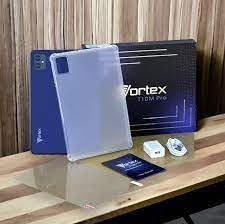
Image: Contents of the Vortex T10M Pro+ Tablet box. This includes the tablet, a clear protective case, the power adapter, and a screen protector, all neatly arranged on a wooden surface.
2. Produktua amaitu daview
Familiarize yourself with the physical components and key features of your Vortex T10M Pro+ Tablet.
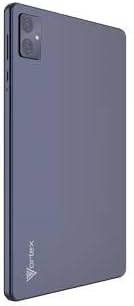
Irudia: Atzealdea view of the Vortex T10M Pro+ Tablet. The tablet has a sleek, dark finish with the 'Vortex' logo subtly placed at the bottom. The camera module is visible in the upper left corner.

Irudia: Xehetasun handikoa view of the back of the Vortex T10M Pro+ Tablet, highlighting its specifications. Printed details include '10.1-inch Brilliant Display', '5MP Front Camera', '8MP Rear Camera', 'MTK6766 Processor', 'Quad-Core, 4GB+64GB', '5000mAh Mega Battery', and 'Android 12'.
3. Konfigurazioa
3.1. Gailua kargatzea
Before first use, fully charge your tablet. Connect the provided charger to the tablet's charging port and plug it into a power outlet. The battery indicator on the screen will show charging progress.
3.2. Inserting SIM/MicroSD Card
The Vortex T10M Pro+ supports 4G LTE connectivity and expandable storage. To insert a SIM card (for mobile data) or a microSD card (for additional storage):
- Bilatu SIM/microSD txartelaren erretilua tabletaren alboan.
- Erabili SIM txartelaren kanporatzeko tresna erretilua irekitzeko.
- Carefully place the SIM card(s) and/or microSD card into the designated slots, ensuring correct orientation.
- Sartu erretilua tabletaren barrura astiro-astiro, klik egin arte.
3.3. Hasierako piztea
Press and hold the Power button located on the side of the tablet until the Vortex logo appears. Follow the on-screen prompts to complete the initial setup, including language selection, Wi-Fi connection, and Google account setup.
4. Funtzionamendu-argibideak
4.1. Oinarrizko nabigazioa
Your tablet runs on Android 13.0. Use touch gestures for navigation:
- Sakatu: Hautatu elementu bat edo ireki aplikazio bat.
- Pasatu hatza: Pantailetan edo zerrendetan zehar joan.
- Zoom egiteko apur bat egin: Argazkiak handitu edo txikitu eta web orrialdeak.
- Sakatu luzea: Sartu testuinguru-menuetara edo mugitu ikonoak.
4.2. Wi-Fira konektatzen
Wi-Fi sare batera konektatzeko:
- Joan zaitez Ezarpenak > Sarea eta Internet > Internet.
- Aktibatu Wi-Fi.
- Hautatu nahi duzun sarea zerrendatik eta idatzi pasahitza eskatzen bazaizu.
4.3. Using Mobile Data (4G LTE)
If you have inserted a valid SIM card with an active data plan:
- Joan zaitez Ezarpenak > Sarea eta Internet > SIMak.
- Ensure Mobile data is enabled for your SIM.
4.4. Kameraren funtzionamendua
Tabletak 8MP-ko atzeko kamera eta 5MP-ko aurrealdeko kamera ditu.
- Ireki Kamera aplikazioa.
- Sakatu obturadorearen botoia argazkia ateratzeko.
- Aldatu aurreko eta atzeko kameren artean kameraren txandakatze-ikonoa erabiliz.
4.5. Biltegiratzea kudeatzea
Your tablet comes with 64GB of internal storage. You can expand this using a microSD card up to 128GB. To view storage usage, go to Ezarpenak > Biltegiratzea.
5. Mantentzea
5.1. Garbiketa
Erabili zapi leun eta lihorik gabeko bat tabletaren pantaila eta gorputza garbitzeko. Saihestu produktu kimiko gogorrak edo material urratzaileak erabiltzea.
5.2. Software eguneraketak
Periodically check for software updates to ensure your tablet has the latest features and security patches. Go to Ezarpenak > Sistema > Sistema eguneratzea.
5.3. Bateria zaintzea
Bateriaren iraupena luzatzeko:
- Saihestu muturreko tenperaturak.
- Ez utzi bateria maiz erabat deskargatzen.
- Deskonektatu kargagailua bateria beteta dagoenean.
6. Arazoak
Atal honek zure tabletarekin izan ditzakezun arazo ohikoenei buruzko informazioa ematen du.
| Gaia | Irtenbide posiblea |
|---|---|
| Tableta ez da pizten | Ziurtatu bateria kargatuta dagoela. Berrabiarazteko, sakatu eta eutsi pizteko botoia gutxienez 10-15 segundoz. |
| Wi-Fi konexio arazoak | Berrabiarazi tableta eta Wi-Fi bideratzailea. Ahaztu sarea ezarpenetan eta konektatu berriro. |
| Aplikazioak motel doaz edo huts egiten dute | Close background apps. Clear app cache (Settings > Apps > [App Name] > Storage > Clear cache). Restart the tablet. |
| Storage full message | Ezabatu behar ez den files or apps. Move media to a microSD card. |
7. Zehaztapenak
Detailed technical specifications for the Vortex T10M Pro+ Tablet.
| Ezaugarri | Zehaztapena |
|---|---|
| Ereduaren izena | T10M Pro+ Tablet (Unlocked) Blue 10.1" 64GB 4GB GSM 4G LTE + Wifi 8MP |
| Bistaratzeko tamaina | 10.1 hazbete |
| Gehienezko pantailaren bereizmena | 1280 x 800 pixel |
| Freskatze tasa | 120 Hz |
| Prozesadorea | MediaTek, 2 GHz |
| RAM | 4 GB |
| Barne Biltegiratzea | 64 GB |
| Biltegiratze zabalgarria | MikroSD (128 GB arte) |
| Sistema eragilea | Android 13.0 |
| Atzeko kamera | 8 MP |
| Aurrealdeko kamera | 5 MP |
| Konektibitatea | 4G LTE, Wi-Fi, Bluetooth, GPSa |
| Bateria mota | Litio-Ioia |
| Bateriaren batez besteko iraupena | 18 ordu |
| Produktuaren neurriak | 10.1 x 5 x 3 hazbete |
| Kolorea | Beltza |
8. Bermearen informazioa
This product is covered by a manufacturer's warranty. Please refer to the warranty card included with your purchase or visit the manufacturer's official webwebgunean bermearen estaldurari, iraupenari eta erreklamazio-prozesuari buruzko baldintza zehatzak ikusteko.
9. Laguntza
For further assistance, technical support, or service inquiries, please contact the manufacturer's customer support. Contact information can typically be found on the product packaging, the manufacturer's webgunea edo bermearen dokumentazioa.


