
Sarrera
Welcome to the GOBOULT UFO True Wireless Earbuds user manual. These earbuds are designed to provide a superior audio experience with features like extended playtime, low latency gaming, advanced noise cancellation, and robust bass drivers. Please read this manual carefully to ensure proper use and optimal performance of your device.
Kutxan dagoena
- GOBOULT UFO True Wireless Earbuds
- Haririk gabeko kargatzeko kaxa
- C motako kargatzeko kable azkarra
- Belarri-punta pare gehigarria
- Erabiltzailearen eskuliburua
- Berme Txartela
Produktua amaituview
The GOBOULT UFO earbuds feature a distinctive design with integrated breathing LEDs on both the earbuds and the charging case. They are equipped with 13mm drivers for rich bass and Quad Mic ENC for clear calls.

Image: GOBOULT UFO Earbuds and Charging Case. This image highlights key features such as Bluetooth 5.3 connectivity, 48 hours of playtime, Quad Mic ENC, 13mm drivers, 45ms low latency, and Type-C fast charging.
Arnasketa LEDak
The breathing LEDs on the case and earbuds provide visual feedback for various actions, including opening/closing the case, charging, and when buds are connected.

Image: The GOBOULT UFO charging case and earbuds displaying their distinctive breathing LED lights, which indicate various operational states.
Audioaren kalitatea
Experience high-fidelity sound with precision-tuned 13mm drivers, ensuring clear audio across all frequencies and rich bass. The Quad Mic ENC (Environmental Noise Cancellation) system ensures crystal-clear, interference-free calls.
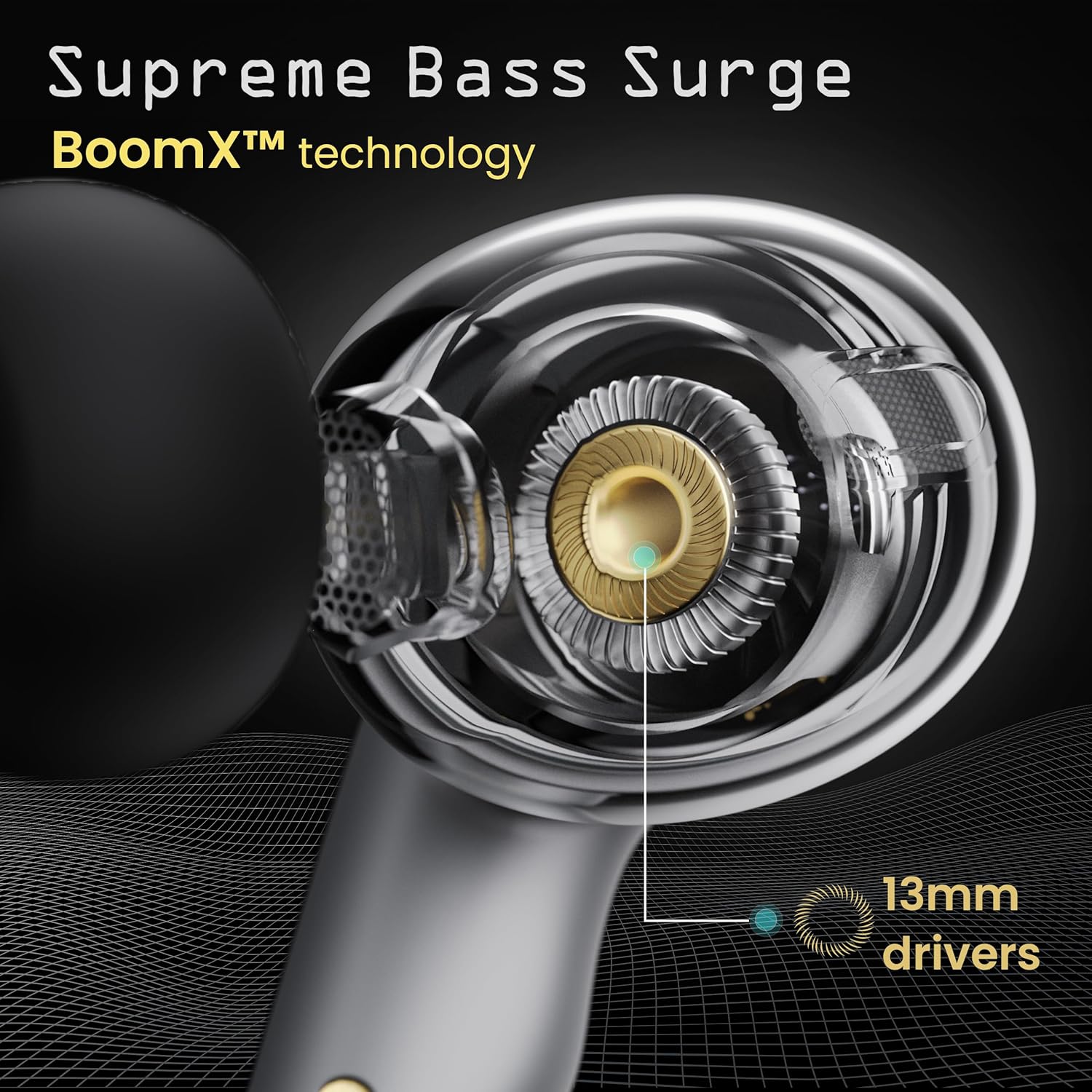
Image: A close-up of a GOBOULT UFO earbud, highlighting the 13mm drivers responsible for supreme bass surge.

Irudia: Xehetasun zehatza view of a GOBOULT UFO earbud, showcasing the AI-powered Quad Mic AI-ENC technology for high-definition call clarity and Zen™ mode for silence.
Konfigurazioa
Hasierako parekatzea
- Ireki kargatzeko zorroa. Aurikularrak automatikoki sartuko dira parekatze moduan.
- Zure gailuan (smartphone-an, tabletan, etab.), gaitu Bluetooth-a.
- Bilatu "GOBOULT UFO" in the list of available Bluetooth devices and select it to connect.
- Once connected, you will hear an audio prompt, and the LED indicators on the earbuds will change.
The earbuds utilize Bluetooth 5.3 for stable and efficient connection, featuring Blink & Pair™ technology for fast pairing.

Image: GOBOULT UFO Earbuds illustrating stable connectivity with Bluetooth 5.3 and fast pairing technology.
Aplikazioen laguntza
Enhance your experience by downloading the dedicated GOBOULT app. The app allows you to:
- Switch between 6 Equalizer Modes.
- Pertsonalizatu ukipen-kontrolak.
- Aldatu izena entzungailuei.
- Sartu ezarpen eta funtzio gehigarrietara.
Funtzionamendu-argibideak
Ukitu Kontrolak
The GOBOULT UFO earbuds feature intuitive touch controls on each earbud.
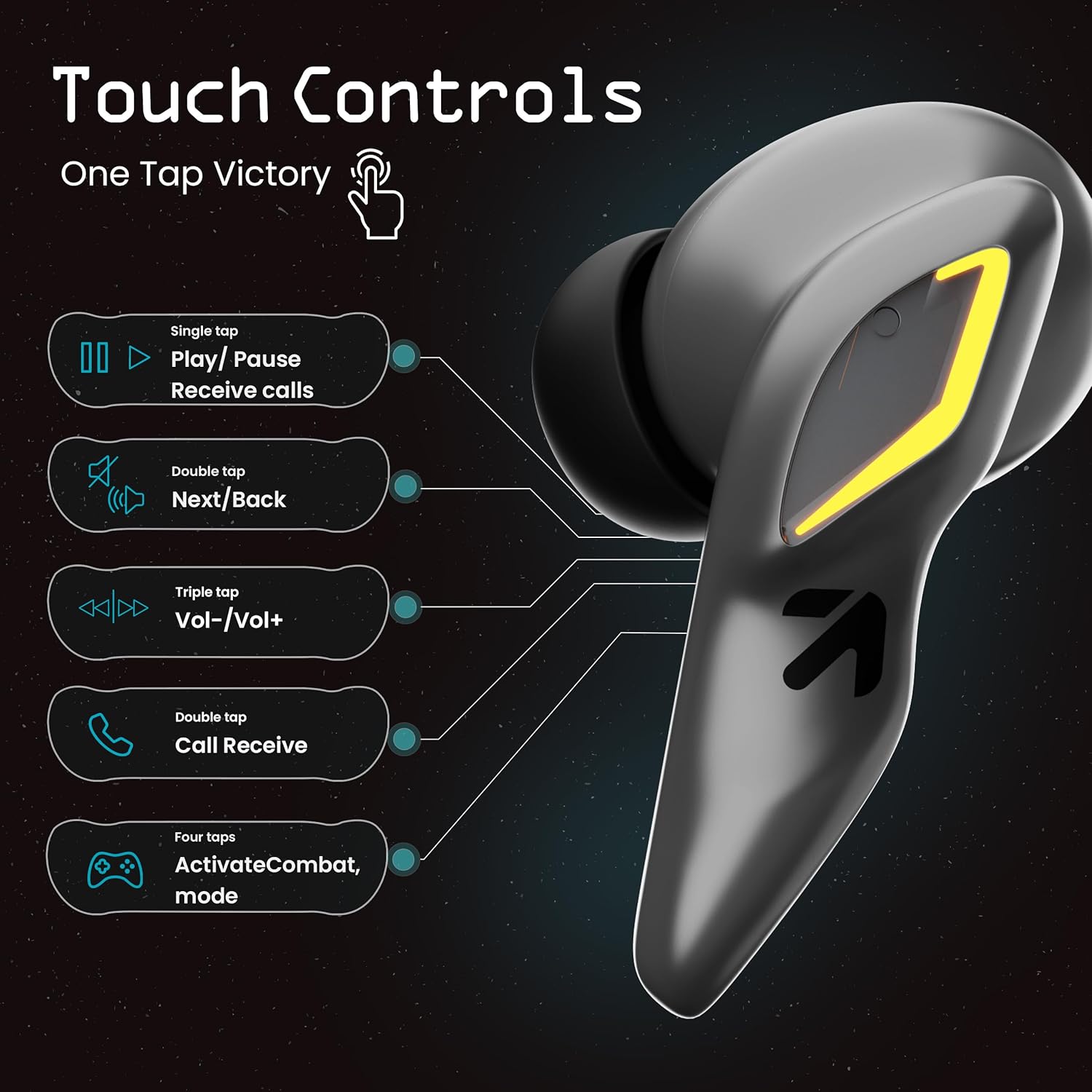
Image: A visual guide to the touch controls on the GOBOULT UFO Earbuds, detailing single, double, triple, and four-tap functions.
- Ukitu bakarra: Play/Pause music, Receive calls.
- Sakatu birritan: Next/Back track.
- Sakatze hirukoitza: Bolumena igo/behera.
- Lau txorrota: Activate Combat Mode (Gaming Mode).
- Prentsa luzea: Activate Voice Assistant (Google Assistant, Siri).
Gaming Mode (Combat Mode)
Activate Combat Mode for an ultra-low latency experience of 45ms, ideal for gaming. Tap the earbud four times to toggle this mode.

Image: The GOBOULT UFO Earbuds case open, highlighting the Combat Gaming Mode with 45ms ultra-low latency, activated by four taps.
Ahots Laguntzailea
Long press the touch control area on either earbud to activate your device's voice assistant (e.g., Google Assistant, Siri).

Image: GOBOULT UFO Earbuds demonstrating the long-press gesture to activate the voice assistant feature.
Kargatzen
The GOBOULT UFO earbuds offer up to 48 hours of total playtime with the charging case.
Kaxa eta entzungailuak kargatzea
- Jarri entzungailuak kargatzeko zorroan. Ziurtatu ondo sartuta daudela.
- Connect the Type-C fast charging cable to the charging port on the case and to a power source.
- Kasuan dauden LED adierazleek kargaren egoera erakutsiko dute.
- A full charge for the earbuds and case takes approximately 100 minutes.
- With Type-C fast charging, a 10-minute charge can provide up to 1.5 hours of playtime.
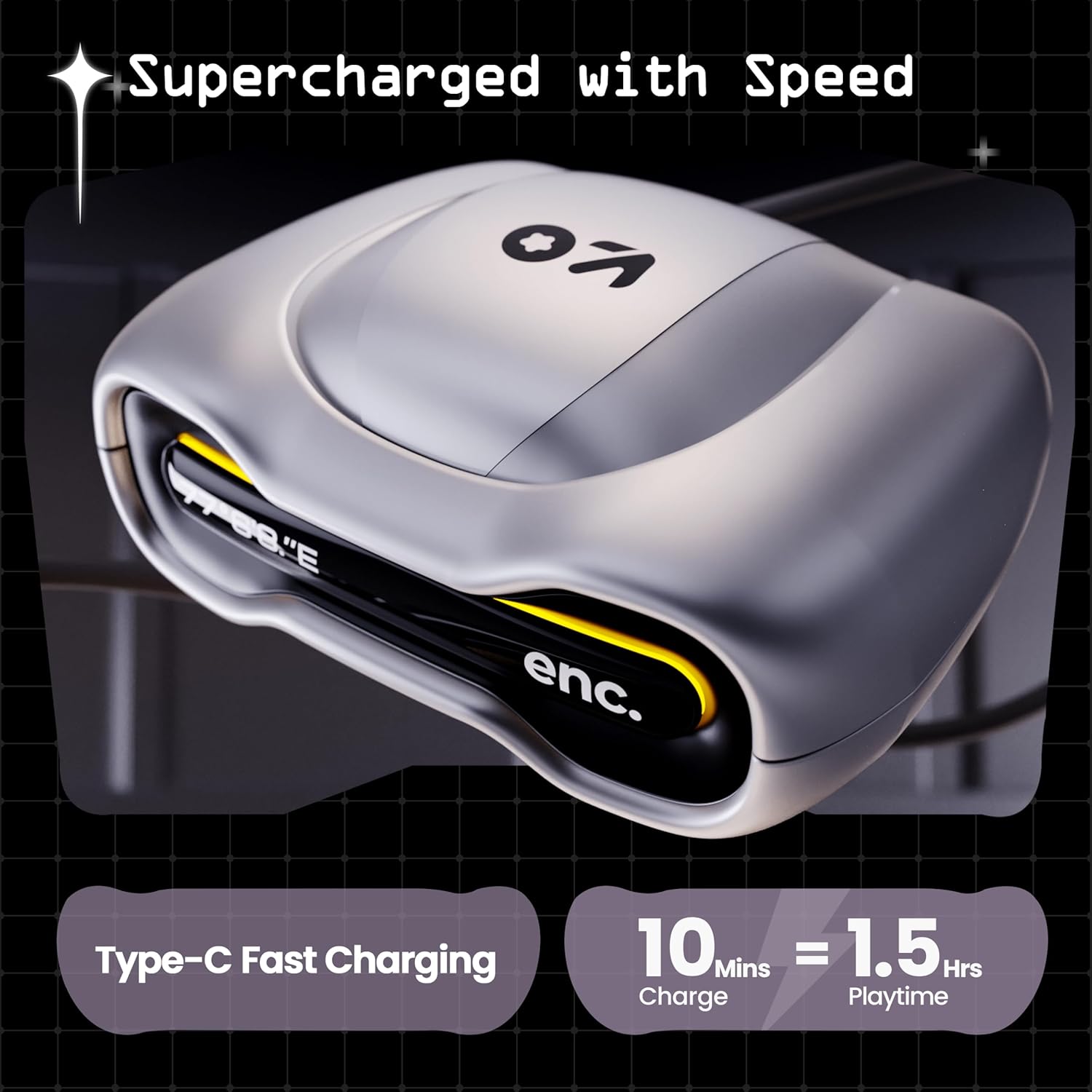
Image: The GOBOULT UFO charging case, illustrating its Type-C fast charging capability, providing 1.5 hours of playtime from a 10-minute charge.
Mantentzea
Uraren Erresistentzia
The GOBOULT UFO earbuds are IPX5 water-resistant, making them sweatproof, rainproof, and splashproof. This protection allows for use during workouts or in light rain.

Image: GOBOULT UFO Earbuds on a metallic surface, indicating their IPX5 water resistance, making them suitable for sweat, rain, and splashes.
Garbiketa
Errendimendu eta higiene optimoa mantentzeko, garbitu entzungailuak eta kargatzeko zorroa aldizka.
- Erabili zapi leun, lehor eta lihorik gabeko bat entzungailuak eta zorroa garbitzeko.
- Zikinkeria egoskorrerako, apur bat lehortuampGarbitu oihalak urarekin. Saihestu produktu kimiko gogorrak edo material urratzaileak erabiltzea.
- Ziurtatu entzungailuen eta zorroaren kargatzeko kontaktuak garbi eta hondakinik gabe daudela.
- Allow all components to dry completely before placing earbuds back in the case or charging.
Arazoak konpontzea
If you encounter any issues with your GOBOULT UFO earbuds, please refer to the following common solutions:
- Soinurik ez: Ensure earbuds are charged and properly connected to your device. Check device volume.
- Parekatzeko arazoak: Make sure Bluetooth is enabled on your device. Try forgetting the device in your Bluetooth settings and re-pairing. Ensure earbuds are fully charged.
- Aurikular batek ez du funtzionatzen: Place both earbuds back in the case, close it, and then open it again. This often resets the connection.
- Deien kalitate eskasa: Ensure microphones are clean. Check for strong Bluetooth connection.
- Erantzuten ez duten ukipen-kontrolak: Ziurtatu hatzak garbi eta lehor daudela. Saiatu entzungailuak berriro pizten zorroan sartuz eta ateraz.
For further assistance, please contact GOBOULT customer support.
Zehaztapenak
| Ezaugarri | Xehetasuna |
|---|---|
| Ereduaren izena | UFO (Airbass Earbuds) |
| Bluetooth bertsioa | 5.3 |
| Jolas-ordua | Gehienez 48 ordu (kargatzeko zorroarekin) |
| Audio latentzia | 45 milisegundo (joko modua) |
| Gidariak | 13 mm-ko kontrolatzaile dinamikoak |
| Mikrofonoak | Quad Mic ENC (Environmental Noise Cancellation) |
| Uraren Erresistentzia | IPX5 (Sweatproof, Rainproof, Splashproof) |
| Kargatzeko ataka | C motako karga azkarra |
| Kargatzeko Denbora | Gutxi gorabehera. 100 Minutu |
| Bluetooth barrutia | 10 metro |
| Maiztasun Erantzuna | 20 Hz |
| Sentikortasuna | 115 dB |
| Inpedantzia | 32 ohmio |
| Elementuaren pisua | 60 gramo |
| Produktuaren neurriak | 4.7 x 9 x 10 cm |
| Materiala | Metala |
Bermea eta Laguntza
Bermearen informazioa
The GOBOULT UFO True Wireless Earbuds come with a Urtebeteko fabrikatzailearen bermea from the date of purchase. Please retain your proof of purchase for warranty claims. The warranty covers manufacturing defects. It does not cover damage caused by misuse, accidents, or unauthorized modifications.
Bezeroarentzako Arreta
For any questions, technical support, or warranty claims, please contact GOBOULT customer service.
Fabrikatzailea: Exotic Mile Pvt. Ltd.
Helbidea: B67 Wazirpur Industrial Area, New Delhi 110052, India.
Please refer to the warranty card included in your product packaging for specific contact details and procedures.