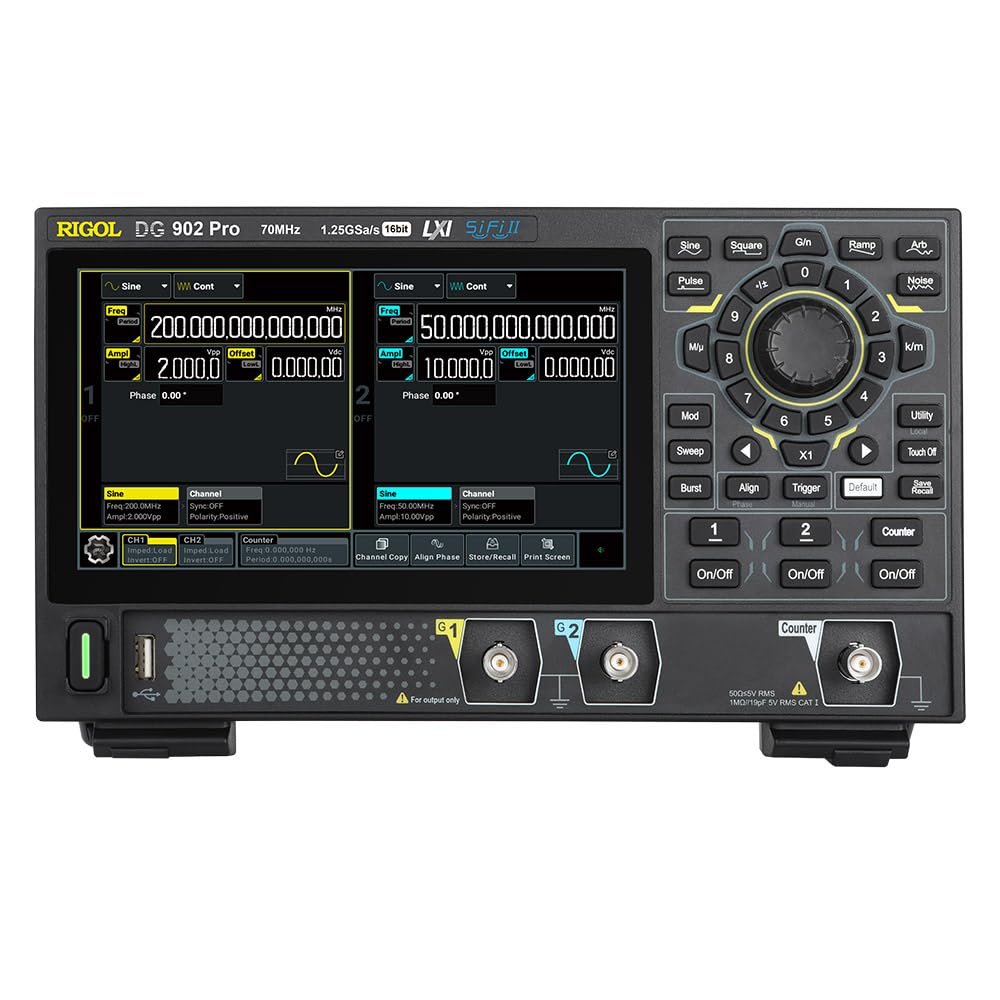
The RIGOL DG902 Pro is a high-performance waveform generator designed for a wide range of applications requiring precise signal generation. It features a 16-bit vertical resolution, a maximum sample rate of 1.25 GSa/s, and a 70 MHz output frequency. This device is capable of generating various waveforms and offers advanced modulation capabilities.
Ezaugarri nagusiak hauek dira:
1.25 GSa/s Max. sample Tarifa
Arb Length of 16 Mpts/CH (32 Mpts/CH optional)
Rise Time as Low as 3 ns
Waveform Jitter as Low as 200 ps
A 7 Digits/s Counter with 1 GHz Bandwidth
1.1. irudia: Aurrealdea view of the RIGOL DG902 Pro Waveform Generator, showing the display, control panel, and output channels.
2. Konfigurazioa eta konexioak
2.1 Desontziratzea eta ikuskatzea
Carefully unpack the DG902 Pro waveform generator and all accessories from the shipping carton. Inspect the instrument for any signs of damage that may have occurred during transit. If any damage is found, contact your supplier immediately.
2.2 Energia-konexioa
Connect the provided power adapter to the DC input port on the rear panel of the instrument. Plug the power adapter into a suitable AC power outlet. The DG902 Pro can also be operated via a USB-C power bank for portable use.
Figure 2.1: The DG902 Pro connected to an external USB-C power bank, demonstrating its portable power capability.
2.3 Sarrera/Irteerako konexioak
The rear panel of the DG902 Pro provides various input and output ports for signal generation and external synchronization.
2.2. Irudia: Atzealdea view of the DG902 Pro, highlighting the 10MHz REF IN/OUT, AUX IN/OUT, LAN, USB DEVICE, and USB-C ports.
Channel Outputs (CH1, CH2): Located on the front panel, these BNC connectors provide the main waveform outputs.
10MHz REF IN/OUT: Used for external reference clock synchronization.
AUX IN/OUT: Auxiliary input/output ports for additional signal routing.
LAN ataka: Sarearen konexiorako eta urrutiko aginterako.
USB DEVICE Port: For connecting to a computer for data transfer and control.
3. Funtzionamendu-argibideak
3.1 User Interface and Display
The DG902 Pro features a 7.0-inch color display with a resolution of 1024x600 pixels, providing a clear and intuitive interface for operation. Navigation is primarily done through the rotary knob, directional buttons, and dedicated function keys.
3.1. irudia: Gertuko planoa view of the DG902 Pro's 7.0-inch display, highlighting its size and resolution.
Figure 3.2: The DG902 Pro display showing detailed settings for Channel 1 and Channel 2, including frequency, amplongitudea eta desplazamendua.
3.2 Oinarrizko uhin-formaren sorrera
Piztu: Press the power button located on the front panel to turn on the instrument.
Hautatu kanala: Use the CH1 or CH2 buttons to select the desired output channel.
Hautatu uhin-forma mota: Sakatu Uhin forma button (e.g., Sine, Square, Pulse, Ramp, Arb, Noise) to choose the desired waveform.
Ezarri parametroak: Use the rotary knob and numeric keypad to adjust parameters such as frequency, amplitude, and offset. The display will show the current settings.
Gaitu irteera: Sakatu Piztu/Desaktibatu button for the selected channel to enable the waveform output.
3.3 Advanced Modulation Functions
The DG902 Pro supports various modulation types to meet complex signal generation requirements. These include Amplitude Modulation (AM), Frequency Modulation (FM), Phase Modulation (PM), Amplitude Shift Keying (ASK), Frequency Shift Keying (FSK), Pulse Width Modulation (PWM), and Sum modulation.
Figure 3.3: An illustration showing the DG902 Pro's support for various modulation types, including AM, FM, PM, ASK, FSK, PWM, and SUM.
To access modulation settings, press the Mod button and navigate through the options using the display and control knob.
4. Mantentzea
4.1 Tresna garbitzea
To maintain the performance and appearance of your DG902 Pro, regularly clean its exterior. Use a soft, damp cloth with a mild detergent to wipe down the casing. Avoid using abrasive cleaners or solvents that could damage the plastic components or screen.
Deskonektatu beti elektrizitatea garbitu aurretik.
Do not allow any liquids to enter the instrument.
Clean the display screen gently with a soft, lint-free cloth.
4.2 Biltegiratzea
When not in use for extended periods, store the DG902 Pro in a dry, dust-free environment, away from direct sunlight and extreme temperatures. It is recommended to store the instrument in its original packaging or a protective case to prevent damage.
5. Arazoak
This section provides solutions to common issues you might encounter with your DG902 Pro Waveform Generator. If the problem persists after trying these steps, please contact Rigol customer support.
Arazoa
Kausa posiblea
Irtenbidea
Tresna ez da pizten.
Power cable not connected properly; power outlet issue; power adapter fault.
Check power cable connection. Try a different power outlet. Ensure power adapter is functioning correctly.
No waveform output.
Irteera kanala ez dago gaituta; amplitude set to zero; incorrect cable connection.
Sakatu Piztu/Desaktibatu button for the channel. Increase amplitude. Verify BNC cable connections.
Pantaila hutsik edo izoztuta dago.
Software error; temporary glitch.
Restart the instrument by powering it off and on again. If the issue persists, contact support.
6. Zehaztapenak
The following table outlines the key technical specifications of the RIGOL DG902 Pro Waveform Generator.
Parametroa
Balioa
Modelo zenbakia
DG902 Pro
Max. Sample Tarifa
1.25 GSa/s
Irteerako maiztasuna
70 MHz arte
Kanalak
2
Ebazpen bertikala
16 bit
Arb Length
16 Mpts/CH (32 Mpts/CH optional)
Igoera Denbora
As low as 3 ns
Waveform Jitter
As low as 200 ps
Counter Bandwidth
1 GHz
Produktuaren neurriak
10.47 x 6.5 x 3.15 hazbete
Pisua
3.92 kilo
Fabrikatzailea
RIGOL
7. Bermea eta Laguntza
7.1 Bermearen informazioa
RIGOL provides a standard warranty for its products, covering defects in materials and workmanship under normal use. For specific warranty terms and duration, please refer to the warranty card included with your product or visit the official RIGOL webgunea. Gorde erosketa-agiria erosketaren frogagiri gisa berme-erreklamazioetarako.
7.2 Bezeroarentzako laguntza
For technical assistance, troubleshooting, or service requests, please contact RIGOL customer support. You can find contact information, including phone numbers and email addresses, on the official RIGOL webgunea (www.rigol.com). When contacting support, please have your product model number (DG902 Pro) and serial number ready.
Ask a question about this manual
Ask about setup, troubleshooting, compatibility, parts, safety, or missing instructions. Manuals+ will review the question and use this page’s manual context to help answer it.