
1. Sarrera
Thank you for choosing the RIGOL DS1102Z-E Digital Oscilloscope. This manual provides essential information for the safe and efficient use of your device. Please read it thoroughly before operation and keep it for future reference.
The DS1102Z-E is a high-performance digital oscilloscope designed for various applications including research and development, education, maintenance, and industrial testing. It features a 100 MHz bandwidth, 1 GSa/s sample rate, and a 24 Mpts memory depth, enabling precise analysis of complex waveforms.
2. Produktua amaitu daview
The RIGOL DS1102Z-E is a versatile measurement instrument integrating a frequency counter and supporting protocol decoding for RS232/UART, I2C, and SPI. It also includes FFT analysis and automatic measurement functions to enhance testing efficiency.
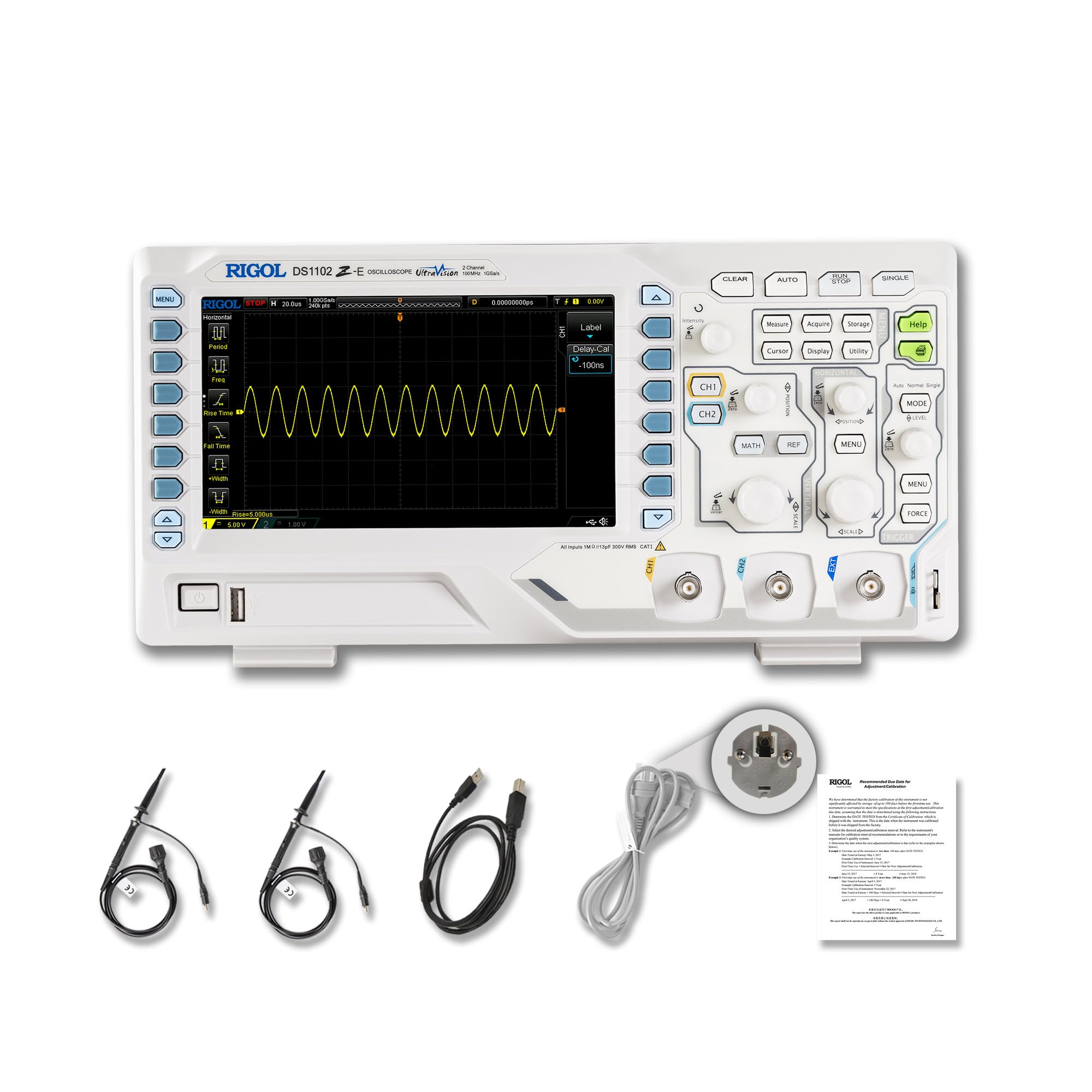
2.1. irudia: Aurrealdea view of the RIGOL DS1102Z-E Digital Oscilloscope.
2.1 Ezaugarri nagusiak
- 100 MHz Bandwidth, 1 GSa/s SampTasa: Captures signals with high precision.
- 24 Mpts Memory Depth: Allows for extended signal capture and detailed waveform analysis.
- Multi-function Measurement Device: Includes frequency counter, protocol decoding (RS232/UART, I2C, SPI), FFT analysis, and automatic measurement functions.
- Waveform Recording and Playback: Records signal variations and replays them for fault identification.
- Definizio handiko pantaila: 7-inch TFT screen with 256-level grayscale, offering a phosphor-like display effect for clear waveform details.
- Remote Control & Secondary Development Support: Equipped with USB and LAN ports for PC remote control, compatible with SCPI commands, LabVIEW, Visual Basic, and Visual C++.
2.2 Zer dago kutxan

Figure 2.2: Contents included with the DS1102Z-E Oscilloscope.
- 1x Main Unit (DS1102Z-E Digital Oscilloscope)
- 2x Passive Probes (150MHz)
- 1x Power Cable (EU plug)
- 1x USB A-B Cable
- 1x Berme Txartela
- Kalibrazio ziurtagiri 1x
- 1x Declaration of Conformity
3. Konfigurazioa
Follow these steps to set up your RIGOL DS1102Z-E oscilloscope:
- Despaketatzea: Carefully remove all components from the packaging. Inspect the device for any signs of damage.
- Potentzia-konexioa: Connect the provided power cable to the oscilloscope's power input and then to a suitable AC power outlet.
- Zundaren konexioa: Connect the passive probes to the BNC input connectors (CH1, CH2) on the front panel. Ensure a secure connection.
- Lurreratzea: Always ensure the oscilloscope is properly grounded through the power cable.
- USB/LAN Connection (Optional): If you plan to use remote control or secondary development, connect the USB cable to a PC or the LAN cable to your network.

3.1 Irudia: Gainetikview of the oscilloscope's physical dimensions and ports.
4. Funtzionamendu-argibideak
This section covers the basic operation of your oscilloscope.
4.1 Piztu/Itzaltzea
- Piztu: Press the power button located on the front panel. The device will perform a self-test and display the main interface.
- Itzali: Eduki sakatuta pizteko botoia gailua itzali arte.
4.2 Basic Waveform Display
After powering on, connect a signal to one of the input channels (e.g., CH1). Adjust the vertical scale (Volts/Div) and horizontal scale (Time/Div) knobs to display the waveform clearly. Use the AUTO button for automatic setup of the waveform display.

4.1. irudia: Adibample of a waveform displayed on the oscilloscope screen.
4.3 Funtzio aurreratuak
- Neurketa-funtzioak: Sakatu NEURRIA button to access automatic measurements like frequency, period, peak-to-peak voltage, etab.
- Trigger sistema: Use the trigger controls to stabilize repetitive waveforms. Adjust the trigger level and mode (Edge, Pulse, Video, Slope, etc.) as needed.
- Waveform Recording: The oscilloscope allows recording and replaying waveforms. Access this feature through the menu to capture transient events.
- Protocol Decoding: For serial bus analysis (RS232/UART, I2C, SPI), configure the decoding settings via the menu.
- FFT Analysis: Perform Fast Fourier Transform (FFT) to analyze the frequency components of your signal.

Figure 4.2: Complex waveform analysis with measurement data.

Figure 4.3: Multiple waveforms displayed simultaneously for comparison.
5. Mantentzea
Mantentze egokiak zure osziloskopioaren iraupena eta zehaztasuna bermatzen ditu.
- Garbiketa: Erabili oihal leun eta lehor bat osziloskopioaren kanpoaldea garbitzeko. Zikinkeria egoskorra bada, garbitu oihal pixka bat.amp cloth with mild detergent can be used. Avoid abrasive cleaners or solvents.
- Pantaila zaintzea: Clean the display screen with a soft, lint-free cloth. Do not use excessive force or harsh chemicals.
- Biltegiratzea: When not in use, store the oscilloscope in a clean, dry environment, away from direct sunlight, extreme temperatures, and excessive dust.
- Zunda zaintzea: Handle probes carefully. Avoid bending or stressing the probe tips. Store them properly to prevent damage.
- Kalibrazioa: For optimal performance, periodic calibration by qualified personnel is recommended. Refer to the official RIGOL website for calibration services.
6. Arazoak
Atal honek aurki ditzakezun arazo ohikoenei irtenbideak eskaintzen ditu.
| Arazoa | Kausa posiblea | Irtenbidea |
|---|---|---|
| Piztuta dagoenean ez dago argindarrik. | Power cable not connected, power outlet faulty, or power button issue. | Check power cable connection. Test the power outlet. Ensure the power button is fully pressed. |
| Ez da uhin-formarik bistaratzen. | No signal input, probe not connected correctly, vertical/horizontal scale incorrect, or trigger not set. | Verify signal source. Check probe connections. Adjust Volts/Div and Time/Div. Press AUTO or adjust trigger settings. |
| Waveform is unstable. | Incorrect trigger settings. | Adjust trigger level, mode, and source to stabilize the waveform. |
| Urruneko kontrola ez dabil. | USB/LAN cable issue, incorrect network settings, or software driver not installed. | Check cable connections. Verify network configuration. Install necessary drivers and software (e.g., UltraScope). |
If the problem persists, please contact RIGOL technical support.
7. Zehaztapenak
Detailed technical specifications for the RIGOL DS1102Z-E Digital Oscilloscope.

Figure 7.1: Visual representation of key technical specifications.
| Ezaugarri | Zehaztapena |
|---|---|
| Marka | Rigol |
| Eredua | DS1102Z-E |
| Banda zabalera | 100 MHz |
| Kanalak | 2 Channels + EXT |
| Sample Tarifa | 1 GSa/s |
| Memoriaren Sakonera | 24 Mpts |
| Uhin-formaren harrapaketa-tasa | 30,000 wfms/s |
| Ebazpen bertikala | 8 bit |
| Gutxieneko sentsibilitatea | 1 mV/div |
| Minimum Time Base | 2 ns/div |
| Deskodetzeko laguntza | RS232/UART, I2C, SPI |
| FFT Analisia | Estandarra |
| Bistaratzea | 7-inch TFT (800x480) |
| Konektibitatea | USB Host, USB Device, LAN |
| Energia iturria | AC egokigailua |
| Kolorea | Gris / White |
| Elementuaren pisua | 2.9 kilogramo |
| Neurriak (L x W x H) | 31.31 x 16.08 x 12.24 zentimetro |
| Arauak betetzea | CE, RoHS |
| Fabrikatzailearen pieza zenbakia | DS1102Z-E |
| Jatorrizko Herrialdea | Txina |
8. Bermea eta Laguntza
RIGOL is committed to providing high-quality products and excellent customer service.
- Bermea: The RIGOL DS1102Z-E Digital Oscilloscope comes with a 3 urteko bermea erosketa-datatik aurrera. Berme honek ohiko erabileran materialen eta eskulanen akatsak estaltzen ditu.
- Laguntza teknikoa: RIGOL offers 24/7 laguntza teknikoa to assist you with any questions or issues you may encounter. Please refer to the official RIGOL webharremanetarako informazioa eta laguntza baliabideak lortzeko gunea.
- Sareko baliabideak: Visit the official RIGOL website for product documentation, software updates (e.g., UltraScope), and additional support materials.

Figure 8.1: RIGOL oscilloscopes support multiple languages for user convenience.