
1. Sarrera
Thank you for choosing the ARROWMAX Mini Electric Drill SDS MINI 22. This compact and powerful cordless drill is designed for precision tasks in various materials, making it ideal for DIY enthusiasts, model builders, and jewelers. This manual provides essential information for safe and efficient operation, maintenance, and troubleshooting.
Ezaugarri nagusiak:
- Compact and powerful with a 500 mAh LiPo battery and 600 RPM rotation speed.
- Ergonomic aluminum alloy body for comfortable single-hand operation.
- Includes 10 precision HSS drill bits (0.6mm to 2.2mm) for diverse materials.
- Equipped with 4 shadowless LED lights for optimal visibility and LED battery indicators.
- Simple one-button operation for clockwise, counter-clockwise rotation, and power off.
- Durable aluminum CNC storage case for drill bits.
2. Segurtasun-argibideak
Please read all safety warnings and instructions carefully before using this product to prevent electric shock, fire, and serious injury.
Segurtasun Orokorra
- Always wear appropriate personal protective equipment, including safety glasses, when operating the drill.
- Mantendu zure lan-eremua garbi eta ondo argiztatuta. Eremu nahasiak edo ilunek istripuak gonbidatzen dituzte.
- Ez erabili tresna elektrikoak atmosfera lehergarrietan, adibidez, likido sukoiak, gasak edo hautsak daudenean.
- Mantendu haurrak eta ingurukoak urrun, erreminta elektrikoa erabiltzen duzun bitartean. Distrakzioek kontrola galtzea eragin dezakete.
- Saihestu ustekabean abiaraztea. Ziurtatu etengailua itzalita dagoela bateria-multzoari konektatu, tresna hartu edo eraman aurretik.
Segurtasun Elektrikoa
- Ez jarri tresna elektrikoak euria edo hezetasunera. Erreminta elektriko batean sartzeak deskarga elektrikoaren arriskua areagotuko du.
- Erabili zehaztutako kargatzeko kablea eta korronte egokitzailea soilik.
Segurtasun pertsonala
- Egon adi, ikusi zer egiten ari zaren eta erabili zentzua erreminta elektrikoa ustiatzean.
- Ez ezazu gainditzen. Mantendu oin eta oreka egokia uneoro.
- Ziurtatu laneko pieza. Erabili clamps edo tornu bat lan-pieza eusteko.
- Always ensure the drill bit is securely fastened in the chuck before operation.
3. Paketearen edukia
Egiaztatu behean zerrendatutako elementu guztiak zure paketean sartuta daudela. Elementuren bat falta bada edo hondatuta badago, jarri harremanetan zure saltzailearekin.
- 1 x ARROWMAX Mini Electric Drill (SDS MINI 22)
- 10 x HSS Drill Bits (0.6mm, 0.8mm, 1.0mm, 1.2mm, 1.4mm, 1.5mm, 1.6mm, 1.8mm, 2.0mm, 2.2mm)
- 1 x Aluminum Drill Bit Storage Case
- 1 x USB kargatzeko kablea (C mota)
- 1 x Erabiltzailearen eskuliburua
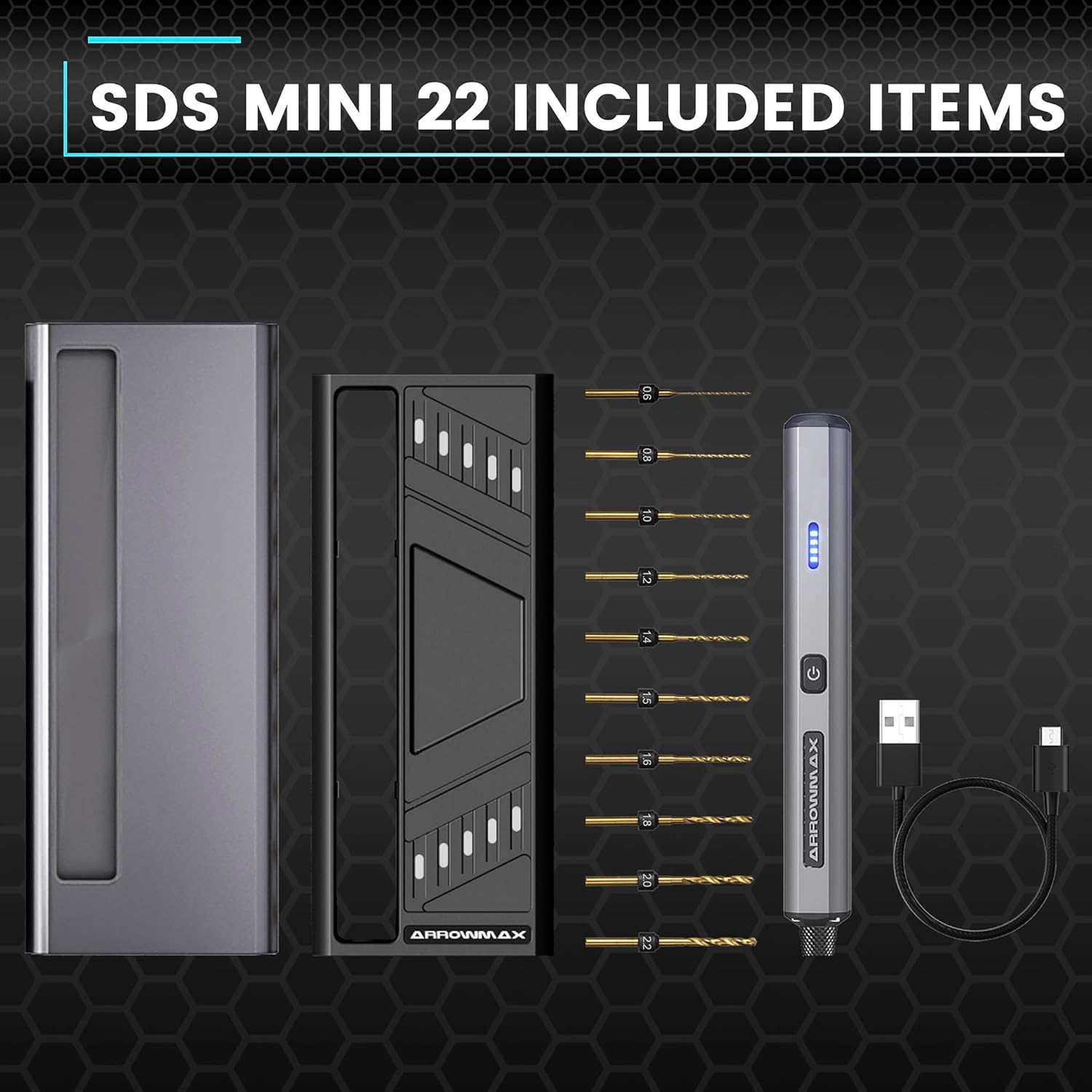
Figure 3.1: Complete package contents of the SDS MINI 22.
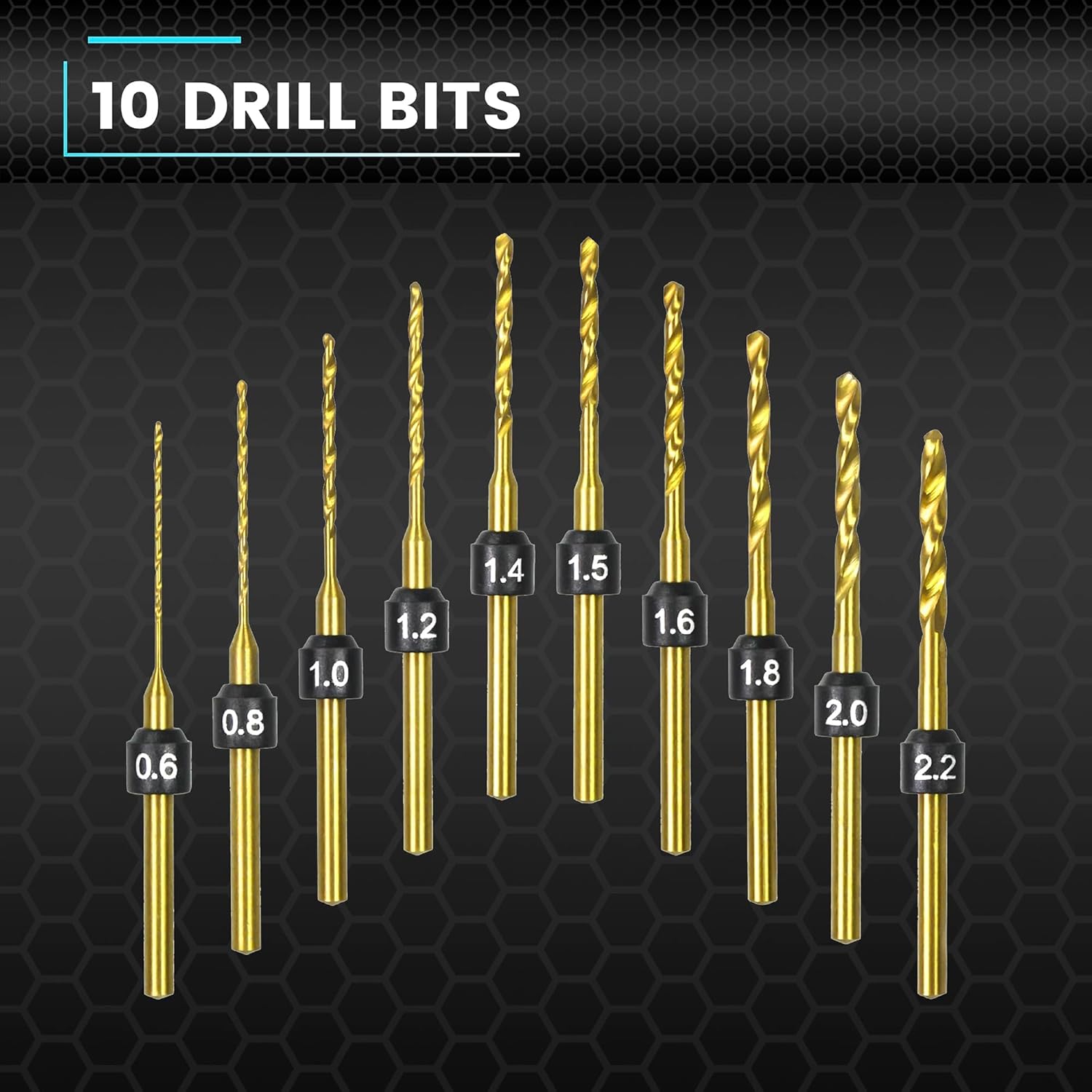
Figure 3.2: The 10 HSS drill bits included with the SDS MINI 22.
4. Produktua amaitu daview
Familiarize yourself with the components of your ARROWMAX Mini Electric Drill.
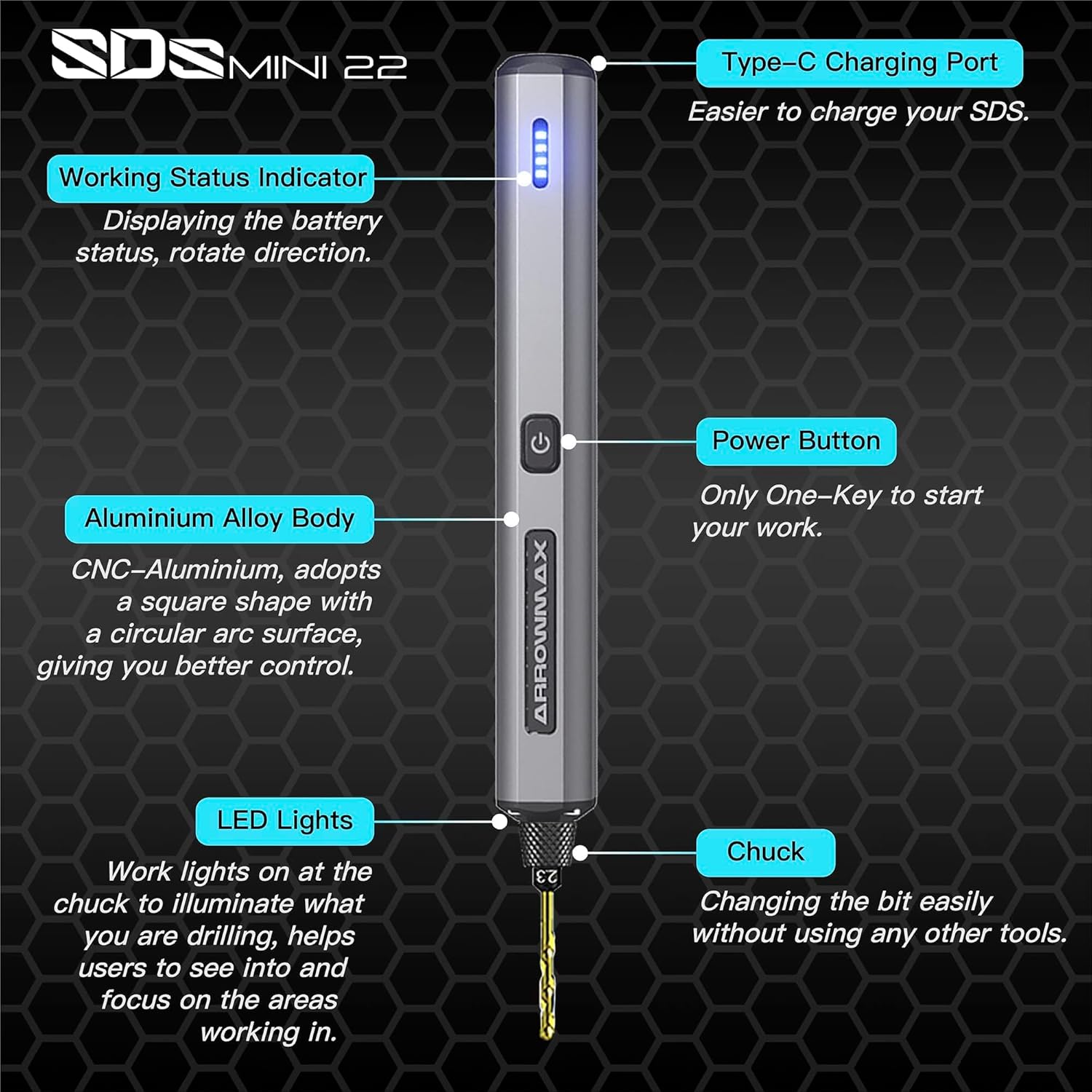
Figure 4.1: Labeled components of the SDS MINI 22.
- C motako kargatzeko ataka: Barneko bateria kargatzeko.
- Lan egoeraren adierazlea: Displays battery status and rotation direction.
- Pizteko botoia: Controls power on/off and rotation direction.
- Aluminiozko aleazio gorputza: Provides durability and ergonomic grip.
- LED argiak: Illuminates the drilling area for improved visibility.
- Chuck: Holds the drill bits securely.
5. Konfigurazioa
5.1 Gailua kargatzea
- Locate the Type-C charging port on the top of the drill.
- Connect the provided USB Type-C cable to the drill and the other end to a compatible USB power source (e.g., computer, wall adapter).
- The Working Status Indicator LEDs will illuminate to show the charging progress. A full charge is indicated when all LEDs are solid.
- Allow approximately 60 minutes for a full charge.
5.2 Zulagailu-puntak instalatzea
- Ensure the drill is powered off before installing or removing bits.
- Gently pull the chuck downwards to open the jaws.
- Insert the desired drill bit into the chuck. Ensure the bit is inserted as far as it can go for maximum stability.
- Release the chuck to secure the drill bit. The chuck is designed for tool-free bit changes.
- To remove a bit, pull the chuck downwards and extract the bit.
6. Funtzionamendu-argibideak
6.1 Power On/Off and Rotation Control
The SDS MINI 22 features a simple one-button control:
- Lehen prentsa: The drill will power on and rotate in a clockwise direction. The LED indicator will show the direction.
- Bigarren prentsa: The drill will switch to counter-clockwise rotation. The LED indicator will update to show the new direction.
- Hirugarren prentsa: The drill will power off.
You do not need to continuously hold the button during operation.
6.2 Bateriaren adierazlea
The LED indicators on the drill body display the remaining battery power. Monitor these lights to know when recharging is necessary.
6.3 Working with Materials
The SDS MINI 22 is suitable for drilling various materials, including:
- Plastikoa
- Maskorrak
- Egurra
- Larrua
- Soft metals (e.g., aluminum)
Always select the appropriate drill bit size for your task and material. Apply gentle, consistent pressure. Avoid excessive force, which can damage the bit or the material.
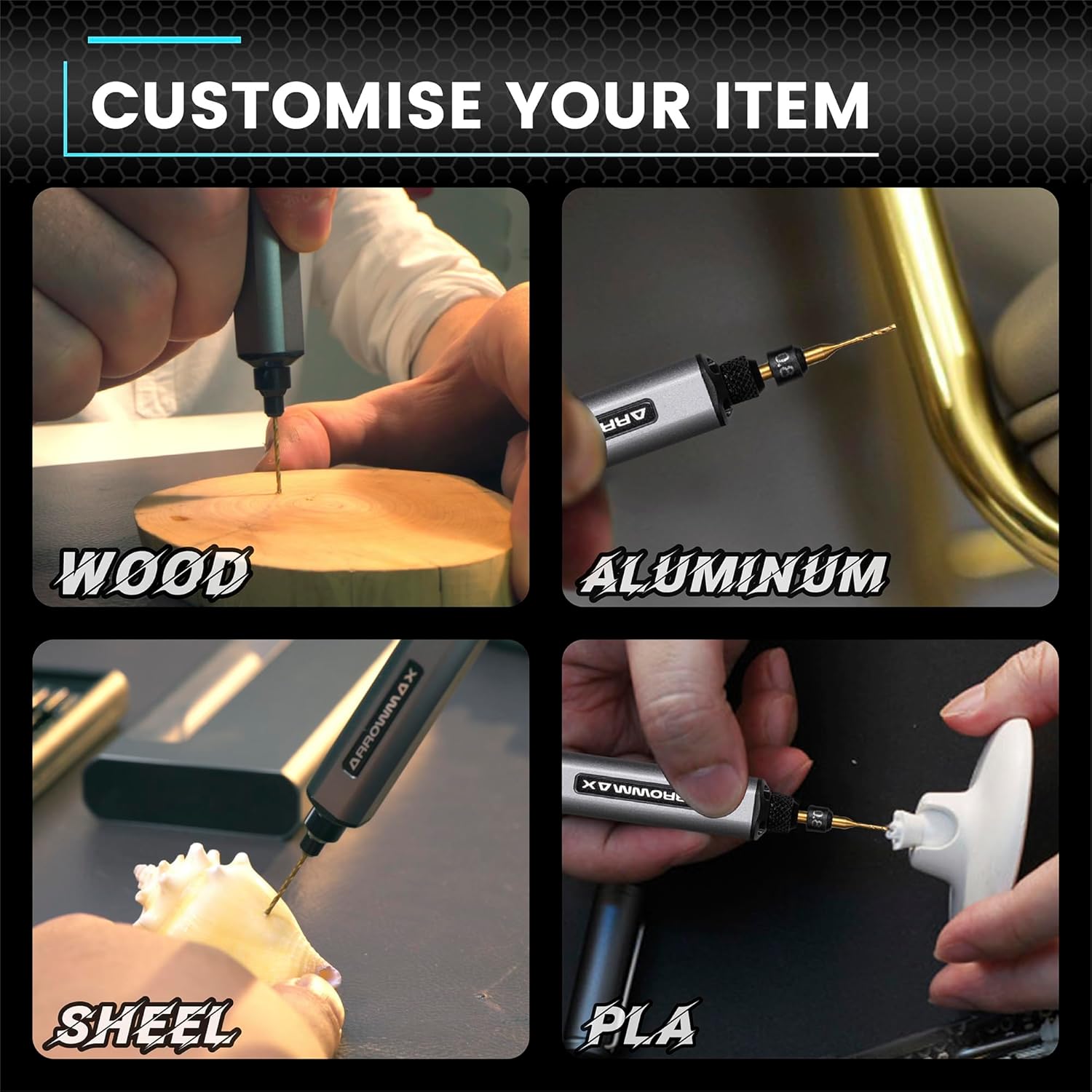
6.1. irudia: Adibamples of materials suitable for drilling with the SDS MINI 22.
7. Mantentzea
7.1 Garbiketa
- Ensure the drill is powered off and disconnected from any charging source before cleaning.
- Wipe the drill body with a soft, dry cloth. Do not use harsh chemicals or abrasive cleaners.
- Remove any dust or debris from the chuck and ventilation openings using a soft brush or compressed air.
7.2 Biltegiratzea
- Store the drill and its accessories in a cool, dry place, away from direct sunlight and moisture.
- Always store the drill bits in their provided aluminum case to protect them from damage and loss.
- Epe luzerako biltegiratzean, ziurtatu bateria partzialki kargatuta dagoela (% 50 inguru) bere iraupena luzatzeko. Kargatu berriro 3-6 hilabetero erabiltzen ez bada.
8. Arazoak
If you encounter issues with your ARROWMAX Mini Electric Drill, refer to the following common problems and solutions:
- Problem: The drill does not turn on.
Irtenbidea: Check the battery level. If the battery is low or depleted, connect the drill to a power source using the USB-C cable and charge it fully. Ensure the power button is pressed correctly (first press for clockwise, second for counter-clockwise). - Problem: The drill is not charging.
Irtenbidea: Verify that the USB-C cable is securely connected to both the drill and the power source. Try a different USB port or power adapter. Ensure the charging port on the drill is clean and free of debris. - Problem: The drill bit is loose or falls out.
Irtenbidea: Ensure the drill bit is inserted correctly and fully into the chuck. Pull the chuck down, insert the bit, and release it to ensure it clamps securely. If the chuck mechanism appears damaged, discontinue use and contact support. - Problem: Reduced drilling performance or unusual noise.
Irtenbidea: Check if the drill bit is dull or damaged; replace it if necessary. Ensure you are using the correct bit for the material. If the issue persists, contact customer support.
9. Zehaztapenak
| Ezaugarri | Zehaztapena |
|---|---|
| Eredua | SDS MINI 22 |
| Marka | ARROWMAX |
| Fabrikatzailea | Freemax Technology Company Limited (IMPORT) |
| Produktuaren neurriak (L x W x H) | 18.5 x 7 x 3 cm |
| Pisua | 280 gramo |
| Energia iturria | Bateriaren bidez |
| Bateria mota | Litio-polimeroa |
| Bateria Edukiera | 500 mAh |
| liburukiatage | 5 Volt |
| Amparoa | 2 A |
| Gehienezko biraketa-abiadura | 600 RPM |
| Ezaugarri bereziak | Compact, LED Lights, Battery Indicator |
| Kolorea | Beltza |
| Dakarten osagaiak | 1 Electric Pen, 10 Drill Bits, 1 Manual, 1 USB Charging Cable |
10. Bermea eta Laguntza
Specific warranty information for the ARROWMAX Mini Electric Drill SDS MINI 22 is not provided in the product details. For warranty claims, technical support, or inquiries regarding spare parts, please contact your retailer or the manufacturer directly. Keep your purchase receipt as proof of purchase.


