
Sarrera
Thank you for choosing the KOLMAX BK98 Wireless Gaming Keyboard. This manual provides detailed instructions for setting up, operating, and maintaining your keyboard to ensure optimal performance and longevity. Please read this manual thoroughly before using the product.

Image: KOLMAX BK98 Wireless Gaming Keyboard, showcasing its full layout, RGB backlighting, and the included 2.4G USB receiver.
Paketearen edukia
Mesedez, egiaztatu paketearen edukia elementu guztiak daudela ziurtatzeko:
- KOLMAX BK98 Wireless Gaming Keyboard
- Erabiltzailearen eskuliburua
- USB-C kablea
Produktuaren Ezaugarriak
- Dual Modes Gaming Keyboard Connection: Supports Bluetooth and 2.4G Wireless connectivity for versatile device compatibility.
- Wireless Bluetooth RGB Keyboard: Features customizable RGB backlighting with various modes (breathing, horse racing) and adjustable brightness/speed.
- Quick Charge, Longer Lasting: Equipped with a Type-C charging port and a power-saving feature that automatically turns off backlight after 60 seconds of inactivity.
- Strong Compatibility with 98 Layout: Compact 98-key layout saves desk space while retaining a number pad. Compatible with PC, Windows, Mac, iOS, Linux, Chrome OS, Android, Laptops, Chromebooks, Tablets, and TVs.
Konfigurazioa
Konexio moduak
The BK98 keyboard supports two wireless connection modes: Bluetooth and 2.4G Wireless. The USB-C cable is for charging only.

Image: Illustration of the keyboard's dual connection modes (Bluetooth and 2.4G Wireless) and the multifunctional knob for switching between devices.
2.4G haririk gabeko konexioa
- Locate the 2.4G USB receiver, usually stored in a compartment on the keyboard.
- Konektatu USB hargailua zure ordenagailuko USB ataka erabilgarri batean.
- Piztu teklatua. Teklatua automatikoki konektatu beharko litzateke hargailura.
Bluetooth konexioa
- Piztu teklatua.
- Long press the multifunctional knob or the designated FN key combination (e.g., FN+1/2/3) to switch to Bluetooth mode. The indicator light will flash, indicating pairing mode.
- On your device (PC, Mac, tablet, smartphone), go to Bluetooth settings and search for new devices.
- Select "KOLMAX BK98" (or similar name) from the list of available devices to pair.
- Parekatu ondoren, argi adierazleak keinuka geldituko da eta tinko jarraituko du.
Hasierako karga
Before first use, it is recommended to fully charge the keyboard. Connect the provided USB-C cable to the keyboard's charging port and the other end to a USB power source (e.g., computer USB port, wall adapter).
Funtzionamendua
Atzeko argiaren kontrola
The keyboard features RGB backlighting with multiple effects. Use the FN key combinations to control the backlight:
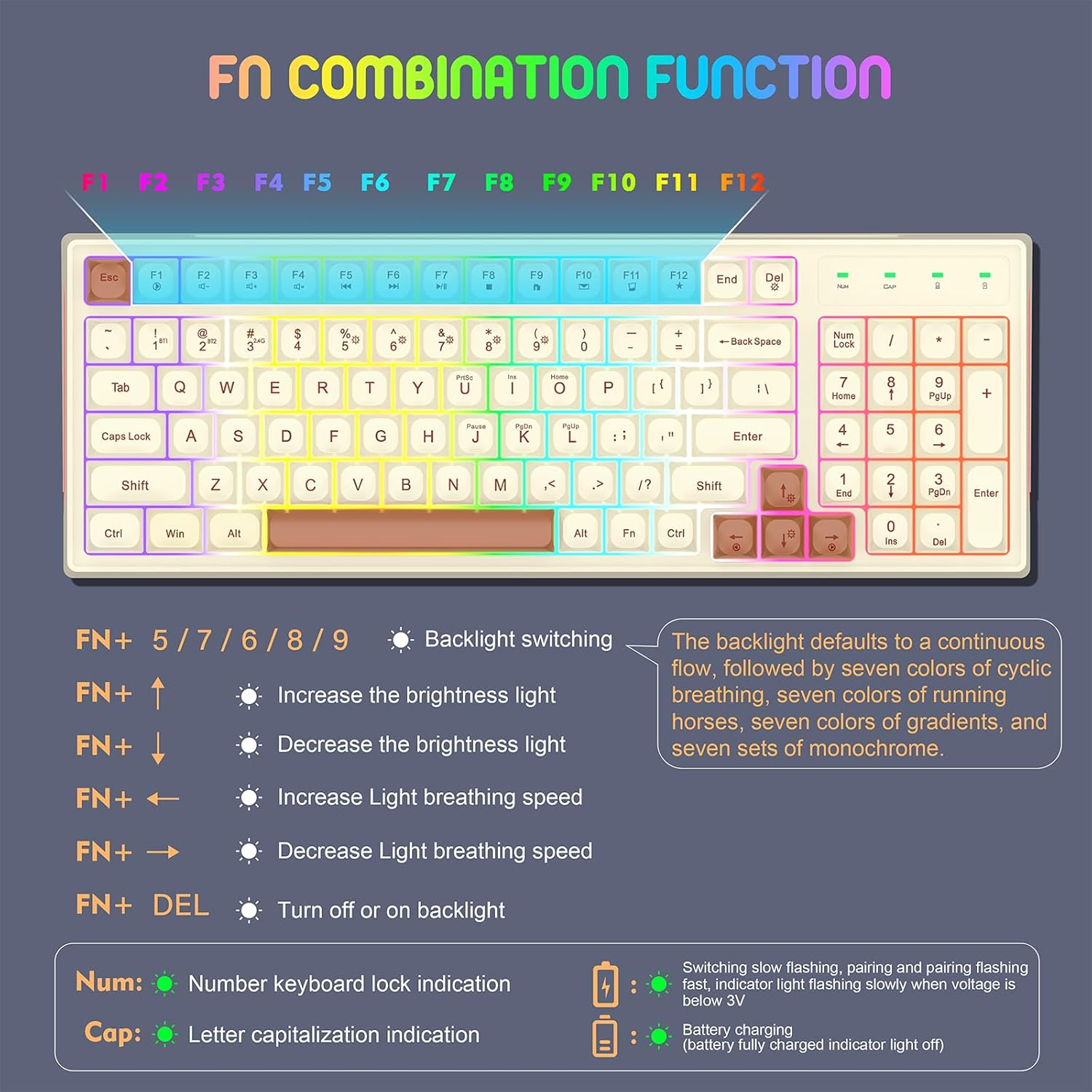
Image: A detailed guide to the FN key combinations for controlling the keyboard's backlight effects, brightness, and speed.
- FN + 5/7/6/8/9: Aldatu atzeko argiztapen modu desberdinen artean.
- FN + ↑: Handitu atzeko argiaren distira.
- FN + ↓: Atzeko argiaren distira txikitu.
- FN + ←: Increase light breathing speed.
- FN + →: Decrease light breathing speed.
- FN + DEL: Turn backlight on or off.

Image: A visual guide to the 12 distinct RGB backlight effects, demonstrating the variety of lighting options for the keyboard.
Gailu anitzeko bateragarritasuna
The keyboard is designed for wide compatibility across various operating systems and devices.
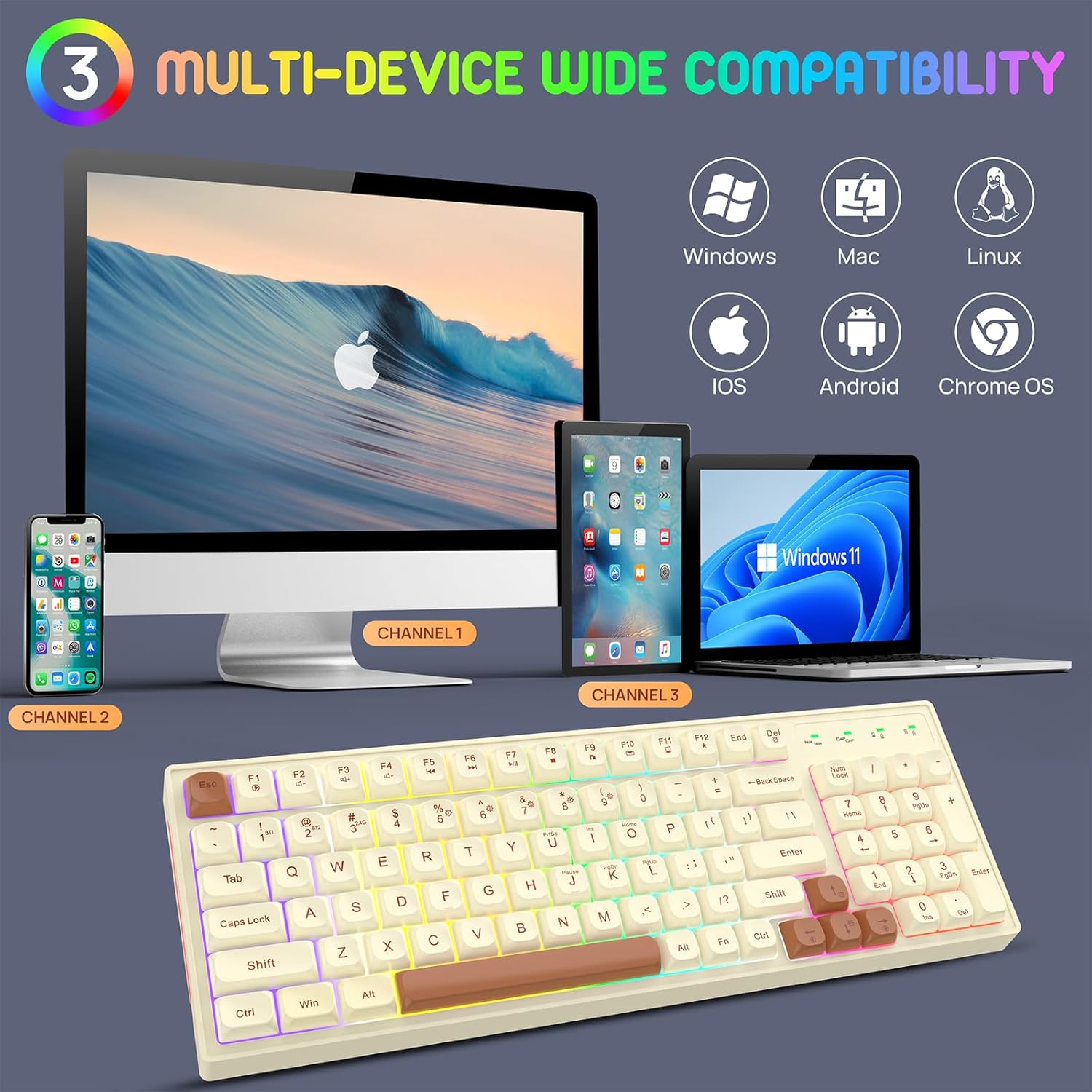
Image: The keyboard demonstrating its multi-device compatibility with various operating systems including Windows, Mac, Linux, iOS, Android, and Chrome OS.
Mantentzea
Teklatua kargatzen
The keyboard is equipped with a rechargeable battery. When the battery is low, the indicator light will flash slowly. Connect the USB-C cable to charge.

Image: The keyboard's Type-C rechargeable feature, highlighting its 2000mAh battery, smart sleep mode, and long standby time.
- Konektatu emandako USB-C kablea teklatuaren atakara.
- Konektatu kablearen beste muturra USB elikadura-iturri batera.
- The battery charging indicator will illuminate during charging and turn off when fully charged.
Energia aurrezteko eginbideak
To conserve battery life, the keyboard features:
- Automatic backlight turn-off after 60 seconds of non-use.
- A separate power switch to completely turn off the keyboard when not in use for extended periods.
Garbiketa
To clean the keyboard, gently wipe the surface with a soft, dry cloth. For deeper cleaning, you may use a slightly damp cloth, ensuring no liquid enters the keyboard. Do not use harsh chemicals or abrasive materials.
Arazoak konpontzea
- Teklatua ez da konektatzen:
- Ziurtatu teklatua piztuta dagoela.
- Check if the correct connection mode (Bluetooth or 2.4G) is selected.
- For 2.4G, ensure the USB receiver is properly plugged in.
- Bluetooth-erako, ziurtatu Bluetooth gaituta dagoela zure gailuan eta saiatu berriro parekatzen.
- Ziurtatu teklatua kargatuta dagoela.
- Atzeko argia ez dabil:
- Press FN + DEL to toggle the backlight.
- Adjust brightness using FN + ↑/↓.
- Ziurtatu teklatuak bateria nahikoa duela.
- Teklak ez dute erantzuten:
- Kargatu teklatua.
- Try reconnecting the keyboard (unplug/replug receiver, re-pair Bluetooth).
- Berrabiarazi zure ordenagailua/gailua.
Zehaztapenak

Image: The ergonomic design and dimensions of the 98-key KOLMAX BK98 keyboard, including its adjustable height.
| Ezaugarri | Xehetasuna |
|---|---|
| Produktuaren neurriak | 15.3 x 5.5 x 1.5 hazbete |
| Elementuaren pisua | 1.72 kilo |
| Modelo zenbakia | BK98 |
| Pilak | 1 litio-polimeroko bateria (barne) |
| Konektibitate Teknologia | Bluetooth, 2.4G haririk gabekoa |
| Ezaugarri bereziak | Backlit, Ergonomic, Portable, Rechargeable |
| Gailu bateragarriak | Joko-kontsola, ordenagailu eramangarria, ordenagailu pertsonala, telefono adimenduna, tableta |
Bermea eta Laguntza
Every KOLMAX product comes with a 30-day money-back guarantee and a 12-month worry-free warranty. If you encounter any problems or have questions, please do not hesitate to contact KOLMAX customer service. We are committed to providing the best service and will reply within 12 hours to assist you.
For support, please refer to the contact information provided with your purchase or visit the official KOLMAX webgunea.