
CYCPLUS M2B
CYCPLUS M2B GPS bizikleta-ordenagailuaren erabiltzailearen eskuliburua
Model: M2B
Marka: CYCPLUS
1. Sarrera
Thank you for choosing the CYCPLUS M2B GPS Bicycle Computer. This device is designed to provide cyclists with comprehensive and accurate data for an enhanced riding experience. Featuring a large, clear display, robust GPS capabilities, and extensive sensor compatibility, the M2B is an essential tool for both casual riders and serious athletes.
This manual provides detailed instructions on how to set up, operate, and maintain your CYCPLUS M2B bicycle computer to ensure optimal performance and longevity.
2. Produktua amaitu daview
The CYCPLUS M2B is a high-performance wireless GPS bicycle computer offering a wide range of features to track and analyze your rides.
Ezaugarri nagusiak:
- Large 2.5" Anti-Glare LED Screen: Provides clear, easy-to-read data even in bright sunlight.
- IPX67 Iragazgaitzaren balorazioa: Ensures reliable performance in various weather conditions, including rain.
- Bateriaren iraupen hedatua: Built-in 1100 mAh lithium battery offers up to 70 hours of continuous operation on a single charge.
- GNSS anitzeko euskarria: Utilizes GPS, GLONASS, GALILEO, and BEIDOU for fast and accurate positioning.
- Datuen bistaratzea: Tracks up to 13 different data types, including speed (current, max, average), distance, time, cadence, heart rate, power, altitude, gradient, and more.
- ANT+ & Bluetooth 5.0 Connectivity: Seamlessly connects with external sensors (cadence, heart rate, power meters) and syncs data to your smartphone via the XOSS APP for analysis and sharing on platforms like Strava.
- Automatic Backlight & Awakening: Enhances visibility and conserves battery.
Produktuaren osagaiak:

The package includes the CYCPLUS M2B unit, a standard bike mount, and a USB-C charging cable. Additional sensors (cadence, heart rate, power) are sold separately.

3. Konfigurazioa
3.1 Gailua muntatzea
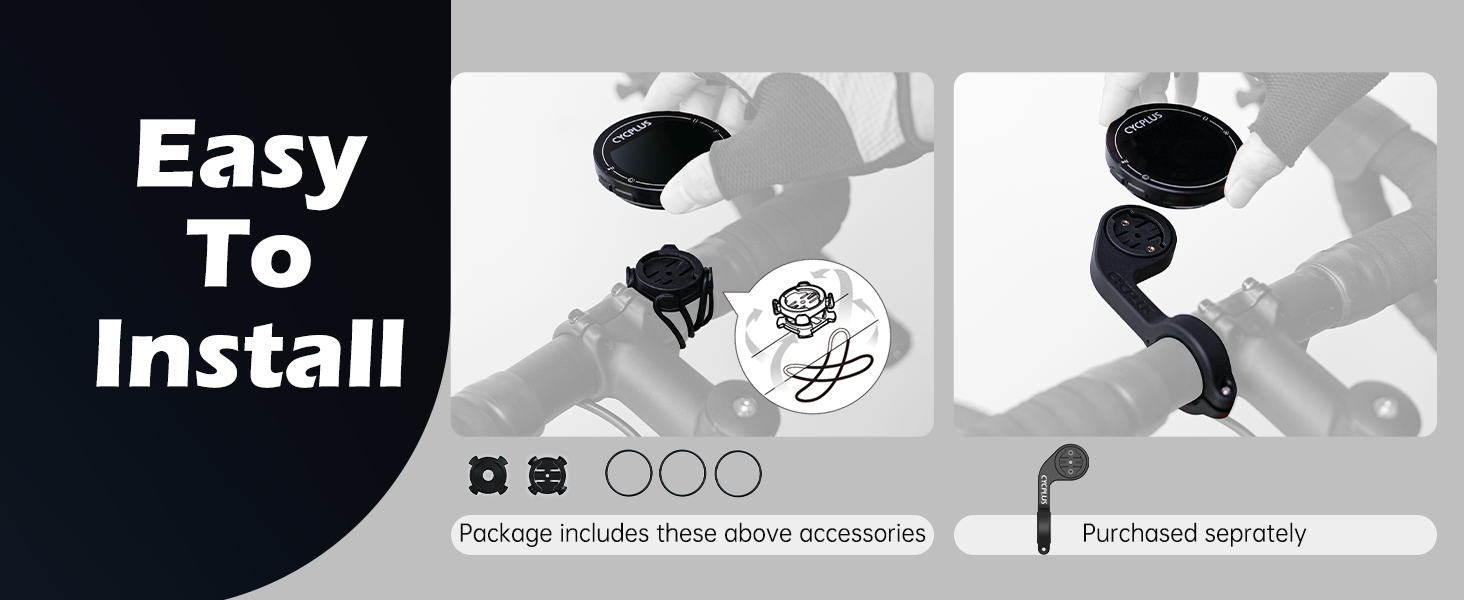
The CYCPLUS M2B comes with a standard bike mount for easy installation on your handlebars or stem.
- Attach the mount to your bicycle's handlebars or stem using the provided rubber bands or zip ties. Ensure it is securely fastened and does not obstruct your view edo kontrolak.
- Align the back of the M2B unit with the mount's grooves.
- Twist the M2B unit clockwise until it clicks securely into place.

3.2 Hasierako piztea eta GPS eskuratzea
Upon first power-on, the device will search for GPS signals. For accurate positioning, ensure you are in an open, unobstructed environment.

The M2B supports multiple global navigation satellite systems (GNSS) including GPS, GLONASS, GALILEO, and BEIDOU for enhanced accuracy.
4. Funtzionamendu-argibideak
4.1 Displaying Ride Data
The M2B can display up to 13 different data types across 3 switchable screens. Press the left button to cycle through the data screens.

4.2 Sensor Compatibility and Connection
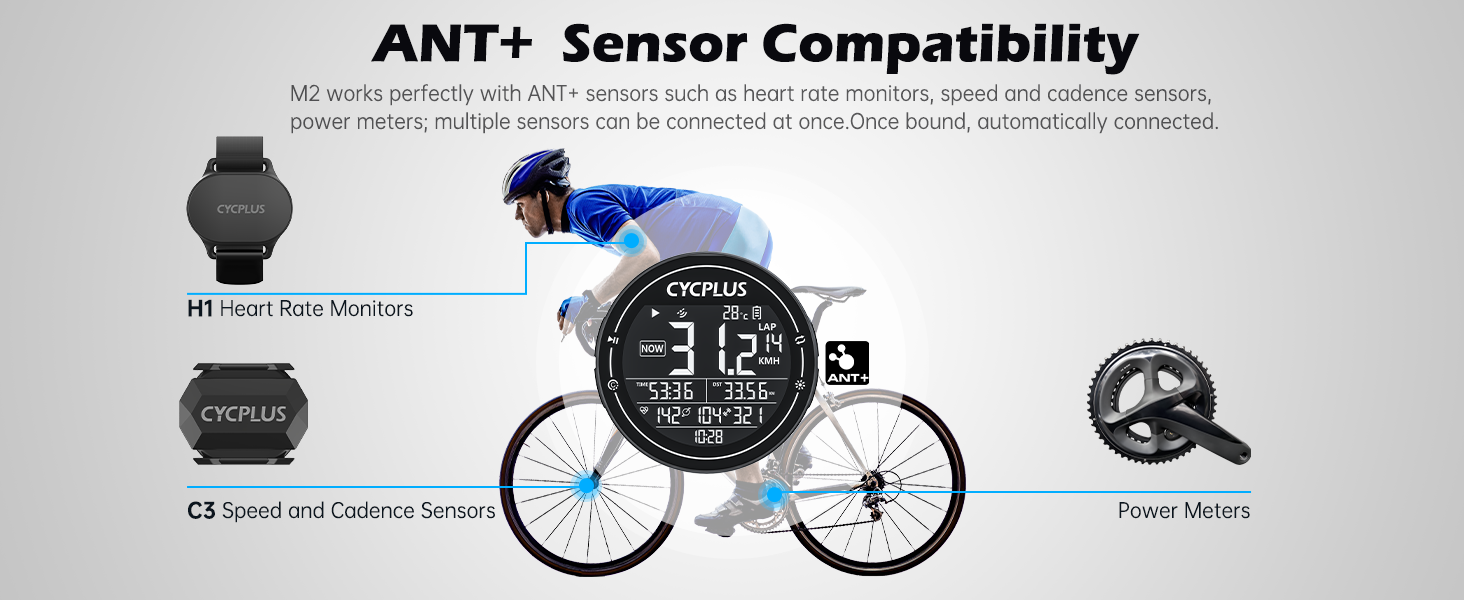
The M2B is compatible with ANT+ sensors such as heart rate monitors, speed sensors, cadence sensors, and power meters. Once paired, sensors will automatically connect when in range.

To connect ANT+ sensors:
- Press the L1 button (left button) to start searching for ANT+ sensors.
- Data from the sensor will appear on the screen once connected.
- To unpair sensors, switch to the C9 page (refer to device interface for navigation) and press the left button to unpair all paired sensors.
4.3 Time Zone and Speed Unit Settings
Ordu-eremuaren ezarpena:
- Press the L1 button to start time zone setting.
- Press the R1 button (right button) to modify the time zone.
- Press the L1 button again to finish setting.
Speed Unit Setting:
- Press the L1 button to start speed unit setting.
- Press the R1 button to switch between KM/H and MPH.
- Press the L1 button again to finish setting.
4.4 Automatic Backlight and Awakening
The M2B features an automatic backlight that adjusts based on ambient light conditions. It also has an auto-awakening function: after 10 minutes of no displacement or vibration, the device hibernates and will wake up automatically when movement is detected.

4.5 Data Synchronization with XOSS APP and Strava/TrainingPeaks
The M2B can sync your ride data to your smartphone via Bluetooth 5.0 using the XOSS APP. From the XOSS APP, you can then upload your data to popular platforms like Strava and TrainingPeaks for detailed analysis and sharing.


Steps to Sync Data:
- Download the "XOSS" app from Google Play (Android) or App Store (iOS).
- Sign in with your email.
- Click your avatar and then select CYCPLUS M2.
- Scan and select your bike computer (M2).
- Once connected, you can synchronize your ride data.
5. Mantentzea
5.1 Garbiketa eta Zainketa
The M2B is IPX67 waterproof, meaning it can withstand splashes and rain. However, it is not designed for submersion. To clean the device, wipe it with a soft, damp oihal. Saihestu produktu kimiko gogorrak edo material urratzaileak erabiltzea.
5.2 Bateria kargatzea
The M2B is equipped with a built-in 1100 mAh rechargeable lithium battery, providing up to 70 hours of continuous use. Charge the device using the provided USB-C cable connected to a standard USB power adapter (not included) or a computer USB port.

Ziurtatu kargatzeko ataka lehor dagoela kablea konektatu aurretik.
6. Arazoak
| Arazoa | Kausa posiblea | Irtenbidea |
|---|---|---|
| Gailua ez da pizten. | Bateria baxua. | Charge the device for at least 2 hours using the USB-C cable. |
| GPS signal not acquired or inaccurate. | Oztopatua view of the sky (indoors, dense forest, tall buildings). | Mugitu leku ireki eta garbi batera view of the sky. Allow a few minutes for signal acquisition. |
| ANT+ sensor not connecting. | Sensor is off, battery low, or too far from the M2B. Sensor already paired with another device. | Ensure sensor is on and has sufficient battery. Bring sensor closer to the M2B. Try unpairing and re-pairing the sensor. |
| Data not syncing to XOSS APP/Strava. | Bluetooth is off on phone/M2B. XOSS APP not open or connected. Internet connection issues. | Ensure Bluetooth is enabled on both devices. Open the XOSS APP and ensure the M2B is connected. Check your internet connection. |
| Screen difficult to read. | Backlight off or insufficient. | Manually activate backlight if needed. Ensure auto-backlight is enabled. |
7. Zehaztapenak
| Ezaugarri | Xehetasuna |
|---|---|
| Modelo zenbakia | M2B |
| Neurriak | 6.9 x 6.9 x 2.2 cm (2.75 x 2.75 x 0.84 hazbete) |
| Pisua | 68 gramo (0.15 lb) |
| Pantailaren tamaina | 2.5 hazbetekoa |
| Bistaratzeko mota | LCDa |
| Bateria mota | 1 x Litio Polimeroa (barne) |
| Bateria Edukiera | 1100 mAh |
| Bateriaren iraupena | Up to 70 hours (Note: Product features also state 30+ hours) |
| Iragazgaitzaren balorazioa | IPX67 |
| Konektibitatea | ANT+, Bluetooth 5.0 |
| GNSS euskarria | GPS, GLONASS, GALILEO, BEIDOU |
| Materiala | Plastikoa |
| Kutxan sartuta | M2B Unit, Mounting Kit, USB-C Cable |
8. Bermea eta Laguntza
CYCPLUS provides professional technical support for its products. Your CYCPLUS M2B GPS Bicycle Computer comes with a urtebeteko bermea erosketa-datatik aurrera.
For any technical assistance, questions, or concerns, please contact CYCPLUS customer support. Our team is available 24/7 to provide quick and efficient assistance.
Please refer to the official CYCPLUS webgunean edo zure erosketa-dokumentazioan harremanetarako datu zehatzak lortzeko.
Ask a question about this manual
Ask about setup, troubleshooting, compatibility, parts, safety, or missing instructions. Manuals+ will review the question and use this page’s manual context to help answer it.