
Produktua amaituview
The MONODEAL MD08 Air Conduction Headphones are designed for comfort and clear communication, featuring an open-ear design, Bluetooth 5.1 connectivity, and a noise-canceling microphone with a mute function. These headphones transmit sound through air conduction, providing an alternative to traditional in-ear or bone conduction devices, aiming to reduce pressure and discomfort during extended use.

Image: MONODEAL MD08 Air Conduction Headphones, showcasing the open-ear design and boom microphone.
Kutxan dagoena
- Air Conduction Headphones (1 unit)
- USB-C kargatzeko kablea (unitate 1)
- Erabiltzailearen eskuliburua (unitate 1)
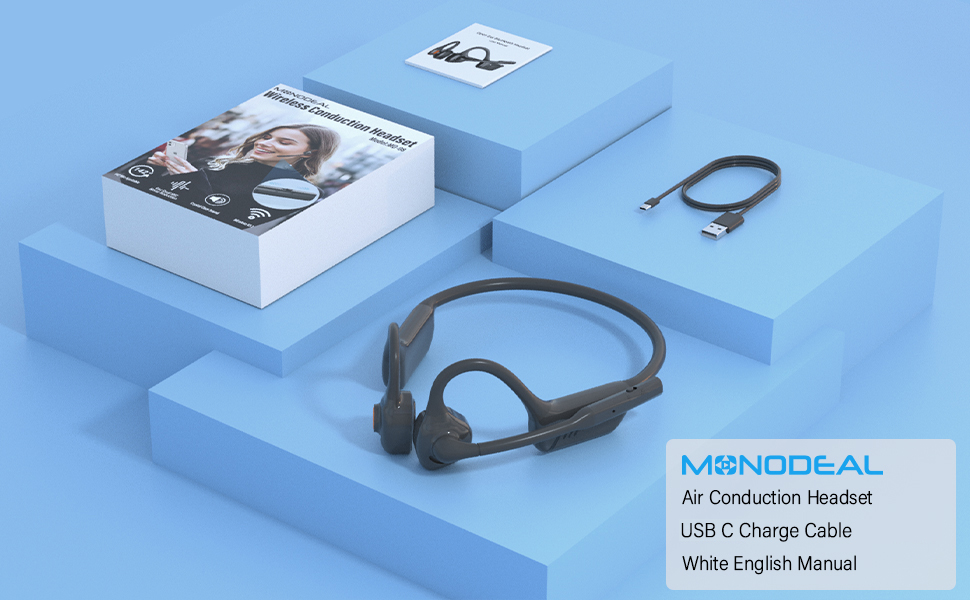
Image: The MONODEAL MD08 headphones, USB-C charging cable, and user manual laid out, representing the package contents.
Konfigurazioa
1. Entzungailuak kargatzea
Before initial use, fully charge the headphones. Connect the provided USB-C charging cable to the charging port on the headphones and plug the other end into a compatible USB power source. A full charge typically takes approximately 2 hours.

Image: Diagram illustrating the charging process and battery life indicators: 8 hours usage, 36 hours standby, 2 hours charging time.
2. Bluetooth parekatzea
To connect your MONODEAL MD08 headphones to a device:
- Ziurtatu entzungailuak itzalita daudela.
- Press and hold the multi-function button until the indicator light flashes red and blue, indicating pairing mode.
- Zure gailuan (telefono adimenduna, tableta, ordenagailua), gaitu Bluetooth eta bilatu eskuragarri dauden gailuak.
- Select "MD08" from the list of found devices to connect. A voice prompt will confirm successful pairing.
3. Multi-Point Connection (Connecting to Two Devices Simultaneously)
The MD08 headphones support connecting to two Bluetooth devices at the same time. This allows you to seamlessly switch between audio sources, for example, listening to music on your tablet and answering calls on your phone.
- 1. urratsa: Pair the headphones with the first device (e.g., your phone) as described in the Bluetooth Pairing section.
- 2. urratsa: Once connected to the first device, turn off Bluetooth on the first device. This will put the headphones back into pairing mode.
- 3. urratsa: Pair the headphones with the second device (e.g., your tablet).
- 4. urratsa: Turn Bluetooth back on for the first device. The headphones should automatically reconnect to both devices.
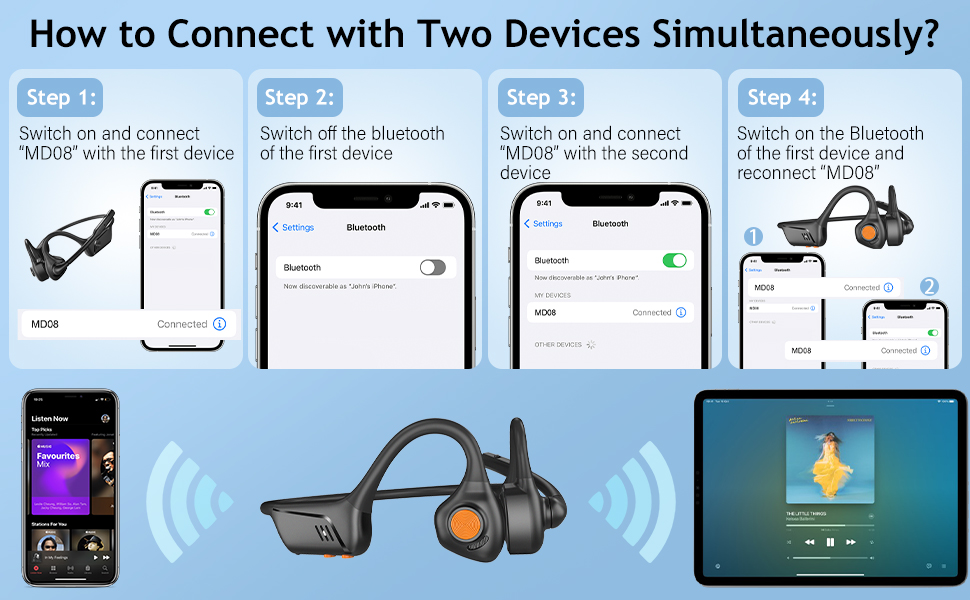
Image: Visual guide demonstrating the four steps to connect the MD08 headphones to two devices simultaneously, showing a phone and a tablet.
Funtzionamendu-argibideak
1. Entzungailuak janztea
Position the headphones with the speakers resting gently in front of your ears, allowing the sound to be transmitted through air conduction. The flexible band should rest comfortably around the back of your head. The open-ear design ensures you remain aware of your surroundings.

Image: A man wearing the MD08 headphones, illustrating the open-ear design and comfortable fit, emphasizing its lightweight nature (40g) and stable design.
2. Oinarrizko Kontrolak
The headphones feature a multi-functional button and volume controls for easy operation:
- Piztu/Itzali: Sakatu eta eutsi funtzio anitzeko botoiari.
- Erreproduzitu/Pausatu: Sakatu behin funtzio anitzeko botoia.
- Deia erantzun/amaitu: Sakatu behin funtzio anitzeko botoia sarrerako dei batean edo dei aktibo batean.
- Deia baztertu: Sakatu eta eutsi funtzio anitzeko botoia sarrerako dei batean.
- Bolumena igo/behera: Erabili bolumen botoiak dedikatuak.
- Hurrengo ibilbidea: Sakatu bi aldiz funtzio anitzeko botoia.
- Aurreko pista: Sakatu hiru aldiz funtzio anitzeko botoia.
- Aktibatu ahots-laguntzailea (Siri/Google Assistant): Eduki sakatuta funtzio anitzeko botoia 2 segundoz.

Image: A user demonstrating the controls of the MD08 headphones, with icons indicating functions like Play/Pause, Skip Track, Control Calls, Volume+/-, and Voice Assistant.
3. Microphone Mute Function
The MD08 headphones feature a dedicated mute button on the microphone boom. During a call, you can easily touch this button to mute or unmute your microphone, providing privacy when needed.

Image: A woman using the MD08 headphones, highlighting the microphone mute function and environmental noise reduction technology, showing 96% noise filtered during calls.
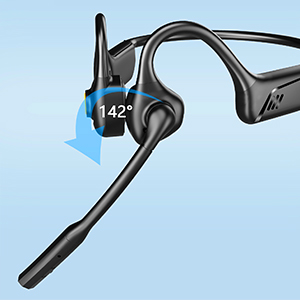
Image: Close-up of the MD08 microphone, showing its 142-degree rotation capability for optimal positioning.
Mantentzea
- Garbiketa: Erabili oihal leun eta lehor bat entzungailuak garbitzeko. Saihestu produktu kimiko gogorrak edo material urratzaileak erabiltzea.
- Biltegiratzea: Gorde entzungailuak leku fresko eta lehor batean, eguzki-argitik eta muturreko tenperaturetatik babestuta.
- Kargatzen: Bateriaren iraupena luzatzeko, saihestu bateria maiz erabat deskargatzea. Kargatu entzungailuak aldizka, denbora luzez erabiltzen ez badituzu ere.
- Uraren erresistentzia: While designed for active use, avoid submerging the headphones in water.
Arazoak konpontzea
| Arazoa | Irtenbidea |
|---|---|
| Entzungailuak ez dira pizten. | Ziurtatu entzungailuak guztiz kargatuta daudela. Konektatu energia-iturri batera eta saiatu berriro. |
| Ezin da gailu batekin parekatu. |
|
| Soinurik ez edo bolumen baxua. |
|
| Mikrofonoa ez dabil. |
|
| Konexio etengabea. |
|
Zehaztapenak
| Ezaugarri | Xehetasuna |
|---|---|
| Ereduaren izena | MD08 |
| Konektibitate Teknologia | Haririk gabeko (Bluetooth) |
| Bluetooth bertsioa | 5.1 |
| Bluetooth barrutia | Gehienez 10 metro (33 oin) |
| Audio kontrolatzaile mota | Air Conduction Driver |
| Bateriaren iraupena (musika/elkarrizketa denbora) | Gehienez 8 ordu |
| Egonean Denbora | Gehienez 36 ordu |
| Kargatzeko Denbora | 2 ordu gutxi gorabehera |
| Kargatzeko ataka | USB-C |
| Pisua | 1.41 ontza (gutxi gorabehera 40 g) |
| Belarrien Kokatzea | Belarri irekia |
| Zarata Kontrola | Zarata aktiboaren ezeztapena (mikrofonoarentzat) |
| Ezaugarri bereziak | Microphone Included, Multipoint Pairing, Rechargeable Battery, Volume Control, Mute Function |
Bermea eta Laguntza
MONODEAL products are designed and manufactured to high-quality standards. For warranty information, technical support, or customer service inquiries, please refer to the contact information provided with your purchase or visit the official MONODEAL webgunea.
Manufacturer: MONODEAL