1. Sarrera
This manual provides detailed instructions for the setup, operation, and maintenance of your Cheerlux C50 Projector. Please read this manual thoroughly before using the product to ensure proper function and to prevent damage.
The Cheerlux C50 is a high-performance projector featuring Android 9.0, Wi-Fi 5.0G, Bluetooth 5.1, autofocus, and 4P keystone correction. It offers a brightness of 4000 Lumens and a contrast ratio of 2500:1, delivering a full HD 1920x1080 resolution display.
2. Segurtasun informazioa
- Do not block the ventilation openings of the projector. Ensure adequate space around the device for proper airflow.
- Ez begiratu zuzenean proiektorearen lentera lamp piztuta dago, argi distiratsuak begietan kalteak eragin ditzakeelako.
- Ez jarri proiektorea gainazal ezegonkorretan.
- Mantendu proiektorea uretatik, hezetasunetik eta muturreko tenperaturetatik urrun.
- Erabili proiektorearekin batera datorren korronte-egokitzailea soilik.
- Ez saiatu proiektorea zeuk desmuntatzen edo konpontzen. Jarri harremanetan zerbitzu-langile kualifikatuekin laguntza jasotzeko.
- Mantendu haurren eskura.
3. Paketearen edukia
Egiaztatu elementu guztiak paketean daudela:
- Cheerlux C50 proiektorea
- Urruneko Kontrola
- Energiaren entxufea
- AV Seinalearen kablea
- Erabiltzailearen eskuliburua (dokumentu hau)
- Support Base (1x)
- Lenteak garbitzeko zapia
- VGA kablea
- Garbiketa Kit
4. Produktua amaitu daview
Familiarize yourself with the projector's components and ports.
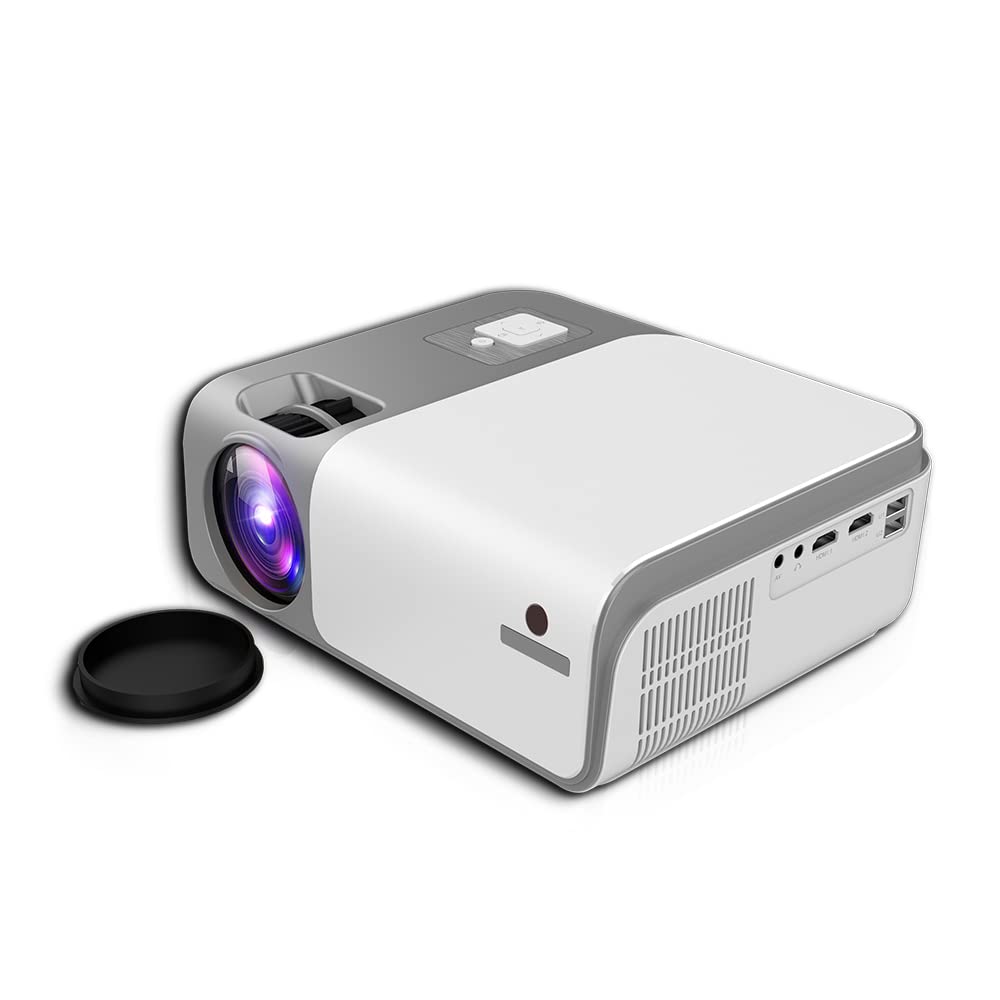
4.1. irudia: Aurrealdea eta albokoa view of the Cheerlux C50 Projector. This image shows the projector's lens, ventilation grilles, and various input ports on the side, including USB and HDMI.

4.2. irudia: The Cheerlux C50 Projector demonstrating screen mirroring with a smartphone. A wireless signal icon indicates the mirroring function, allowing content from a mobile device to be displayed on the projector.
Sarrera/Irteera Portuak:
- 2x USB Sockets: USB unitateak edo beste USB gailu batzuk konektatzeko.
- 2x HDMI Sockets: For connecting HDMI-enabled devices like laptops, gaming consoles, or media players.
- 1x Composite AV Socket: For connecting older devices using AV cables.
- Entzungailuen hargunea: Kanpoko audio gailuak edo entzungailuak konektatzeko.
5. Konfigurazioa
5.1 Jartzea
Position the projector on a stable, flat surface or mount it securely. Ensure the projector lens is perpendicular to the projection surface for optimal image quality.
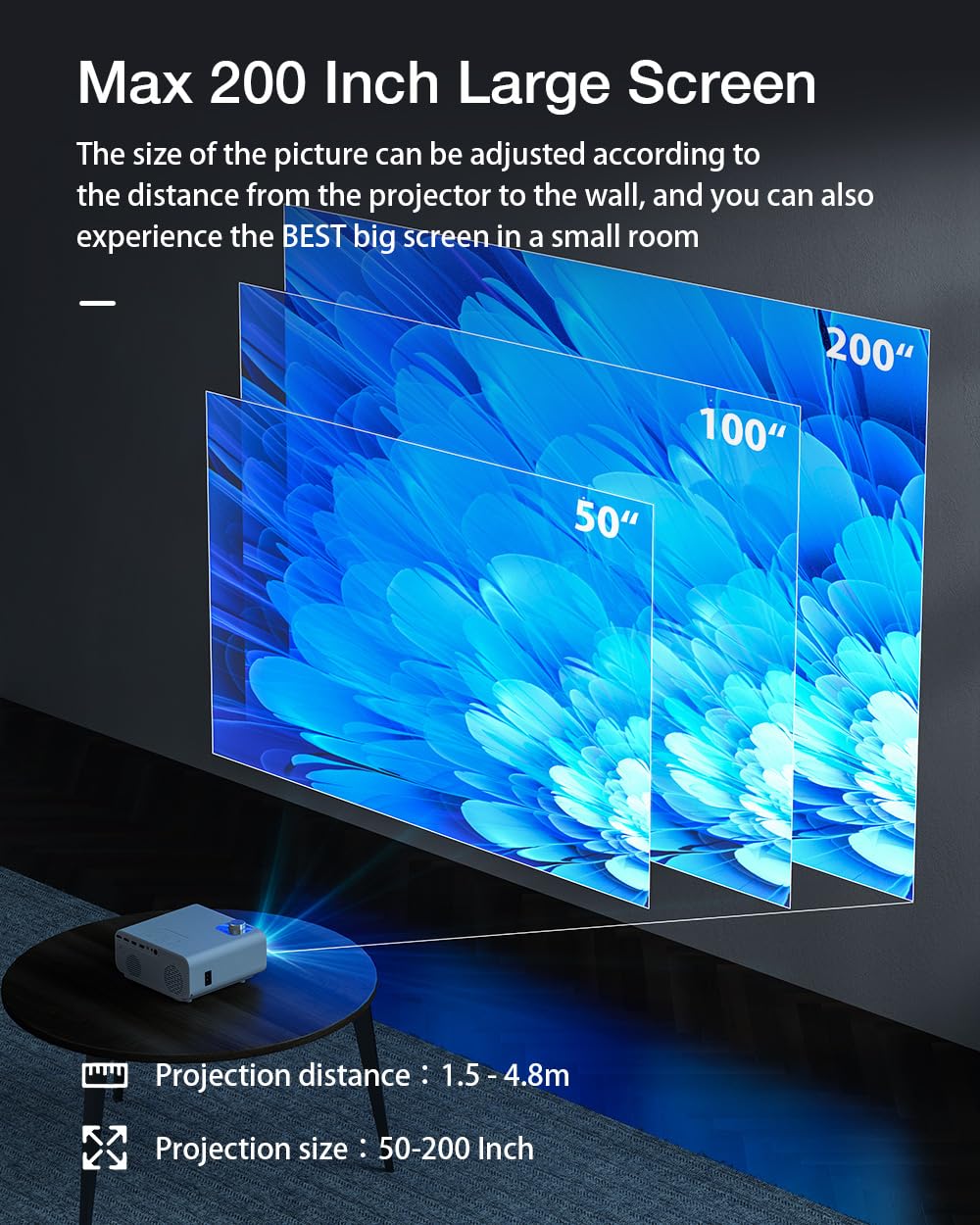
5.1. irudia: Projection distance and screen size guide. The projector can achieve a screen size of 50 to 200 inches with a projection distance ranging from 1 to 8 meters (approximately 3.3 to 26.2 feet).
- Proiekzio distantzia: 1 - 8 metro (3.3 - 26.2 oin)
- Aurreikusitako irudiaren tamaina: 50 - 200 hazbete
- Aspektu-erlazioa: 16:9
5.2 Energia-konexioa
- Konektatu elikatze-kablea proiektorearen elikatze-sarrera atakara.
- Entxufatu kablearen beste muturra entxufe elektriko egoki batera.
- Proiektorearen pizte-adierazlearen argia piztu beharko litzateke.
5.3 Fokua eta Keystone zuzenketa
- Fokatze automatikoa: The Cheerlux C50 features an autofocus function. The projector will automatically adjust the image clarity upon startup or movement.
- 4P Keystone zuzenketa: If the projected image appears distorted (trapezoidal), use the 4P keystone correction feature to adjust each corner of the image independently until it forms a perfect rectangle. This is particularly useful when the projector is not perfectly aligned with the screen. Refer to the on-screen menu for keystone adjustment options.
6. Funtzionamendu-argibideak
6.1 Piztu/Itzali
- Piztu: Press the power button on the projector or the remote control. The projector will start up and display the Android 9.0 home screen.
- Itzali: Press the power button again. A shutdown confirmation prompt may appear. Select "Power Off" to safely shut down the projector.
6.2 Android 9.0 sistema eragilea
The Cheerlux C50 Projector runs on Android 9.0, providing access to a smart interface and various applications.

6.1. irudia: The Android 9.0 operating system interface on the Cheerlux C50 Projector. The screen shows various streaming and social media application icons, indicating smart functionality.
- Nabigazioa: Use the remote control to navigate through the Android interface.
- Aplikazioak: Access pre-installed applications or download new ones from the app store (if available) to watch videos, browse the internet, and more.
- Ezarpenak: Adjust system settings, network connections, display options, and other preferences through the settings menu.
6.3 Pantaila islatzea
The projector supports screen mirroring from compatible smartphones and tablets.
- Ensure both your mobile device and the projector are connected to the same Wi-Fi network.
- On the projector's Android interface, select the "Mirroring" or "Screen Share" application.
- On your mobile device, activate its screen mirroring feature (e.g., "Smart View" on Samsung, "Screen Cast" on Android, "AirPlay" on iOS).
- Select the projector's name from the list of available devices on your mobile device.
- The mobile device's screen content will now be displayed on the projector.
7. Konektibitatea
7.1 Wi-Fi konexioa
Connect the projector to a wireless network to access online content and enable screen mirroring.
- Go to the projector's "Settings" menu.
- Hautatu "Sarea eta Internet" edo "Wi-Fi".
- Aktibatu Wi-Fia eta hautatu nahi duzun sarea zerrendatik.
- Eskatzen bazaizu, idatzi Wi-Fi pasahitza eta konektatu.
7.2 Bluetooth konexioa
Connect Bluetooth speakers, headphones, or other compatible devices for audio output.
- Go to the projector's "Settings" menu.
- Hautatu "Konektatutako gailuak" edo "Bluetooth".
- Turn on Bluetooth and put your Bluetooth device into pairing mode.
- Select your device from the list of available devices on the projector and pair.
7.3 Wired Connections (HDMI, USB, AV)
- HDMI: Connect an HDMI cable from your source device (e.g., laptop, gaming console) to one of the projector's HDMI ports. Select the corresponding HDMI input source from the projector's input menu.
- USBa: Insert a USB flash drive or external hard drive into a USB port. The projector's media player will typically detect the device, allowing you to browse and play media files.
- OF: Connect an AV cable from your source device to the projector's AV input. Select the AV input source from the projector's input menu.
8. Mantentzea
- Lenteen garbiketa: Use the provided lens cleaning cloth or a soft, lint-free cloth to gently wipe the projector lens. Do not use abrasive cleaners or solvents.
- Hautsa kentzea: Regularly clean the projector's ventilation openings with a soft brush or compressed air to prevent dust buildup, which can affect performance and lifespan.
- Biltegiratzea: Proiektorea denbora luzez erabiltzen ez baduzu, gorde leku fresko eta lehor batean, hautsetik eta eguzki-argitik babestuta.
9. Arazoak
- Potentziarik gabe:
- Ensure the power cable is securely connected to both the projector and a working power outlet. Check if the power indicator light is on.
- Irudirik ez:
- Verify that the correct input source (HDMI, AV, USB) is selected. Check cable connections. Ensure the lens cap is removed.
- Irudi lausoa:
- Allow the autofocus to adjust. If still blurry, manually adjust focus if an option is available, or ensure the projector is within the recommended projection distance.
- Irudi distortsionatua (Trapezioa):
- Use the 4P keystone correction feature in the projector's settings menu to adjust the image corners.
- Soinurik ez:
- Check the volume settings on both the projector and the source device. Ensure external speakers or headphones are properly connected if used. Verify that the correct audio output is selected in settings.
- Pantaila islatzearen arazoak:
- Ensure both devices are on the same Wi-Fi network. Restart both the projector and the mobile device. Check for compatibility issues with your mobile device's mirroring protocol.
10. Zehaztapenak
| Marka | Generikoa |
| Ereduaren izena | Cheerlux C50 |
| Sistema eragilea | Android 9.0 |
| Distira | 4000 lumen |
| Kontraste-erlazioa | 2500:1 |
| Berezko Ebazpena | 1920 x 1080 pixel (HD osoa) |
| Bistaratzeko mota | LED |
| Aspektu-erlazioa | 16:9 |
| Proiekzio Distantzia | 1 - 8 metro |
| Proiektatutako irudiaren tamaina | 50 - 200 hazbete |
| Konektibitate Teknologia | Wi-Fi 5.0G, Bluetooth 5.1 |
| Hardware interfazea | 2x HDMI, 2x USB, 1x Composite AV, Headphone Socket |
| Ezaugarri bereziak | Autofocus, 4P Keystone Correction, Screen Mirroring, Built-In Wi-Fi |
| Gailu bateragarriak | Gaming Console, Smartphone, Laptop, TV, Speakers |
| Produktuaren neurriak | 260 x 210 x 102 mm (21 x 26 x 10 cm) |
| Elementuaren pisua | 1 kg |
| Wattage | 150 Watt |
| Freskatze tasa | 480 MHz |
11. Bermea eta Laguntza
Bermeari buruzko informazioa eta laguntza teknikoa lortzeko, kontsultatu erosketa unean emandako dokumentazioa edo jarri harremanetan zure saltzailearekin. Gorde erosketaren frogagiria bermearen erreklamazioetarako.


