
Angrox NS-RCFNA-21-Upgrade
Angrox Universal TV Remote Control Instruction Manual
Model: NS-RCFNA-21-Upgrade
Marka: Angrox
1. Sarrera
Thank you for choosing the Angrox Universal TV Remote Control. This remote is designed to simplify your entertainment experience by providing a single control solution for a wide range of smart TVs. It offers seamless compatibility and intuitive operation, making it an ideal replacement for lost or broken original remotes.

1.1. irudia: Aurrealdea view of the Angrox Universal TV Remote Control.
2. Segurtasun informazioa
- Mantendu bateriak haurren eskura. Irensten bada, bilatu berehala medikuaren arreta.
- Ez nahastu bateria zaharrak eta berriak, edo bateria mota desberdinak.
- Kendu pilak urrutiko agintea denbora luzez erabiliko ez baduzu, isuriak saihesteko.
- Avoid exposing the remote to direct sunlight, heat sources, or excessive moisture.
- Ez saiatu urrutiko agintea desmuntatzen edo aldatzen.
3. Paketearen edukia
Paketeak elementu hauek izan behar ditu:
- 1 x Angrox Universal TV Remote Control
- 1 x Argibide eskuliburua (dokumentu hau)
Oharra: 2 AAA bateria behar dira funtzionatzeko eta ez daude paketean sartuta.
4. Zatiak eta Ezaugarriak
Familiarize yourself with the buttons and functions of your new remote control.
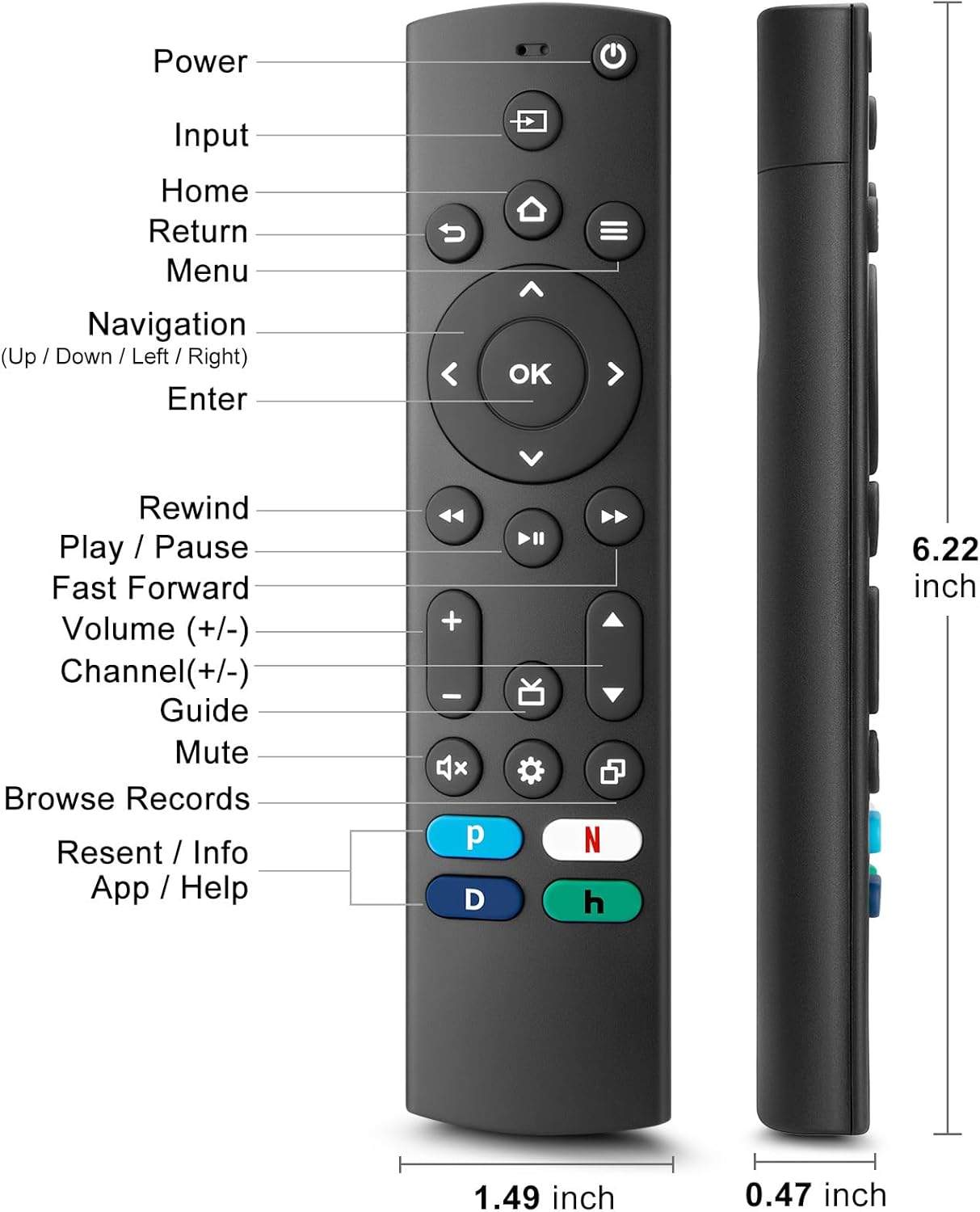
Figure 4.1: Labeled buttons and dimensions of the remote control.
- Pizteko botoia: Telebista pizten edo itzaltzen du.
- Sarrerako botoia: Sarrera iturria hautatzen du (HDMI, AV, etab.).
- Hasierako botoia: Telebistaren hasierako pantailara itzultzen da.
- Navigation Pad (Up/Down/Left/Right) & OK Button: Menuetan nabigatzeko eta hautatzeko.
- Itzultzeko botoia: Aurreko pantailara itzultzen da.
- Menuko botoia: Accesses TV settings or options menu.
- Rewind/Play/Pause/Fast Forward Buttons: Multimedia erreprodukzio-kontrolak.
- Bolumena igo/behera: Telebistaren bolumena doitzen du.
- Kanal gora/behera: Telebistako kateak aldatzen ditu.
- Mututu botoia: Telebistaren soinua aktibatzen edo isilarazten du.
- Ezarpenen botoia: Accesses quick settings.
- Dedicated Hotkeys (Netflix, P-Video, Disney+, Hulu): Streaming zerbitzu ezagunetarako sarbide zuzena.
This remote control utilizes infrared (IR) technology for stable performance and a fast response time of 0.2 seconds, with a control range of up to 40 feet. Please note that this remote does EZ support voice search functions.

Figure 4.2: Remote's stable performance and precise control features.

Figure 4.3: This remote does not include voice search functionality.
5. Konfigurazioa
5.1. Bateriaren instalazioa
- Ireki bateriaren konpartimentuaren estalkia urruneko agintearen atzeko aldean.
- Insert two (2) AAA batteries, ensuring the positive (+) and negative (-) terminals align with the markings inside the compartment.
- Itxi bateriaren konpartimenduaren estalkia ondo.
5.2. Initial Pairing and TV Compatibility
This universal remote is designed for easy setup with most major TV brands. Simply press and hold two specific buttons simultaneously to pair it with your TV.

Figure 5.1: Easy 2-button setup for various TV brands.
| Telebista marka | Button Combination (Press & Hold) | Oharrak |
|---|---|---|
| Insignia telebista | OK + Home Button | |
| Toshiba telebista | OK + Home Button | |
| Roku telebista | OK + Up Arrow | |
| Hisense telebista | OK + Down Arrow | Hulu not supported |
| TCL telebista | OK + Right Arrow | Hulu not supported |
| Samsung telebista | OK + Return Button | |
| Bizio telebista | OK + Menu Button | |
| LG telebista | OK + Rewind Button | Hulu not supported |
| Philips telebista | OK + Play/Pause Button | Prime Video, Disney+, Hulu not supported |
| Sony telebista | OK + Fast Forward Button | Hulu not supported |
Once the remote is paired, it should function immediately. No further programming is typically required.
5.3. Bateragarritasun Oharrak
This remote is designed to be a universal replacement for many TV models, including specific Insignia and Toshiba smart TV remotes (e.g., NS-RCFNA-21, NS-RCFNA-19, CT-95018, CT-RC1US-21, CT-RC1US-19). However, it is important to note that it may not be compatible with all specific original remote models or streaming devices, particularly those with unique pairing methods or voice control features.

5.2. irudia: Adibamples of remote controls and devices that are NOT compatible with this universal remote.

Figure 5.3: This remote is not compatible with TV Cube or TV Stick streaming devices.
For optimal performance, ensure your TV's infrared receiver is unobstructed.
Video 5.1: An official product video demonstrating the features and ease of use of the Angrox Universal TV Remote. This video highlights the remote's compatibility and quick access buttons for streaming services.
6. Urrutiko agintea erabiltzea
Once paired, the Angrox Universal TV Remote operates like a standard TV remote. Point the remote directly at your TV's infrared receiver for best results.
6.1. Oinarrizko funtzioak
- Potentzia: Sakatu Boterea botoia behin telebista pizteko edo itzaltzeko.
- Bolumena: Erabili Bolumena igo (+) eta Bolumena jaitsi (-) botoiak soinu-maila doitzeko.
- Kanala: Erabili Kanala gora (▲) eta Kanala behera (▼) kanalak aldatzeko botoiak.
- Nabigazioa: Erabili Gora, Behera, Ezkerra, Eskuinera arrows to navigate through menus and options. Press OK hautaketa baieztatzeko.
- Hasiera: Sakatu Hasiera button to return to the main smart TV interface.
- Itzulera: Sakatu Itzuli button to go back to the previous screen or menu.
6.2. Dedicated Hotkeys
The remote features dedicated hotkeys for quick access to popular streaming platforms:
- Netflix: Instantly launch the Netflix application.
- P-Video (Prime Video): Instantly launch the Prime Video application.
- Disney+: Instantly launch the Disney+ application.
- Hulu: Instantly launch the Hulu application.

Figure 6.1: Quick access to streaming services with dedicated hotkeys.
7. Mantentzea
- Garbiketa: Garbitu urrutiko agintea oihal leun eta lehor batekin. Ez erabili garbitzaile edo disolbatzaile urratzailerik.
- Bateria ordezkatzea: Replace batteries when the remote's response becomes sluggish or it stops functioning. Always replace both batteries at the same time.
- Biltegiratzea: Gorde urrutiko agintea leku fresko eta lehor batean, eguzki-argitik eta muturreko tenperaturetatik babestuta.
8. Arazoak
| Arazoa | Kausa posiblea | Irtenbidea |
|---|---|---|
| Urrutiko agintea ez da telebistari erantzuten. | Low or dead batteries. Incorrect pairing. Obstruction between remote and TV. | Replace batteries with new AAA batteries. Re-attempt pairing using the correct button combination for your TV brand (refer to Section 5.2). Ensure no objects are blocking the TV's IR receiver. |
| Specific hotkey (e.g., Hulu) not working. | TV brand incompatibility with specific hotkey functions. | Some TV brands (e.g., Hisense, TCL, LG, Philips, Sony) may not support all dedicated hotkeys. This is a limitation of the TV's software, not the remote. You may need to navigate to these apps manually. |
| No voice control functionality. | This remote does not support voice commands. | The Angrox Universal TV Remote Control is designed for infrared (IR) control and does not include a microphone for voice search. This is an intended feature. |
| Remote feels unresponsive or delayed. | Weak batteries. Remote too far from TV. | Replace batteries. Ensure you are within the effective range (up to 40 feet) and pointing directly at the TV. |
9. Zehaztapenak
| Ezaugarri | Xehetasuna |
|---|---|
| Modelo zenbakia | NS-RCFNA-21-Upgrade |
| Marka | Angrox |
| Neurriak (L x W x H) | 6.22 x 1.49 x 0.47 hazbete |
| Elementuaren pisua | 1.76 ontza |
| Energia iturria | 2 x AAA bateria (ez daude barne) |
| Materiala | Kalitate handiko ABS eta silikona |
| Kontrol Teknologia | Infragorriak (IR) |
| Erantzun Denbora | 0.2 segundo |
| Kontrol-eremua | Gehienez 40 oin |
| Ezaugarri bereziak | Universal, Ergonomic, Lightweight, Pre-Programmed, No Programming Required (for most TVs) |
| Kolorea | Beltza |
| Gailu bateragarriak | Television (Insignia, Toshiba, Pioneer, Samsung, TCL, LG, Hisense, Vizio, Sony, Philips, Roku TVs) |
10. Bermea eta Laguntza
Angrox products are manufactured with high-quality materials and undergo strict quality control. For information regarding warranty coverage, returns, or technical support, please refer to the product listing page on Amazon or contact Angrox customer service directly through the Amazon platform.
You can visit the official Angrox store on Amazon for more information and contact options: Angrox Store
Ask a question about this manual
Ask about setup, troubleshooting, compatibility, parts, safety, or missing instructions. Manuals+ will review the question and use this page’s manual context to help answer it.