
Sarrera
This manual provides detailed instructions for the GAMFAMI TERIOS Wireless Controller. Please read this manual carefully before using the product to ensure proper operation and to maximize your gaming experience. This controller is designed for use with PlayStation 4, PS4 Pro, and PS4 Slim consoles.
Produktuaren Ezaugarriak
- Hall efektuko joystickak: Equipped with Hall joysticks to prevent drift and ensure a longer lifespan with smooth, precise control.
- Makro programazioa: Two programmable back buttons (M1, M2) allow mapping of various inputs (X, O, Triangle, Square, Up, Down, Left, Right, L3, R3, L1, R1, L2, R2) for enhanced gameplay.
- Haririk gabeko konektagarritasuna: Enjoy a seamless wireless gaming experience with Bluetooth technology.
- Dual Shock Vibration: Enhanced dual shock motors provide immersive haptic feedback for a realistic gaming experience.
- Turbo funtzioa: Activate the Turbo feature for rapid, repeated button presses, offering a competitive advantage.
- Iraupen luzeko bateria: Features a 1000mAh rechargeable battery for extended play sessions.
- Diseinu ergonomikoa: Lightweight and durable ABS construction with textured grips for comfortable handling.
- Built-in Speaker & 3.5mm Audio Jack: Provides high-quality audio directly from the controller and supports headset connection.
Paketearen edukia
Mesedez, egiaztatu paketearen edukia kutxa irekitzean:
- GAMFAMI TERIOS Wireless Controller
- USB kargatzeko kablea
- Argibide eskuliburua
Kontrolagailuaren diseinua
Familiarize yourself with the buttons and features of your GAMFAMI TERIOS Wireless Controller.
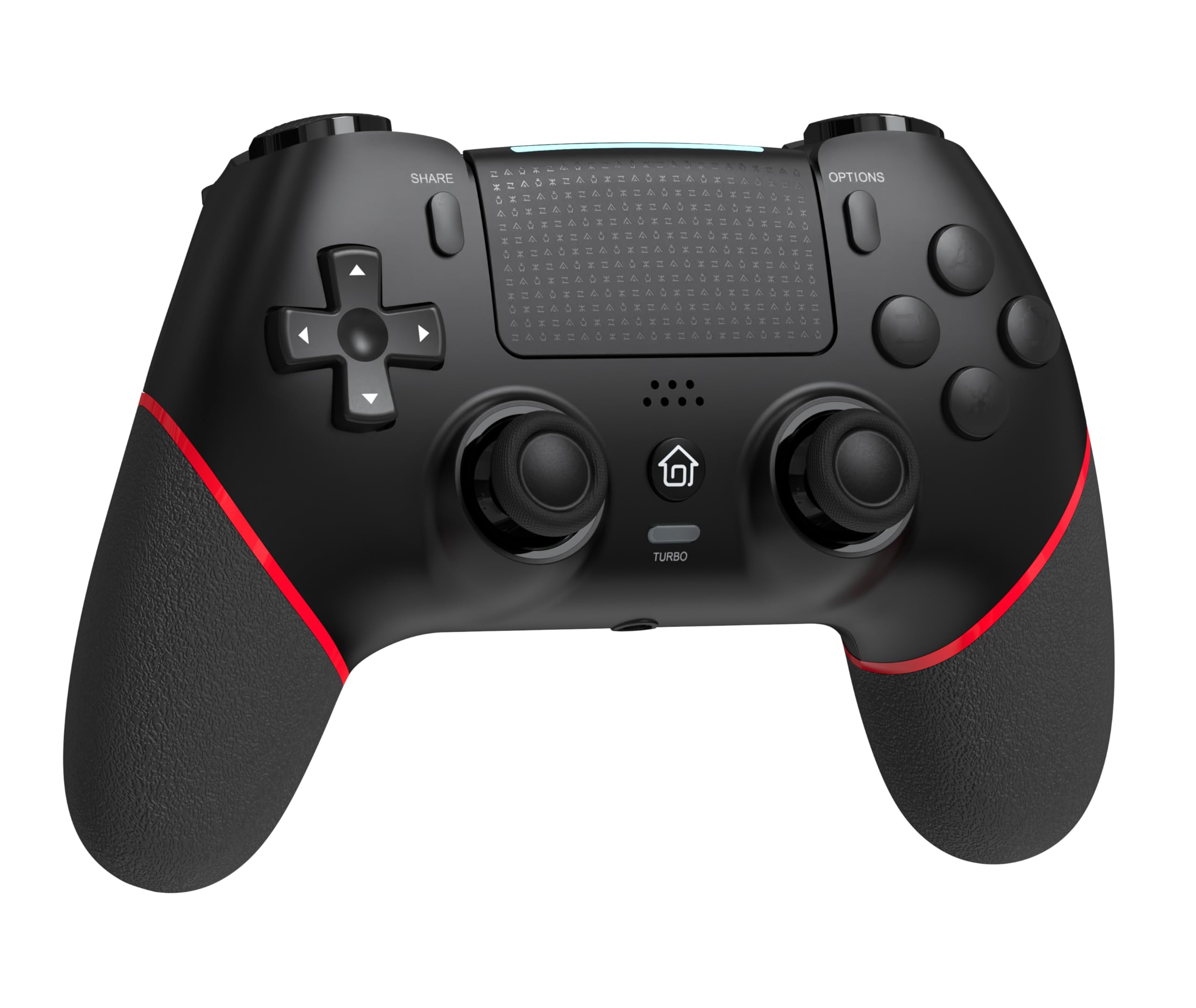
Aurrealdea view of the GAMFAMI TERIOS Wireless Controller, showing the joysticks, D-pad, action buttons, Share, Options, Home, and Turbo buttons, and the touchpad.
- Norabide-panel-a (D-Pad): Norabideko sarrerarako.
- Ekintza botoiak (Triangelua, Zirkulua, Gurutzea, Karratua): Standard PlayStation action buttons.
- Ezkerreko/eskuineko analogikoen makilak: For precise movement and camera control. Features Hall Effect technology.
- PARTEKATU botoia: Joko-edukia partekatzeko.
- AUKERAK botoia: For in-game menus and options.
- PS botoia (Hasiera botoia): To access the PS4 system menu.
- L1/R1 botoiak: Sorbaldako botoiak.
- L2/R2 abiarazleak: Analog triggers.
- Ukipen-panela: Multi-touch input area.
- M1/M2 botoiak: Atzera botoiak programatzeko modukoak.
- TURBO botoia: Turbo funtzioa aktibatzen/desaktibatzen du.
- 3.5 mm-ko entzungailuen konektua: Entzungailu bateragarriak konektatzeko.
- USB-C ataka: Kargatzeko eta kable bidezko konexiorako.

Itzuli view of the controller, highlighting the M1 and M2 programmable buttons and product information.
Konfigurazioa eta konexioa
Pairing with PS4/PS4 Pro/PS4 Slim
- Ziurtatu zure PS4 kontsola piztuta dagoela.
- Connect the controller to your PS4 console using the included USB charging cable.
- Press the PS button on the controller. The light bar will flash, indicating it is pairing.
- Once the light bar turns solid, the controller is successfully paired and ready for use.
- Orain USB kablea deskonektatu dezakezu haririk gabeko erreprodukzioa egiteko.
Reconnecting to PS4
After initial pairing, simply press the PS button on the controller to reconnect wirelessly to your PS4 console.
Funtzionamendu-argibideak
Turbo funtzioa erabiliz
- Eduki sakatuta TURBOA botoia.
- Eusten bitartean TURBOA, press the action button (e.g., Cross, Circle, Square, Triangle, L1, R1, L2, R2) you wish to apply the turbo function to.
- Release both buttons. The selected action button will now rapidly repeat its input when held down.
- To disable turbo for a specific button, repeat the process: hold TURBOA and press the turbo-enabled action button.
- To disable turbo for all buttons, press and hold the TURBOA botoia 5 segundoz.
Macro Programming (M1/M2 Buttons)
The M1 and M2 buttons on the back of the controller can be programmed to replicate other button inputs.
- Eduki sakatuta PARTEKATU botoia eta M1 or M2 button simultaneously for 3 seconds until the light bar flashes rapidly. This indicates macro programming mode.
- Press the button(s) you wish to map to M1 or M2 (e.g., X, O, Triangle, Square, Up, Down, Left, Right, L3, R3, L1, R1, L2, R2). You can map a single button or a sequence of buttons.
- Sakatu M1 or M2 button again to save the macro. The light bar will stop flashing rapidly and return to its normal state.
- To clear a macro, repeat step 1, then press the M1 or M2 button twice without pressing any other buttons.

Illustration of the advanced buttons and their programming capabilities.
Kargatzea eta bateriaren kudeaketa
Kontrolagailuak 1000 mAh-ko bateria kargagarri bat du.
Kontrolagailua kargatzen
- Connect the included USB charging cable to the USB-C port on the controller.
- Connect the other end of the cable to a USB port on your PS4 console (when powered on or in rest mode) or a compatible USB wall adapter (5V/1A recommended).
- The light bar on the controller will slowly pulse orange while charging.
- Once fully charged, the light bar will turn off.
Bateriaren mailaren adierazlea
The controller's light bar will indicate battery status. A low battery will cause the light bar to flash red. It is recommended to charge the controller when this occurs.
Mantentzea
- Garbiketa: Erabili zapi leun eta lehor bat kontrolatzailea garbitzeko. Ez erabili produktu kimiko gogorrik edo material urratzailerik.
- Biltegiratzea: Gorde kontrolatzailea leku fresko eta lehor batean, eguzki-argitik eta muturreko tenperaturetatik babestuta.
- Saihestu tantoak: Babestu kontrolatzailea erorketetatik eta kolpeetatik, barneko osagaiak kaltetu baititzakete.
Arazoak konpontzea
| Arazoa | Irtenbidea |
|---|---|
| Kontrolatzailea ez da konektatzen/parekatzen. |
|
| Controller experiences input lag or disconnection. |
|
| Joysticks exhibit drift. |

Illustration of Hall Effect joystick technology, designed to prevent drift. |
| Controller does not charge. |
|
Zehaztapenak
| Ereduaren izena | TERIOS |
| Marka | GAMFAMI |
| Gailu bateragarriak | PS4, PS4 Pro, PS4 Slim |
| Kontrolagailu mota | Gamepad |
| Konektibitate Teknologia | Bluetootha (haririk gabekoa) |
| Energia iturria | Bateriaren bidez |
| Bateria Edukiera | 1000mAh |
| Elementuaren pisua | 0.37 kilogramo |
| Kolorea | Beltza Gorria |
Bermea eta Laguntza
For warranty information and technical support, please refer to the documentation included with your purchase or visit the official GAMFAMI webgunea. Gorde erosketa-agiria erosketaren frogagiri gisa, berme-erreklamazioetarako.
For further assistance, please contact GAMFAMI customer service through their official channels.