
CHUWI CHUWI GemiBook Plus (HEROBOOK)
CHUWI GemiBook Plus Laptop User Manual
Model: CHUWI GemiBook Plus (HEROBOOK)
15.6 inch Laptop Computer, 8GB LPDDR5 256GB SSD, Intel N100, Windows 11
1. Sarrera
This manual provides essential information for the proper setup, operation, maintenance, and troubleshooting of your CHUWI GemiBook Plus laptop. Please read this manual thoroughly before using your device to ensure optimal performance and longevity.

1.1. irudia: Aurrealdea view of the CHUWI GemiBook Plus laptop, showcasing its 15.6-inch display with system specifications like 8GB DDR5 RAM, 256GB SSD, Intel N100 processor, and Windows 11 Home operating system.
2. Zer dago kutxan
Egiaztatu elementu guztiak paketean daudela:
- CHUWI GemiBook Plus Laptop
- Charger set (Power Adapter and Cable)
- Eskuliburu eleanitza
- Adostasun-ziurtagiria
3. Produktua amaitu daview
3.1 Ezaugarri nagusiak
- Prozesadorea: 12th Gen Intel Alder Lake N100 CPU (up to 3.4GHz)
- Memoria: 8GB LPDDR5 RAM (4800 MHz)
- Biltegiratzea: 256GB SSD (expandable up to 1TB via M.2 2280 SSD slot)
- Pantaila: 15.6-inch FHD IPS screen (1920 × 1080p, 16:9 aspect ratio)
- Grafikoak: Intel UHD grafikoak 12. belaunaldiko Intel prozesadoreetarako
- Sistema eragilea: Windows 11 Home
- Konektibitatea: Wi-Fi 6, Bluetooth 5.2, HDMI, USB 3.0, Type-C, RJ45 Ethernet
- Bateria: 38Wh for 6 to 8 hours of usage
- Diseinua: Lightweight (1.74kg) and thin (19mm) with 180° opening hinge
- Segurtasuna: Physical camera switch for privacy

3.1 irudia: Gehiegizko batview of the CHUWI GemiBook Plus's key features, including its 15.6-inch IPS screen, 12th Gen Intel Alder Lake-N100 processor, 38Wh Li-ion battery, FHD resolution, 12th Gen Intel UHD Graphics, 8GB LPDDR5 RAM, 256GB M.2 SSD, and WiFi6+BT5.2 connectivity.
3.2 Portuak eta konektoreak
Familiarize yourself with the various ports and connectors on your laptop:

Image 3.2: Diagram illustrating the various ports on the CHUWI GemiBook Plus laptop. On one side, it shows the charging port, HDMI port, USB-A 3.0 port, Type-C port, and Audio Jack. On the other side, it displays another Type-C port, USB-A 2.0 port, USB-A 3.0 port, RJ45 LAN Port, and a lock slot.
- Kargatzeko ataka: Konektatu korronte-egokigailua hemen.
- HDMI ataka: Kanpoko pantailetara konektatzeko.
- USB-A 3.0 Portuak: Gailu bateragarriekin datu-transferentzia azkarra egiteko.
- USB-A 2.0 ataka: USB gailu estandarretarako.
- Type-C Ports: Versatile ports for data, display, and power delivery (check specific functionality).
- Audio Jack: Entzungailuetarako edo kanpoko bozgorailuetarako.
- RJ45 LAN Port: Kable bidezko sare konexiorako.
- Blokeatu zirrikitua: For security cable locks.
4. Hasteko urratsak (konfigurazioa)
4.1 Hasierako piztea
- Connect the charger to the laptop's charging port and a power outlet.
- Ireki ordenagailu eramangarriaren estalkia.
- Press the power button, usually located on the keyboard deck.
- Jarraitu pantailan agertzen diren argibideei Windows 11 konfigurazio prozesua osatzeko, hizkuntza hautatzea, sareko konexioa eta erabiltzaile kontua sortzea barne.
4.2 Wi-Fira konektatzea
- During Windows setup, you will be prompted to connect to a network. Select your Wi-Fi network from the list.
- Sartu Wi-Fi pasahitza behar izanez gero.
- Geroago konfiguratzen baduzu, egin klik ataza-barrako Wi-Fi ikonoan, hautatu zure sarea eta konektatu.
5. Funtzionamendu-argibideak
5.1 Teklatua eta ukipen-panela
The GemiBook Plus features a full-size keyboard and a large touchpad for comfortable interaction.

5.1. irudia: Plano hurbila view of the CHUWI GemiBook Plus laptop's full-size keyboard and large touchpad, highlighting its ergonomic design for comfortable typing.
- Teklatua: Use for typing and system commands. Function keys (Fn) combined with F1-F12 keys provide additional shortcuts (e.g., volume, brightness).
- Ukipen-panela: Nabigaziorako, korritzeko eta zoom egiteko ukipen anitzeko keinuak onartzen ditu.
5.2 Bistaratzea
The 15.6-inch FHD IPS screen offers vibrant visuals. The laptop supports a 180° opening angle for flexible viewing.
5.3 Webcam and Privacy
The laptop includes a webcam for video calls and conferencing. A physical camera switch is provided to block the camera lens, ensuring privacy when not in use.
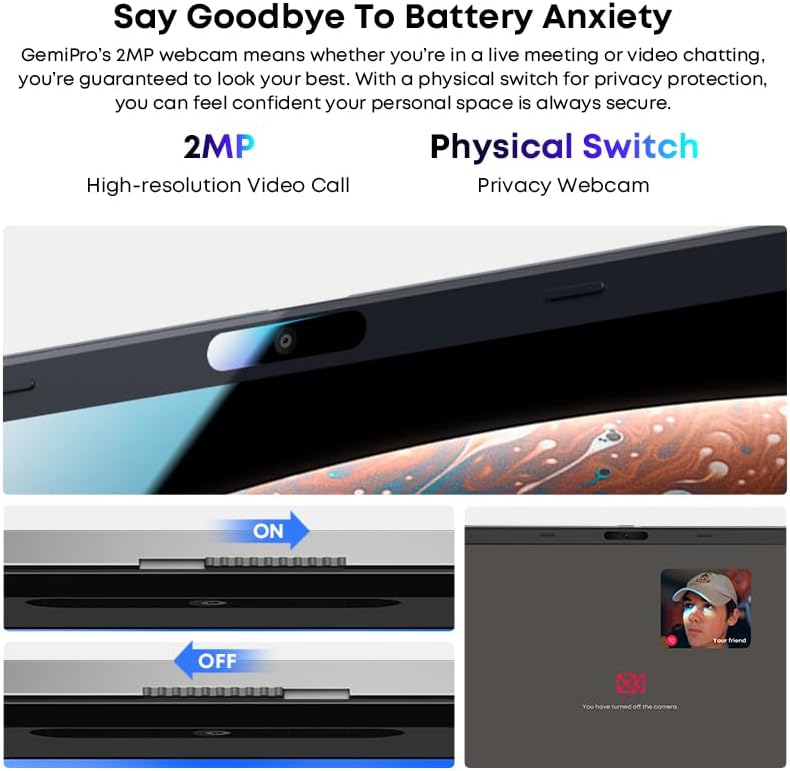
Image 5.2: Close-up of the CHUWI GemiBook Plus webcam with a physical privacy switch. The image shows the switch in both 'ON' (camera exposed) and 'OFF' (camera covered) positions, demonstrating how to physically block the camera lens for enhanced privacy.
5.4 Haririk gabeko konexioa
The GemiBook Plus supports Wi-Fi 6 and Bluetooth 5.2 for fast and stable wireless connections.

Image 5.3: A visual representation of the CHUWI GemiBook Plus's seamless wireless experience, highlighting Wi-Fi 6, Bluetooth 5.2, Ethernet RJ45, and HD Camera features. A user is shown participating in a video call on the laptop.
- Wi-Fi 6: Provides faster internet speeds and improved network efficiency compared to previous Wi-Fi standards.
- Bluetooth 5.2: Haririk gabeko periferikoak konektatzeko, hala nola entzungailuak, saguak eta teklatuak.
6. Baterien kudeaketa
The laptop is equipped with a 38Wh battery, providing approximately 6 to 8 hours of usage on a full charge. A full recharge typically takes about 3 hours.
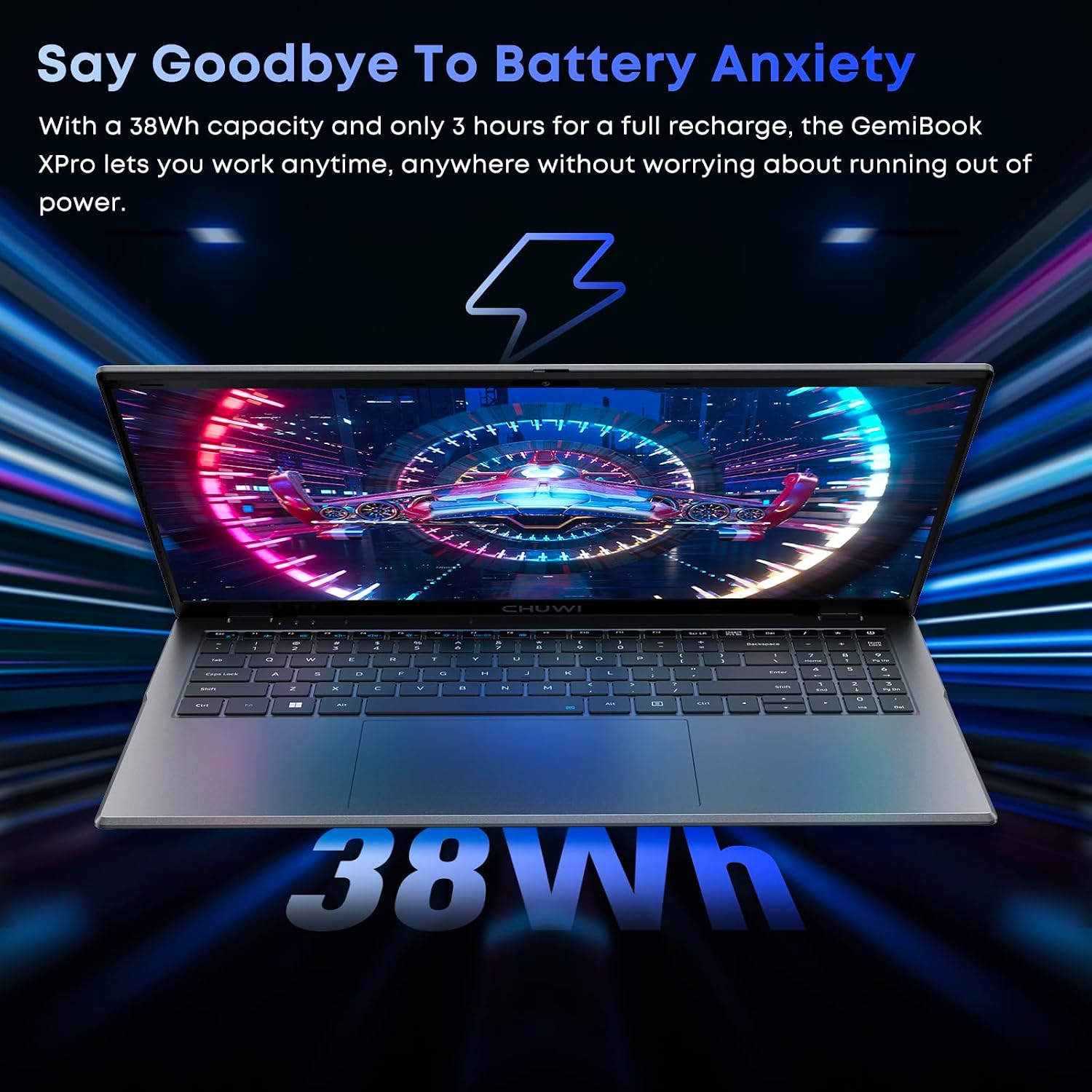
Image 6.1: The CHUWI GemiBook Plus laptop displayed with a visual representation of its 38Wh battery capacity, emphasizing its ability to provide extended usage without frequent recharging.
- Kargatzen: Connect the provided charger to the laptop and a power outlet. The charging indicator light will typically show the charging status.
- Bateria zaintzea: Bateriaren iraupena luzatzeko, saihestu bateria guztiz maiz deskargatzea. Gorde ordenagailu eramangarria leku fresko eta lehor batean denbora luzez erabiltzen ez duzunean.
7. Mantentzea eta Zainketa
- Garbiketa: Erabili zapi leun eta lihorik gabeko bat pantaila eta kanpoaldea garbitzeko. Orbain egoskorrak izanez gero, garbitu apur batampGarbitu zapi bat urarekin edo pantaila-garbitzaile batekin. Saihestu produktu kimiko gogorrak.
- Biltegiratzea: When not in use, store the laptop in a protective sleeve or bag to prevent scratches and dust accumulation.
- Tenperatura: Operate the laptop within recommended temperature ranges. Avoid exposing it to extreme heat or cold.
- Aireztapena: Ziurtatu aireztapen-zuloak ez daudela blokeatuta, gehiegi berotzea saihesteko.
8. Arazoak
8.1 Ohiko arazoak eta irtenbideak
| Gaia | Irtenbide posiblea |
|---|---|
| Ordenagailu eramangarria ez da pizten | Ensure the power adapter is securely connected and the outlet is working. Try a different power outlet. If the battery is completely drained, it may take a few minutes to respond after connecting the charger. |
| Ez dago Wi-Fi konexiorik | Check if Wi-Fi is enabled in Windows settings. Restart your router and modem. Ensure you are entering the correct Wi-Fi password. |
| Errendimendu motela | Close unnecessary applications. Check for background processes consuming resources. Ensure Windows is updated. Consider running a disk cleanup. |
| Pantaila hutsik dago edo keinuka ari da | Adjust screen brightness. Connect to an external monitor to check if the issue is with the laptop screen. Restart the laptop. |
| Webkamerak ez du funtzionatzen | Ensure the physical camera switch is in the 'ON' position. Check privacy settings in Windows to allow apps access to the camera. Update camera drivers. |
9. Zehaztapen Teknikoak
| Ezaugarri | Zehaztapena |
|---|---|
| Zutik pantailako tamaina | 15.6 hazbete |
| Pantailaren bereizmena | 1920 x 1080 pixel (FHD) |
| Prozesadorea | Intel Alder Lake N100 (up to 3.4 GHz) |
| RAM | 8 GB LPDDR5 |
| Disko gogorra | 256 GB SSD (M.2 2280, expandable to 1TB) |
| Koprozesadore grafikoa | Intel UHD grafikoak |
| Sistema eragilea | Windows 11 |
| Haririk gabeko mota | Wi-Fi 6, Bluetooth 5.2 |
| USB 3.0 ataka kopurua | 2 |
| Bateriaren batez besteko iraupena | 6 Hours (38Wh) |
| Elementuaren pisua | 3.7 libra (gutxi gorabehera 1.74 kg) |
| Produktuaren neurriak | 14 x 0.78 x 9.5 hazbete (gutxi gorabehera 35.5 x 1.98 x 24.1 cm) |
| Kolorea | Zilarrezkoa |
10. Bermea eta Laguntza
10.1 Berme Epea
The CHUWI GemiBook Plus laptop comes with a 1 urteko bermea, valid immediately after purchase.
10.2 Bezeroarentzako laguntza
CHUWI offers lifetime factory professional support and 24-hour online support. For any issues or inquiries, please contact CHUWI customer service. They aim to provide professional and timely assistance.
Ask a question about this manual
Ask about setup, troubleshooting, compatibility, parts, safety, or missing instructions. Manuals+ will review the question and use this page’s manual context to help answer it.