
1. Sarrera
The MeLE Overclock 4C Mini PC N100 is a compact and powerful micro desktop computer designed for business, education, and multimedia use. Featuring an Intel N100 processor, 32GB DDR4 RAM, and a 512GB SSD, it supports 4K triple display output and runs Windows 11 Pro, with compatibility for Linux and Ubuntu.

Aurrealdea view of the MeLE Overclock 4C Mini PC N100.
2. Konfigurazioa
2.1 Zer dago kutxan
- 1*Overclock 4C Mini PC
- 1*12V/3A Power Adapter
- 1*Vesa Mount
- 1 * Erabiltzailearen eskuliburua
2.2 Hasierako konexioa
Connect the power adapter, display cables (HDMI or USB-C), and any peripherals such as a keyboard and mouse to the appropriate ports on the mini PC. Once all connections are secure, press the power button to start the device.
Bat baino gehiagoview video demonstrating the unboxing, port connections, and basic usage scenarios like light gaming and triple display multitasking of the MeLE Overclock 4C Mini PC N100.

Gertutik view of the MeLE Overclock 4C Mini PC N100's ports, including Kensington Lock Slot, USB 3.2 Gen2, USB 2.0, USB Type-C (PD3.0, DP1.4, Data), Micro-SD slot, Audio Jack, HDMI 2.0, Reset Button, and Gigabit Ethernet port.
2.3 VESA Mount Installation
The included VESA mount allows for convenient installation of the mini PC on the back of a compatible TV or monitor, helping to save desk space.
3. Funtzionamendu-argibideak
3.1 Piztu/Itzaltzea
Press the power button located on the front of the device to turn it on. To shut down, use the operating system's power options. A brief press of the power button can also initiate sleep mode.
3.2 Bistaratzeko konfigurazioa
The mini PC supports triple display output via two HDMI 2.0 ports and one USB-C port, enabling 4K UHD video playback (4096x2160@60Hz) and HDR. Configure display settings through your operating system.
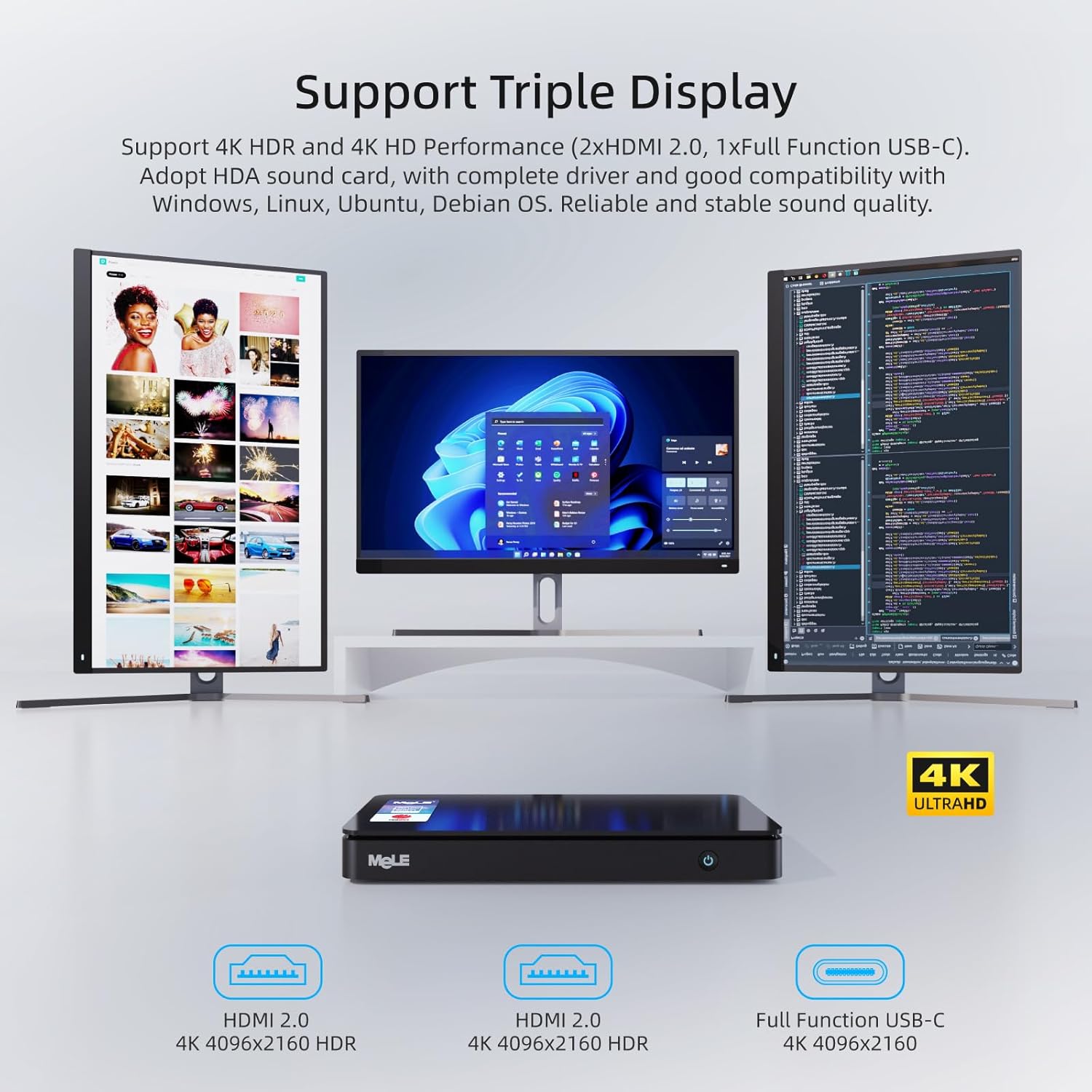
The MeLE Overclock 4C Mini PC N100 connected to three monitors, demonstrating its triple display multitasking capability with 4K resolution.
Bideo emanaldi batasing the 4K video playback capabilities of the MeLE Overclock 4C Mini PC N100, highlighting smooth and detailed visual performance.
3.3 Sare eta haririk gabeko konexioa
Connect to the internet using the Gigabit Ethernet port or via dual-band Wi-Fi (2.4G and 5.0G) with Wi-Fi 5 MU-MIMO support. Bluetooth 5.1 is available for connecting wireless peripherals.

Illustration of the MeLE Overclock 4C Mini PC N100's stable connectivity options, including Wi-Fi 5, Bluetooth 5.1, and Gigabit Ethernet.
4. Mantentzea
4.1 Biltegiratze-hobekuntza
The device supports storage expansion via an M.2 22x80 Key M Slot for PCIe3.0 x4 SSDs (up to 4TB) and a Micro SD slot (up to 2TB). Refer to the video below for instructions on how to upgrade the SSD.
A step-by-step guide on how to safely open the MeLE Mini PC and replace or upgrade the SSD storage.

Barnekoa view of the MeLE Overclock 4C Mini PC N100, illustrating the M.2 2280 slot for PCIe3.0 x4 SSDs up to 4TB and Micro SD slot for up to 2TB, along with RAM upgrade options.
4.2 Garbiketa
To ensure optimal performance and longevity, regularly clean the exterior of the mini PC with a soft, dry cloth. Avoid using liquid cleaners directly on the device. Ensure ventilation openings are free from dust and obstructions.

Lehertuta view of the MeLE Overclock 4C Mini PC N100, showcasing its intelligent cooling fan design, pure copper pipe, Intel N100 processor, and thermal conductive engineering plastic for efficient heat dissipation.
5. Arazoak
5.1 Potentziarik gabe
- Ensure the power adapter is securely connected to both the mini PC and a working power outlet.
- Egiaztatu entxufea funtzionatzen duela beste gailu bat konektatuz.
- Egiaztatu korronte-egokitzailea kalterik dagoen ikusteko.
5.2 Ez dago pantaila-irteerarik
- Confirm that the display cables (HDMI, USB-C) are securely connected to both the mini PC and the monitor.
- Ziurtatu monitoreak piztuta dagoela eta sarrera-iturri zuzenera konfiguratuta dagoela.
- Try using a different display cable or monitor to rule out hardware issues.
5.3 Errendimendu motela
- Itxi atzeko planoan exekutatzen ari diren beharrezkoak ez diren aplikazioak.
- Check for available operating system updates and install them.
- Ziurtatu SSDan leku libre nahikoa dagoela.
- Monitor system temperatures to ensure proper cooling.
6. Zehaztapenak
| Ezaugarri | Xehetasuna |
|---|---|
| Marka | MELE |
| Ereduaren izena | Overclock 4C |
| Sistema eragilea | Windows 11 Pro (supports Linux, Ubuntu, Debian) |
| CPU eredua | Intel N100 (12th Gen Alder Lake) |
| CPU Abiadura | Gehienez 3.4 GHz |
| Processor Cores/Threads | 4 Nukleo / 4 Hari |
| Smart cachea | 6 MB |
| TDP | 15W |
| RAM memoria instalatuta | 32 GB DDR4 |
| Memoria Abiadura | 3200 MHz |
| Memoria Biltegiratzeko Ahalmena | 512 GB SSD |
| Biltegiratze zabalgarria | M.2 2280 SATA SSD & NVMe SSD up to 4TB, Micro SD slot up to 2TB |
| Koprozesadore grafikoa | Intel UHD Graphics (up to 1.20 GHz) |
| Bideo Irteera | 2x HDMI 2.0 (4K@60Hz), 1x USB-C (DP1.4, 4K@60Hz) |
| USB atakak | 2x USB 3.2 Gen2, 1x USB 2.0, 1x USB-C (PD3.0, DP1.4, Data) |
| Sare-konektibitatea | Gigabit Ethernet (RJ45), Wi-Fi 5 (2.4G/5.0G, MU-MIMO), Bluetooth 5.1 |
| Audio Interfazea | 3.5mm Audio Jack (Headphone and MIC) |
| Segurtasun Ezaugarriak | Kensington Lock Slot, Windows 11 Pro security features |
| Ezaugarri gehigarriak | Auto power on, PXE/iPXE boot, RTC wake, Wake on LAN, BIOS/CMOS reset |
| Neurriak | 7.0 x 3.7 x 0.8 hazbete (178 x 94 x 21 mm) |
| Pisua | 0.7 lb (0.32 kg) |
| Hozteko metodoa | Smart Fan |
7. Bermea eta Laguntza
7.1 Bermearen informazioa
MeLE offers a one-year warranty for this product, with a three-month replacement policy and lifetime service. MeLE is committed to complying with all applicable laws on privacy protection and personal data security.
7.2 Bezeroarentzako laguntza
For any inquiries or technical assistance, please contact MeLE customer service. Replies are typically provided within 24 hours. Service Contact: Service@mele.cn


