
1. Sarrera
Thank you for choosing the HOWENS 15.6 Inch Portable Touchscreen Monitor. This device is designed to enhance your productivity and entertainment with its Full HD 1920x1080 IPS display, 10-point multi-touch functionality, and versatile connectivity options. Its compact and lightweight design makes it ideal for various applications, from extending your laptop's display to serving as an industrial control interface.

1.1. irudia: Aurrealdea view of the HOWENS 15.6 Inch Portable Touchscreen Monitor.
2. Segurtasun informazioa
Produktu hau erabili aurretik, irakurri arretaz segurtasun-argibide guztiak. Argibide hauek ez jarraitzen badituzu, deskarga elektrikoak, sua edo gailuari kalteak eragin ditzake.
- Ez jarri monitoreari euriari, hezetasunari edo muturreko tenperaturei.
- Saihestu monitoreak bero-iturrien ondoan edo eguzki-argiaren eraginpean jartzea.
- Erabili gailuarekin hornitutako korronte-egokigailua soilik.
- Do not attempt to disassemble or repair the monitor yourself. Contact qualified service personnel for assistance.
- Mantendu monitoreak eremu magnetiko indartsuetatik urrun.
- Ziurtatu aireztapen egokia monitorearen inguruan, gehiegi berotu ez dadin.
3. Zer dago kutxan
Paketeak honako elementu hauek ditu:
- Portable Touchscreen Monitor 15.6 inch
- HDMI kablea
- USB cable (for touch functionality)
- DC korronte egokitzailea
- Urruneko kontrola
- Funtzionamendu eskuliburua
4. Produktua amaitu daview
4.1 Ezaugarri nagusiak
- FHD 1080P Display: Features a 1920x1080 resolution with a 60Hz refresh rate and IPS panel for 178° wide viewing angles. Brightness of 300 cd/m² and 72% NTSC color gamut ensure vibrant and accurate colors.
- 10-Point Touch Screen: Advanced multi-touch functionality for intuitive interaction. Connect via a Type-A to Type-B USB cable for touch support.
- Bateragarritasun zabala: Supports Laptops, PCs, Mini PCs, Raspberry Pi, PS5/4, Xbox, and various industrial devices via HDMI, DVI, and VGA connections.
- Multi-Function Display Modes: Supports expansion, mirror, second-screen-only, horizontal, and vertical display modes.
- Standard VESA Mount: Equipped with a 75x75mm VESA hole for wall or desktop mounting (stand not included).
- Barneko bozgorailu bikoitzak: Enjoy stereo audio directly from the monitor.
4.2 Port Parameters
The monitor features a variety of ports for diverse connectivity:
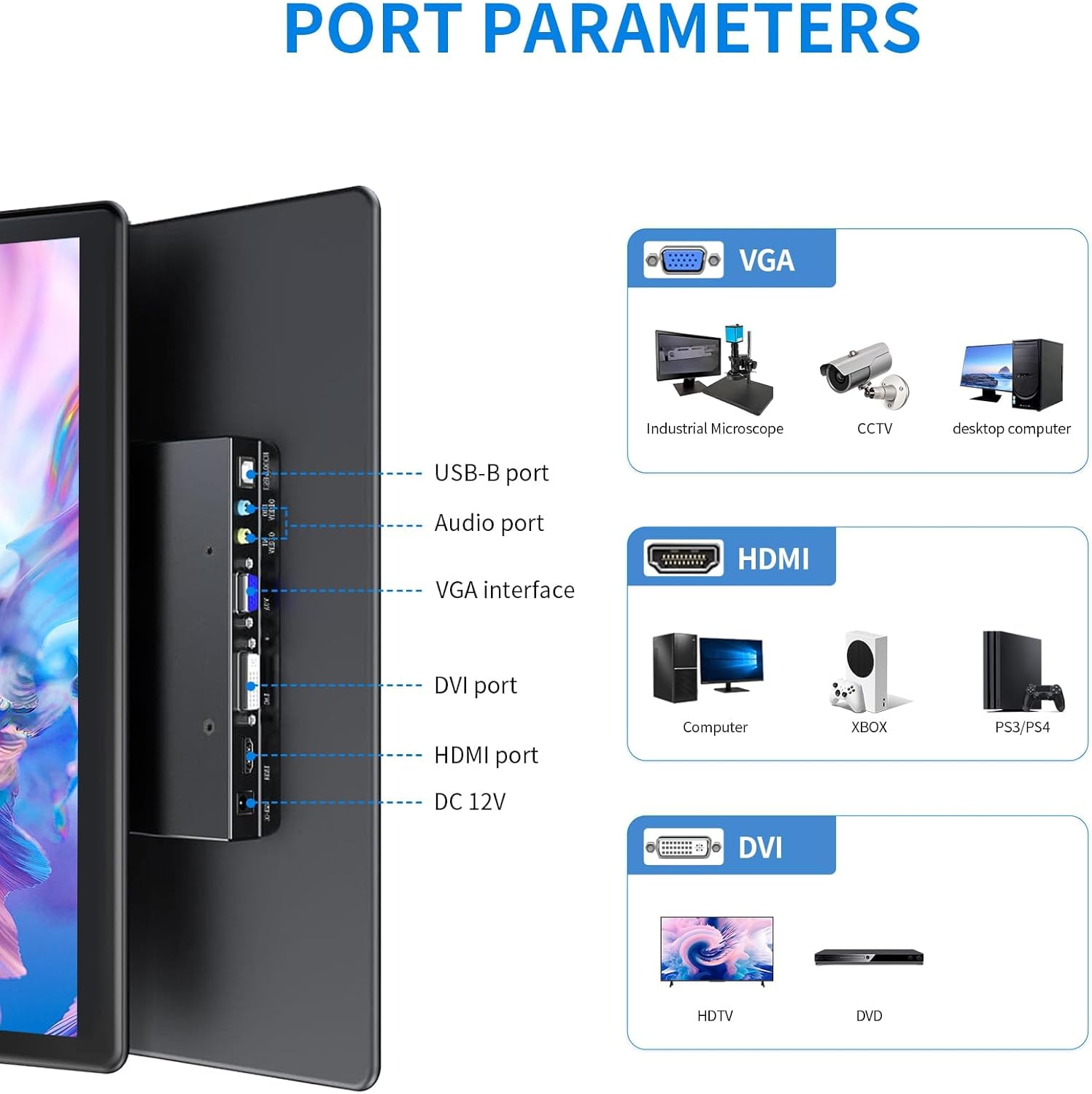
4.1 irudia: Xehetasun zehatza view of the monitor's input/output ports.
- USB-B ataka: For touch functionality connection to a host device.
- Audio ataka: Audio sarrera/irteerarako.
- VGA Interface: For video input from devices like industrial microscopes, CCTV, and desktop computers.
- DVI ataka: For video input from devices such as HDTVs and DVD players.
- HDMI ataka: For high-definition video and audio input from computers, Xbox, PS5/4, and other compatible devices.
- 12 V DC: Energia sarrerako ataka.
4.3 Bistaratzeko Ezaugarriak

Image 4.2: Visual representation of key display features.
The monitor's IPS panel provides a 178° wide viewing angle, ensuring consistent image quality from various perspectives. The 1920x1080 resolution delivers sharp and clear visuals, while the 72% NTSC color gamut offers rich and accurate color reproduction.
4.4 Dimensions and VESA Mount

Image 4.3: Product dimensions and VESA mounting details.
The monitor features a standard 75x75mm VESA mounting pattern, allowing for flexible installation on compatible wall mounts or desktop stands (sold separately).
5. Konfigurazioa eta konexioa
Follow these steps to connect your HOWENS portable touchscreen monitor to your device:
- Connect Video Signal: Use the provided HDMI cable to connect the monitor's HDMI port to your laptop, PC, or gaming console's HDMI output. Alternatively, use a DVI or VGA cable if your device supports those interfaces.
- Connect Touch Functionality (Optional): For touchscreen features, connect the provided USB-A to USB-B cable from your host device's USB-A port to the monitor's USB-B port.
Note: Touch input is not enabled on devices with strict security protocols, such as Nintendo Switch, iPhones, or iPads.
- Konektatu energia: Plug the DC power adapter into the monitor's DC 12V port and then into a power outlet.
- Piztu: Press the power button on the monitor or use the remote control to turn on the device.
Video 5.1: Demonstration of connecting the monitor to a laptop, including HDMI, USB for touch, and power connections, and showcasing touch functionality and remote control use.
5.1 VESA muntatzea
The monitor is compatible with 75x75mm VESA mounts. To mount the monitor, attach a compatible VESA arm or bracket to the four screw holes on the back of the monitor. Ensure the mount can support the weight of the monitor.
6. Monitorea funtzionatzea
6.1 Ukipen-pantailaren funtzionaltasuna
Once the USB-A to USB-B cable is connected to a compatible device, the 10-point multi-touch feature will be active. You can use gestures such as tapping, swiping, pinching, and zooming directly on the monitor screen for intuitive control.
6.2 Urruneko kontrola
The included remote control allows you to navigate the monitor's On-Screen Display (OSD) menu to adjust settings such as brightness, contrast, color temperature, and input source. Point the remote control towards the infrared receiver on the monitor.
6.3 Bistaratzeko moduak
Monitoreak hainbat bistaratze modu onartzen ditu zure beharretara egokitzeko:

6.1 irudia: Adibide bisualaamppantaila modu anitzekoak.
- Modu hedatua: Extends your desktop across both screens, providing more workspace.
- Ispilu modua: Duplicates your primary display onto the portable monitor.
- Second Screen Only Mode: Displays content only on the portable monitor, turning off the primary display.
- Horizontal/Vertical Mode: Adjust the display orientation to landscape or portrait as required. This can usually be configured in your operating system's display settings.
6.4 Audioa

Image 6.2: Location of built-in dual speakers.
The monitor includes built-in dual speakers for stereo audio output. You can adjust the volume using the remote control or through your connected device's audio settings.
7. Mantentzea
- Pantaila garbitzea: Garbitu pantaila astiro-astiro zapi leun eta pelusik gabeko batekin. Orba egoskorrak kentzeko, garbituampGarbitu oihal pixka bat urarekin edo pantaila garbitzeko soluzio batekin. Saihestu produktu kimiko gogorrak edo material urratzaileak erabiltzea.
- C garbiketaasing: Erabili zapi leun eta lehor bat monitorearen aldea garbitzeko.asing.
- Biltegiratzea: When not in use for extended periods, store the monitor in a cool, dry place, preferably in its original packaging or a protective sleeve.
8. Arazoak
Monitorearekin arazoak badituzu, jo ezazu honako ohiko irtenbide hauetara:
- Potentziarik gabe:
- Ensure the DC power adapter is securely connected to the monitor and a working power outlet.
- Egiaztatu entxufea funtzionatzen duela beste gailu bat konektatuz.
- Ez dago pantailarik/seinalerik:
- Check that the HDMI, DVI, or VGA cable is securely connected to both the monitor and the source device.
- Ensure the correct input source is selected on the monitor using the remote control or OSD menu.
- Try connecting the monitor to a different source device to rule out issues with the original source.
- Ukipen-pantailak ez du erantzuten:
- Confirm the USB-A to USB-B cable is properly connected between the monitor and the host device.
- Restart both the monitor and the host device.
- Ensure your operating system supports touchscreen functionality and that drivers are up to date.
- Remember that some devices (e.g., Switch, iPhones, iPads) do not support touch input with this monitor due to security protocols.
- Irudiaren kalitate eskasa:
- Doitu distira, kontrastea eta kolore ezarpenak OSD menuaren bidez.
- Ensure the display resolution on your source device is set to 1920x1080 for optimal clarity.
9. Zehaztapenak
| Ezaugarri | Zehaztapena |
|---|---|
| Marka | HOWENS |
| Modelo zenbakia | CXTP-BB |
| Pantailaren tamaina | 15.6 hazbete |
| Ebazpena | FHD 1920 x 1080p |
| Aspektu-erlazioa | 16:9 |
| Bistaratzeko mota | LCDa |
| Bistaratzeko Teknologia | IPS |
| Freskatze tasa | 60 Hz |
| Distira | 300 Kandela |
| Kontraste-erlazioa | 1000:1 |
| Viewangelua | 178 gradu |
| Kolore gama | %72 NTSC |
| Konektibitate Teknologia | DVI, HDMI, VGA |
| Ezaugarri gehigarriak | Built-In Speakers, Energy Efficient, Eye Care, Portable, Touchscreen |
| Elementuaren pisua | 2.33 kilo |
| Muntatze Mota | Wall Mount (75x75mm VESA) |
10. Bermea eta Laguntza
This HOWENS monitor comes with a 1 urteko fabrikatzailearen bermea against defects. For any product issues or technical support, please contact HOWENS customer service. We are committed to resolving any concerns promptly.
For further assistance, please refer to the contact information provided on the HOWENS official webgunea edo zure erosketa-dokumentazioa.