
1. Sarrera
The Irfora YR2050 is a handheld, high-accuracy 4-wire milliohm meter designed for precise resistance measurements. This instrument is suitable for quick testing of wire length, resistivity, and assessing the quality of power cords in motors and transformers. Its portable size makes it convenient for various applications.
This meter is particularly useful for detecting the resistance of precision current-sense resistors and verifying the qualification of transformer windings.

Figure 1.1: Irfora YR2050 Milliohm Meter with test clips. This device is designed for quick testing of wire length, resistivity, and quality assessment of power cords in motors and transformers.
2. Segurtasun informazioa
Please read and understand the following safety precautions before operating the Irfora YR2050 Milliohm Meter to prevent injury and avoid damage to the instrument.
- Prohibited Measurements: It is strictly prohibited to measure any live parts. Do not apply AC or direct current voltage input to the test interface, as this may severely damage the instrument and pose a safety risk.
- Battery Internal Resistance: This YR2050 model cannot measure battery internal resistance. Attempting to do so may yield inaccurate results or damage the device.
- Ingurune operatiboa: Use the instrument within the specified working temperature range of 10 ℃ to 40 ℃.
- Biltegiratzea: Store the instrument in a dry environment within the specified storage temperature range of -20℃ to 60℃.
- Baimendutako pertsonala: Only qualified personnel should perform maintenance or repairs on the instrument.

Figure 2.1: Important safety notes displayed on the product image, emphasizing that the YR2050 cannot measure battery internal resistance and prohibits measuring live parts.
3. Produktua amaitu daview
3.1 Osagaiak
The Irfora YR2050 Milliohm Meter package includes the following items:
- YR2050 Tester Unit
- Test Clips (4-wire Kelvin clips)
- USB Cable (for charging/data, if applicable)
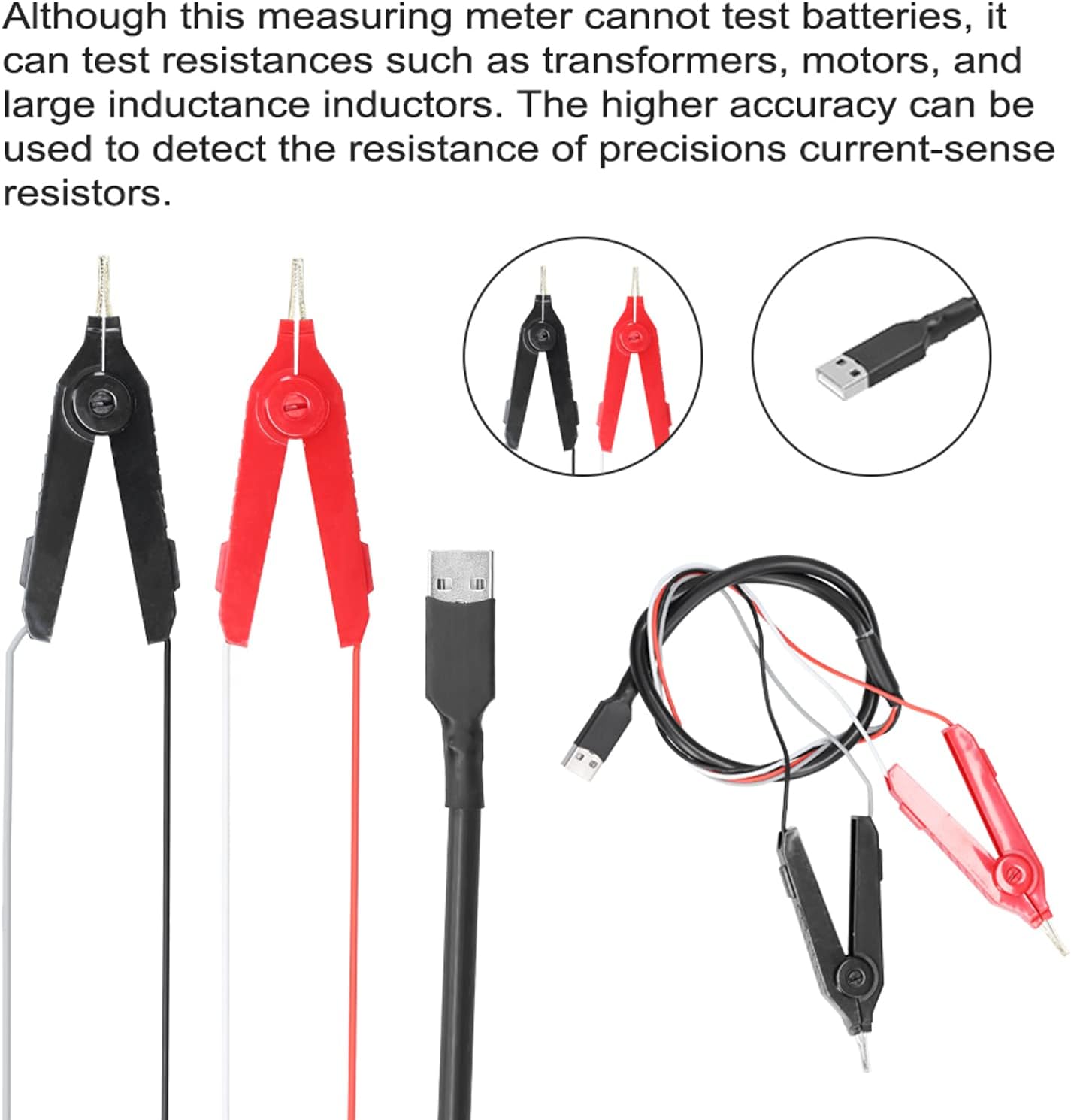
Figure 3.1: Included accessories: 4-wire test clips (red and black) and a USB cable. These are essential for connecting the meter to the test subject.
3.2 Kontrolak eta pantaila
The YR2050 features a clear display and intuitive buttons for operation.

Figure 3.2: Front panel controls of the YR2050, indicating buttons for 'menu', 'range', 'hold', and 'choose' functions.
- Pantaila: Shows measurement readings, units, and operational status.
- Menuko botoia: Accesses instrument settings and modes.
- Barruti botoia: Manually selects measurement range or enables auto-ranging.
- Eutsi botoia: Uneko neurketa pantailan izozten du.
- Choose/Navigation Buttons: Used for selecting options within menus and adjusting parameters.
4. Zehaztapenak
| Parametroa | Balioa |
|---|---|
| Eredua | YR2050 |
| Resolution (Display Counts) | 120,000 |
| Fusing Current | 0.5A |
| Laneko Tenperatura | 10 ℃ ~ 40 ℃ (50 ℉ ~ 104 ℉) |
| Biltegiratze Tenperatura | -20 ℃ ~ 60 ℃ (-4 ℉ ~ 140 ℉) |
| Bateria | 1 x Lithium battery, 2000mAh |
| Neurriak (L x W x H) | 120 x 60 x 40 mm (4.72 x 2.36 x 1.57 hazbete) |
| Pisua | 300 g (10.6 ontza) |
5. Konfigurazioa
5.1 Hasierako karga
Before first use, ensure the internal lithium battery is fully charged. Connect the provided USB cable to the meter and a suitable USB power source (e.g., computer USB port, USB wall adapter).
5.2 Connecting Test Clips
The YR2050 uses 4-wire (Kelvin) test clips for accurate low resistance measurements. Connect the red and black test clips to the corresponding ports on the meter. Ensure a secure connection.
Figure 5.1: The 4-wire test clips and USB cable. Connect the test clips firmly to the meter's input terminals.
6. Funtzionamendu-argibideak
6.1 Funtzionamendu Orokorra
- Piztu: Sakatu pizteko botoia neurgailua pizteko.
- Aukeratu modua: Use the 'Menu' button to navigate through different measurement modes if available.
- Connect to DUT: Connect the 4-wire test clips to the Device Under Test (DUT). Ensure good contact for accurate readings.
- Irakurri neurketa: The resistance value will be displayed on the screen.
- Hold Reading: Press the 'Hold' button to freeze the current reading on the display.
6.2 Wire Length and Resistivity Test
This function allows for the determination of wire resistivity and material purity.
- Prestatu kablea: Intercept a specific length of the wire to be tested.
- Measure Diameter: Accurately measure the diameter of the wire to calculate its cross-sectional area.
- Enter Parameters: Enter the instrument's detection mode and input the measured wire length and cross-sectional area.
- Erresistentzia neurtu: Connect the test clips to the prepared wire and measure its resistance.
- Calculate Resistivity: The instrument will calculate the resistivity based on the input parameters and measured resistance. This resistivity value can help determine if the wire material is pure copper or another material.

Figure 6.1: The YR2050 in use for wire resistivity measurement. The process involves intercepting a wire, calculating its cross-sectional area, and then measuring its resistance to determine resistivity.
6.3 Transformer Winding Qualification Test
The YR2050 can be used to determine if a transformer winding is qualified by comparing its resistance to predefined limits.
- Access Normal Mode: Enter the normal measurement mode on the instrument.
- Set Limits: Open the upper and lower limit settings. Input the acceptable upper and lower resistance limits for the transformer winding.
- Measure Winding: Connect the test clips to the transformer winding.
- Evaluate: The instrument will measure the winding resistance and indicate if it falls within the set limits, thereby determining its qualification.

Figure 6.2: The YR2050 being used to test transformer winding qualification. The meter allows setting upper and lower resistance limits for comparison.
6.4 Precision Current-Sense Resistor Test
The high accuracy of the YR2050 makes it suitable for detecting the resistance of precision current-sense resistors.
- Konektatu erresistentzia: Connect the 4-wire test clips directly to the terminals of the current-sense resistor.
- Irakurri neurketa: The meter will display the precise resistance value.
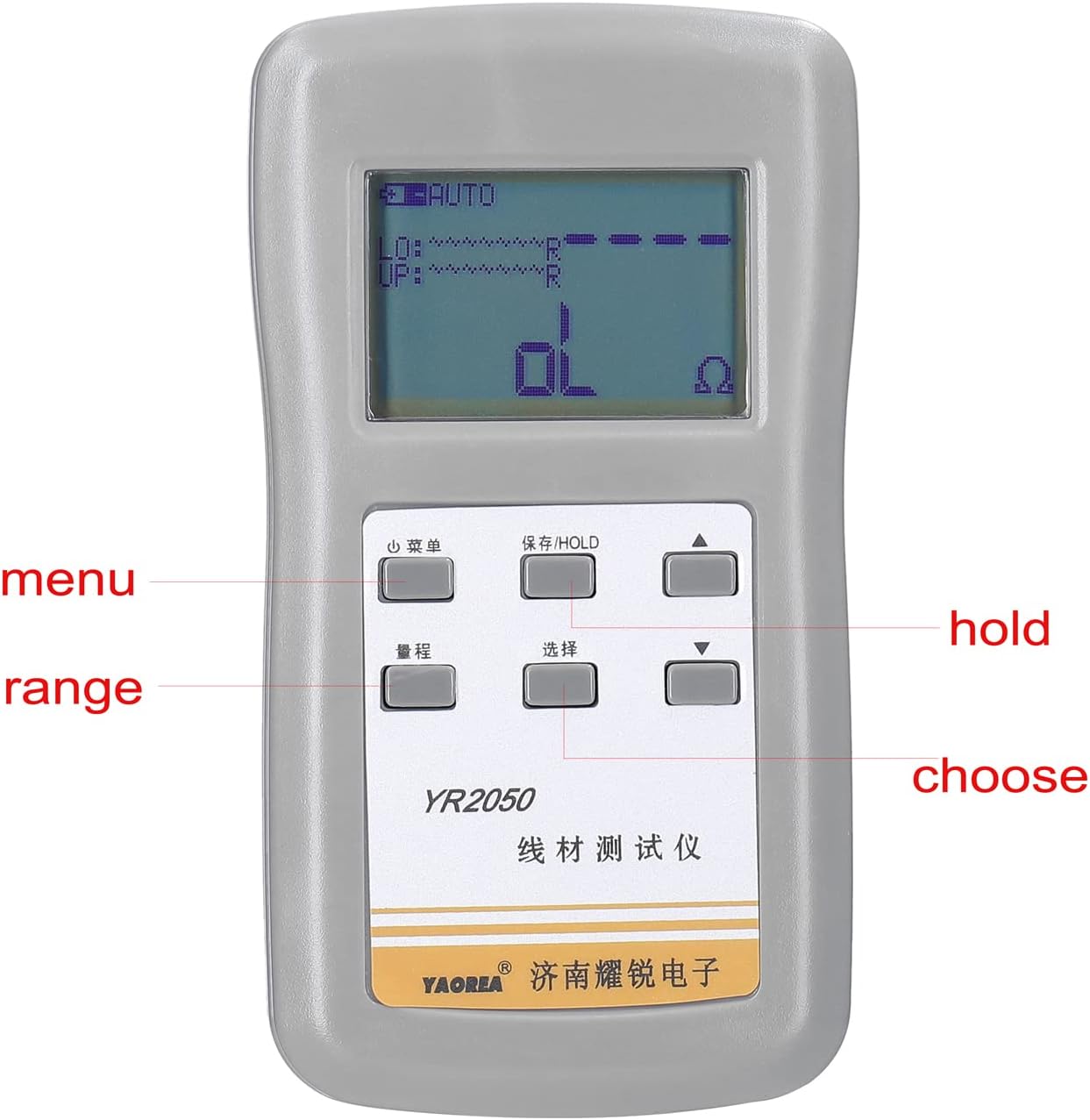
Figure 6.3: The YR2050's high accuracy is beneficial for measuring the resistance of precision current-sense resistors.
7. Mantentzea
- Garbiketa: Use a soft, dry cloth to clean the instrument's casing. Ez erabili garbitzaile edo disolbatzaile urratzailerik.
- Bateria zaintzea: Recharge the battery regularly, especially if the instrument will not be used for an extended period, to maintain battery health.
- Biltegiratzea: When not in use, store the meter in a cool, dry place, away from direct sunlight and extreme temperatures.
- Proba-buruak: Inspect test leads and clips for any signs of wear or damage before each use. Replace damaged leads immediately.
8. Arazoak
If you encounter issues with your Irfora YR2050, refer to the following common troubleshooting steps:
- Potentziarik gabe: Ensure the battery is charged. Connect the meter to a USB power source and allow it to charge for some time before attempting to power it on again.
- Irakurketa okerrak:
- Check that the test clips are securely connected to both the meter and the DUT.
- Ensure the test clips are making good contact with the measurement points.
- Verify that the measurement mode is appropriate for the test being performed.
- Clean the test points on the DUT and the tips of the test clips.
- Pantailak 'OL' (gainkarga) erakusten du: This indicates that the measured resistance is outside the meter's current range or that there is an open circuit. Check connections and ensure the DUT is not an open circuit.
- Instrument Not Responding: Try turning the unit off and on again. If the issue persists, allow the battery to fully discharge and then recharge it.
9. Bermea eta Laguntza
For warranty information or technical support, please refer to the documentation provided with your purchase or contact your retailer. Keep your purchase receipt as proof of purchase.