
1. Sarrera
The DEWENWILS Wireless Motion Detector Light Switch offers a convenient and flexible solution for automated lighting control. This system eliminates the need for new wiring, allowing for easy replacement of existing light switches. It features sensitive motion detection, a wide detection angle, and multiple operating modes to suit various applications in areas such as garages, basements, and stairwells.
2. Segurtasun informazioa
- Always disconnect power at the circuit breaker before installing or servicing the receiver unit.
- Ziurtatu konexio elektriko guztiak ondo daudela eta tokiko araudi elektrikoak betetzen dituztela.
- Do not expose the sensor or receiver to moisture or extreme temperatures outside the specified operating range.
- Mantendu haurren eskura.
- Use only the specified battery type for the motion sensor.
3. Paketearen edukia
- 1 x Wireless Motion Detector Sensor
- 1 x Haririk gabeko Hartzaile Unitatea
- Muntatzeko Hardwarea
- Erabiltzailearen eskuliburua
4. Produktua amaitu daview
The system consists of a battery-powered motion sensor and a wired receiver unit. The sensor detects movement and wirelessly transmits a signal to the receiver, which then controls the connected light or device.

Motion Sensor Features:
- Rotary Mode Switch: Selects between PIR, NTM, DTD, and RND modes.
- Delay Time Switch: Adjusts the duration the light stays on after motion detection (1, 5, 15, 30 minutes).
- Parekatzeko botoia: Used to link the sensor with the receiver.
- Bateriaren konpartimendua: Houses 3x AAA batteries (not included).
- DC 5V Power Connection: Optional power input for the sensor.
Hartzaile Unitatearen Ezaugarriak:
- Diseinu trinkoa instalazio malgu baterako.
- Wired connection to lighting fixtures or other devices.
- Receives wireless signals from the motion sensor.
5. Konfigurazioa eta instalazioa
5.1 Sentsoreen instalazioa
- Sartu bateriak: Open the battery compartment on the back of the motion sensor and insert 3x AAA batteries (not included), ensuring correct polarity. Alternatively, connect a DC 5V power adapter (not included) to the DC 5V port.
- Muntatu sentsorea: Choose a suitable location for the sensor, typically on a wall or ceiling, where it can cover the desired detection area. The sensor can be rotated up to 180 degrees for optimal positioning. The recommended installation height is between 0.9 and 2.1 meters.

5.2 Receiver Installation (Wiring)
OHARRA: Disconnect power at the circuit breaker before proceeding with wiring.
- Identifikatu kableak: Locate the Live (L), Neutral (N), and Ground (G) wires from your power source and the lighting fixture.
- Hartzailea konektatu: Connect the receiver's wires according to the wiring diagram provided. Typically, the receiver's input Live (L) and Neutral (N) connect to the power source, and its output Live (L) and Neutral (N) connect to the light fixture.
- Konexio seguruak: Ensure all wire connections are tight and properly insulated.
- Muntaketa-hartzailea: Place the compact receiver unit in a suitable location, such as inside a junction box or fixture canopy.

5.3 Pairing the Sensor and Receiver
After installing both units, follow the receiver's specific pairing instructions (usually involves pressing a pairing button on the receiver and then activating the sensor) to establish a wireless connection. Refer to the receiver's individual manual for detailed pairing steps.
6. Funtzionamendu-argibideak
6.1 Funtzionamendu moduak hautatzea
The motion sensor offers four distinct operating modes, selected by rotating the dial on the front of the sensor:
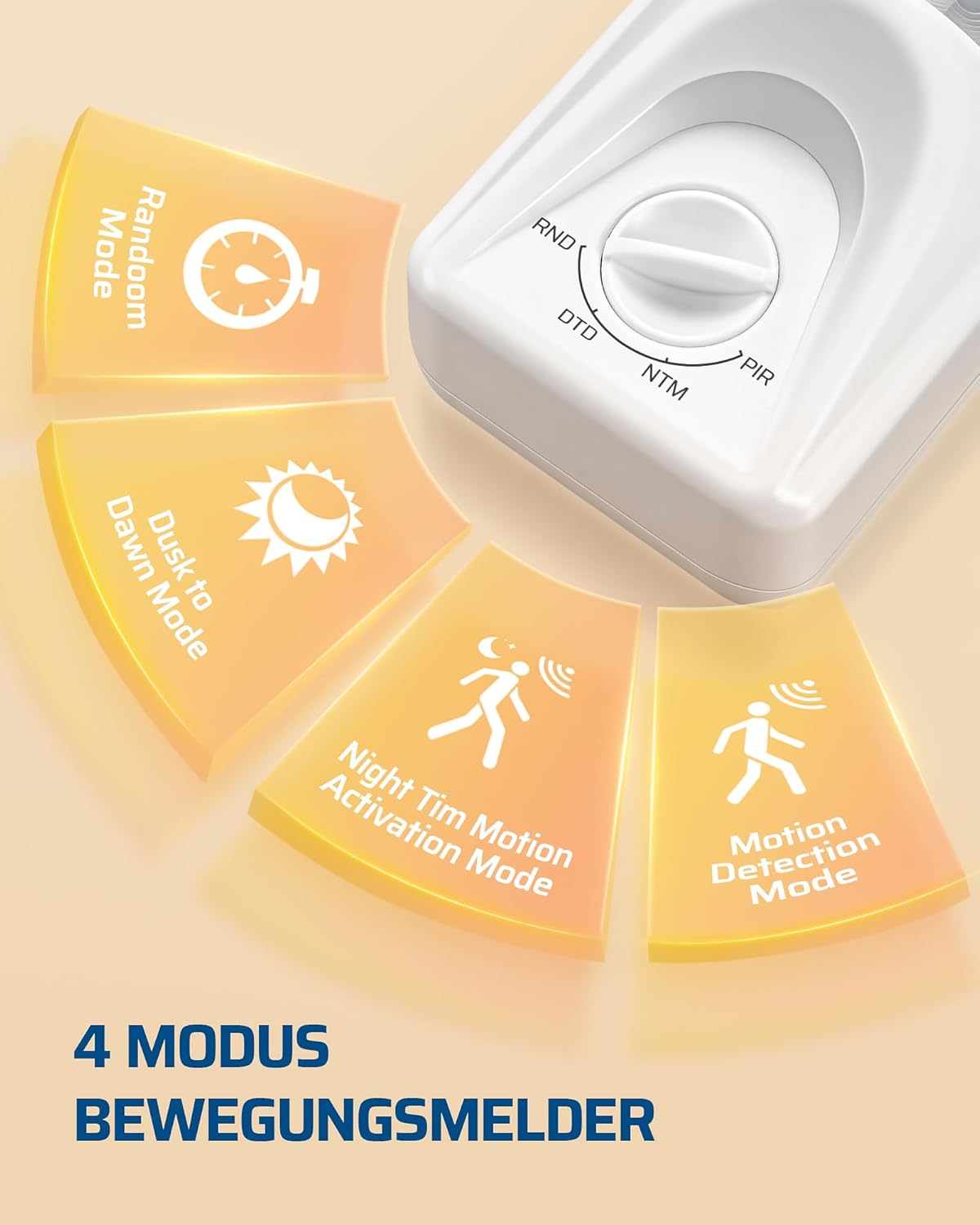
- PIR (Motion Detection Mode): The light activates when motion is detected, regardless of ambient light conditions.
- NTM (Night Time Motion Activation Mode): The light activates only when motion is detected in low light conditions.
- DTD (Iluntzetik Egunsentirako modua): The light turns on automatically at dusk and turns off at dawn, without motion detection.
- RND (ausazko modua): The light turns on and off randomly to simulate occupancy, typically used for security purposes when away from home.

6.2 Adjusting Delay Time
In PIR and NTM modes, the delay time (how long the light stays on after the last detected motion) can be adjusted using the switch on the side of the sensor. Available settings are 1, 5, 15, and 30 minutes.
6.3 Detection Range and Angle
The motion sensor has a detection range of approximately 6 meters and an adjustable detection angle of 120 degrees. The wireless signal between the sensor and receiver can transmit up to 30 meters in open areas, even through walls.


7. Mantentzea
7.1 Bateria ordezkatzea
When the motion sensor's performance degrades or it stops responding, it may be time to replace the batteries. Open the battery compartment on the back of the sensor and replace the 3x AAA batteries with new alkaline or lithium batteries, ensuring correct polarity. If using the DC 5V power option, ensure the power adapter is functioning correctly.
7.2 Garbiketa
Wipe the sensor and receiver units with a soft, dry cloth. Do not use abrasive cleaners or solvents, as these can damage the surfaces or internal components.
8. Arazoak
- Light does not turn on with motion:
- Check if the sensor batteries are dead or incorrectly installed.
- Ensure the sensor and receiver are properly paired. Re-pair if necessary.
- Verify the sensor is within the 30-meter wireless range of the receiver.
- Check the selected operating mode (PIR or NTM for motion detection).
- Ensure the light fixture connected to the receiver is functional.
- Argia etengabe piztuta mantentzen da:
- Check the selected operating mode. If in DTD mode, it will stay on from dusk till dawn.
- Ensure there is no continuous motion within the sensor's detection area.
- Verify the delay time setting is not excessively long.
- Poor detection range or sensitivity:
- Adjust the sensor's position and angle to optimize coverage.
- Ziurtatu sentsorearen funtzionamendua blokeatzen duen oztoporik ez dagoela view.
- Replace sensor batteries if they are low.
- Haririk gabeko konexio arazoak:
- Reduce the distance between the sensor and receiver.
- Gutxitu beste haririk gabeko gailuen interferentziak.
- Re-pair the sensor and receiver.
9. Zehaztapenak
| Ezaugarri | Zehaztapena |
|---|---|
| Marka | DEWENWILS |
| Modelo zenbakia | DMLC18+DRLS02 |
| Kolorea | Neutroa |
| Energia iturria (sentsorea) | 3x AAA Batteries (Alkaline or Lithium) or DC 5V |
| Energia iturria (hartzailea) | Wired (230V, 50Hz implied from context) |
| Haririk gabeko distantzia maximoa | 30 metro (eremu irekia) |
| Mugimendua detektatzeko tartea | Approx. 6 Meters |
| Detekzio angelua | 120 gradu |
| Atzerapen-denbora doigarria | 1, 5, 15, 30 Minutes (PIR & NTM modes) |
| Funtzionamendu moduak | PIR, NTM, DTD, RND |
| Muntaketa mota (sentsorea) | Wall/Ceiling Mount (Adjustable) |
| Mounting Type (Receiver) | Flexible (e.g., within fixture canopy) |
| Produktuaren neurriak (sentsorea) | 4.3S x 5.6Z x 9A cm |
| Funtzionamendu-tenperatura | 10°C (Note: This value seems unusually low for a typical operating range. Please refer to product packaging for full range.) |
| Gailu bateragarriak | Lighting control, Smart Home Hub, Alarm systems |
10. Bermea eta Laguntza
For warranty information and technical support, please refer to the documentation included with your product or visit the official DEWENWILS webgunea. Gorde erosketa-agiria berme-erreklamazioetarako.


