
KALI AUDIO IN-8W V2
Kali Audio IN-8W V2 8 hazbeteko 3 bideko estudioko monitore aktibatua Erabiltzailearen eskuliburua
Model: IN-8W V2
1. Sarrera
The Kali Audio IN-8W V2 is a 3-way powered studio monitor designed for critical listening and mixing applications. It features an 8-inch woofer, a 4-inch midrange driver, and a 1-inch soft dome tweeter, with the midrange and tweeter arranged coaxially for precise imaging. These near-field monitors deliver accurate, extended low frequencies and detailed high frequencies with low distortion, suitable for monitoring at various volume levels. With a flat frequency response and neutral tonality, the IN-8W V2 allows users to hear subtle details in their mixes. Its balanced XLR and 1/4" TRS inputs, along with RCA inputs, ensure easy integration into any studio setup.

Aurrealdea view of the Kali Audio IN-8W V2 8-inch powered 3-way studio monitor in white, showcasing the coaxial midrange and tweeter above the main woofer.
2. Segurtasun-argibide garrantzitsuak
- Irakurri arretaz argibide hauek produktua erabili aurretik.
- Gorde jarraibide hauek etorkizuneko erreferentzia izateko.
- Kontuan izan produktuaren eta funtzionamendu-argibideetako abisu guztiak.
- Jarraitu erabilera eta funtzionamendu segururako argibide guztiak.
- Ez erabili aparatu hau ur edo hezetasunetik gertu.
- Garbitu zapi lehor batekin bakarrik.
- Ez blokeatu aireztapen-irekidurak. Instalatu fabrikatzailearen argibideen arabera.
- Ez instalatu bero-iturri inongo ondoan, esate baterako, erradiadoreak, bero-erregistroak, sukaldeak edo beste aparatu batzuk (barne ampberoa sortzen duten argitzaileak).
- Ez zapaldu polarizatutako edo lurreko entxufearen segurtasun-helburua. Entxufe polarizatu batek bi pala ditu, bata bestea baino zabalagoa dutenak. Lurreratze-motako entxufe batek bi pala eta lurreko hirugarren ahoa ditu. Pala zabala edo hirugarren ahoa zure segurtasunerako eskaintzen dira. Emandako entxufea zure entxufean sartzen ez bada, kontsultatu elektrizista bati zaharkituta dagoen entxufea ordezkatzeko.
- Babestu korronte-kablea oinez ibiltzetik edo atxilotzetik, batez ere entxufeetan, erosotasun-harguneetan eta aparatutik irteten diren puntuetan.
- Erabili soilik fabrikatzaileak zehaztutako eranskinak/osagarriak.
- Deskonektatu aparatu hau tximista-ekaitzetan edo denbora luzez erabiltzen ez duzunean.
- Jarri zerbitzu-zerbitzu guztiak zerbitzu-pertsonal kualifikatuari. Zerbitzua behar da aparatua edozein modutan hondatu denean, hala nola, elikatze-kablea edo entxufea hondatuta dagoenean, likidoa isuri denean edo objektuak aparatura erori direnean, aparatua euria edo hezetasuna jasan duenean, ez du normalean funtzionatzen. , edo erori egin da.
3. Paketearen edukia
Upon unpacking your Kali Audio IN-8W V2 studio monitor, please ensure all items are present and in good condition:
- One Kali Audio IN-8W V2 Studio Monitor
- Elikatze kable bat
4. Ezaugarri nagusiak
- Errendimendu indartsua: 140-watt Class D digital amplifier system delivers clear and accurate sound for studio mixing and mastering.
- Kontrol zehatza: Independent level controls, low-cut filters, and input selection allow customization of the monitors for any application or room environment.
- Studio Reference: 8-inch woofer, 4-inch midrange driver, and 1-inch soft dome tweeter (coaxially mounted) reproduce a wide frequency response from 42Hz to 22kHz.
- Konektibitate polifazetikoa: Balanced XLR and 1/4" TRS inputs, along with unbalanced RCA inputs, ensure broad compatibility with studio equipment.

Aurrealde angeluatua view of the Kali Audio IN-8W V2 studio monitor, highlighting its sleek design and driver arrangement.
5. Konfigurazioa
5.1 Jartzea
Proper placement of your studio monitors is crucial for accurate sound reproduction. Position the monitors to form an equilateral triangle with your listening position. The tweeters should ideally be at ear level. Avoid placing monitors directly against walls or in corners without utilizing the boundary compensation settings.
5.2 Konexioak
The IN-8W V2 offers three types of audio inputs:
- XLR Input (+4 dBu): For balanced professional audio equipment.
- TRS Input (+4 dBu): For balanced or unbalanced 1/4-inch connections.
- RCA Input (-10 dBV): For unbalanced consumer audio equipment.
Connect your audio source to one of these inputs. Only use one input at a time. Ensure the volume knob on the monitor is set to its lowest position before connecting the power cable.
5.3 Piztea
After connecting your audio source, plug the power cable into the monitor and then into a suitable AC outlet. Flip the power switch to the 'On' position. The LED indicator on the front of the monitor will illuminate.
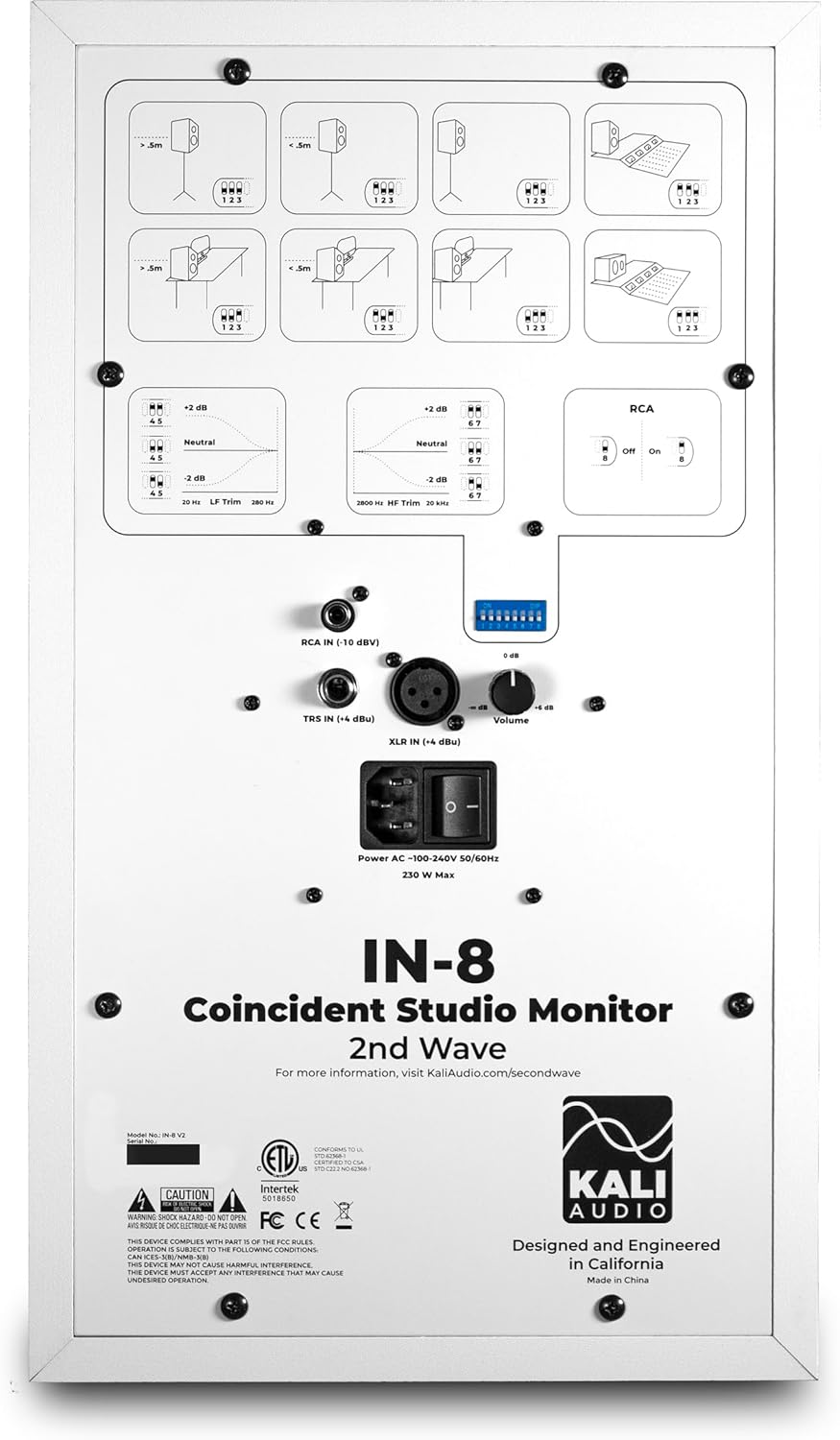
Xehetasuna view of the rear panel of the Kali Audio IN-8W V2 studio monitor, displaying input connections (XLR, TRS, RCA), volume control, and DIP switches for boundary compensation and EQ settings.
6. Funtzionamendu-argibideak
6.1 Bolumen kontrola
The large knob on the rear panel controls the output volume of the monitor. Start with a low volume and gradually increase it to a comfortable listening level.
6.2 Sarrera hautatzea
The IN-8W V2 automatically detects which input is active. If multiple inputs are connected, ensure only one source is playing audio at a time to avoid signal conflicts.
6.3 Boundary Compensation EQ Settings
The IN-8W V2 features a series of DIP switches on the rear panel to adjust the monitor's frequency response based on its placement in your room. These settings help to compensate for acoustic anomalies caused by boundaries (walls, desks, etc.). Refer to the diagrams printed on the rear panel for recommended settings based on your monitor's position.
- LF Trim: Maiztasun baxuko erantzuna doitzen du.
- HF Trim: Maiztasun handiko erantzuna doitzen du.
- RCA Input On/Off: Activates or deactivates the RCA input. Ensure this is set correctly if using RCA.
Experiment with these settings to achieve the most neutral and accurate sound in your listening environment.
7. Mantentzea
7.1 Garbiketa
To clean the monitor, use a soft, dry cloth. Do not use abrasive cleaners, waxes, or solvents, as these can damage the cabinet finish or drivers. Avoid spraying liquids directly onto the monitor.
7.2 Biltegiratzea
If storing the monitor for an extended period, ensure it is powered off and disconnected from the power source. Store it in a cool, dry place, ideally in its original packaging, to protect it from dust and physical damage.
8. Arazoak
| Arazoa | Kausa posiblea | Irtenbidea |
|---|---|---|
| Soinurik ez |
|
|
| Soinu distortsionatua |
|
|
| Burrunba edo zarata |
|
|
9. Zehaztapenak
| Ereduaren izena | IN-8W V2 |
| Hizlari mota | 3 bideetako estudioko monitorea |
| Wooferaren diametroa | 8 hazbete |
| Erdiko Gidaria | 4 Inches (Coaxial) |
| Tweeter Diametroa | 1 Inch (Coaxial) |
| Amppotentzia biziagoa | 140 watt (D klasea) |
| Maiztasun Erantzuna | 42 Hz - 22 kHz |
| Sarrerak | XLR (+4 dBu), TRS (+4 dBu), RCA (-10 dBV) |
| Produktuaren neurriak (L x W x H) | 10" x 15" x 12" |
| Elementuaren pisua | 25.9 kilo |
| Kolorea | Zuria |
| Energia iturria | Kable elektrikoa |
10. Bermea eta Laguntza
This Kali Audio IN-8W V2 studio monitor is covered by a manufacturer's warranty. For specific details regarding the warranty period and terms, please refer to the documentation included with your product or visit the official Kali Audio website. For technical support, troubleshooting assistance beyond this manual, or warranty claims, please contact Kali Audio customer service directly.
You can find more information and support resources on the official Kali Audio webgunea: www.kaliaudio.com
Ask a question about this manual
Ask about setup, troubleshooting, compatibility, parts, safety, or missing instructions. Manuals+ will review the question and use this page’s manual context to help answer it.