
Sarrera
This manual provides comprehensive instructions for the ProtoArc EK01 Plus Ergonomic Wireless Backlit Keyboard. Please read this guide carefully to ensure proper setup, operation, and maintenance of your device. Keep this manual for future reference.
Paketearen edukia
Egiaztatu elementu guztiak paketean daudela:
- ProtoArc EK01 Plus Ergonomic Wireless Backlit Keyboard
- Eskumuturrekoa
- USB-C kargatzeko kablea
- 2.4G USB hargailua
- Erabiltzailearen eskuliburua
Produktua amaituview
The ProtoArc EK01 Plus is a full-size ergonomic keyboard designed to enhance typing comfort and reduce muscle strain. Its split and curved keyframe design promotes a natural hand and wrist posture.
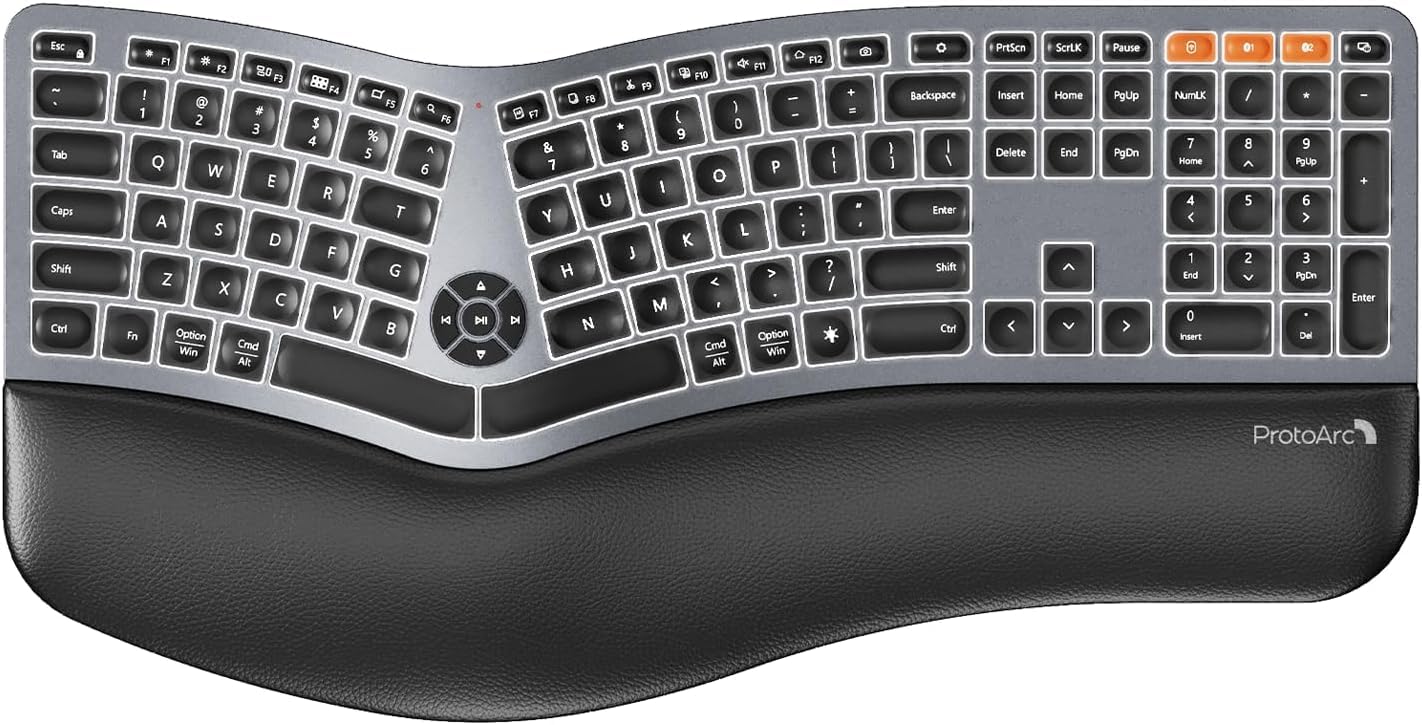
Image 1: ProtoArc EK01 Plus Ergonomic Wireless Backlit Keyboard. This image displays the full keyboard with its split design, integrated wrist rest, and key layout.
Ezaugarri nagusiak:
- Ergonomic Full-Size Design: Features a split, curved keyframe and integrated wrist rest to minimize muscle fatigue and promote proper posture.
- Oin erregulagarri inklinagarriak: Four adjustable tilt feet allow customization of the keyboard angle for optimal comfort.
- Atzeko argiztapen erregulagarria: Soft white LED backlighting with three adjustable brightness levels (low-medium-high) for comfortable typing in various lighting conditions.
- Gailu anitzeko konexioa: Connects to up to three devices simultaneously via Bluetooth and 2.4G USB. Easily switch between devices with a dedicated key.
- USB-C kargagarria: Equipped with a 2000 mAh rechargeable lithium battery for extended use.
- Lo modu automatikoa: Enters sleep mode after 60 minutes of inactivity to conserve power, waking up within 3 seconds upon key press.
- Bateragarritasuna: Widely compatible with Windows 7/8/10, Mac OS X 10.12 or higher, and Android 4.3 or higher.
Konfigurazioa
1. Teklatua kargatzea
- Bilatu USB-C kargatzeko ataka teklatuan.
- Connect the provided USB-C cable to the keyboard and the other end to a USB power source (e.g., computer USB port, wall adapter).
- Kargatzeko adierazlearen argia piztuko da. Guztiz kargatuta dagoenean, argiaren kolorea alda daiteke edo itzali egin daiteke.
2. Gailuetara konektatzea
The keyboard supports both 2.4G USB and Bluetooth connectivity.
2.1. 2.4G USB Connection
- Locate the 2.4G USB receiver (dongle). It is usually stored in a compartment on the keyboard or in the packaging.
- Konektatu USB hargailua zure ordenagailuko USB ataka erabilgarri batean.
- Piztu teklatua etengailua erabiliz.
- Teklatua automatikoki konektatu beharko litzateke zure gailura.
2.2. Bluetooth Connection (Up to 3 Devices)
- Piztu teklatua.
- Sakatu eta eutsi Bluetooth kanaleko tekletako bat (adibidez, BT1, BT2, edo BT3) for 3-5 seconds until the indicator light flashes, indicating pairing mode.
- Zure gailuan (ordenagailuan, tabletan, telefonoan), gaitu Bluetooth-a eta bilatu gailu berriak.
- Select "ProtoArc EK01 Plus" (or similar name) from the list of available devices.
- Jarraitu pantailan agertzen diren argibideei parekatze prozesua osatzeko. Adierazle-argia keinuka geldituko da konektatuta dagoenean.
- Repeat these steps for up to two additional Bluetooth devices using the other Bluetooth channel keys.
Funtzionamendua
1. Gailuen artean aldatzea
Konektatutako gailuen artean aldatzeko, sakatu dagokion konexio-tekla:
- Sakatu 2.4G to switch to the device connected via the USB receiver.
- Sakatu BT1 to switch to the first Bluetooth device.
- Sakatu BT2 to switch to the second Bluetooth device.
- Sakatu BT3 to switch to the third Bluetooth device.
2. Atzeko argia doitzea
The keyboard features a soft white LED backlight with three brightness levels.
- To cycle through brightness levels (low, medium, high, off), press the dedicated backlight key (refer to keyboard layout for specific key).
3. Sleep Mode and Power Saving
To conserve battery life, the keyboard will automatically enter sleep mode after 60 minutes of inactivity. To wake the keyboard, press any key. The keyboard will be ready for use within 3 seconds.
4. Adjustable Tilt
The keyboard includes four adjustable tilt feet. Extend or retract these feet to customize the typing angle to your preference, ensuring comfortable wrist positioning whether sitting or standing.
Mantentzea
1. Teklatua garbitzea
- Deskonektatu teklatua gailu eta energia-iturri guztietatik garbitu aurretik.
- Erabili lipurrik gabeko zapi leun bat dampTeklatuaren gainazala urarekin edo garbiketa-soluzio leun batekin garbitu.
- Saihestu produktu kimiko gogorrak, garbitzaile urratzaileak edo disolbatzaileak erabiltzea, hauek teklatuaren akabera kaltetu baitezakete.
- Teklen artean garbitzeko, erabili aire konprimatua hautsa eta hondakinak kentzeko.
2. Bateria zaintzea
- Charge the keyboard regularly to maintain battery health.
- Saihestu bateria maiz erabat deskargatzea.
- If storing the keyboard for an extended period, charge it to approximately 50% before storage.
Arazoak konpontzea
| Arazoa | Kausa posiblea | Irtenbidea |
|---|---|---|
| Teklatuak ez du erantzuten | Low battery; Keyboard off; Incorrect connection mode; USB receiver not plugged in (2.4G); Bluetooth not paired. | Charge the keyboard; Turn on the keyboard; Switch to the correct connection mode (2.4G, BT1/2/3); Ensure USB receiver is securely plugged in; Re-pair Bluetooth. |
| Lag or delayed input | Interferentzia; Hartzailearekiko/gailuarekiko distantzia; Bateria baxua. | Move closer to the receiver/device; Ensure no strong interference sources nearby; Charge the keyboard. |
| Atzeko argiak ez du funtzionatzen | Atzeko argia itzalita; Bateria gutxi. | Press the backlight key to adjust brightness; Charge the keyboard. |
| Ezin da Bluetooth bidez konektatu | Keyboard not in pairing mode; Device Bluetooth off; Already connected to 3 devices. | Ensure keyboard is in pairing mode (flashing indicator); Enable Bluetooth on your device; Disconnect from an existing Bluetooth device if maximum reached. |
Zehaztapenak
| Marka | ProtoArc |
| Modelo zenbakia | EK01 Plus |
| Konektibitate Teknologia | Bluetooth, 2.4G USB |
| Teklatuaren deskribapena | Ergonomic, Full Size, Split Design |
| Ezaugarri bereziak | Ergonomic, Full Size, Wrist Rest, Backlit, Rechargeable |
| Kolorea | Espazio Grisa |
| Backlight Color Support | Monochromatic (White LED) |
| Materiala | Plastikoa |
| Energia iturria | Battery Powered (2000 mAh Lithium Battery) |
| Aldatu mota | Mintza |
| Teklatuaren diseinua | QWERTY (UK layout for this variant) |
| Gako kopurua | 117 |
| Gailu bateragarriak | Laptop, PC, Tablet, Windows/Mac/Android |
| Elementuaren pisua | 1.6 kilogramo |
| Neurriak (gutxi gorabehera) | 48 cm (luzera) x 25 cm (zabalera) |
Bermea eta Laguntza
For warranty information and technical support, please refer to the ProtoArc official website or contact their customer service. Details are typically provided on the product packaging or the official brand store.
ProtoArc Official Store: Visit ProtoArc Store on Amazon