
Tenda TEM2010X
Tenda TEM2010X 8-Port 2.5G Ethernet Switch User Manual
Model: TEM2010X
1. Sarrera
The Tenda TEM2010X is an unmanaged 8-port 2.5G Ethernet switch designed to enhance network performance for various applications, including 2.5G WiFi 6 APs, NAS devices, gaming computers, and 4K/8K video streaming. It features eight 2.5 Gigabit RJ45 ports and two 10 Gigabit SFP+ slots, offering flexible connectivity and high-speed data transfer capabilities. This device supports multiple operating modes, including Standard, VLAN, and Static Link Aggregation, to adapt to different network requirements. Its fanless metal design ensures quiet operation and efficient heat dissipation.
2. Paketearen edukia
Egiaztatu elementu guztiak zure paketean daudela:
- Tenda TEM2010X 8-Port 2.5G Ethernet Switch
- Elikatze-moldagailua
- Erabiltzailearen eskuliburua (dokumentu hau)
3. Produktua amaitu daview
The TEM2010X switch features a robust metal casing and a clear layout for easy identification of ports and indicators.
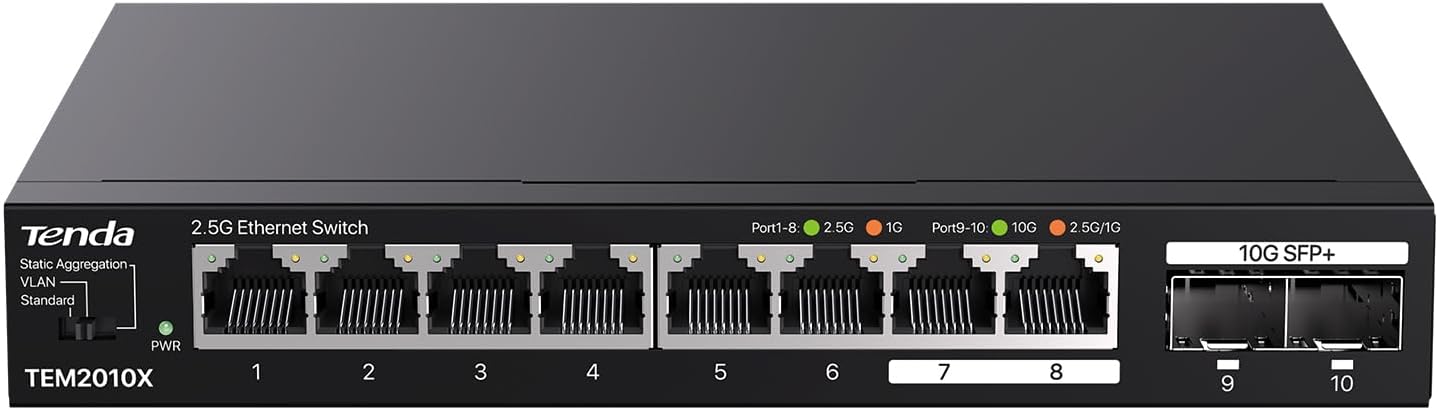
3.1. irudia: Front panel of the Tenda TEM2010X switch, showing 8 RJ45 ports, 2 SFP+ slots, a power LED, and a mode toggle switch.
Aurrealdeko panela
- PWR LED: Indicates power status. Green for power on.
- Mode Toggle Switch: Selects between Standard, VLAN, and Static Aggregation operating modes.
- Ports 1-8 (2.5G RJ45): Eight 2.5 Gigabit Ethernet ports for connecting network devices. Each port has an indicator LED for link/activity status.
- Ports 9-10 (10G SFP+): Two 10 Gigabit SFP+ slots for fiber optic connections, supporting 1G, 2.5G, and 10G modules (modules not included). Each slot has an indicator LED for link/activity status.
Atzeko panela
- Potentzia sarrera: Barneratutako energia-egokitzailera konektatzen da.
- Lurreko terminalera: For optional grounding connection to protect against electrical surges.
4. Konfiguratzeko argibideak
The TEM2010X switch is designed for plug-and-play operation, requiring no software configuration for basic functionality.
- Lekua: Place the switch on a stable, flat surface or mount it to a wall using appropriate hardware (not included). Ensure adequate ventilation around the device.
- Potentzia-konexioa: Connect the power adapter to the switch's power input port and then plug the adapter into a standard electrical outlet. The PWR LED on the front panel should illuminate green.
- Sare-konexioak:
- Connect your router or modem to any of the 2.5G RJ45 ports (Ports 1-8) using an Ethernet cable.
- Connect your network devices (e.g., computers, NAS, gaming consoles, WiFi APs) to the remaining 2.5G RJ45 ports.
- For 10G fiber optic connections, insert compatible SFP+ modules (not included) into Ports 9-10, then connect fiber optic cables to these modules.
- Egiaztatu konexioa: Once devices are connected, the corresponding port LEDs on the switch should light up, indicating an active link. A blinking LED signifies data activity.

4.1. irudia: Illustrates how the TEM2010X switch expands network connectivity for devices such as 4K/8K video systems, laptops with 2.5G adapters, WiFi 5/6/7 routers, WiFi 6 APs, 2.5G gaming PCs, and 2.5G NAS/servers.

4.2. irudia: Depicts the two 10Gbps SFP+ slots, highlighting their support for 1G, 2.5G, and 10G optical fiber modules to meet diverse transmission speed requirements. Modules are sold separately.
5. Funtzionamendu moduak
The TEM2010X switch offers three distinct operating modes, selectable via the toggle switch on the front panel. These modes cater to different network isolation and performance needs.

5.1. irudia: Amaituview of the three selectable operating modes: Standard, VLAN, and Static Aggregation.
- Modu estandarra: This is the default mode. All ports (1-10) can communicate with each other at their respective speeds (2.5G for RJ45, up to 10G for SFP+). The switch functions as a standard unmanaged switch, allowing full connectivity between all connected devices.
- VLAN modua: In this mode, ports 1-6 are isolated from each other, preventing direct communication between them. However, all isolated ports (1-6) can communicate with ports 7-10 (RJ45 ports 7 and 8, and SFP+ ports 9 and 10). This mode helps to isolate DHCP broadcast domains and reduce broadcast storms, enhancing network security and efficiency for specific segments.
- Static Aggregation Mode: This mode groups ports 7 and 8 together to form a single logical link, providing increased bandwidth and redundancy. This is particularly useful for dual-port 2.5G NAS devices, allowing for a combined throughput of up to 5 Gbps.
6. Mantentzea
The Tenda TEM2010X switch is designed for reliable, low-maintenance operation.
- Garbiketa: Erabili zapi leun eta lehor bat etengailuaren kanpoaldea garbitzeko. Ez erabili garbitzaile likido edo aerosolik.
- Aireztapena: Ensure that the ventilation openings on the sides of the switch are not blocked. The fanless metal design relies on natural convection for heat dissipation.
- Ingurumen-baldintzak: Operate the switch within the specified temperature range of 0°C to 40°C (32°F to 104°F) and humidity range of 10% to 90% non-condensing.
- Potentzia-zikloa: If the switch experiences unexpected behavior, try disconnecting and reconnecting the power adapter to restart the device.

6.1. irudia: Highlights key features contributing to the switch's reliability: fanless quiet operation, an operating temperature range of 32°F-104°F, a durable metal case, and effective heat dissipation.

6.2. irudia: Illustrates the energy-efficient technology integrated into the TEM2010X, designed to expand network capacity with reduced power consumption.
7. Arazoak
If you encounter issues with your Tenda TEM2010X switch, refer to the following common problems and solutions:
- Potentziarik gabe:
- Ziurtatu korronte-egokitzailea ondo konektatuta dagoela etengailura eta funtzionatzen duen entxufe elektriko batera.
- Egiaztatu korronte-hartunea funtzionala dela.
- Ez dago esteka/jarduerarik portu batean:
- Egiaztatu Ethernet kablea ondo konektatuta dagoela bai switch atakara bai konektatutako gailura.
- Saiatu beste Ethernet kable batekin kablearen kalteak saihesteko.
- Ziurtatu konektatutako gailua piztuta dagoela eta bere sare-egokitzailea behar bezala funtzionatzen duela.
- Verify that the connected device's network adapter supports 2.5G Ethernet or is set to auto-negotiate speed.
- Sarearen abiadura motela:
- Ensure all connected devices and cables support 2.5G Ethernet for optimal performance. Older Gigabit (1G) devices will operate at their maximum speed, which is slower than 2.5G.
- Check the mode toggle switch. If in VLAN mode, ensure your network configuration is appropriate for isolated ports.
- For SFP+ ports, ensure compatible 10G modules and fiber optic cables are used.
- Etengabeko konexioa:
- Egiaztatu kable-konexio guztiak solteak edo kalteak dauden.
- Ensure the switch is placed in a well-ventilated area to prevent overheating.
- Consider potential electromagnetic interference from other electronic devices.
8. Zehaztapenak

8.1. irudia: Illustrates the compact design of the TEM2010X, suitable for various installations, including desktop and wall mounting, with dimensions provided.
| Ezaugarri | Deskribapena |
|---|---|
| Eredua | TEM2010X |
| Marka | Tenda |
| Portu kopurua | 10 (8 x 2.5G RJ45, 2 x 10G SFP+) |
| Datuen transferentzia-tasa | 2500 Gigabits Per Second (for RJ45 ports) |
| Aldaketa-gaitasuna | 80 Gbps |
| Interfaze mota | RJ45, SFP+ |
| Kasu Materiala | Metala |
| Fanless Diseinua | Bai |
| Funtzionamendu-tenperatura | 0°C eta 40°C (32°F eta 104°F) |
| liburukiatage | AC 240 Volts (Input) |
| Elementuaren pisua | 1.56 kilo |
| Paketearen neurriak | 8.46 x 5.47 x 3.31 hazbete |
| Gailu bateragarriak | 2.5G NAS, Wifi 6/7 AP, Wifi 6/7 Router & Mesh, 2.5G Gaming PC, 4K/8K Video |
9. Bermea eta Laguntza
Tenda Technology provides professional support for its products.
- Fabrikatzailearen laguntza: This product comes with a 3-year manufacturer support warranty.
- Jarri harremanetan laguntzarekin: For technical assistance or warranty inquiries, please contact Tenda support at support.us@tenda.cn.