
1. Sarrera
Welcome to the Pimax Crystal Light VR Headset user manual. This guide provides essential information for setting up, operating, and maintaining your new virtual reality headset. The Pimax Crystal Light offers an immersive PC VR experience with industry-leading resolution and advanced features designed for clarity and performance.
2. Segurtasun informazioa
Please read and follow all safety instructions before using the Pimax Crystal Light VR Headset to prevent injury or damage to the device.
- Ensure your play area is clear of obstacles to avoid tripping or collisions.
- Take regular breaks to prevent eye strain, motion sickness, or discomfort.
- Do not expose the headset to direct sunlight, as this can damage the lenses and display.
- Keep the headset away from liquids and extreme temperatures.
- Consult a doctor before use if you have pre-existing medical conditions that could be affected by VR.
3. Paketearen edukia
Verify that all items are present in your Pimax Crystal Light VR Headset package:
- Pimax Crystal Light VR Headset x1
- DisplayPort Cable x1
- Elikadura egokitzailea x1
- USB C motako kablea x2
- Gida azkarra txartela x1
- After-sales Service Card x1

Image: Pimax Crystal Light VR Headset and its components.
4. Konfigurazio gida
4.1 Sistemaren eskakizunak
To ensure optimal performance, your PC must meet the following recommended specifications:
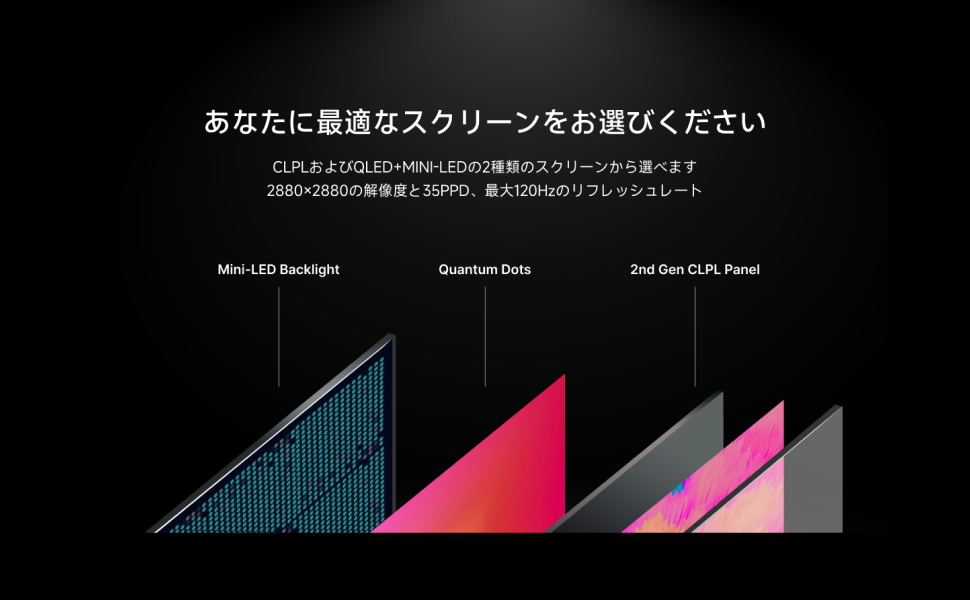
Image: Recommended PC specifications for the Pimax Crystal Light.
- Sistema eragilea: Windows 10 / Windows 11
- GPU: NVIDIA GeForce RTX 3080 and above
- CPU: Intel i7-12500 / AMD R7-3700X and above
- RAM: 16 GB eta gehiago
- Bideo irteera: DisplayPort 1.2
- USB atakak: USB 3.0 edo berriagoa
- Jolas eremua: Standing/Seated (No minimum space requirements), Roomscale (Up to 10m x 10m)
Note: Recommended requirements ensure optimal performance for enjoying the full capabilities of Pimax Crystal Light.
4.2 Hardware konexioa
- Connect DisplayPort Cable: Plug one end of the DisplayPort cable into the headset and the other end into your PC's graphics card DisplayPort output.
- Connect USB Type-C Cables: Connect both USB Type-C cables from the headset to available USB 3.0 or newer ports on your PC.
- Konektatu korronte egokitzailea: Plug the power adapter into the headset and then into a wall outlet.
4.3 Software-instalazioa
Download and install the latest version of Pimax Play software from the official Pimax website. Pimax Play is required for headset configuration and integration with SteamVR.
- Install Pimax Play and follow the on-screen instructions.
- Ensure SteamVR is installed and updated on your PC.
- Launch Pimax Play and follow the guided setup for initial calibration.
5. Funtzionamendu-argibideak
5.1 Entzungailuak janztea
Adjust the head strap and interpupillary distance (IPD) until the image is clear and comfortable. The headset is designed for lightweight comfort and balanced weight distribution.

Image: Proper wearing and usage of the Pimax Crystal Light VR Headset.
5.2 Ezaugarri eta ezarpen nagusiak
The Pimax Crystal Light offers several advanced features for an enhanced VR experience:
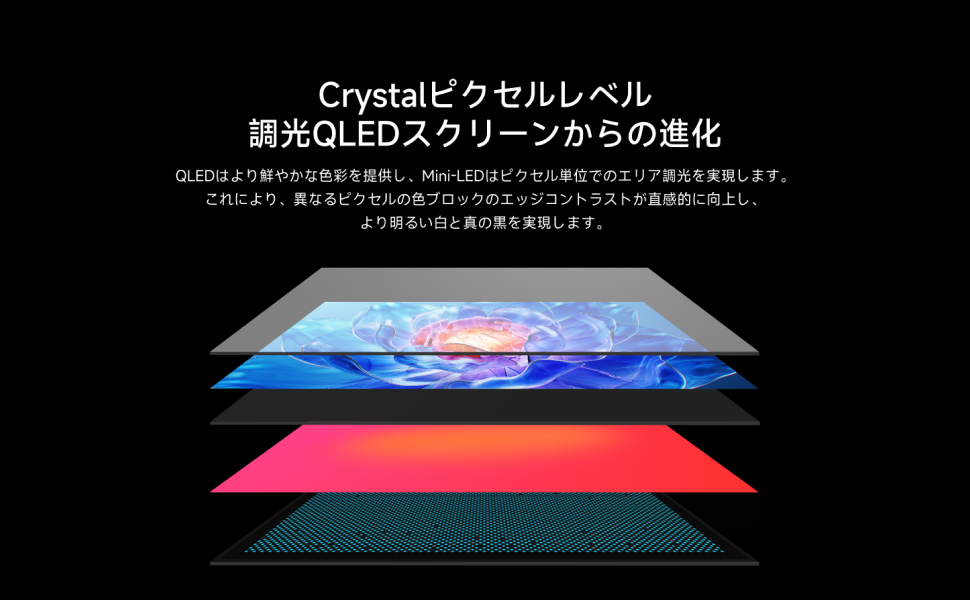
- Bereizmen handia: Enjoy a crisp visual experience with 2880 x 2880 pixels per eye.
- Freskatze-tasak: Select between 72Hz, 90Hz, or 120Hz refresh rates via Pimax Play software for smooth motion.
- 35 PPD (Pixels Per Degree): Delivers exceptional visual clarity and detail.
- Tokiko iluntzea: Enhances contrast and black levels for a more immersive display.
- Fixed Foveated Rendering (FFR): Optimizes performance by rendering the center of your vision at full resolution and the periphery at a lower resolution.
- Lighthouse Compatibility: Supports Lighthouse base stations for precise external tracking (base stations and controllers sold separately).
- 6DOF Inside-Out Tracking: Provides accurate positional tracking without external sensors.
- Glass Lenses: Aspherical glass lenses minimize distortion and maximize clarity.
- Integrated Audio & Dual Microphones: For immersive sound and clear communication.
Irudia: Gainetikview of Pimax Crystal Light's core features.
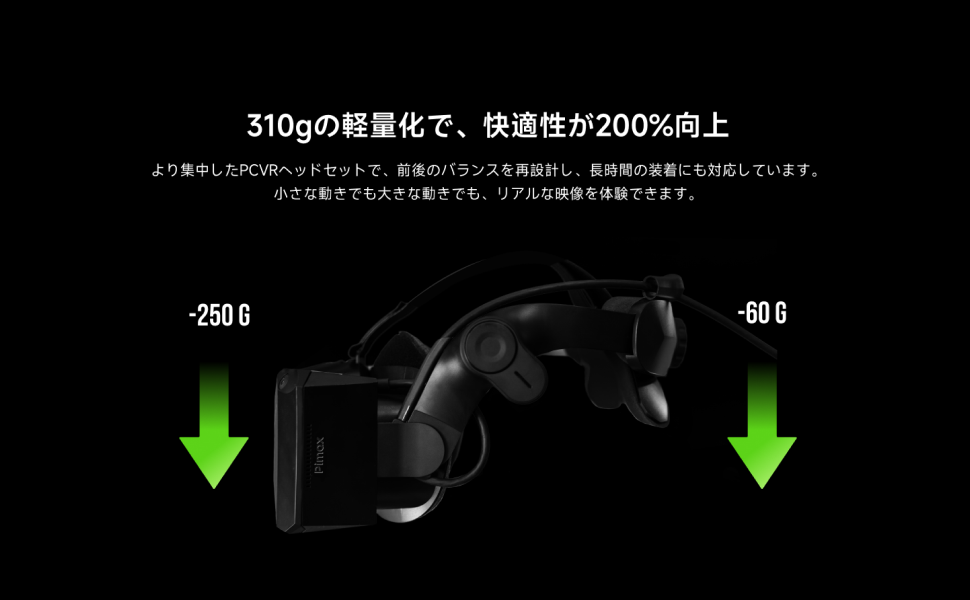
Image: Detailed features including 6DOF tracking, Lighthouse compatibility, 35 PPD, 2880x2880 resolution, 120Hz refresh rate, and lightweight design.
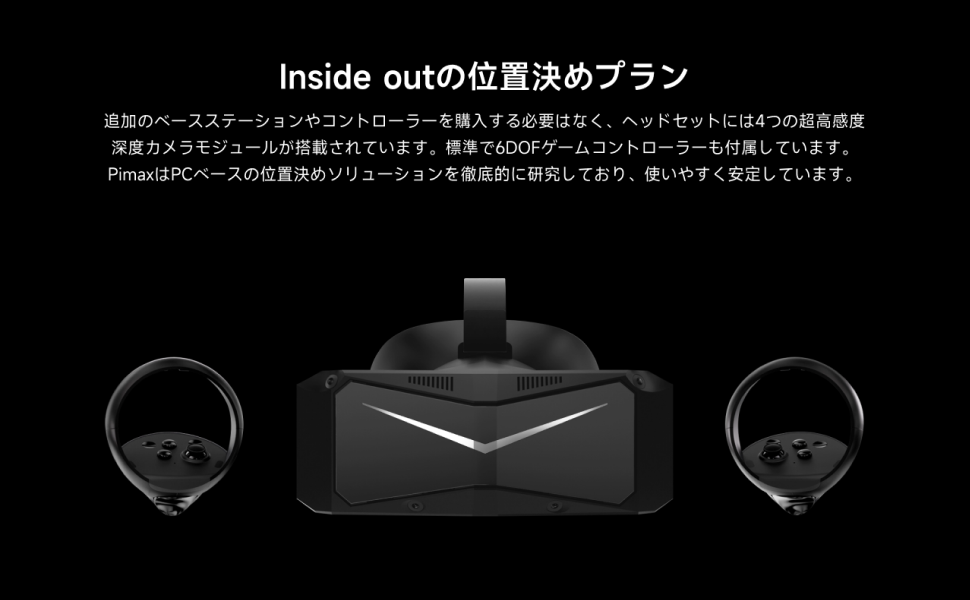
Image: Explanation of screen technology, including Mini-LED backlight and Quantum Dots for enhanced display quality.
6. Mantentzea
- Lenteak garbitzea: Use a microfiber cloth specifically designed for optical lenses. Do not use abrasive materials or chemical cleaners.
- Entzungailuen gorputza garbitzea: Garbitu kanpoaldea leun batekin, damp oihal. Saihestu hezetasuna ataketan edo irekiduretan sartzea.
- Biltegiratzea: Store the headset in a cool, dry place away from direct sunlight. Use the provided lens cover to protect the lenses from dust and scratches.
- Kableen kudeaketa: Saihestu kableetan tolestura edo okerdura zorrotzak kalteak ekiditeko.
7. Arazoak
If you encounter issues with your Pimax Crystal Light VR Headset, refer to the following common troubleshooting steps:

Image: Troubleshooting guide for common issues.
Ohiko arazoak eta irtenbideak:
- Jarraipen arazoak:
- Ingurumena: Ensure your play area has consistent lighting (not too bright or too dark). Verify that the Pimax Play indoor ambient frequency matches your local AC power frequency.
- Game Area: Ensure the game area has sufficient identifiable features for tracking.
- Performance Issues (Frame Drops):
- PC Specifications: Confirm your PC meets the minimum requirements:
- Minimum CPU: Intel Core i5 12th generation (or equivalent)
- Minimum GPU: NVIDIA RTX 2070 (or equivalent)
- Softwarea/Firmwarea: Outdated drivers or firmware can cause frame drops. Update Pimax Play and headset firmware.
- Graphic Settings: Excessive rendering resolution in Pimax Play or the game itself can lead to performance issues. Adjust settings for better performance.
- PC Specifications: Confirm your PC meets the minimum requirements:
- Headset Not Detected / Display Off:
- USB konexioa: Ensure the headset is connected to a USB 3.0+ port. Check all cable connections.
- Energia kudeaketa: Disable USB power saving modes in your PC's power settings.
Ohar garrantzitsua: If the above troubleshooting steps do not resolve the issue, please contact Pimax customer support. They can provide further assistance and guidance.
8. Zehaztapenak
| Ezaugarri | Xehetasuna |
|---|---|
| Marka | Pimax |
| Ereduaren izena | Crystal Light (Headset only) |
| Kolorea | Beltza |
| Bistaratzeko mota | LCDa |
| Gehienezko pantailaren bereizmena | 2880 x 2880 pixels per eye |
| Freskatze tasa | 72Hz / 90Hz / 120Hz |
| Pixel graduko (PPD) | 35 ppd |
| ren eremua View (FOV) | 130 gradu |
| Lenteen teknologia | Aspherical Glass Lenses |
| Jarraipen Teknologia | 6DOF Inside-Out Tracking, Lighthouse compatible (external base stations required for Lighthouse tracking) |
| Sensor Teknologia | Lighthouse Gyroscope Accelerometer |
| Konektibitatea | DisplayPort, USB Type-C (x2) |
| Gailu bateragarriak | PC |
| Sistema eragilea | Leihoak |
| Plataforma | SteamVR |
| Ezaugarri bereziak | Local Dimming, Fixed Foveated Rendering, Integrated Audio, Dual Microphones |
| Jatorrizko Herrialdea | Txina |
9. Bermea eta Laguntza
The Pimax Crystal Light VR Headset comes with a 1 urteko fabrikatzailearen bermea erosketa-datatik aurrera. Berme honek ohiko erabileran materialen eta eskulanen akatsak estaltzen ditu.
For technical support, warranty claims, or any product-related inquiries, please refer to the After-sales Service Card included in your package or visit the official Pimax support website. Ensure you have your product's serial number and proof of purchase ready when contacting support.
