
1. Segurtasun-argibide garrantzitsuak
When using electrical appliances, basic safety precautions should always be followed to reduce the risk of fire, electric shock, and personal injury. Read all instructions carefully before using the Milex Digital Steam Iron.
- Ziurtatu beti liburukiatagE-ren balio-etiketako zenbakia zure sare nagusiaren bolumenari dagokiotage.
- Ez murgildu lisagailua, kablea edo entxufea uretan edo beste likido batzuetan.
- Deskonektatu plantxa entxufe elektrikotik urez betetzen ari zarenean, husten ari zarenean edo erabiltzen ez duzunean.
- Ez erabili aparaturik kablea edo entxufea hondatuta duen, edo aparatuak gaizki funtzionatzen duen edo erortzen den edo edozein modutan hondatu ondoren.
- Piztuta edo hozten ari denean, lisagailua eta kablea haurren eta animalien eskura ez utzi.
- Never leave the iron unattended while it is connected to the power supply or on an ironing board.
- Erabili lisagailua etxeko erabilerarako soilik.
- The soleplate of the iron can become extremely hot. Avoid direct contact with the hot soleplate.
- Jarri beti plantxa gainazal egonkor eta beroarekiko erresistente batean atseden hartzen duzunean.
2. Produktua amaitu daview
The Milex Digital Steam Iron MSI004 is designed for efficient garment care. Familiarize yourself with its components before use.
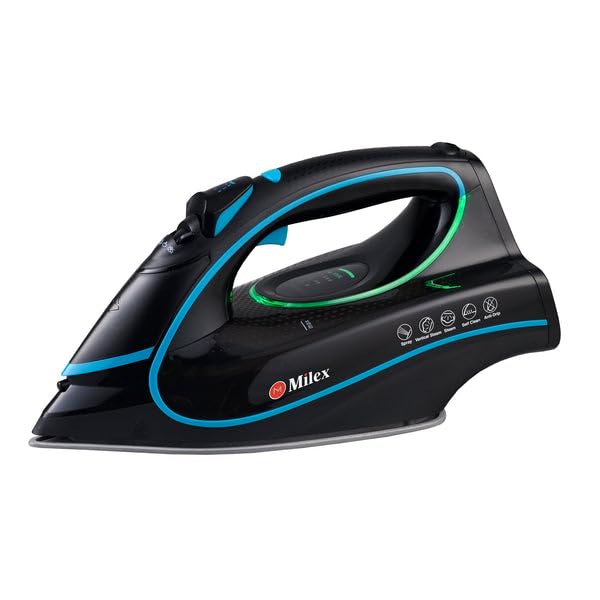
Figure 1: Milex Digital Steam Iron (3/4 view)
This image displays the Milex Digital Steam Iron from a three-quarter angle, highlighting its sleek black design with blue and green accents. Key features visible include the handle, water tank, and the general shape of the soleplate.
Osagaiak:
- Water Spray Nozzle: For moistening fabrics.
- Ura betetzeko sarrera: Where water is added to the tank.
- Steam Control Dial/Buttons: To adjust steam output.
- Temperature Control Dial/Buttons: To select desired heat setting.
- LED pantaila: Uneko ezarpenak erakusten ditu.
- Heldulekua: For gripping the iron.
- Ur depositua: Reservoir for water.
- Zola: Ehunaren gainean irristatzen den gainazal berotua.
- Elikatze kablea: Lisagailua entxufe elektrikora konektatzen du.

Figure 2: Ceramic Soleplate
Irudi honek hurbileko irudia eskaintzen du view of the ceramic soleplate, showing its textured surface and steam vents designed for even heat distribution and smooth gliding.
3. Konfigurazioa eta lehen erabilera
3.1 Paketatzea
- Remove the iron from its packaging.
- Kendu babes-film edo eranskailu oro zola-plakatik.
- Inspect the iron for any signs of damage. If damaged, do not use and contact customer support.
3.2 Ur depositua betetzea
- Ziurtatu lisagailua entxufetik deskonektatuta dagoela.
- Set the steam control to the "Dry Ironing" position (if applicable).
- Ireki ura betetzeko sarrerako estalkia.
- Neurketa-kopa bat erabiliz, kontu handiz bota txorrotako ur garbia ur-deposituan "MAX" betetze-marraraino. Ez bete gehiegi.
- Itxi ondo ura betetzeko sarrerako estalkia.
Oharra: For areas with hard water, it is recommended to use a mixture of 50% tap water and 50% distilled water to prevent mineral buildup. Never use perfumed water, vinegar, starch, or descaling agents in the water tank.
4. Funtzionamendu-argibideak
4.1 Lisatzeko prestatzea
- Sort garments according to fabric type (e.g., linen, cotton, wool, silk, synthetics).
- Check garment care labels for recommended ironing temperatures.
- Plug the iron into a suitable electrical outlet. The LED display will illuminate.
4.2 Setting Temperature and Steam
- Use the temperature control buttons to select the appropriate heat setting for your fabric. The LED display will show the selected temperature.
- Allow the iron to heat up until the indicator light (if present) or LED display confirms it has reached the desired temperature.
- For steam ironing, ensure the water tank is filled. Adjust the steam control to the desired steam level. Steam is typically available at higher temperature settings.
- For dry ironing, ensure the water tank is empty or the steam control is set to "Dry Ironing".
4.3 Using Steam Functions
- Etengabeko lurruna: Select a steam setting on the control. Steam will be continuously emitted from the soleplate.
- Steam Burst: Press the "Burst" button for an extra shot of steam to remove stubborn wrinkles. Wait a few seconds between bursts.
- Ur ihinztadura: Press the "Spray" button to lightly moisten fabric before ironing.
4.4 Auto-Shutoff Feature
The iron is equipped with an auto-shutoff safety feature. If left unattended horizontally for a certain period (e.g., 30 seconds) or vertically (e.g., 8 minutes), the heating element will automatically turn off. To reactivate, simply move the iron.
4.5 Tantaka-kontrako sistema
The anti-drip system prevents water from dripping from the soleplate when the iron is not hot enough to produce steam. This helps prevent water stains on delicate fabrics.
5. Mantentzea eta Garbiketa
Regular maintenance ensures optimal performance and extends the life of your Milex Digital Steam Iron.
5.1 Erabilera bakoitzaren ondoren
- Deskonektatu plantxa eta utzi guztiz hozten.
- Hustu ur depositutik geratzen den ura.
5.2 Zola garbitzea
- When the soleplate is cool, wipe it with a damp oihal bat eta, beharrezkoa bada, urratzailerik gabeko garbitzaile bat.
- Ez erabili urratzailerik edo produktu kimikorik, hauek zeramikazko estaldura kaltetu baitezakete.
5.3 Auto-garbiketa funtzioa
The iron features a self-cleaning function to remove mineral deposits from the steam vents.
- Bete ur depositua MAX lerroraino.
- Konektatu lisagailua eta jarri tenperatura maximoan.
- Lisagailuak gehienezko tenperaturara iristen denean, deskonektatu.
- Eutsi plantxa horizontalean konketa baten gainean.
- Press and hold the self-clean button (refer to product diagram for location). Hot water and steam will be expelled from the soleplate, flushing out mineral deposits.
- Astindu lisagailua aurrera eta atzera astiro ur-depositua hustu arte.
- Plug the iron back in and allow it to heat up again to dry the soleplate.
- Deskonektatu eta gorde hozten denean.
5.4 Biltegiratzea
Always store the iron upright on its heel rest, with the cord neatly wrapped, once it has completely cooled down and the water tank is empty.
6. Arazoak
| Arazoa | Kausa posiblea | Irtenbidea |
|---|---|---|
| Burdina ez da berotzen. | Ez dago konektatuta; itzalita dagotage; auto-shutoff activated; faulty outlet. | Check power connection; check circuit breaker; move iron to reactivate; try a different outlet. |
| Lurrunik ez edo nahikoa lurrun. | Water tank empty; temperature too low for steam; steam vents clogged; steam control set to "Dry". | Fill water tank; increase temperature setting; perform self-clean; adjust steam control. |
| Ura tantaka dario zolatik. | Temperature too low for steam (anti-drip system working); water tank overfilled. | Igo tenperatura; ez bete gehiegi ur-depositua. |
| Arropetan dauden maluta edo hondakin zuriak. | Mineral buildup in water tank/steam vents. | Perform self-clean function; use distilled water or a mix with tap water. |
7. Zehaztapenak
| Modelo zenbakia | MSI004 |
| Marka | Milex |
| Boterea | 2400W |
| liburukiatage | 220-240V, 50Hz |
| Funtzioak | Dry, Spray, Steam, Burst |
| Zola-plakaren materiala | Zeramika |
| Bistaratzeko mota | LED |
| Ur deposituaren edukiera | 450 ml |
| Ezaugarri bereziak | Anti-drip, Auto-shutoff, Lightweight |
| Produktuaren neurriak (L x Z) | 32L x 16W zentimetro |
8. Bermea eta bezeroarentzako laguntza
For information regarding warranty coverage, please refer to the warranty card included with your product or contact the retailer where the product was purchased.
If you experience any issues or have questions about your Milex Digital Steam Iron, please contact Milex customer support. You can find more information and contact details on the official Milex webgunearen edo bidez Milex Store on Amazon.