
Segurtasun informazio garrantzitsua
Mesedez, irakurri arretaz argibide guztiak muntatu eta erabili aurretik. Gorde eskuliburu hau etorkizunean erreferentzia gisa.
- This product has a maximum weight recommendation of 350 LBS (158 kg). Do not exceed this weight limit.
- Improper assembly or use may lead to instability or malfunction, potentially causing injury.
- To avoid health issues associated with prolonged sitting, take regular breaks and adjust your posture during extended use.
- Ensure all screws and connections are tightened securely before use and periodically check for looseness.
Paketearen edukia
Muntaketa hasi aurretik, egiaztatu osagai guztiak daudela. Piezarik falta edo hondatuta badago, jarri harremanetan bezeroarentzako arreta-zerbitzuarekin.
- Beso-euskarriak (2)
- Gurpilak (5)
- Gas Igogailua (1)
- Buru-euskarria (1)
- Erabiltzailearen gida (1)
- Assembly Tools (1 set)
- Chair Base (1)
- Eserlekuko kuxina (1)
- Bizkarraldea (1)

1. irudia: Example of a caster wheel, part of the chair's base assembly.
Konfigurazioa eta Muntaketa
The FLEXISPOT OC4 Lite chair is designed for straightforward assembly. A detailed user manual with step-by-step instructions and all necessary tools are included in the package. Assembly can typically be completed in approximately 30 minutes.
- Deskonprimitu osagaiak: Kontu handiz atera pieza guztiak paketetik eta jarri gainazal garbi eta lau batean.
- Gurpilak oinarrira lotu: Insert the five caster wheels into the holes on the chair base until they click securely into place.
- Txertatu gas-igogailua: Jarri gas-igogailuaren zilindroa aulkiaren oinarriaren erdiko zuloan.
- Muntatu eserlekua eta bizkarraldea: Follow the specific instructions in the included user guide to attach the backrest to the seat cushion and then to the chair mechanism.
- Buruko euskarria jarri: Lotu buruko euskarria bizkarraldearen goialdean.
- Connect to Gas Lift: Kontu handiz jarri muntatutako eserlekua eta bizkarraldea gas-igogailuaren zilindroaren gainean.
- Azken egiaztapenak: Ziurtatu konexio guztiak estuak direla eta aulkia egonkor dagoela erabili aurretik.
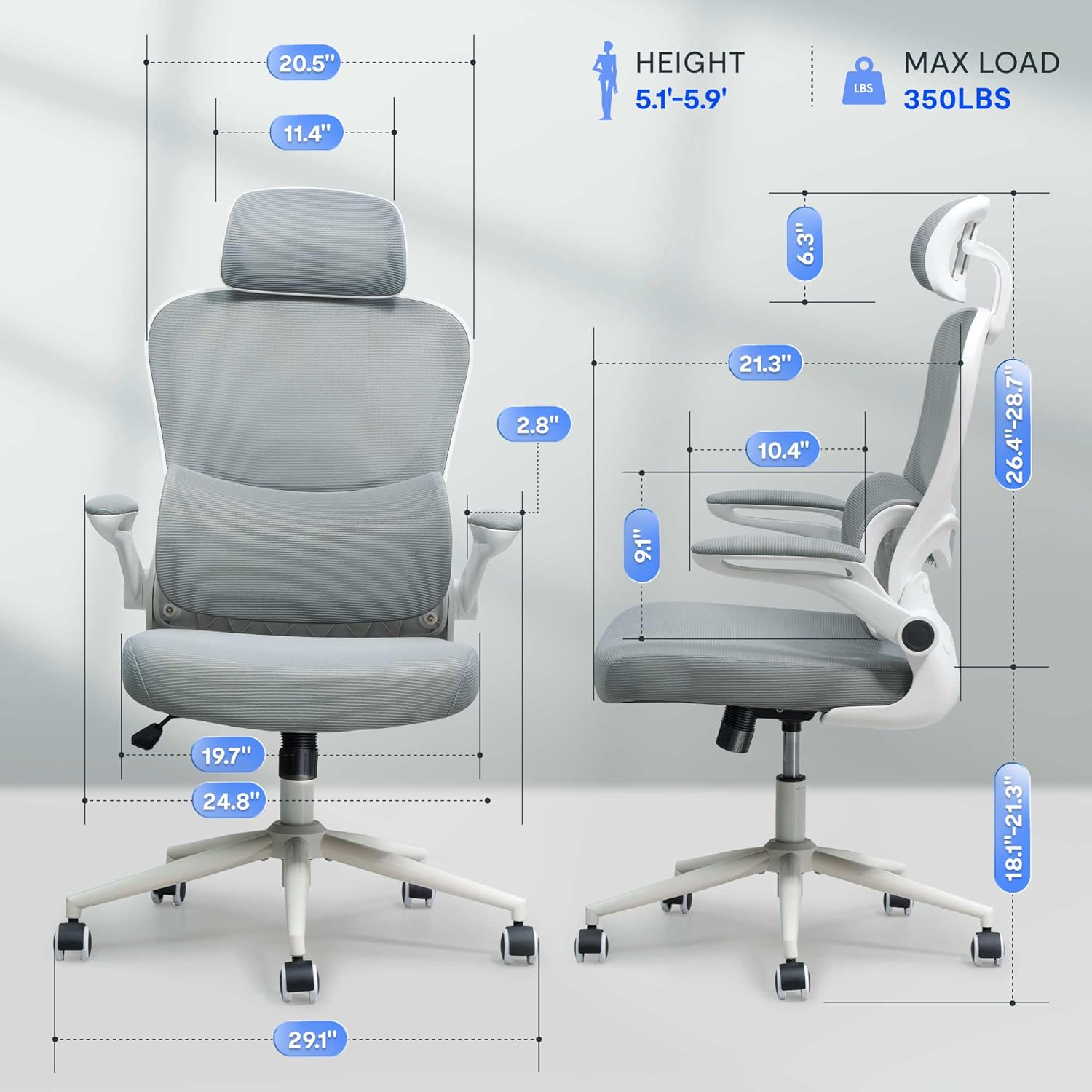
2. irudia: Assembled chair with key dimensions for reference.
Funtzionamendu-argibideak
The FLEXISPOT OC4 Lite chair offers multiple adjustment points to customize your seating experience for optimal comfort and support.
1. Eserlekuaren altuera doitzea
To adjust the seat height, locate the lever on the right side beneath the seat. Pull the lever up while seated to lower the seat, or pull it up while standing to raise the seat. Release the lever at the desired height.
2. Tilt Function and Tension Control
The chair features a tilt function allowing the backrest and seat to recline together. Use the lever on the left side beneath the seat to lock or unlock the tilt. The tilt tension knob, located at the front center beneath the seat, can be rotated to adjust the resistance of the tilt mechanism.

3. irudia: Adjusting the chair's tilt angle and tension.
3. Gerrialdeko euskarri erregulagarria
The chair includes adjustable lumbar support that adapts to your waist movement, providing dynamic support. The lumbar support can be adjusted vertically by sliding it up or down along the backrest frame to align with the natural curve of your spine.
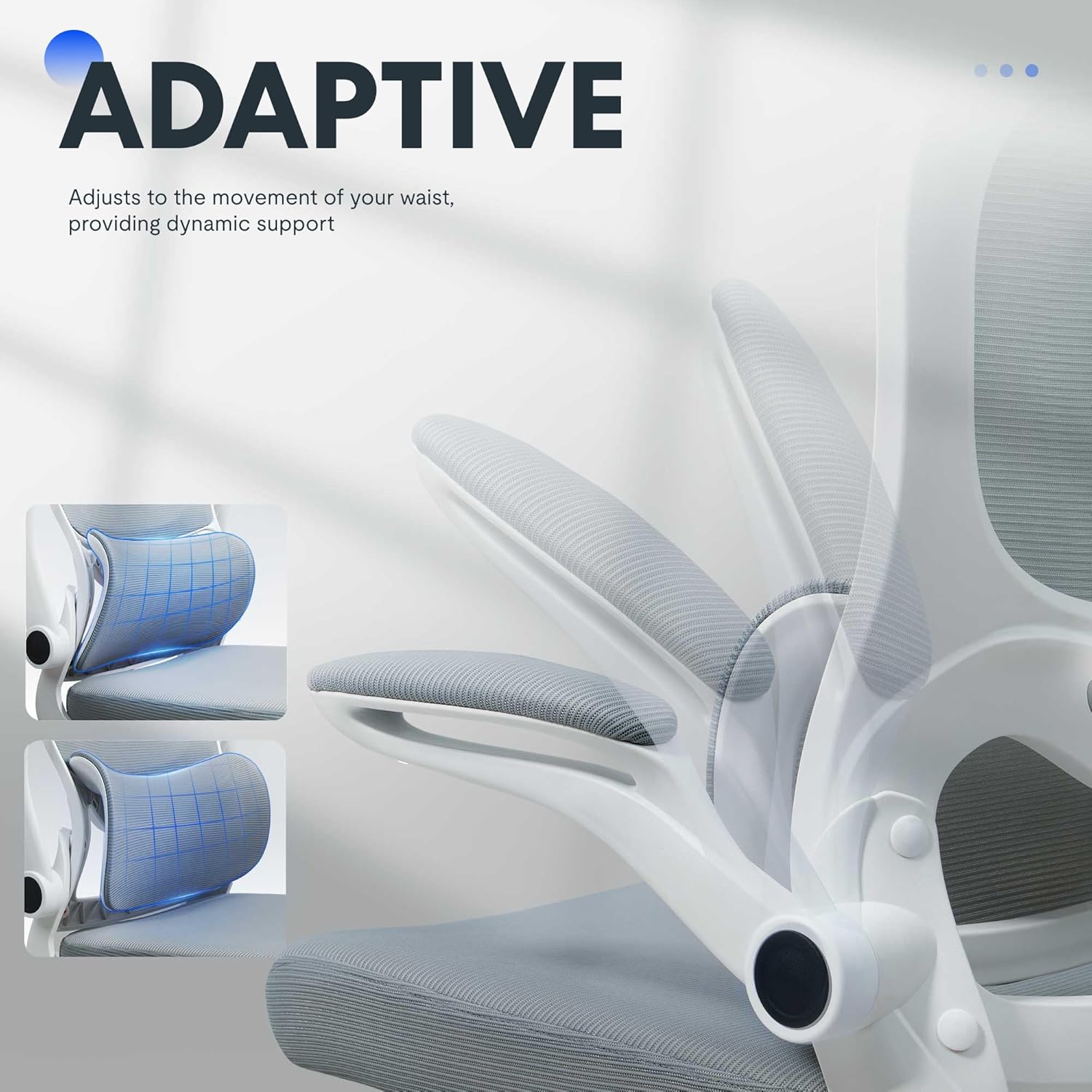
4. irudia: Adaptive lumbar support for personalized comfort.
4. Buru-euskarri erregulagarria
The headrest can be adjusted for height and angle to provide optimal neck and head support. Gently push or pull the headrest to move it to your preferred position.
5. Beso-euskarri tolesgarriak
The armrests can be flipped up to allow the chair to be pushed closer to a desk, saving space. To flip them up, lift the armrests until they lock into the vertical position. To return them, gently pull them down.

5. irudia: Chair with armrests flipped up for space-saving storage.
Mantentzea
Behar bezalako zaintzak zure bulegoko aulkiaren bizitza eta itxura luzatuko ditu.
- Garbiketa: Garbiketa orokorra egiteko, garbitu gainazalak iragarki batekinamp cloth. For fabric areas, dry clean or wipe clean as needed. Avoid harsh chemical cleaners that may damage the material.
- Ikuskapena: Aldian-aldian egiaztatu torloju eta torloju guztiak ondo estututa daudela ziurtatzeko. Beharrezkoa bada, berriro estutu egonkortasuna eta segurtasuna mantentzeko.
- Gurpilen zaintza: Mugimendu leuna bermatzeko, mantendu gurpilak ile eta hondakinik gabe.
Arazoak konpontzea
If you encounter any issues with your chair, refer to the common problems and solutions below.
| Arazoa | Kausa posiblea | Irtenbidea |
|---|---|---|
| Aulkia ez da altuera doitzen | Gas-igogailuaren matxura edo palanka ez da sartu. | Ensure the height adjustment lever is fully engaged. If the issue persists, the gas lift may need replacement. Contact customer service. |
| Aulkia dabil edo ezegonkorra sentitzen da | Torloju solteak edo zorua irregularra. | Egiaztatu eta estutu muntaketa-torloju guztiak. Ziurtatu aulkia gainazal lau eta berdin batean dagoela. |
| Gurpilak ez dira leunki biratzen | Hondakinak gurpiletan edo gurpil hondatuak. | Kendu ilea edo hondakinak gurpiletatik. Gurpilak hondatuta badaude, ordezkatu egin beharko dira. |
| Bizkarraldea ez da okertzen edo blokeatzen | Inklinazio-mekanismoa blokeatuta dago edo tentsioa altuegia da. | Ensure the tilt lock lever is disengaged. Adjust the tilt tension knob to a lower setting. |
Produktuaren zehaztapenak
| Marka | FLEXISPOT |
| Ereduaren izena | OC4-V2 |
| Kolorea | Zuria |
| Materiala | Alloy Steel, Mesh, Nylon |
| Produktuaren neurriak (L x W x H) | 29.1" x 29.1" x 50" (73.9 cm x 73.9 cm x 127 cm) |
| Elementuaren pisua | 32 libra (14.5 kg) |
| Gehienezko pisuaren gomendioa | 350 libra (158 kg) |
| Eserlekuaren sakonera | 21.3 hazbete (54.1 cm) |
| Aulkiaren bizkarraldearen zabalera | 20.5 hazbete (52.1 cm) |
| Atzeko Estiloa | Sare atzealdea |
| Beso estiloa | Flip-up arms |
| Altzarien Oinarri Mugimendua | Birakaria |
| Beharrezko muntaia | Bai |
| Ziurtagiriak | BIFMA, SGS |
Bermea eta Laguntza
The FLEXISPOT OC4 Lite Ergonomic Office Chair is rigorously tested and certified by BIFMA and SGS, ensuring durability and safety. The reinforced nylon base is capable of supporting significant weight, and the resilient mesh fabric is designed to maintain its shape over time.
For any questions, concerns, or assistance with assembly, operation, or troubleshooting, please contact our professional customer service team. Refer to the contact information provided with your purchase or visit the official FLEXISPOT webgunea laguntza xehetasunetarako.