
T-Wolf GG-G530
T-Wolf RoboCop Competitive Gaming Mouse GG-G530 User Manual
Model: GG-G530
Sarrera
This manual provides essential information for the setup, operation, and maintenance of your T-Wolf RoboCop Competitive Gaming Mouse GG-G530. Please read this manual thoroughly before using the product to ensure optimal performance and longevity.
Paketearen edukia
- 1 x T-Wolf RoboCop Competitive Gaming Mouse GG-G530
- 1 x Erabiltzailearen eskuliburua (dokumentu hau)
Produktuaren Ezaugarriak
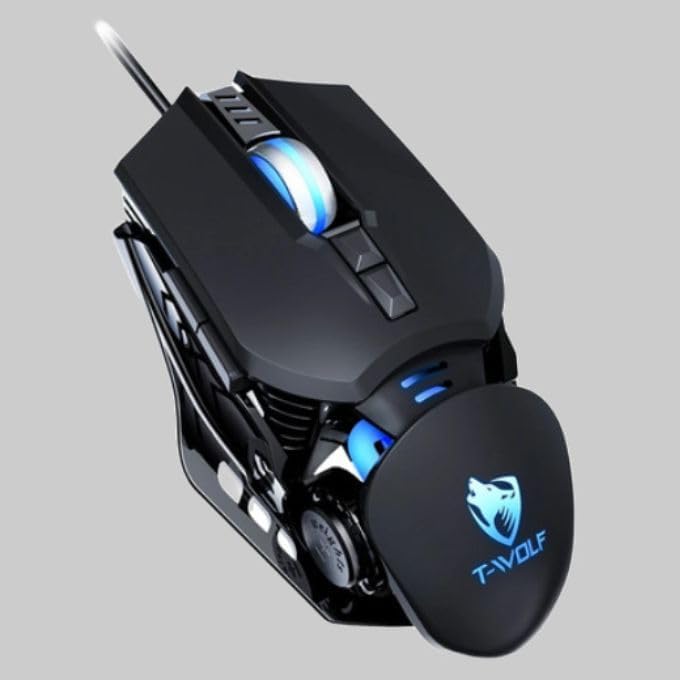
The T-Wolf RoboCop Competitive Gaming Mouse GG-G530 is designed for precision and comfort, suitable for both gaming and office use. Key features include:
- Optical Engine Design: Ensures stable operation and high sensitivity.
- Mechanical Armored Modeling: Distinctive and robust design.
- Symmetrical DIY Counterweight: Allows for adaptable weight adjustment.
- 7 Botoiak: Includes left click, right click, scroll wheel, DPI switcher, and additional programmable buttons.
- Konektibitate adimenduna: Plug-and-play functionality with automatic driver installation.
- DPI erregulagarria: Four levels of sensitivity (1200/2400/3200/6400 DPI) for precise control.
- Diseinu ergonomikoa: Provides comfortable use for extended periods without fatigue.
- Four-Color Light Effect: Dynamic lighting for visual appeal.
- Kable bidezko konexioa: Reliable USB interface with a 150cm cable.
- Sistemaren bateragarritasuna: Windows eta Mac sistema eragileak onartzen ditu.
Konfigurazioa
- Konektatu sagua: Insert the USB connector of the T-Wolf RoboCop Gaming Mouse into an available USB port on your computer.
- Gidariaren instalazio automatikoa: The operating system will automatically detect the mouse and install the necessary drivers. This process typically takes a few moments. No manual driver installation is required.
- Erabiltzeko prest: Behin kontrolatzaileak instalatuta, sagua berehala erabiltzeko prest dago.
Funtzionamendu-argibideak
The T-Wolf RoboCop Gaming Mouse features 7 buttons for various functions. Familiarize yourself with their basic operations:
- Ezkerreko klik botoia: Primary selection and interaction.
- Eskuineko botoiarekin klik egiteko: Accesses contextual menus and secondary functions.
- Korritzeko gurpila: Dokumentuetan zehar nabigatzen du eta web pages. Can also function as a middle click button.
- DPI Switcher Button: Saguaren sentikortasuna (DPI) doitzen du.
- Botoi gehigarriak: The remaining buttons can be assigned specific functions through your operating system's mouse settings or compatible third-party software (note: no macro programming is natively supported by the mouse hardware).

DPI doikuntza
The mouse features an adjustable DPI (Dots Per Inch) setting, allowing you to change the cursor sensitivity on the fly. This is particularly useful for different tasks, such as precise aiming in games or fast navigation in general use.
- Kokatu DPI Switcher Button, typically positioned behind the scroll wheel.
- Press the DPI Switcher Button to cycle through the available DPI settings: 1200 DPI, 2400 DPI, 3200 DPI, and 6400 DPI.
- Each press will change the sensitivity, allowing you to find the setting that best suits your current activity.

Mantentzea
To ensure the longevity and optimal performance of your T-Wolf RoboCop Gaming Mouse, follow these simple maintenance guidelines:
- Garbiketa: Erabili zapi leun eta lehor bat saguaren gainazala garbitzeko. Zikinkeria egoskorra bada, garbitu pixka bat.ampGarbitu zapi bat urarekin edo garbiketa-soluzio leun batekin. Saihestu produktu kimiko gogorrak edo material urratzaileak.
- Sentsore optikoa: Periodically clean the optical sensor on the underside of the mouse with a cotton swab to prevent dust buildup, which can affect tracking performance.
- Kableen zainketa: Avoid sharply bending or pulling the USB cable to prevent internal damage.
- Biltegiratzea: Erabiltzen ez duzunean, gorde sagua leku garbi eta lehor batean, muturreko tenperaturetatik urrun.
Arazoak konpontzea
If you encounter issues with your T-Wolf RoboCop Gaming Mouse, refer to the following common solutions:
- Saguak ez du erantzuten:
- Ziurtatu USB kablea ondo konektatuta dagoela ordenagailuko USB ataka funtzional batean.
- Saiatu sagua beste USB ataka batera konektatzen.
- Berrabiarazi ordenagailua.
- Cursor Movement is Erratic or Jumpy:
- Garbitu saguaren azpialdeko sentsore optikoa.
- Ziurtatu sagua gainazal garbi, islatzailerik gabeko eta uniforme batean erabiltzen ari zarela. Sagu-alfonbrak erabiltzea gomendatzen da.
- DPI doikuntzak ez du funtzionatzen:
- Ensure you are pressing the correct DPI switcher button.
- The mouse cycles through fixed DPI settings; there is no visual indicator on the mouse itself for the current DPI level, only the change in cursor speed.
- Botoiak ez dute funtzionatzen:
- Egiaztatu zure sistema eragilearen saguaren ezarpenak botoiak gaituta eta behar bezala konfiguratuta daudela ziurtatzeko.
- Test the mouse on another computer to rule out a software or system issue.
Zehaztapenak
| Eredua | GG-G530 |
| Materiala | ABS + Electroplating |
| Jarraipen Sistema | Optikoa |
| Konexioa | Kableatua |
| Kablearen luzera | 150 cm |
| Interfaze mota | USBa |
| DPI ezarpenak | 1200 / 2400 / 3200 / 6400 (Egokigarria) |
| Botoi kopurua | 7 |
| Zerbitzu-bizitza | Approximately three years |
| Lan egiteko metodoa | fotovoltaiko |
| Argi Efektua | Four-color cycling |
| Elementuaren tamaina | 130 x 80 x 35 mm |
| Elementuaren pisua | 160 g |
| Onartutako Sistemak | Windows, Mac |
Bermea eta Laguntza
Your T-Wolf RoboCop Competitive Gaming Mouse GG-G530 comes with a 6 hilabeteko fabrikatzailearen bermea erosketa-datatik aurrera.
This warranty covers defects in materials and workmanship under normal use. It does not cover damage caused by accident, misuse, abuse, unauthorized modification, or external causes such as liquid damage.
For warranty claims or technical support, please contact your retailer or the point of purchase. Please retain your proof of purchase for warranty validation.

Ask a question about this manual
Ask about setup, troubleshooting, compatibility, parts, safety, or missing instructions. Manuals+ will review the question and use this page’s manual context to help answer it.