
1. Sarrera
This manual provides detailed instructions for the setup, operation, maintenance, and troubleshooting of your TouchWo 17.3-inch Touchscreen Industrial Computer Monitor. This versatile device is designed for various applications, including office, classroom, retail, and industrial environments, offering a responsive 10-point touch display with robust performance.

Figure 1.1: TouchWo 17.3-inch Touchscreen Industrial Computer Monitor in use, demonstrating its touch capabilities.
1.1 Produktua gainditzeaview
The TouchWo TD173 is a 17.3-inch industrial-grade touchscreen monitor featuring a 1080P display, powered by a Core i7 processor with 8GB RAM and a 512GB SSD, running Windows 11 Pro. Its 10-point capacitive touch screen allows for intuitive interaction, similar to a tablet. The monitor is designed with a true flat seamless design and an IP65 standard touch screen, making it suitable for demanding environments. It supports various connectivity options including USB, VGA, HDMI, LAN, and WiFi, and includes built-in speakers.
1.2 Paketearen edukia
Mesedez, egiaztatu behean zerrendatutako elementu guztiak zure paketean daudela:
- 1 x Touchscreen Smart PC
- 1 x korronte egokitzailea
- 1 x Power Line (1.5m)
- 1 x Produktuaren eskuliburua (dokumentu hau)
- 1 x Wall-Mounted Bracket (standard)
- 1 x WiFi antena

1.2 irudia: Produktuaren ontzian sartutako edukia.
1.3 Segurtasun informazioa
Erabilera segurua bermatzeko eta kalteak saihesteko, irakurri eta bete segurtasun-jarraibide hauek:
- Ez jarri monitorea muturreko tenperatura edo hezetasunetara.
- Use only the provided power adapter and power line.
- Saihestu aireztapen-zuloak blokeatzea.
- Ez saiatu gailua zeuk desmuntatzen edo konpontzen. Jarri harremanetan zerbitzu-langile kualifikatuekin.
- Garbitu pantaila zapi leun eta lihorik gabeko batekin. Saihestu garbitzaile urratzaileak.
2. Konfigurazioa
2.1 Instalazio-metodoak
The TouchWo TD173 monitor offers flexible installation options to suit various environments. The standard package includes a wall-mounted bracket. Other bracket types (Simple Bracket, VESA Bracket, Desktop Folding Bracket, Desktop Stand) may need to be purchased separately.
- Hormako muntaia: Use the included wall-mounted bracket for secure installation on a vertical surface.
- VESA muntaia: The monitor features 100x100 VESA holes, allowing compatibility with various VESA-compliant arms and stands.
- Mahaigaineko euskarria: For desktop use, a compatible stand can be attached to the monitor.

Figure 2.1: Available installation methods for the monitor.
2.2 Periferikoak konektatzea
The monitor is equipped with multiple interfaces for connecting external devices:
- USB atakak (4x): Connect keyboards, mice, external storage, or other USB devices.
- VGA & HDMI: For video input from external sources if using the monitor as a display only.
- LAN (Ethernet): Kable bidezko sarearen konexiorako.
- WiFi eta Bluetooth: Built-in wireless connectivity for internet access and pairing Bluetooth devices.
- 3.5mm Audio & Mic Jack: For connecting external headphones, speakers, or microphones.
To connect the WiFi antenna, screw it into the designated port on the back of the monitor until secure.
2.3 Hasierako piztea
- Connect the power adapter to the monitor's power input port.
- Plug the power line into a suitable electrical outlet.
- Press the power button, usually located on the side or back of the monitor.
- The monitor will boot up, displaying the Windows 11 Pro operating system. Follow the on-screen prompts for initial Windows setup if this is the first use.
3. Funtzionamendu-argibideak
3.1 Ukipen-pantailaren funtzionaltasuna
The TouchWo monitor features advanced 10-point capacitive touch technology, allowing for precise and responsive interaction. No additional drivers are required for basic touch functionality.
- Ukitu bakarra: Functions like a mouse click to select items or open applications.
- Sakatu birritan: Irekitzen da files or folders, similar to a double-click.
- Arrastatu: Touch and hold an item, then move your finger to drag it across the screen.
- Zoom egiteko apur bat egin: Use two fingers to pinch in (zoom out) or spread out (zoom in) on images, maps, or documents.
- Multi-finger Gestures: The 10-point touch supports various multi-finger gestures for navigation and control within Windows 11 and compatible applications.

Figure 3.1: Demonstrating 10-point touch screen interaction.

Figure 3.2: Common touchscreen gestures for interaction.
3.2 Erabilera-eszenatokiak
The TouchWo TD173 is a versatile smart PC suitable for a wide range of applications:
- Industria Kontrola: Ideal for factory automation, monitoring systems, and interactive displays in industrial settings.
- Retail & POS: Can be integrated into Point-of-Sale (POS) systems, interactive kiosks, or menu screens in restaurants and bars.
- Office & Classroom: Functions as a smart board for presentations, collaborative work, or general computing tasks.
- Segurtasun Jarraipena: Can serve as a CCTV monitor for security camera systems.
- Self-Service Kiosks: Suitable for interactive information points or self-service terminals.

3.3. irudia: Adibamples of multiple usage scenarios for the monitor.

Figure 3.4: Diverse applications of the TouchWo monitor in different environments.
4. Mantentzea
4.1 Monitorea garbitzea
Regular cleaning helps maintain the monitor's performance and appearance. The IP65 standard touch screen offers protection against dust and water splashes.
- Pantaila: Garbitu pantaila astiro-astiro zapi leun eta pelusik gabeko batekin. Orban egoskorrak lortzeko, garbitu apur batampGarbitu zapia urarekin edo pantailarako garbiketa-soluzio espezifiko batekin. Ez ihinztatu likidoa zuzenean pantailan.
- Gorputza: Use a soft, dry cloth to wipe the aluminum alloy frame and back-shell.
- Saihestu: Do not use abrasive cleaners, alcohol, ammonia, or benzene-based solvents, as these can damage the screen or finish.
4.2 Arreta orokorra
- Ziurtatu aireztapen egokia monitorearen inguruan, gehiegi berotu ez dadin.
- Saihestu objektu astunak monitorearen edo haren kableen gainean jartzea.
- Protect the monitor from direct sunlight and heat sources.
- When moving the monitor, handle it carefully to avoid drops or impacts.
5. Arazoak
Atal honek aurki ditzakezun arazo ohikoenei irtenbideak eskaintzen ditu. Arazoak jarraitzen badu, jarri harremanetan bezeroarentzako arreta-zerbitzuarekin.
| Arazoa | Kausa posiblea | Irtenbidea |
|---|---|---|
| Monitorea ez da pizten. | No power, faulty power adapter/cable, or power button issue. |
|
| Touchscreen is unresponsive or inaccurate. | Screen dirty, calibration needed, or software issue. |
|
| No display/black screen. | Power issue, input source not selected (if external), or system crash. |
|
| Bozgorailuetatik ez dago soinurik. | Volume too low, muted, or audio driver issue. |
|
6. Zehaztapenak
Detailed technical specifications for the TouchWo 17.3-inch Touchscreen Industrial Computer Monitor (Model TD173):
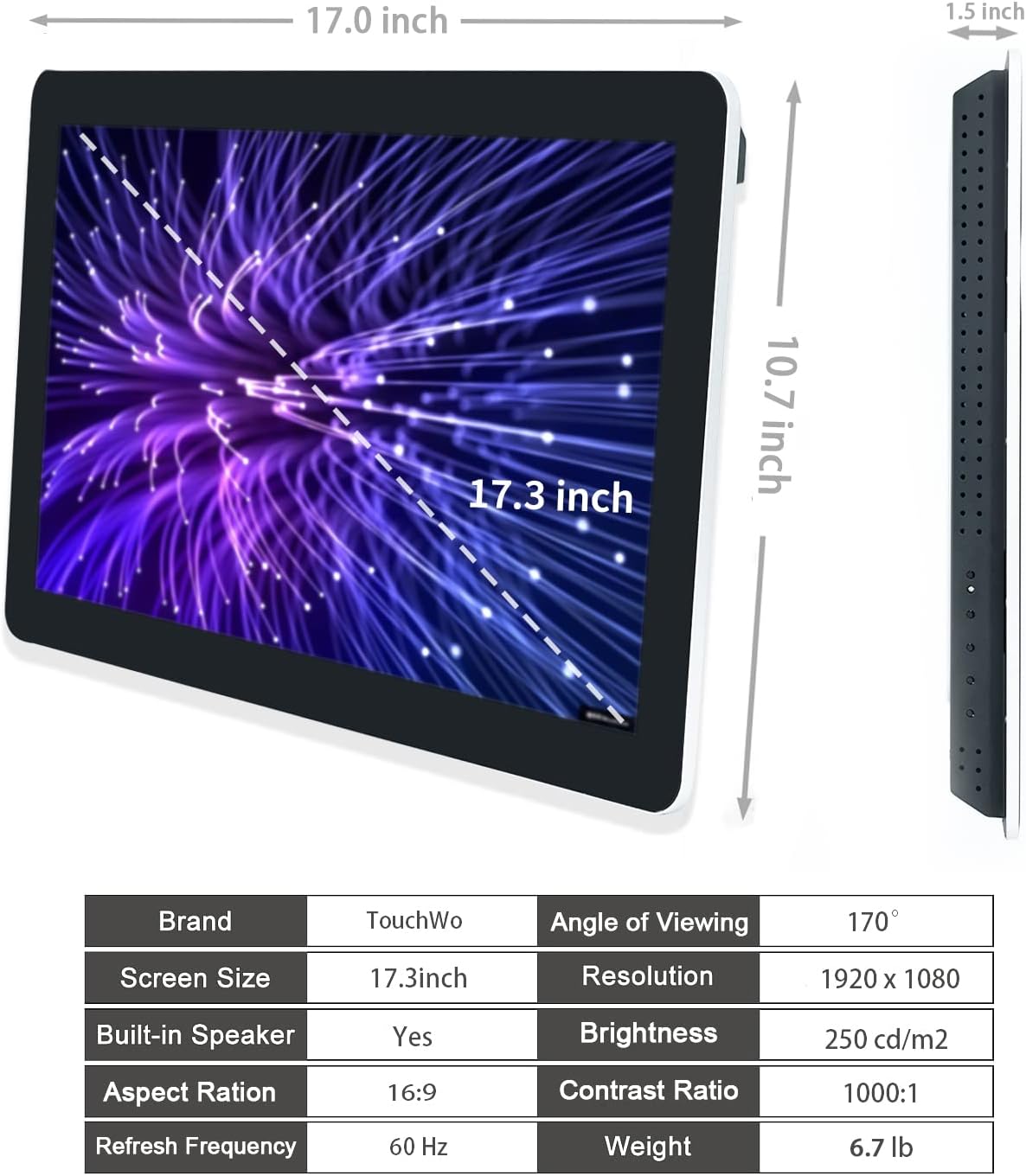
Figure 6.1: Dimensions and key specifications of the monitor.

6.2 Irudia: Gainetikview of TD Series Touchscreen HD Monitor features.

Figure 6.3: Performance and durability features of the monitor.
| Ezaugarri | Zehaztapena |
|---|---|
| Modelo zenbakia | TD173 |
| Pantailaren tamaina | 17.3 hazbete |
| Ebazpena | 1920 x 1080 pixel (FHD 1080p) |
| Aspektu-erlazioa | 16:9 |
| Distira | 250 cd/m² (250 lm) |
| Kontraste-erlazioa | 1000:1 |
| Viewangelua | 178° |
| Ukitu teknologia | 10 puntu ukipen ahalbidetiboa |
| Sistema eragilea | Windows 11 Pro (Core i7, 8GB RAM, 512GB SSD configuration) |
| Konektibitatea | 4x USB, VGA, HDMI, LAN, WiFi, Bluetooth, 3.5mm Audio & Mic Jack |
| Bozgorailu integratuak | Bai |
| IP balorazioa | IP65 (Aurreko panela) |
| Produktuaren neurriak | 1.5 x 17 x 10.7 hazbete |
| Elementuaren pisua | 6.7 kilo |
| liburukiatage | 12 voltio (DC) |
| Ziurtagiriak | FCC, CE, RoHS |
7. Bermea eta Laguntza
7.1 Berme politika
TouchWo offers a one-year warranty for this touchscreen monitor, covering manufacturing defects and malfunctions under normal use. The factory holds ISO9001 quality management certification, ensuring product quality.
For warranty claims, please retain your proof of purchase. The warranty does not cover damage caused by misuse, accidents, unauthorized repairs, or natural disasters.
7.2 Bezeroarentzako laguntza
For any assistance, technical support, or inquiries, please feel free to reach out to TouchWo customer service. We are committed to providing 24/7 online customer support.
- Posta elektroniko ofiziala: touchwoamz@outlook.com
- Amazon saltzailearen orria: For more information or to contact the seller directly, visit the TouchWo Seller Page on Amazon.
- Bulk or Custom Orders: Please reach out to the provided email for inquiries regarding bulk purchases or custom orders.

Figure 7.1: Contact information for customer assistance.