
Produktua amaituview
This manual provides detailed instructions for the assembly, operation, and maintenance of your PayLessHere Office Computer Gaming Chair. Designed for ergonomic comfort and versatility, this chair features a breathable mesh back, adjustable height, 360-degree swivel, and lumbar support, making it suitable for both office work and gaming.
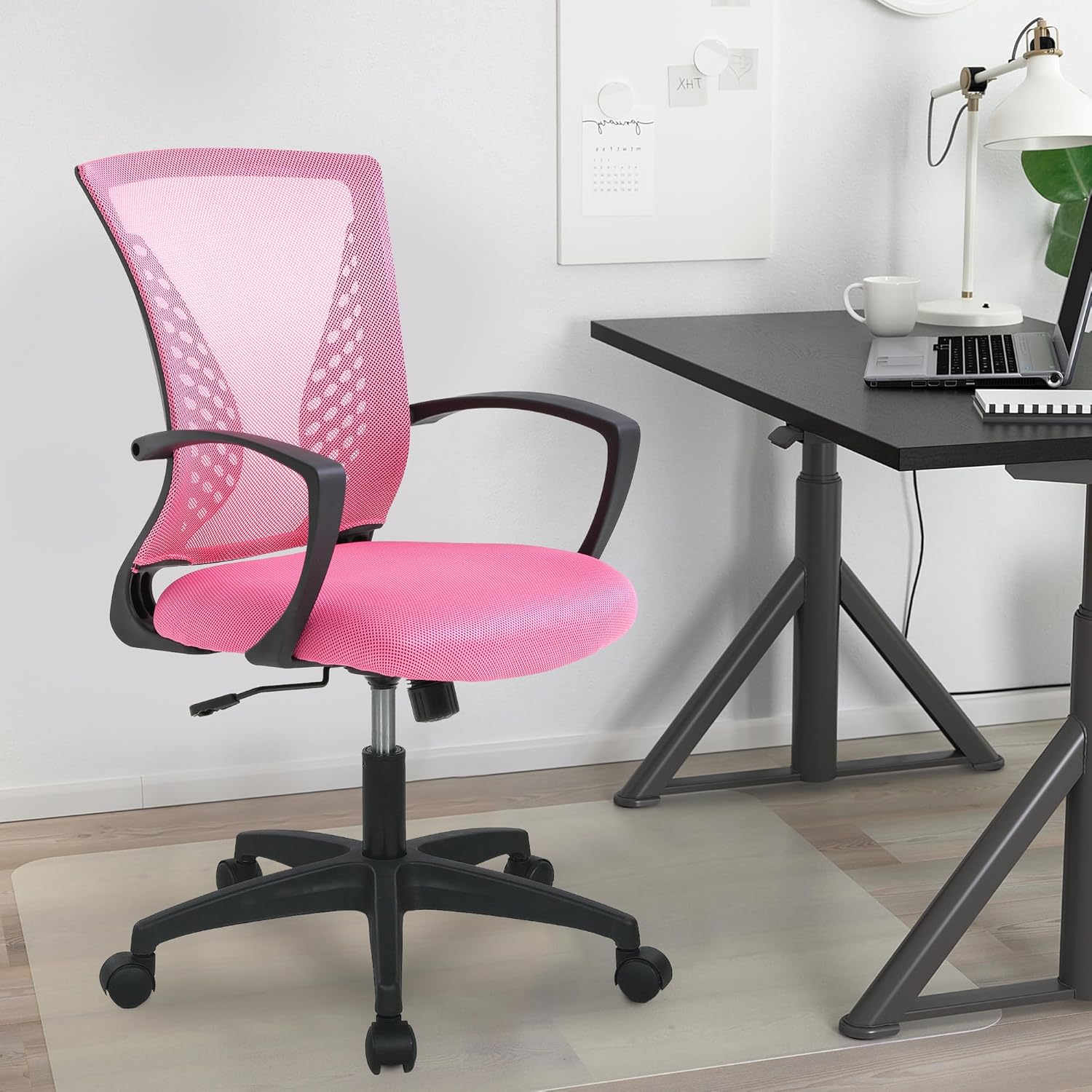
Image: The PayLessHere Office Computer Gaming Chair in pink, set up in a home office environment.
Segurtasun Informazioa
Do not exceed the maximum weight capacity of 250 pounds. Ensure the chair is properly assembled and stable before use.
Always follow assembly instructions carefully. Keep small parts away from children. Regularly inspect the chair for loose screws or damaged components and tighten or replace as necessary.
Paketearen edukia
Before beginning assembly, please verify that all components are present:
- Aulkiaren bizkarraldea (1)
- Eserlekuko kuxina (1)
- Beso-euskarriak (2)
- Gas-igogailu zilindroa (1)
- Izar Oinarria (1)
- Gurpilak (5)
- Mekanismo Plaka (1)
- Screws and Allen Wrench (1 set)
Muntatzeko jarraibideak
Follow these steps to assemble your PayLessHere Office Computer Gaming Chair:
1. urratsa: Gurpilak oinarrira lotu
Sartu bost gurpilak izar-oinarriaren hanka bakoitzaren muturretan dauden zuloetan. Sakatu ondo klik egin arte.

Image: Close-up of the chair's star base and caster wheels, highlighting 360-degree rotation and floor protection.
Step 2: Insert Gas Lift Cylinder
Jarri gas-igogailuaren zilindroa muntatutako izar-oinarriaren erdiko zuloan. Ez kendu tapoi gorria gas-igogailutik adierazi arte.

Irudia: Xehetasun handikoa view of the chair's components, including the certified gas rod (lift cylinder).
Step 3: Attach Mechanism Plate to Seat
Lerrokatu mekanismoaren plaka eserlekuaren kuxinaren azpialdeko torloju-zuloekin. Ziurtatu mekanismoaren aurrealdea eserlekuaren aurrealdera begira dagoela. Lotu torlojuekin, emandako Allen giltza erabiliz.
4. urratsa: Lotu beso-euskarriak
Attach the armrests to the sides of the seat cushion using the designated screws. Pay attention to the 'L' (left) and 'R' (right) markings on the armrests.
Step 5: Connect Backrest to Seat
Align the backrest with the attachment points on the seat cushion or mechanism plate. Secure with screws.
Step 6: Assemble Seat to Base
Carefully place the assembled seat (with mechanism and armrests) onto the gas lift cylinder. The tapered end of the gas lift should fit securely into the mechanism plate.
Muntatzeko bideoa
Video: A demonstration of the adjustable features of the office chair, including height and swivel, for home comfort.
Funtzionamendu-argibideak
Familiarize yourself with the chair's adjustable features for optimal comfort:
Altuera doitzea
To adjust the seat height, pull the lever located under the right side of the seat upwards. While seated, lift your weight slightly to raise the chair, or remain seated to lower it. Release the lever to lock the height.

Image: Diagram illustrating the height adjustment lever and 360-degree swivel function of the chair.
Inklinazio eta etzantze funtzioa
The chair features a reclining backrest. To activate the tilt, pull the lever (often the same as the height adjustment lever, or a separate one) outwards. To lock the backrest in an upright position, push the lever inwards. The tension of the tilt can be adjusted by rotating the round knob located under the front of the seat.
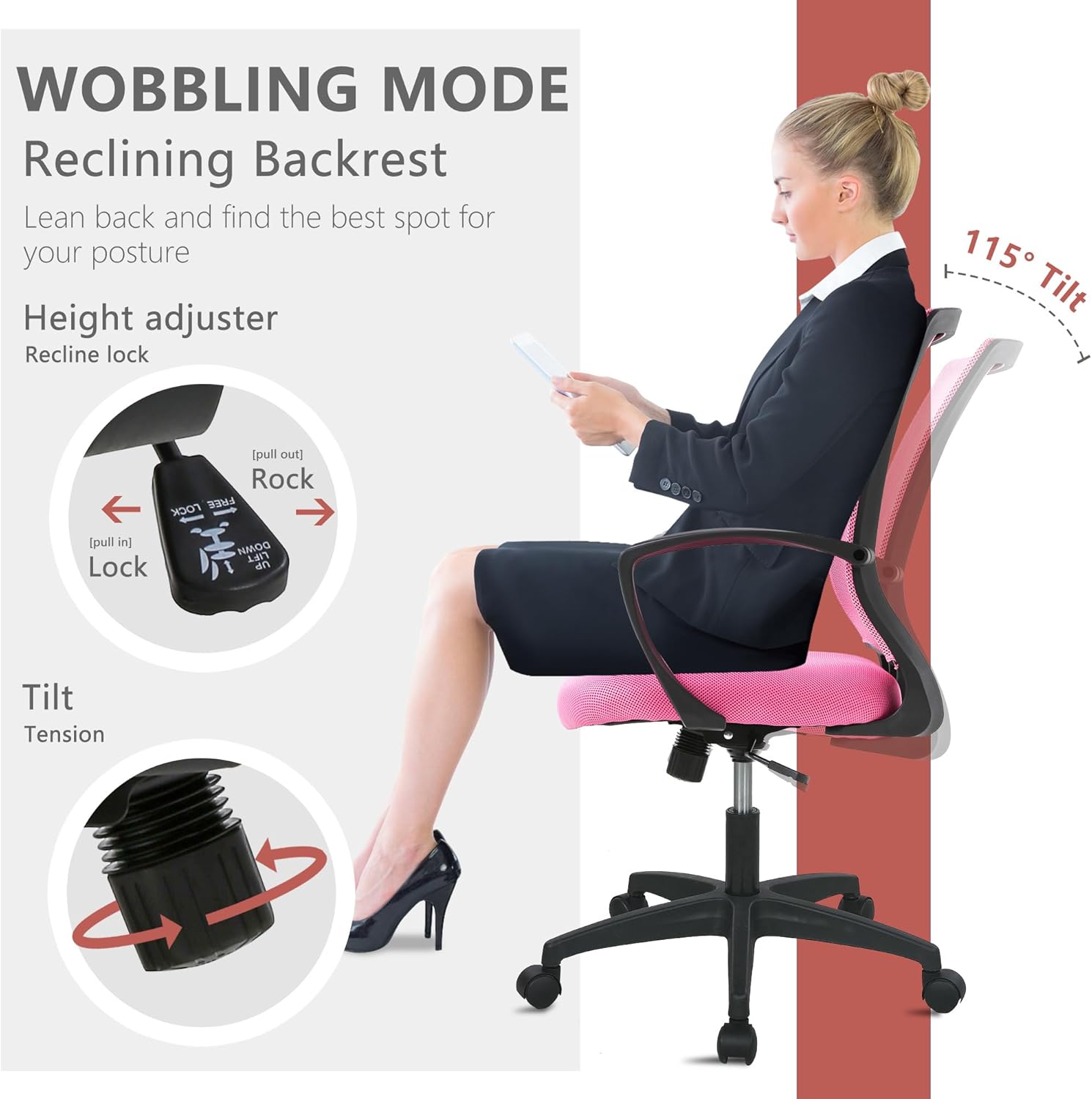
Image: Illustration of the chair's wobbling mode, showing the reclining backrest and the tilt tension adjustment knob.
Birako funtzioa
Aulkia 360 gradu biratzen diseinatuta dago, eta horrek erraz mugitzeko eta lan-eremuko eremu desberdinetara sartzeko aukera ematen du, aulki osoa berriro kokatu beharrik gabe.
Mantentzea
Proper maintenance will extend the life of your chair:
- Garbiketa: For mesh and fabric surfaces, use a soft cloth with mild soap and water. Avoid harsh chemicals. For the plastic and metal parts, wipe with a damp oihal.
- Ikuskapena: Aldian-aldian egiaztatu torloju eta azkoin guztiak ondo estututa daudela ziurtatzeko. Beharrezkoa bada, berriro estutu egonkortasuna eta segurtasuna mantentzeko.
- Gurpilak: Keep caster wheels clean from hair and debris to ensure smooth rolling.
Arazoak konpontzea
Aulkiarekin arazorik baduzu, jo ezazu honako arazo eta irtenbide ohikoenei:
| Arazoa | Kausa posiblea | Irtenbidea |
|---|---|---|
| Aulkia ez da altuera doitzen | Gas-igogailuaren palanka ez dago aktibatuta edo gas-igogailua akastuna. | Ensure the lever is fully pulled up/down. If issue persists, contact customer support for gas lift replacement. |
| Aulkia dardarka | Torloju solteak edo zorua irregularra. | Egiaztatu eta estutu muntaketa-torloju guztiak. Ziurtatu aulkia gainazal lau eta berdin batean dagoela. |
| Gurpilak ez dira leunki biratzen | Debris in casters or damaged wheels. | Remove any hair or debris from the caster wheels. If damaged, replace casters. |
| Bizkarraldea ez da etzan edo blokeatzen | Inklinazio-mekanismoa blokeatuta dago edo tentsioa altuegia da. | Pull the tilt lever outwards to unlock. Adjust the tilt tension knob to a lower setting. |
Zehaztapenak
| Ezaugarri | Xehetasuna |
|---|---|
| Marka | Ordaindu gutxiago hemen |
| Ereduaren izena | Office Computer Gaming Chair |
| Kolorea | Arrosa |
| Produktuaren neurriak (L x W x H) | 23" L x 22" W x 40" H |
| Eserlekuaren sakonera | 17 hazbetekoa |
| Elementuaren pisua | 21 kilo |
| Materiala | Mesh (Back), Foam (Seat) |
| Atzeko Estiloa | Sare atzealdea |
| Ezaugarri bereziak | Cushion Availability, Ergonomic, Rolling, Adjustable Height, Swivel |
| Altzarien Oinarri Mugimendua | Birakaria |
| Etzandako posizioen zenbaketa | 2tik 5ra |
| Gehienezko pisu-gaitasuna | 250 pounds (as per safety information) |
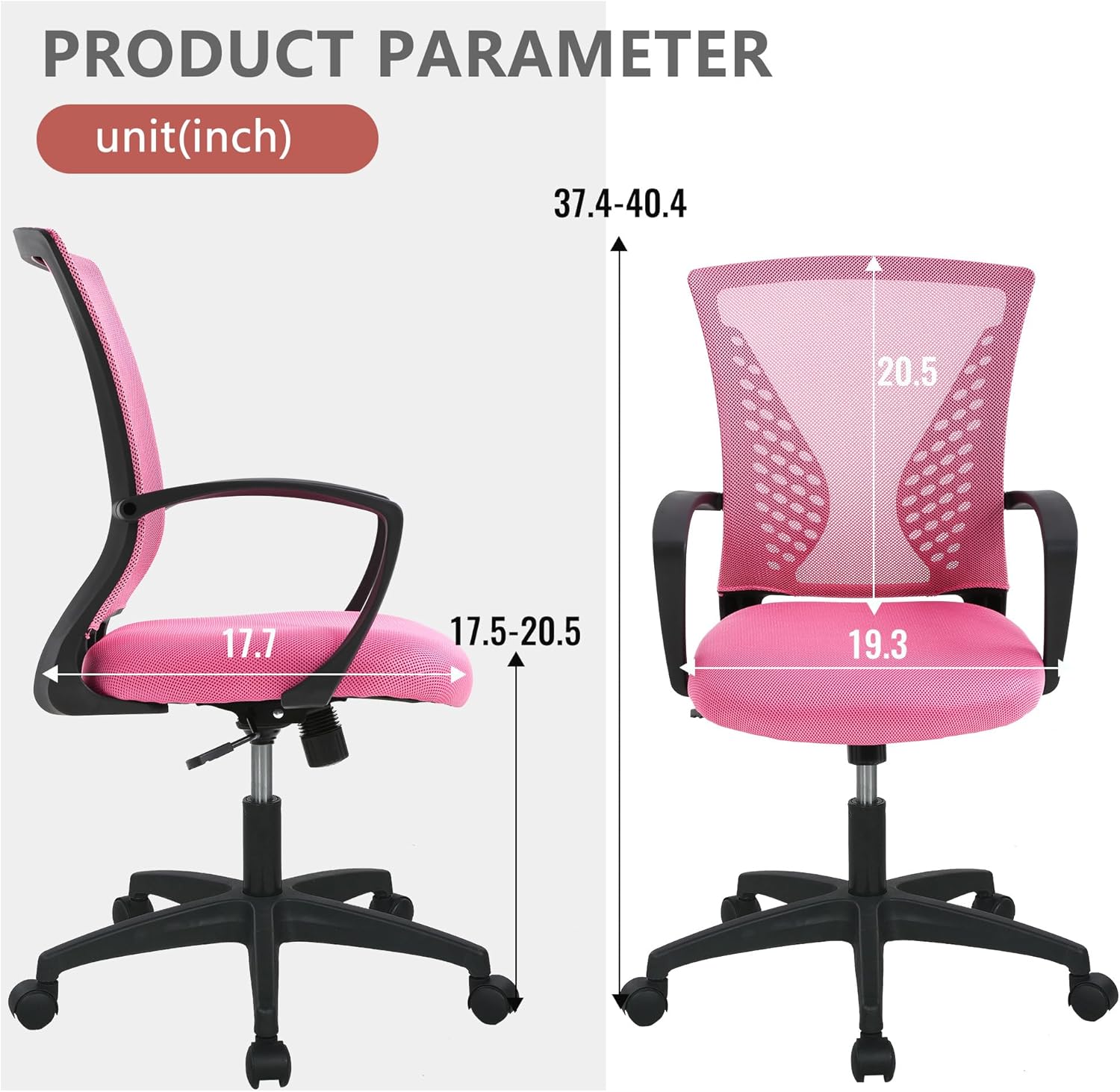
Image: Detailed product parameter diagram showing chair dimensions in inches.
Bermea eta Laguntza
For warranty information, technical support, or to order replacement parts, please contact PayLessHere customer service through the retailer where the product was purchased. Keep your purchase receipt for warranty claims.