
Sarrera
Welcome to the user manual for your new boAt Stone 352 Pro Bluetooth Speaker. This guide provides detailed instructions on how to set up, operate, and maintain your speaker, ensuring you get the best audio experience. Please read this manual thoroughly before using the product.
Kutxan dagoena
Upon unboxing your boAt Stone 352 Pro, you should find the following items:
- 1 x boAt Stone 352 Pro Bluetooth Speaker
- 1 x Kargatzeko kablea (C motakoa)
- 1 x Erabiltzailearen eskuliburua (dokumentu hau)
- 1 x Berme Txartela
- 1 x Katalogoa

Image: The boAt Stone 352 Pro speaker, a USB Type-C charging cable, and the warranty card/user manual are shown, representing the contents of the product box.
Video: An unboxing demonstration of the boAt Stone 352 Pro Bluetooth Speaker, showing the speaker, charging cable, and documentation included in the package.
Produktua amaituview
The boAt Stone 352 Pro is a portable Bluetooth speaker designed to deliver powerful audio with enhanced features. Key highlights include:
- 14W-ko boAt soinu bereizgarria: Experience clear and powerful audio output.
- Dynamic RGB LEDs: Enhance your listening experience with vibrant lighting effects.
- Up to 12 Hours Playback: Gozatu musika erreprodukzio luzeaz karga bakarrarekin.
- TWS Ezaugarri: Connect two Stone 352 Pro speakers for a stereo sound experience.
- Mikrofono integratua: Facilitates hands-free calling.
- Bluetooth v5.3: Haririk gabeko konexio egonkorra eta eraginkorra bermatzen du.
- IPX5 Uraren Erresistentzia: Provides protection against splashes and sweat.
- Multiple Connectivity Modes: Supports Bluetooth, AUX, and TF Card playback.
- C motako karga: Kargatzeko interfaze moderno eta erosoa.

Image: A black boAt Stone 352 Pro speaker, showcasing its cylindrical design and the illuminated RGB LED strip on the front.
Kontrolak eta Adierazleak
Familiarize yourself with the speaker's controls and indicators for optimal use.

Image: The side panel of the boAt Stone 352 Pro speaker, highlighting the power button, volume up/down buttons, and mode selection button.
- Pizteko botoia: Sakatu eta eutsi pizteko/itzaltzeko. Sakatu labur musika erreproduzitzeko/pausatzeko.
- Bolumena igo (+): Sakatu labur bolumena igotzeko. Sakatu luze hurrengo abestirako.
- Bolumena jaitsi (-): Sakatu labur bolumena jaisteko. Sakatu luze aurreko abestira joateko.
- Modu (M) botoia: Sakatu labur Bluetooth, AUX eta TF txartelaren moduen artean aldatzeko.
- RGB LED banda: Indicates power status, charging, and provides dynamic lighting effects.
Hasteko
Hizlaria kargatzen
Before first use, fully charge your speaker. The boAt Stone 352 Pro features a Type-C charging port.
- Connect the Type-C end of the charging cable to the speaker's charging port.
- Connect the USB-A end of the cable to a compatible USB power adapter (5V/1A recommended).
- The RGB LED strip will indicate charging status. It typically takes approximately 2 hours for a full charge.
- Guztiz kargatuta dagoenean, deskonektatu kargatzeko kablea.

Irudia: Xehetasun zehatza view of the boAt Stone 352 Pro's side panel, illustrating the Type-C charging interface and the various connectivity ports (Bluetooth, AUX, TF Card).
Piztu/Itzaltzea
- To power on, press and hold the Power button until you hear an audible prompt and the RGB LEDs illuminate.
- To power off, press and hold the Power button again until you hear an audible prompt and the RGB LEDs turn off.
Funtzionamendu-argibideak
Bluetooth konexioa
- Ensure the speaker is powered on and in Bluetooth mode (indicated by a specific LED pattern or audible prompt).
- Zure telefonoan edo audio gailuan, gaitu Bluetooth eta bilatu eskuragarri dauden gailuak.
- Select "boAt Stone 352 Pro" from the list of devices.
- Once paired, you will hear a confirmation tone, and the speaker's LED will indicate a successful connection.
- Bozgorailuak automatikoki konektatuko da azken parekatutako gailura piztean, gailua bere irismenaren barruan badago.
AUX modua
For wired connections, use the AUX port.
- Connect one end of a 3.5mm AUX cable (not included) to the speaker's AUX port.
- Connect the other end to your audio device's 3.5mm audio output.
- Press the 'M' (Mode) button on the speaker to switch to AUX mode.
- Audioa orain bozgorailutik erreproduzituko da konektatutako gailutik.
TF txartelaren erreprodukzioa
Play music directly from a TF (microSD) card.
- Sartu TF txartela MP3 audioarekin files into the speaker's TF card slot.
- Press the 'M' (Mode) button to switch to TF Card mode.
- The speaker will automatically begin playing music from the card.
TWS (True Wireless Stereo) funtzioa
Connect two boAt Stone 352 Pro speakers wirelessly for a true stereo sound experience.
- Ziurtatu bi bozgorailuak piztuta daudela eta ez daudela beste Bluetooth gailu batera konektatuta.
- On one speaker (this will be the primary speaker), long press the 'M' (Mode) button until you hear a TWS pairing prompt.
- The two speakers will automatically search and pair with each other. A confirmation tone will indicate successful TWS pairing.
- Now, connect your audio device to the primary speaker via Bluetooth as described above.
- Both speakers will play audio in stereo.

Image: Two boAt Stone 352 Pro speakers, one black and one blue, operating in TWS mode, demonstrating synchronized audio playback from a connected smartphone.
Esku libreko deiak
The built-in microphone allows for convenient hands-free calls when connected via Bluetooth.
- When an incoming call is received, press the Power button once to answer.
- To end a call, press the Power button once again.
- To reject an incoming call, long press the Power button.
RGB LED Functionality
The boAt Stone 352 Pro features dynamic RGB LEDs that add a visual element to your audio experience.

Irudia: Gertutik view of the boAt Stone 352 Pro's RGB LED strip, displaying a gradient of colors from blue to green to orange, highlighting its dynamic lighting feature.
- The RGB LEDs automatically cycle through various colors, synchronizing with the music or providing ambient lighting.
- Specific button presses may allow for changing LED modes or turning them off (refer to product-specific quick start guide for advanced controls if available).
Mantentzea eta zaintzea
- Garbiketa: Erabili zapi leun eta lehor bat bozgorailua garbitzeko. Ez erabili garbitzaile edo disolbatzaile urratzailerik.
- Uraren erresistentzia (IPX5): The speaker is IPX5 rated, meaning it is protected against low-pressure water jets from any direction. It is not designed for submersion in water. Ensure the charging port cover is securely closed to maintain water resistance.
- Biltegiratzea: Gorde bozgorailua leku fresko eta lehor batean, eguzki-argitik eta muturreko tenperaturetatik babestuta.
- Bateria zaintzea: Bateriaren iraupena luzatzeko, saihestu bozgorailua maiz erabat deskargatzea. Kargatu aldizka, denbora luzez erabiltzen ez baduzu ere.

Image: The boAt Stone 352 Pro speaker with water droplets on its surface, emphasizing its IPX5 splash and sweat resistance feature.
Arazoak konpontzea
| Arazoa | Irtenbide posiblea |
|---|---|
| Bozgorailuak ez du pizten. | Ziurtatu bozgorailua kargatuta dagoela. Konektatu energia-iturri batera eta saiatu berriro. |
| Ezin da Bluetooth bidez parekatu. |
|
| Soinurik ez edo bolumen baxua. |
|
| TWS parekatzeak huts egin du. |
|
| Deiaren kalitatea eskasa da. |
|
Zehaztapenak
| Ezaugarri | Xehetasuna |
|---|---|
| Ereduaren izena | Stone 352 Pro |
| Hizlari mota | Hizlari eramangarria |
| Bozgorailuaren irteera potentzia | 14 Watt |
| Bluetooth bertsioa | v5.3 |
| Bluetooth barrutia | 10 metro |
| Bateriaren batez besteko bizitza | 12 ordu |
| Kargatzeko Denbora | 2 ordu |
| Bateria Edukiera | 3600 milioiamp Orduak |
| Uraren Erresistentzia | IPX5 |
| Konektibitate Teknologia | Bluetooth, USB, Wi-Fi (Note: While Wi-Fi is listed, primary connectivity is Bluetooth, AUX, and TF Card as per product features.) |
| Kontrol-metodoa | Sakatu botoia |
| Produktuaren neurriak | 15.8D x 9.4Z x 9.4A zentimetro |
| Elementuaren pisua | 20 gramo |
| Dakarten osagaiak | Speaker, Cable, User Manual, Warranty Card, Catalogue |
Bermea eta Laguntza
Your boAt Stone 352 Pro Bluetooth Speaker comes with a standard brand warranty. Please refer to the included Warranty Card for specific terms and conditions.
- Berme Epea: Typically 1 year from the date of purchase.
- Erreklamazio-prozesua: For warranty claims or technical support, please contact boAt customer service or visit their official website. Keep your purchase receipt and warranty card handy.
- Berme Hedatua: An optional 1 Year Extended Warranty by OneAssist is available for purchase.
Laguntza gehiago lortzeko, honako hau ere kontsulta dezakezu: boAt Hearables aplikazioa for additional user help guides and support resources.
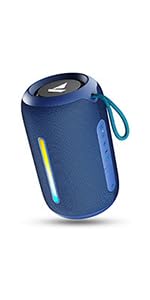
Image: A QR code for the boAt Hearables App, which provides additional support and features for the speaker.