
1. Sarrera
Thank you for choosing the VILTROX 27mm f/1.2 Z Lens. This high-performance prime lens is designed for Nikon Z-Mount APS-C mirrorless cameras, offering an ultra-large f/1.2 aperture for exceptional low-light performance and beautiful background blur. Featuring advanced optical design and a fast autofocus system, this lens is suitable for a wide range of photographic styles, including portraits, street photography, and landscapes. Please read this manual thoroughly to understand the lens's features and ensure optimal usage.

The VILTROX 27mm f/1.2 Z Lens mounted on a compatible Nikon Z-Mount mirrorless camera.
2. Zer dago kutxan
Mesedez, egiaztatu paketearen edukia elementu guztiak daudela ziurtatzeko:
- VILTROX 27mm F1.2 Lens for Nikon Z Mount
- Lentearen estalkia
- Lentearen kapela
- Lotus Lens Hood
- Lentearen poltsa
- Erabiltzailearen eskuliburua
- Enbalatzeko Kutxa
- Salmenta osteko txartela

The standard package contents for the VILTROX 27mm f/1.2 Z Lens.
3. Produktuaren ezaugarriak
3.1. F1.2 Super Large Aperture
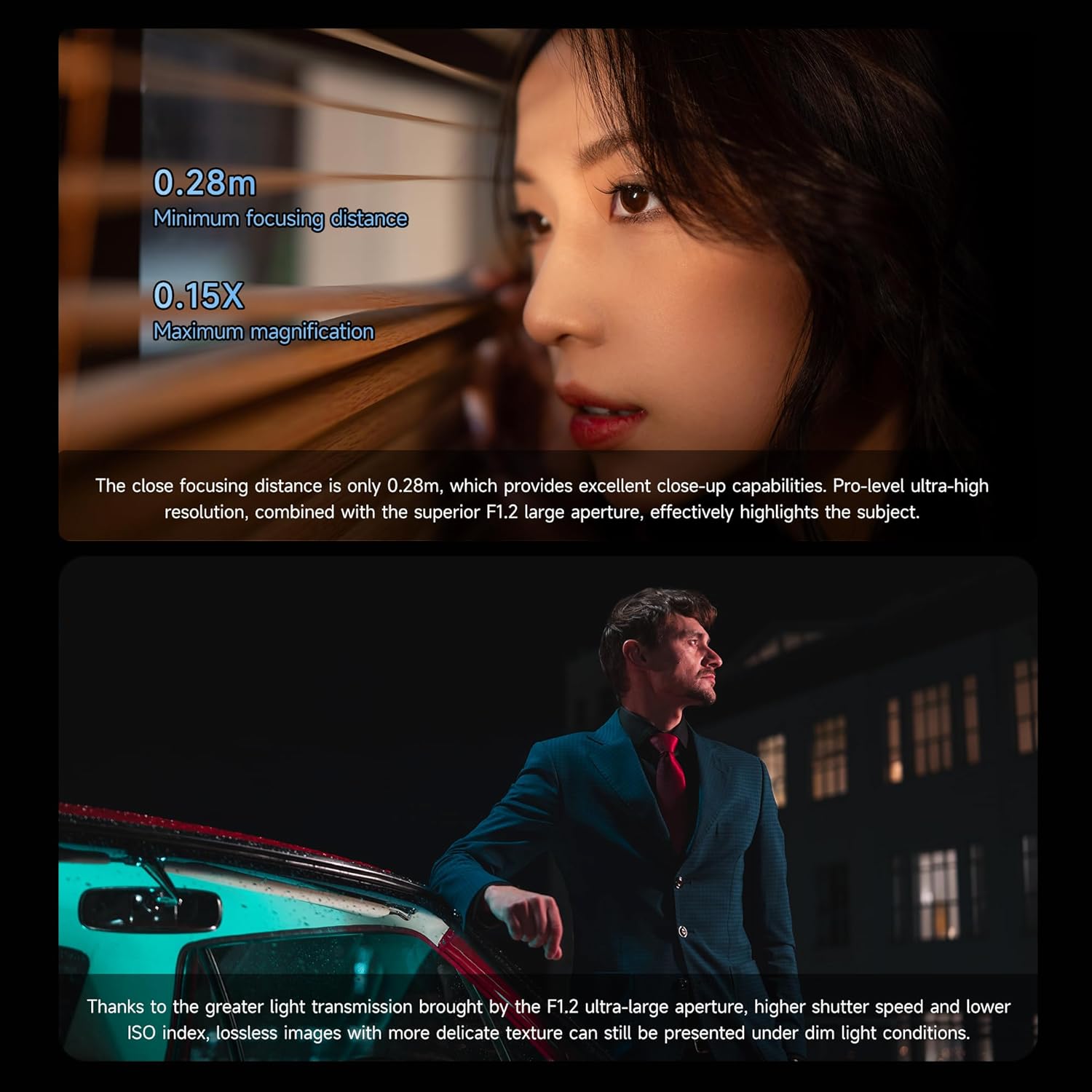
The VILTROX 27mm f/1.2 PRO Z lens features a bright f/1.2 maximum aperture, ideal for shooting in low-light conditions. This large aperture allows for faster shutter speeds and lower ISO settings, resulting in sharp images even in challenging lighting. It also produces a beautiful, soft background blur (bokeh), effectively isolating your subject.
The f/1.2 large aperture creates a beautiful blur effect, making the subject stand out clearly.
3.2. 27mm Focal Length
With a 27mm focal length, this lens provides an approximate 40mm equivalent focal length on APS-C cameras. This perspective is close to the natural human eye, making it versatile for various genres such as street photography, landscapes, and portraits, offering a natural depth perspective.

The 27mm focal length provides a natural perspective, suitable for diverse photography.
3.3. 0.28m Close-up Distance
The lens offers excellent close-up capabilities with a minimum focusing distance of 0.28 meters. This allows you to capture intricate details and effectively highlight your subject, especially when combined with the f/1.2 aperture for stunning resolution.

Capture fine details with the 0.28m minimum focusing distance.
3.4. Fast and Precise Autofocus
Equipped with a quiet STM stepper motor, this lens delivers excellent autofocus performance. It supports various automatic focusing modes, including eye and face autofocus, and animal autofocus, ensuring accurate and reliable capture of decisive moments. An on-body MF/AF switch allows for quick transitions between manual and automatic focusing.

The lens features fast and precise autofocus with support for Eye AF and high-speed tracking.
3.5. Excellent Optical Structure
The lens boasts an 11-group, 15-element optical structure, incorporating HOYA aspherical elements, 2 Extra-low Dispersion (ED) lenses, and 5 high-refractive lenses. These elements, combined with high-definition nano-multilayer coatings, effectively control dispersion, ghosting, and glare, delivering extraordinary image clarity and resolution from center to edge.

Detailed diagram of the lens's advanced optical elements.
3.6. Optimize Video Shooting Performance
The large aperture and sophisticated autofocus system contribute to excellent video shooting performance. The lens exhibits an undetectable breathing effect, allowing for flexible creation and concentration on your video content without distracting focus shifts.
3.7. Stepped Aperture Ring Design
The lens features a stepped aperture ring with smooth damping, providing tactile control over aperture adjustments. This design allows for quick and precise changes without needing to look away from the viewfinder, preventing accidental touches and ensuring a smooth operational feel.
The stepped aperture ring provides precise and tactile control.
3.8. All-round Reliability Design
Constructed with an efficient dust-proof and splash-proof structure, this lens is designed to perform reliably in complex environments. It includes a built-in high-grade dust ring and features front lens waterproof and HD multi-layer coatings, offering enhanced durability and protection.

The lens features a robust dust-proof and splash-proof design for outdoor use.
3.9. Comprehensive and Efficient Control System
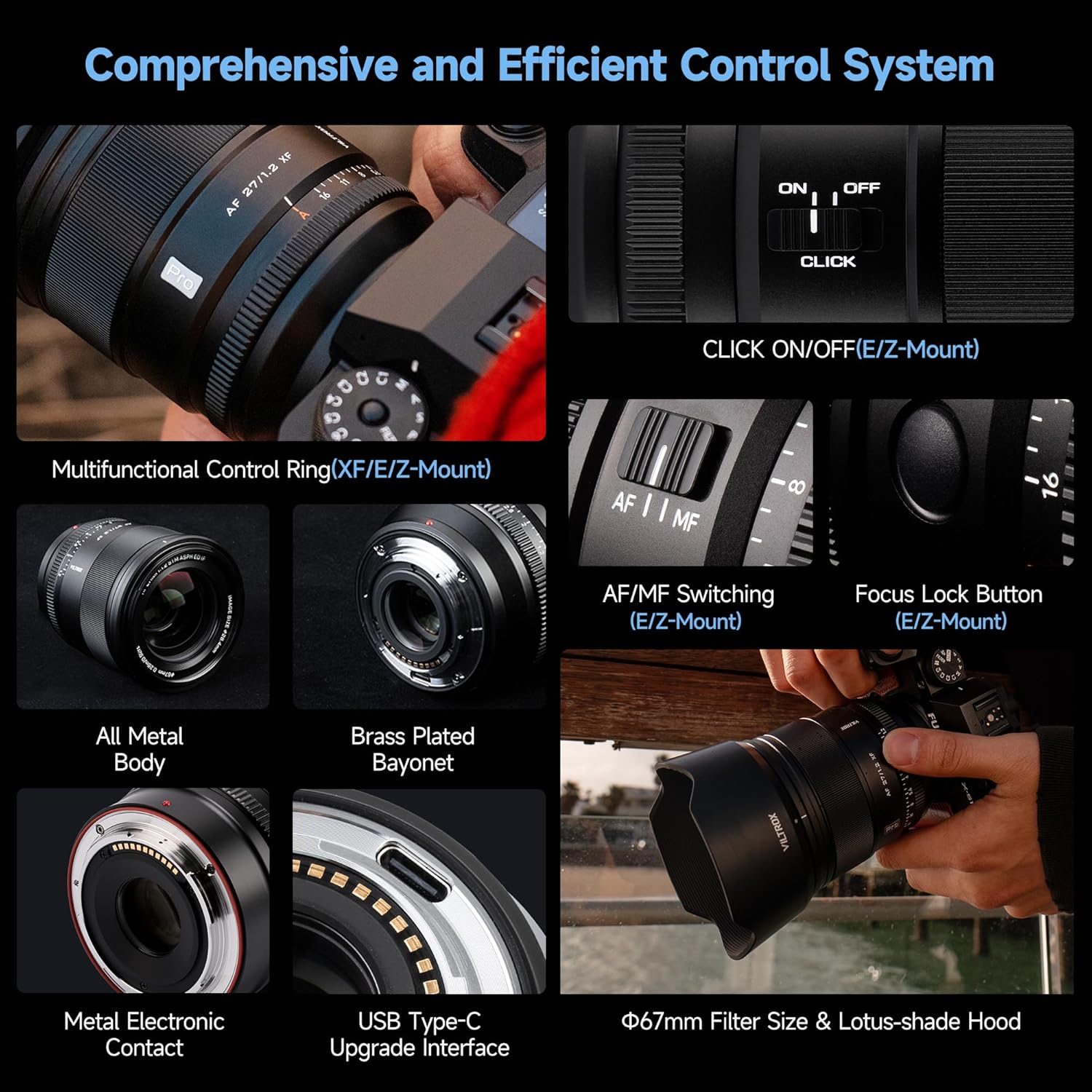
The lens integrates a multifunctional control ring, an AF/MF switching mechanism, and a focus lock button for intuitive operation. A USB Type-C upgrade interface is also included for convenient firmware updates, ensuring your lens remains up-to-date with the latest performance enhancements.

Key control features including the lens hood position, aperture ring, focusing ring, focus lock button, focusing mode switch, CLICK switch, lens hood index, lens mounting index, rubber seal, electronic contacts, and USB upgrade port.
4. Konfigurazioa
4.1. Lentea eranstea
- Ziurtatu kamera itzalita dagoela.
- Align the mounting index (red dot) on the lens with the mounting index on your camera body.
- Biratu lentea erlojuaren orratzen noranzkoan klik egin arte. Ez behartu lentea.
4.2. Detaching the Lens
- Ziurtatu kamera itzalita dagoela.
- While pressing the lens release button on your camera body, rotate the lens counter-clockwise until it stops.
- Kontu handiz kendu lentea kameraren gorputzetik.
4.3. Lentearen estalkia jartzea
Align the mark on the lens hood with the mark on the front of the lens. Rotate the hood clockwise until it locks into place. The lens hood helps to block stray light and protect the front element of the lens.
5. Funtzionamendu-argibideak
5.1. Autofocus (AF) / Manual Focus (MF) Switch
Locate the AF/MF switch on the side of the lens. Slide the switch to 'AF' for automatic focusing or 'MF' for manual focusing. In MF mode, rotate the focusing ring to adjust focus manually.
5.2. Irekidura eraztuna
The lens features an aperture ring for direct control over the aperture. Rotate the ring to select your desired f-stop. The 'CLICK' switch allows you to enable or disable the click stops on the aperture ring, providing a smooth, de-clicked operation for video recording.
5.3. Focus Lock Button
The focus lock button can be customized via your camera's menu to perform various functions, such as locking focus, activating Eye AF, or other programmable controls.
5.4. Firmware eguneraketak
To ensure optimal performance and compatibility, VILTROX may release firmware updates for your lens. Connect the lens to your computer via the USB Type-C port and visit the official VILTROX website for instructions and software to perform updates.
6. Mantentzea
6.1. Lentea garbitzea
- Erabili zapi leun eta pelunik gabeko bat edo lenteentzako eskuila bat lenteen gainazaleko hautsa kentzeko.
- For stubborn smudges or fingerprints, apply a small amount of lens cleaning solution to a microfiber cloth and gently wipe the lens in a circular motion.
- Saihestu material urratzaileak edo produktu kimiko gogorrak erabiltzea, hauek lenteen estaldura kaltetu baitezakete.
6.2. Biltegiratzea
- When not in use, attach the front and rear lens caps and store the lens in its protective bag.
- Gorde lentea leku fresko eta lehor batean, eguzki-argitik eta muturreko tenperaturetatik babestuta.
- If storing for an extended period, consider using a dehumidifier or desiccant to prevent mold and mildew growth.
7. Arazoak
7.1. Autofokatze arazoak
- Lenteak ez du fokatzen: Ensure the AF/MF switch on the lens is set to 'AF'. Check your camera's focus mode settings.
- Autofoku motela edo zehaztugabea: Ensure there is sufficient light on your subject. Clean the lens contacts on both the lens and camera body. Update the lens firmware if available.
7.2. Image Quality Concerns
- Irudi leunak: Check if the lens is properly focused. Ensure the aperture is not too wide or too narrow for your desired depth of field.
- Vignetting or distortion: While the lens is designed to minimize these, some may occur. These can often be corrected in post-processing software using lens profiles.
7.3. General Malfunctions
- Kamerak ez du lentea ezagutzen: Power off the camera, detach and reattach the lens, then power on. Clean the electronic contacts.
- Ezohiko zaratak: If you hear unusual noises from the lens, discontinue use and contact customer support.
For further assistance, please refer to the VILTROX official webwebgunean edo jarri harremanetan bere bezeroarentzako laguntzarekin.
8. Zehaztapenak
| Ezaugarri | Deskribapena |
|---|---|
| Elementua | AF 27/1.2 Pro Z |
| Lentearen muntaia | Z-muntaia |
| Sentsore formatua | APS-C |
| Lenteen elementuak | 15/11 (15 elements in 11 groups) |
| Fokua | F=27 mm |
| Viewangelua | 55.3° |
| Irekiera | F1.2-F16 |
| Irekiduraren palen kopurua | 11 |
| Tiro Distantzia | 0.28m-∞ |
| Focus Mekanismoa | Barne fokua |
| Focus Motor | STM+Berunezko torlojua |
| Foku modua | MF/AF |
| Max. Handitzea | 0.15X |
| Lenteen tamaina | Z: ≈82x92mm |
| Pisua | Z: ≈605g |
| Iragazkiaren tamaina | Φ67mm |

Detailed technical specifications for the VILTROX 27mm f/1.2 Z Lens.
9. Bermea eta Laguntza
This VILTROX product is covered by a manufacturer's warranty. For specific warranty terms, conditions, and duration, please refer to the 'After-sales Card' included in your package or visit the official VILTROX website. For technical support, troubleshooting assistance, or service inquiries, please contact VILTROX customer service through their official channels.