
Sarrera
This manual provides essential instructions for the safe and efficient use of your Aiwa AW-KF4 Portable Bluetooth Speaker. Please read this manual thoroughly before using the product and retain it for future reference.
The Aiwa AW-KF4 is a portable Bluetooth speaker designed for robust audio performance with dynamic LED lighting, a rechargeable battery, and resistance to water and dust (IPX6). It offers versatile connectivity options including Bluetooth, USB, and AUX input.
Paketearen edukia
Carefully unpack your speaker and ensure all items are present and in good condition. If any items are missing or damaged, please contact your retailer.
- Aiwa AW-KF4 Portable Bluetooth Speaker
- USB-C kargatzeko kablea
- Argibide eskuliburua

Image: The Aiwa AW-KF4 speaker in its retail packaging, showing the speaker and branding.
Produktua amaituview
The Aiwa AW-KF4 speaker features a compact, cylindrical design with integrated controls and dynamic LED lighting. It is built for portability and durability.
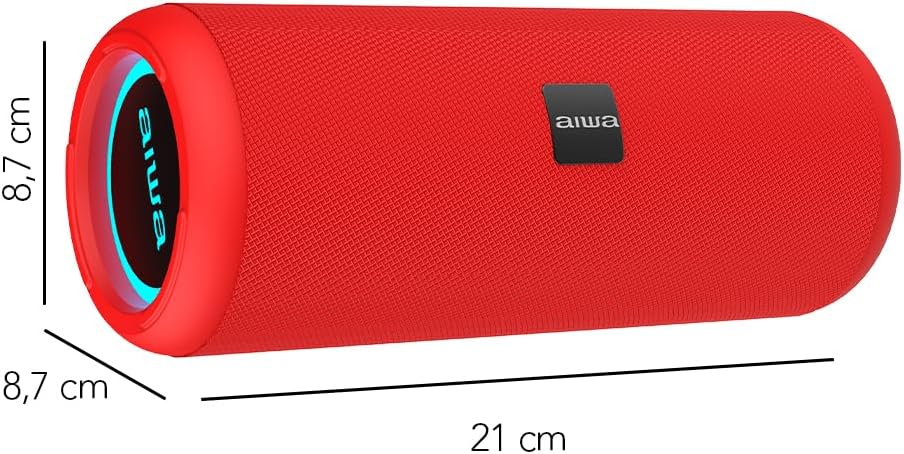
Image: A red Aiwa AW-KF4 speaker showing its approximate dimensions: 21 cm in length and 8.7 cm in diameter.

Image: Two Aiwa AW-KF4 speakers (red and black) illustrating key features: 20W output, LED lighting, TWS function, IPX6 water resistance, Bluetooth, USB, and SD card compatibility.

Image: A collage showing the Aiwa AW-KF4 speaker in various outdoor settings, emphasizing its IPX6 water resistance, up to 10 hours of battery life, and hands-free calling capability with an integrated microphone.
Konfigurazioa
1. Bozgorailua kargatzea
Before first use, fully charge the speaker. Use the provided USB-C cable to connect the speaker to a compatible USB power adapter (not included) or a computer's USB port.
- Kargatzeko adierazlearen argia piztuko da kargatzen ari den bitartean.
- Karga osoak 3 ordu behar ditu gutxi gorabehera.
- Guztiz kargatuta dagoenean, adierazle-argia aldatu edo itzali egin daiteke.
A fully charged battery provides up to 10 hours of playback, depending on volume level and usage.
2. Piztu/Itzali
- To power on: Press and hold the Power button for a few seconds until you hear an audible prompt and the LED lights activate.
- To power off: Press and hold the Power button for a few seconds until you hear an audible prompt and the LED lights turn off.
Funtzionamendu-argibideak
1. Bluetooth parekatzea
The speaker will automatically enter Bluetooth pairing mode when powered on for the first time or if no device is connected. The LED indicator will flash, indicating it's ready to pair.
- Ziurtatu bozgorailua piztuta eta parekatze moduan dagoela.
- Gaitu Bluetooth-a zure telefonoan, tabletan edo beste audio gailu batean.
- Bilatu "AW-KF4" in the list of available Bluetooth devices.
- Select "AW-KF4" to connect. You will hear a confirmation sound once paired.
- The LED indicator will stop flashing and remain solid.
Bozgorailuak 10 metroko (33 oin) Bluetooth irismena du.
2. Benetako haririk gabeko estereo (TWS) funtzioa
The TWS function allows you to pair two Aiwa AW-KF4 speakers together for a stereo sound experience.

Image: A visual representation of the TWS (True Wireless Stereo) function, showing two Aiwa AW-KF4 speakers being used together for synchronized sound.
- Ensure both AW-KF4 speakers are powered on and not connected to any Bluetooth device.
- On one speaker (this will be the primary speaker), press and hold the TWS button (if available, or a designated button as per specific model instructions) until you hear a pairing tone.
- Bi bozgorailuak automatikoki konektatuko dira elkarri. Konektatu ondoren, baieztapen-tonu bat entzungo da.
- Now, connect your Bluetooth device to the primary speaker as described in the "Bluetooth Pairing" section.
Note: Refer to the specific button layout on your speaker for the exact TWS pairing button.
3. USB and AUX Playback
- USB erreprodukzioa: Sartu audioa duen USB flash drive bat fileUSB atakan sartzen da. Bozgorailuak automatikoki detektatuko du musika eta erreproduzitzen hasiko da unitatetik.
- Erreprodukzio AUX: Connect an audio device using a 3.5mm AUX cable (not included) to the AUX input port. The speaker will switch to AUX mode.
4. LED argiak
The speaker features dynamic LED lights. These lights typically activate automatically when the speaker is powered on. Specific controls for changing light modes or turning them off may be available via a dedicated button on the speaker (refer to your speaker's button layout).
5. Kontrolak
The speaker features tactile controls for various functions:
- Pizteko botoia: Eduki sakatuta pizteko/itzaltzeko.
- Erreproduzitu/Pausatu botoia: Sakatu musika erreproduzitzeko edo eteteko.
- Bolumena igo / Hurrengo pista: Sakatu bolumena igotzeko. Sakatu eta eutsi hurrengo abestirako.
- Bolumena jaitsi / Aurreko pista: Sakatu bolumena jaisteko. Sakatu eta eutsi aurreko abestirako.
- Modu botoia: Press to switch between Bluetooth, USB, and AUX modes.
- Call Button (if applicable): Press to answer/end calls. Press and hold to reject calls.
Note: Button functions may vary slightly. Consult the diagrams in your physical manual for precise button identification.
Mantentzea
To ensure the longevity and optimal performance of your Aiwa AW-KF4 speaker, follow these maintenance guidelines:
- Garbiketa: Use a soft, dry cloth to clean the speaker's exterior. Do not use abrasive cleaners, solvents, or harsh chemicals.
- Uraren erresistentzia (IPX6): The speaker is resistant to strong water jets. It is not designed for submersion. Ensure all port covers are securely closed before exposing the speaker to water or dust. After exposure to water, wipe the speaker dry before charging.
- Biltegiratzea: Gorde bozgorailua leku fresko eta lehor batean, eguzki-argitik eta muturreko tenperaturetatik babestuta.
- Bateria zaintzea: To preserve battery life, charge the speaker regularly, even if not in frequent use. Avoid fully discharging the battery for extended periods.

Image: The Aiwa AW-KF4 speaker positioned near a pool, illustrating its IPX6 water resistance feature, suitable for outdoor and poolside use.
Arazoak konpontzea
Bozgorailuarekin arazoak badituzu, jo ezazu honako arazo eta irtenbide ohikoenei:
| Arazoa | Balizko Kausa / Irtenbidea |
|---|---|
| Bozgorailuak ez du pizten. |
|
| Ezin da Bluetooth bidez parekatu. |
|
| Soinurik ez. |
|
| Soinu distortsioa. |
|
| TWS parekatzeak huts egin du. |
|
Zehaztapenak
| Ereduaren izena | AW-KF4 (AWKF4B) |
| Marka | Ez |
| Bozgorailuaren irteera potentzia | 20 watt RMS |
| Maiztasun Erantzuna | 80 Hz (minimum specified) |
| Konektibitate Teknologia | Bluetooth 5.0, USB, AUX |
| Audio irteera modua | Estereoa |
| Etxebizitza Materiala | Plastikoa |
| Hizlari mota | Woofer-a |
| Uraren Erresistentzia Maila | IPX6 (Resistant to strong water jets) |
| Bluetooth barrutia | Gehienez 10 metro (33 oin) |
| Mikrofonoak | 1 (for hands-free calling) |
| Bateria Edukiera | 2000 mAh litio ioi |
| Bateriaren iraupena | 10 ordu arte (bolumenaren eta erabileraren arabera aldatzen da) |
| Kargatzeko Denbora | 3 ordu gutxi gorabehera |
| Sarrera boltage | 5 Volt |
| Inpedantzia | 4 ohmio |
| Kontrol-metodoa | Tactile Buttons |
| Neurriak (L x D) | Gutxi gorabehera 21 cm x 8.7 cm |
| Gailu bateragarriak | Smartphoneak, Tabletak |
| Jatorria | Txina |
Bermea eta Laguntza
Your Aiwa AW-KF4 Portable Bluetooth Speaker comes with a 1 urteko fabrikatzailearen bermea erosketa-datatik aurrera. Berme honek erabilera normalaren ondoriozko fabrikazio-akatsak estaltzen ditu.
Bermeak ez ditu estaltzen:
- Damage caused by misuse, abuse, negligence, or accident.
- Baimenik gabeko konponketa edo aldaketen ondoriozko kalteak.
- Higadura normala.
For warranty claims or technical support, please contact your retailer or the official Aiwa customer service in your region. Please have your proof of purchase and product model number (AW-KF4) ready when contacting support.


