1. Sarrera
The Ultrapods Pro Wireless Earphones (model ultra buds gg) are designed to provide a high-fidelity audio experience with the convenience of wireless connectivity. Featuring Bluetooth 5.3 for stable connections, IPX4 sweat and water resistance, and intuitive touch controls, these in-ear earbuds are suitable for various activities, including sports and daily use. The charging case includes a digital display for battery status and a unique cool light feature.
2. Paketearen edukia
- Ultrapods Pro Wireless Earbuds (Left and Right)
- Haririk gabeko kargatzeko kaxa
- Kargatzeko kablea (USB-C)
- Erabiltzailearen eskuliburua
3. Produktua amaitu daview
The Ultrapods Pro feature an ergonomic in-ear design for comfort and a secure fit. The transparent charging case not only protects and charges your earbuds but also displays the battery level digitally. Each earbud is equipped with touch-sensitive controls for managing audio playback and calls.
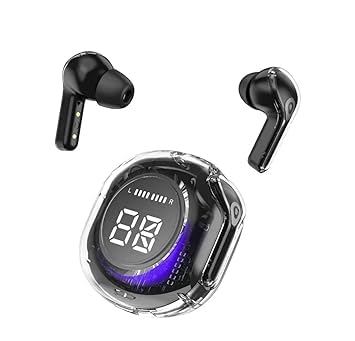
Image: Ultrapods Pro Wireless Earphones with their transparent charging case, showing the earbuds inside.
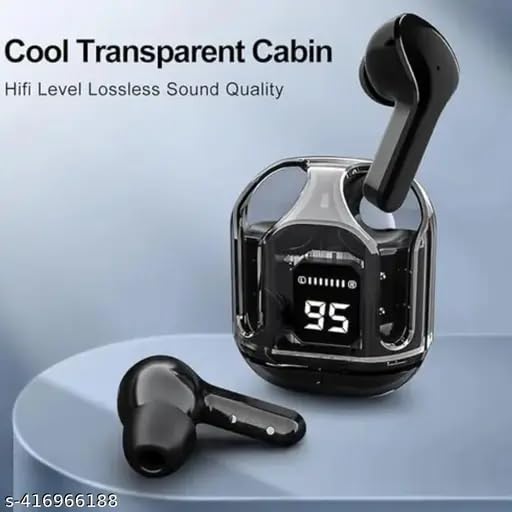
Irudia: Gertuko planoa view of the Ultrapods Pro transparent charging case with one earbud inserted and another lying beside it, highlighting the digital battery display.
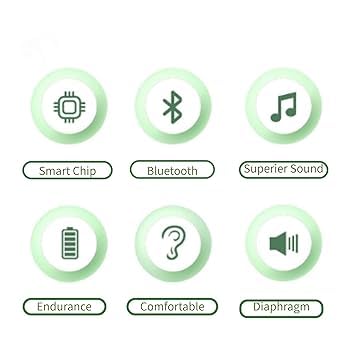
Image: Icons representing key features: Smart Chip, Bluetooth, Superior Sound, Endurance, Comfortable, and Diaphragm.
4. Konfigurazioa
4.1 Entzungailuak eta zorroa kargatzea
- Kasua kargatzea: Connect the provided USB-C charging cable to the charging port on the case and a USB power source. The digital display on the case will show the charging progress. The case features a cool light during charging.
- Entzungailuak kargatzea: Place the earbuds into their respective slots in the charging case. Ensure they are properly seated. The earbuds will automatically begin charging. The case's display will indicate the charging status of the earbuds.
Note: Fully charge the earphones and case before first use for optimal battery life.
4.2 Bluetooth parekatzea
- Piztu: Open the charging case. The earbuds will automatically power on and enter pairing mode. You may hear an audible prompt.
- Aktibatu Bluetootha: Zure gailu mugikorrean (smartphone-a, tableta, etab.), joan Bluetooth ezarpenetara eta ziurtatu Bluetooth gaituta dagoela.
- Hautatu gailua: In the list of available Bluetooth devices, look for "Ultrapods Pro" or a similar name and select it to connect.
- Berrespena: Once connected, you will hear a confirmation tone or voice prompt from the earbuds, and your device will show them as connected.
Oharra: Entzungailuak automatikoki konektatuko dira azken parekatutako gailura zorrotik ateratzean, Bluetooth-a gaituta badago gailuan.
5. Funtzionamendu-argibideak
5.1 Piztu/Itzali
- Piztu: Ireki kargatzeko kaxa, eta entzungailuak automatikoki piztuko dira.
- Itzali: Jarri entzungailuak berriro kargatzeko zorroan eta itxi tapa. Automatikoki itzaliko dira.
5.2 Musika erreproduzitzea
- Erreproduzitu/Pausatu: Sakatu behin aurikular batean.
- Hurrengo ibilbidea: Sakatu birritan eskuineko aurikularra.
- Aurreko pista: Sakatu birritan ezkerreko aurikularra.
5.3 Deien kudeaketa
- Deia erantzun/amaitu: Sakatu behin aurikular batean.
- Deia baztertu: Eduki sakatuta aurikularretako bat 2 segundoz.
5.4 Bolumen kontrola
The Ultrapods Pro include a built-in remote function that allows you to adjust the volume directly from the earbuds. Refer to your device's specific settings or the earbud's touch control guide for detailed volume adjustment gestures, as these can vary.
6. Mantentzea
6.1 Garbiketa
- Erabili zapi leun, lehor eta lihorik gabeko bat entzungailuak eta kargatzeko zorroa garbitzeko.
- Ez erabili produktu kimiko gogorrak, garbiketa-disolbatzaileak edo garbigarri indartsuak.
- Garbitu astiro entzungailuen eta zorroaren kargatzeko kontaktuak behar bezala kargatzen direla ziurtatzeko.
6.2 Biltegiratzea
- Erabiltzen ez dituzunean, gorde beti entzungailuak kargatzeko zorroan, babesteko eta kargatuta mantentzeko.
- Gorde leku fresko eta lehor batean, tenperatura altuetatik eta eguzki-argitik babestuta.
6.3 Urarekiko Erresistentzia (IPX4)
The Ultrapods Pro are rated IPX4, meaning they are resistant to splashing water from any direction. This makes them suitable for workouts and light rain. They are not designed for swimming, showering, or submersion in water. Ensure the earbuds are dry before placing them back into the charging case to prevent damage.
7. Arazoak
- Entzungailuak ez dira parekatzen:
Ensure both earbuds are charged. Place them back in the case, close the lid, then open it again. On your device, forget the "Ultrapods Pro" from your Bluetooth list and try pairing again. - Ez dago soinurik entzungailu batetik:
Check if both earbuds are charged. Try resetting the earbuds by placing them in the case and then taking them out. Re-pair with your device. - Kargatzeko arazoak:
Egiaztatu kargatzeko kablea ondo konektatuta dagoela bai zorroan bai energia-iturrian. Ziurtatu entzungailuetako eta zorro barruko kargatzeko kontaktuak garbi eta hondakinik gabe daudela. - Ukipen-kontrolak ez dute erantzuten:
Ensure your fingers are clean and dry. Sometimes a simple restart (placing earbuds in case and taking them out) can resolve minor glitches.
8. Zehaztapenak
| Ezaugarri | Zehaztapena |
|---|---|
| Ereduaren izena | ultra buds gg |
| Konektibitate Teknologia | Haririk gabekoa |
| Haririk gabeko Komunikazio Teknologia | Bluetooth v5.3 (Enhanced Data Rate) |
| Kontrol-metodoa | Ukitu |
| Ezaugarri bereziak | Fast Charging, Microphone Included, Sweatproof (IPX4) |
| Mikrofonoaren formatua | Eraikitakoa |
| Materiala | Plastikoa |
| Belarrien Kokatzea | Belarrian |
| Forma-faktorea | Belarrian |
| Zarata Kontrola | Zarata Deuseztatze Aktiboa |
| Audio Codecs Support | SBC, ACC |
| Gidariaren tamaina | 10mm + 6mm vibrating diaphragm |
9. Bermea eta Laguntza
For warranty information or technical support, please refer to the documentation provided at the time of purchase or contact the retailer/manufacturer directly. Keep your proof of purchase for any warranty claims.


