
1. Sarrera
This manual provides detailed instructions for the installation, operation, and maintenance of your SJoyBring 7-Inch Double Din Car Stereo. Please read this manual thoroughly before using the product to ensure proper functionality and safety. Keep this manual for future reference.
2. Segurtasun informazioa
- Instalazio profesionala gomendatzen da: Due to the complexity of car audio systems, professional installation is highly recommended to prevent damage to the unit or your vehicle.
- Dash Size Verification: Before installation, ensure your vehicle's dashboard opening size is compatible with this stereo (standard US vehicle double din: 170*97mm). An additional dash kit may be required if the dimensions do not match.
- Kableatua: Carefully follow the wiring diagram provided. Incorrect wiring can cause damage or malfunction.
- Gidatzeko segurtasuna: Do not operate features that require significant attention while driving. Always prioritize safe driving practices.
- Elikatze-iturria: Ensure the car stereo is connected to a 12V DC power supply with negative grounding.
3. Paketearen edukia
Egiaztatu behean zerrendatutako elementu guztiak zure paketean sartuta daudela:
- SJoyBring 7-Inch Double Din Car Stereo Unit
- Urruneko Kontrola
- Kableatu Harness
- Brackets (Mounting Hardware)
- Torlojuak
- Atzekoa View Kamera
- Backup Kameraren kablea
- Erabiltzailearen eskuliburua
- Additional Frames (2, for use if needed)

Image: Main unit, remote control, and included backup camera.
4. Produktua amaitu daview
4.1 Aurrealdeko panelaren kontrolak
- Pizteko / Modua botoia: Press to turn on/off, short press to switch modes.
- Bolumen-eskulekua: Biratu bolumena doitzeko.
- Hasierako botoia: Menu nagusira itzultzen da.
- Erantzun/Ezin egin deiak: Dedicated buttons for phone calls.
- Berrezarri botoia: Sistema berrezartzeko botoi txikia.
- SD txartelaren entxufea: For media playback from an SD card.
- USB entxufea: For media playback, phone charging, and wired Mirror Link.
4.2 Atzeko panelaren konexioak
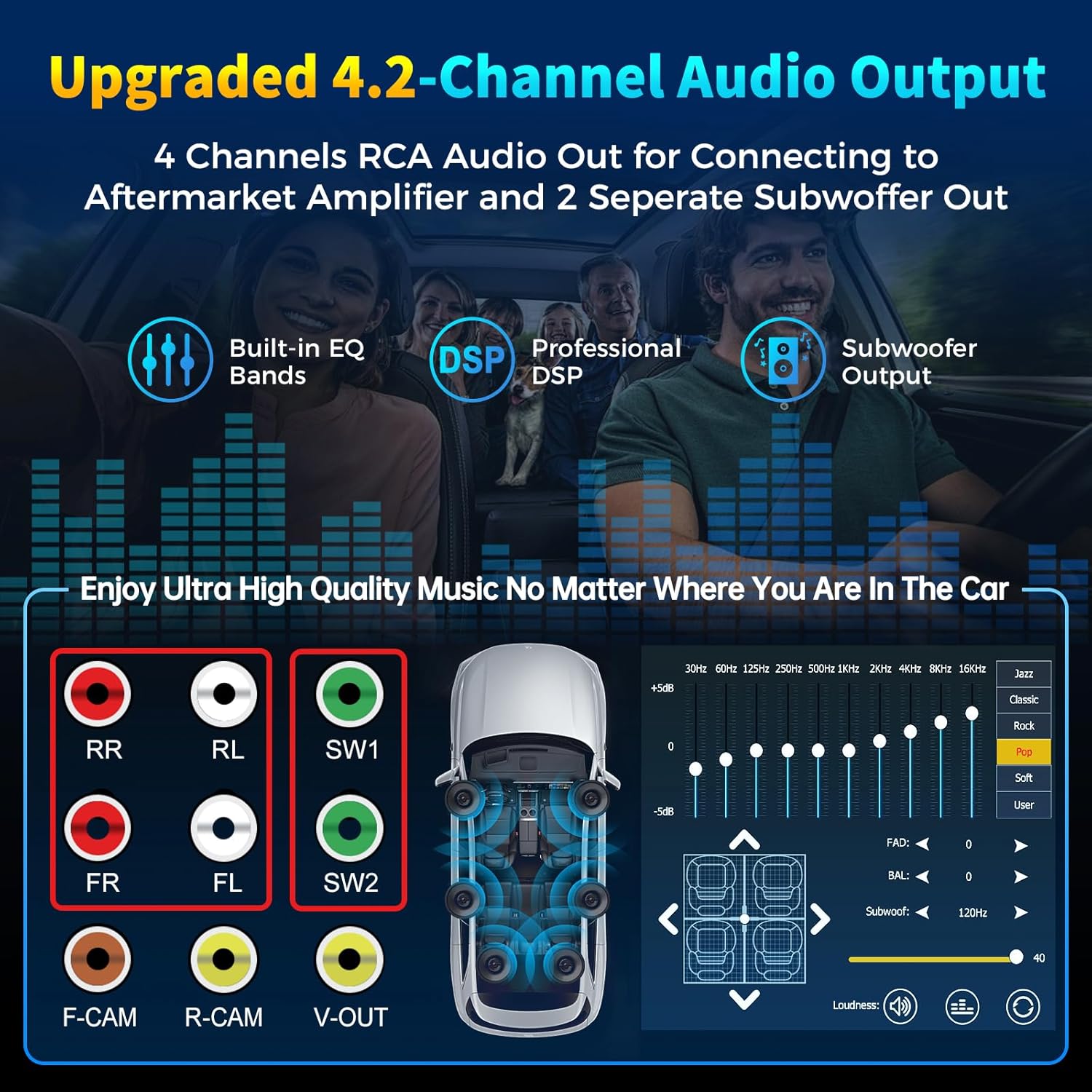
Image: Rear panel of the stereo unit, highlighting RCA pre-amplifier outputs, subwoofer outputs, and camera inputs.
- 4 Channels Pre-amplifier (RCA): Front Right (FR), Front Left (FL), Rear Right (RR), Rear Left (RL) outputs for connecting to an aftermarket ampbiziagoa.
- 2 Subwoofer Outputs (SW1, SW2): Dedicated outputs for connecting subwoofers.
- Front Camera Input (F-CAM): RCA input for an optional front view kamera.
- Rear Camera Input (R-CAM): RCA input for the included backup camera.
- Video Output (V-OUT): RCA video output.
- Extra Bluetooth Antenna: Enhances Bluetooth connection stability.
- Energia-arnesaren konektorea: Main power and speaker wire connection.
5. Instalazio gida
The SJoyBring car stereo is designed for a standard double din opening. Ensure your vehicle's dash size is suitable. If not, an additional dash kit may be required. It is recommended to have this unit installed by a professional car audio technician.
5.1 Dimentsioak eta kableatu-diagrama

Image: Detailed diagram illustrating the physical dimensions of the stereo unit and the comprehensive wiring connections for power, speakers, external amplifier, cameras, and steering wheel controls.
- Power Connections (Section A): Connect the Yellow wire to +12V (B+), Black to Ground (GND), Red to +12V ACC (ignition switch), Orange to Illuminate light, and Blue to Auto Antenna/Ampbiziagoa.
- Speaker Connections (Section B): Connect the corresponding speaker wires (Grey, White, Green, Purple) to your vehicle's front and rear speakers.
- Special Function Wires (Section C): Connect the Brown wire to Brake detect, Pink to Back car control (for reverse camera trigger), Green to Steering wheel control 1, Green/Black to Steering wheel control 2, and Pink/Black to Front view camera power supply.
- RCA konexioak: Konektatu kanpokoa amplifiers, subwoofers, and cameras to the corresponding RCA ports on the rear panel as shown in the diagram.
Ohar garrantzitsua: Some vehicles may require additional accessories such as a wire harness adapter and a radio antenna adapter for proper installation. These are typically specific to your car model and are not included.
6. Konfigurazioa
6.1 Hasierako piztea
After successful installation, turn on your vehicle's ignition. The stereo unit should power on automatically. If not, press the Power/Mode button on the front panel.
6.2 Sistemaren ezarpenak
From the main menu, navigate to the 'Setup' icon to access system configurations.
- Hizkuntza: Hautatu nahi duzun hizkuntza erabiltzailearen interfazerako.
- Ordua konfiguratzea: Doitu data eta orduaren ezarpenak.
- Pantaila: Customize display options, including brightness and wallpaper. You can choose from pre-installed wallpapers or upload your own via USB.
- Audioa: Access equalizer settings, fader/balance controls, and subwoofer adjustments.
- Bluetooth konfigurazioa: Manage Bluetooth pairing and connection settings.
7. Funtzionamendu-argibideak
7.1 Haririk gabeko CarPlay eta Android Auto
This unit supports wireless Apple CarPlay and Android Auto, allowing seamless integration of your smartphone's features onto the stereo display without a USB cable. Access navigation, music, calls, and messages through a simplified interface.

Image: The stereo display showing the Apple CarPlay interface, providing access to phone, music, maps, messages, and other applications.
Ahots kontrola: Utilize intelligent voice assistants (Siri for CarPlay, Google Assistant for Android Auto) to make calls, navigate, play music, and more, ensuring hands-free operation for safer driving.
Bideoa: Amaiera batview of the SJoyBring 7-Inch Double Din Car Stereo, demonstrating features such as wireless CarPlay and Android Auto connectivity, audio adjustments, real-time navigation, voice control, steering wheel control compatibility, wired mirror link, and front/backup camera support.
7.2 Bluetooth funtzioa
The independent Bluetooth module and antenna provide a stable, fast, and clear connection for wireless audio streaming and hands-free calling. The built-in ultra-clear microphone ensures clear call quality and accurate voice control.

Image: The Bluetooth call screen on the stereo, displaying options to end, mute, use keypad, or add a call.
7.3 Ispilu-lotura
The Mirror Link function supports both iOS and Android phones. Connect your smartphone via USB to mirror its screen onto the stereo's 7-inch HD touchscreen. This allows you to view apps like Google Maps, Spotify, or YouTube directly on the larger display.

Image: A smartphone connected to the car stereo via USB, demonstrating the Mirror Link feature where the phone's display is replicated on the stereo's screen.
7.4 4.2-Channel Audio Output
The stereo features 4 channels of RCA audio output for connecting to aftermarket amplifiers and 2 separate subwoofer outputs. This configuration allows for enhanced sound quality and powerful bass effects.

Image: A diagram showing the 4.2-channel audio output system, including connections for front, rear, and subwoofer speakers, along with an equalizer interface.
Berdinketa (EQ): Adjust audio frequencies to customize your listening experience. The unit includes multiple preset EQ modes (e.g., Jazz, Classic, Rock, Pop, Soft) and a user-definable mode.
7.5 FM/AM irratia
Access FM and AM radio stations. Use the scan function to find available stations and save your favorites as presets.
7.6 Rear and Front View Kameraren euskarria
The car stereo supports both rear and front view cameras. When the vehicle shifts into reverse, the display automatically switches to the rear camera view. The included HD night vision rear view camera offers a wide viewing angle and waterproof design for safer parking.
Image: A split screen showing the view from a front camera (top) and a rear camera with parking guidelines (bottom) on the car stereo display.
8. Mantentzea
To maintain the performance and appearance of your SJoyBring car stereo:
- Garbiketa: Erabili zapi leun eta lehor bat ukipen-pantaila eta kanpoaldea garbitzeko. Saihestu garbitzaile edo disolbatzaile urratzaileak.
- Saihestu likidoak: Ez utzi likidorik unitatean sartzen, kalteak eragin ditzakeelako.
- Tenperatura: Saihestu unitatea muturreko tenperaturen eraginpean jartzea.
9. Arazoak
If you encounter issues with your SJoyBring car stereo, refer to the following common problems and solutions:
- Potentziarik gabe: Check all power connections (Yellow, Black, Red wires) to ensure they are securely connected and receiving power. Verify vehicle fuses.
- Soinurik ez: Check speaker wiring connections. Ensure the volume is not muted or set too low. Verify external amplifier connections if used.
- Bluetooth konexio-arazoak: Ensure Bluetooth is enabled on both the stereo and your smartphone. Delete previous pairings and attempt to re-pair. Ensure the extra Bluetooth antenna is properly connected.
- CarPlay/Android Auto ez da konektatzen: For wireless connection, ensure Wi-Fi and Bluetooth are enabled on your phone. For wired Mirror Link, ensure the USB cable is securely connected and the phone's USB debugging mode (for Android) or trust prompt (for iOS) is accepted.
- Atzeko kamera ez da bistaratzen: Check the R-CAM connection and ensure the Pink 'Back car control' wire is correctly connected to the vehicle's reverse light trigger.
- Pantailak ez du erantzuten: Try pressing the Reset button with a thin object (e.g., a paperclip).
If problems persist after attempting these solutions, please contact SJoyBring customer support for further assistance.
10. Zehaztapenak
| Ezaugarri | Zehaztapena |
|---|---|
| Bistaratzeko tamaina | 7 hazbeteko |
| Bistaratzeko ebazpena | 1024 x 600 (Supports 1920 x 1080P video playback) |
| Konektibitate Teknologia | Bluetootha, USBa |
| Ezaugarri bereziak | Wireless Apple CarPlay, Android Auto, Built-In Wi-Fi, DSP, GPS Navigation (via phone mirroring) |
| Audio irteera modua | Estereoa |
| Inguruko soinu-kanalaren konfigurazioa | 4.2 |
| Bideo-kodeketa | H.264, H.265/HEVC, MPEG-4 |
| Elementuaren pisua | 2.72 kilo |
| Paketearen neurriak | 9.21 x 6.34 x 6.14 hazbete |
| Modelo zenbakia | 27a18396-8e56-4cb0-90fe-8164166a6ab7 |
11. Bermea eta Laguntza
This SJoyBring car stereo unit comes with a 1 urteko bermea erosketa-datatik aurrera. Berme honek fabrikazio-akatsak eta erabilera normalaren ondoriozko matxurak estaltzen ditu.
For technical support, troubleshooting assistance, or warranty claims, please contact SJoyBring customer service through the retailer where the product was purchased or visit the official SJoyBring webharremanetarako informazioa lortzeko gunea.