
1. Sarrera
Thank you for choosing the MECHEN H1-Pro Bluetooth MP3 Player with WiFi. This device is designed to provide a versatile and enjoyable audio and video experience. Featuring a 4-inch touchscreen and running on Android 9.0, it supports various applications and connectivity options. This manual provides essential information for setting up, operating, and maintaining your device.
2. Paketearen edukia
Egiaztatu behean zerrendatutako elementu guztiak zure paketean sartuta daudela. Elementuren bat falta bada edo hondatuta badago, jarri harremanetan bezeroarentzako arreta-zerbitzuarekin.
- MECHEN H1-Pro MP3 Player
- USB kablea
- Entzungailuak
- Babes Filma
- Babes-zorroa
- Erabiltzailearen eskuliburua

Image: The MECHEN H1-Pro MP3 Player displayed with its accessories, including a USB cable, headphones, protective film, and a clear protective case.
3. Gailua amaitu daview
Familiarize yourself with the physical components and controls of your MECHEN H1-Pro MP3 Player.
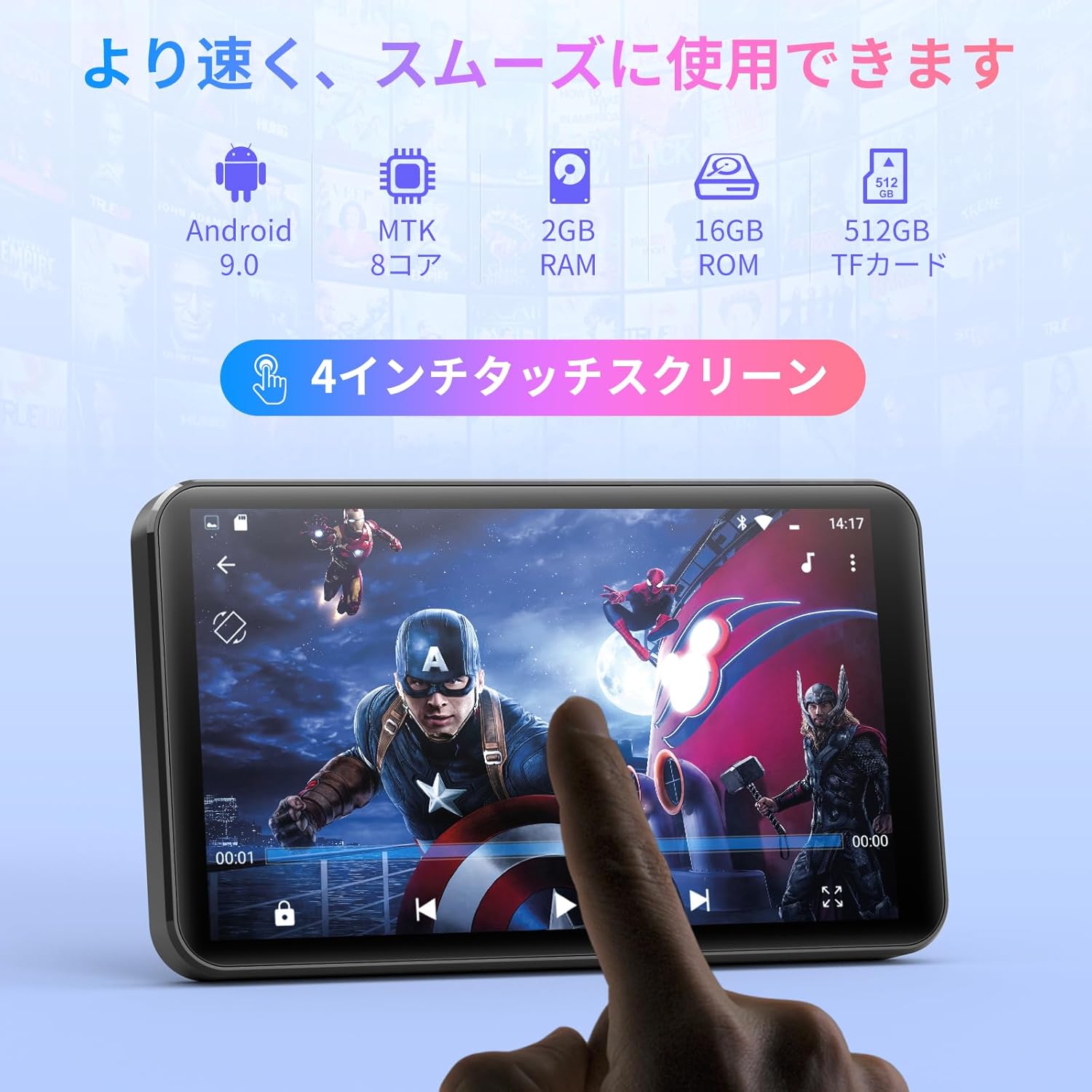
Irudia: Aurrealdea view of the MECHEN H1-Pro MP3 Player, showcasing its 4-inch touchscreen display.

Irudia: Albokoa view of the MECHEN H1-Pro MP3 Player, highlighting the power button and volume controls.

Irudia: Goia eta behea views of the MECHEN H1-Pro MP3 Player, illustrating the USB-C charging port, headphone jack, and Micro SD card slot.
4. Konfigurazioa
4.1 Hasierako karga
Before first use, fully charge the device. Connect the provided USB cable to the player's USB-C port and the other end to a USB power adapter (not included) or a computer's USB port. The charging indicator will show the charging status.
4.2 Piztu/Itzali
- Pizteko: Sakatu eta eutsi gailuaren alboko pizteko botoiari pantaila piztu arte.
- Itzaltzeko: Press and hold the Power button until a power-off menu appears on the screen. Select 'Power Off' to shut down the device.
4.3 Wi-Fira konektatzea
To access online features and download apps, connect your device to a Wi-Fi network.
- Joan zaitez Ezarpenak > Sarea eta Internet > Wi-Fi.
- Wi-Fia aktibatu/desaktibatu On.
- Hautatu nahi duzun Wi-Fi sarea zerrendatik.
- Eskatzen bazaizu, idatzi pasahitza eta sakatu Konektatu.

Image: The MECHEN H1-Pro MP3 Player screen showing Wi-Fi settings and available networks.
4.4 Mikro SD txartela sartzea
The device supports Micro SD cards for expanded storage. Locate the Micro SD card slot on the side of the device. Gently insert the card with the gold contacts facing down until it clicks into place.
5. Funtzionamendu-argibideak
5.1 Basic Navigation (Touchscreen)
The MECHEN H1-Pro features a responsive 4-inch touchscreen. Use standard touch gestures:
- Sakatu: Elementu bat hautatzeko edo aplikazio bat irekitzeko.
- Pasatu hatza: Zerrendetan zehar mugitzeko edo pantaila artean aldatzeko.
- Pixka bat: To zoom in or out (in supported applications).
5.2 Musika erreproduzitzea
The device supports various audio formats including MP3, WAV, WMA, APE, OGG, and FLAC for high-fidelity music playback.
- Ireki Musika aplikazioa.
- Arakatu zure musika liburutegia artista, album, abesti edo erreprodukzio-zerrendaren arabera.
- Sakatu abesti bat erreprodukzioa hasteko.
- Erabili pantailako kontrolak erreproduzitzeko/pausatzeko, abestiak saltatzeko eta bolumena doitzeko.

Image: The MECHEN H1-Pro MP3 Player screen showing a music playback interface with album art and controls.
5.3 Bideo erreprodukzioa
Enjoy 720P/1080P full-format HD video playback without conversion. Supported formats include RM, RMVB, FLV, MP4, DAT, MKV, MPG, MOV, TS, etc.
- Ireki Bideo erreproduzitzailea aplikazioa.
- Hautatu bideoa file zure biltegitik.
- Tap to play. Use on-screen controls for playback options.

Image: The MECHEN H1-Pro MP3 Player screen showing a video playing in full-screen mode.
5.4 Bluetooth konexioa
Connect to Bluetooth headphones, speakers, or other compatible devices.
- Joan zaitez Ezarpenak > Konektatutako gailuak > Bluetootha.
- Aktibatu Bluetooth-a On.
- Ziurtatu zure Bluetooth osagarria parekatze moduan dagoela.
- Select the accessory from the list of available devices to pair.

Image: The MECHEN H1-Pro MP3 Player shown alongside a pair of wireless headphones, indicating Bluetooth connectivity.
5.5 Wi-Fi Connectivity & App Downloads
With Android 9.0 and Wi-Fi, you can download and install various applications from the Google Play Store.
- Ensure the device is connected to Wi-Fi (see Section 4.3).
- Ireki Play Store aplikazioa.
- Hasi saioa zure Google kontuarekin.
- Bilatu and download desired applications (e.g., Spotify, Amazon Music, Audible).

Image: The MECHEN H1-Pro MP3 Player screen showing a variety of installed applications, including music streaming services and web arakatzaileak.
5.6 FM Irratia
Entzun zure FM irrati-kate gogokoenak.
- Connect wired headphones to the 3.5mm audio jack; they act as the antenna.
- Ireki FM Irratia aplikazioa.
- Use the on-screen controls to scan for stations or tune manually.
5.7 File Kudeaketa
Erabili integratua file kudeatzailea zure antolatzeko files on internal storage and the Micro SD card.
- Ireki File Kudeatzailea aplikazioa.
- Navigate through folders to view, copy, move, or delete files.
6. Mantentzea
6.1 Garbiketa
Wipe the device with a soft, dry, lint-free cloth. Do not use liquid cleaners or abrasive materials.
6.2 Biltegiratzea
Store the device in a cool, dry place away from direct sunlight and extreme temperatures. If storing for an extended period, ensure the battery is partially charged (around 50%) to prolong its lifespan.
6.3 Bateria zaintzea
To maximize battery life, avoid fully discharging the battery frequently. Use the original charging cable for optimal performance.
7. Arazoak
| Arazoa | Irtenbide posiblea |
|---|---|
| Gailua ez da pizten. | Ensure the battery is charged. Connect to a charger for at least 30 minutes. If unresponsive, perform a hard reset by holding the power button for 10-15 seconds. |
| Ezin da wifira konektatu. | Check if Wi-Fi is enabled. Verify the Wi-Fi password. Restart your router and the MP3 player. |
| Bluetooth gailua ez da parekatzen ari. | Ensure Bluetooth is enabled on both devices and the accessory is in pairing mode. Move devices closer together. |
| Aplikazioak motel doaz edo huts egiten dute. | Close unnecessary background apps. Clear app cache (Settings > Apps > [App Name] > Storage > Clear Cache). Restart the device. Too many apps can lead to slowdowns. |
| Ez dago soinurik entzungailuetatik. | Check headphone connection. Ensure volume is not muted or too low. Test with different headphones. |
8. Zehaztapenak
| Ezaugarri | Xehetasuna |
|---|---|
| Marka | MECHEN |
| Ereduaren izena | H1-Pro (EU-H11) |
| Sistema eragilea | Android 9.0 |
| Prozesadorea | MTK 8-core |
| RAM | 2 GB |
| Barne Biltegiratzea | 16 GB |
| Biltegiratze zabalgarria | Mikro SD (512 GB arte) |
| Pantailaren tamaina | 4 hazbetekoa |
| Pantaila Teknologia | LCDa |
| Konektibitatea | Bluetooth, USB, Wi-Fi |
| Ezaugarri bereziak | FM Radio, Equalizer, Video Playback |
| Onartutako audio formatuak | MP3, WAV, WMA, APE, OGG, FLAC |
| Onartutako bideo formatuak | RM, RMVB, FLV, MP4, DAT, MKV, MPG, MOV, TS, etc. |
| Bateria Edukiera | 2000 mAh |
| Bateriaren iraupena (musika) | Gehienez 50 ordu |
| Bateriaren iraupena (bideoa) | Gehienez 8 ordu |
| Neurriak (L x W x H) | 10.5 x 6.2 x 1.2 cm (4.14 x 2.44 x 0.46 hazbete) |
| Elementuaren pisua | 97.5 gramo (3.45 oz) |

Image: The MECHEN H1-Pro MP3 Player shown with its physical dimensions and weight specifications.
9. Bermea eta Laguntza
For warranty information and technical support, please refer to the warranty card included in your package or visit the official MECHEN webgunea. Gorde erosketa-agiria erosketaren frogagiri gisa berme-erreklamazioetarako.