
1. Sarrera
This manual provides detailed instructions for the installation, operation, and maintenance of the Yitouniu EWeLink 2-Channel Smart WiFi Switch Relay. This device enables remote control of household appliances and electronic devices via a mobile application, RF remote control, and voice commands through smart assistants like Alexa and Google Home. It supports various operating modes and timing functions to enhance smart home automation.
2. Segurtasun informazioa
- Instalazioa edo mantentze-lanak egin aurretik, ziurtatu korrontea deskonektatzen dela deskarga elektrikoak saihesteko.
- Installation should be performed by qualified personnel or under strict adherence to electrical safety guidelines.
- Ez gainditu korronte eta bolumen maximoatage ratings specified for the device.
- Mantendu gailua uretatik, hezetasunetik eta muturreko tenperaturatik urrun.
- Verify all wiring connections are secure and correct before restoring power.
3. Produktua amaitu daview
The Yitouniu EWeLink Smart WiFi Switch Relay is a compact, 2-channel device designed for integrating traditional appliances into a smart home system. It features WiFi and Bluetooth connectivity for app control and supports RF 433MHz for remote control.

3.1. irudia: Aurrealdea view of the Yitouniu EWeLink Smart WiFi Switch Relay. The device is white with branding and connection labels visible.

3.2 irudia: Gertuko planoa view of the Yitouniu EWeLink Smart WiFi Switch Relay, showing input terminals (N, L), output terminals (NO, COM, NC), and model information.

Image 3.3: The compact size of the Yitouniu EWeLink Smart WiFi Switch Relay, held in a hand for scale.
4. Zehaztapenak
| Parametroa | Balioa |
|---|---|
| Sarrera boltage | AC/DC 85-250V, Micro USB 5V input |
| Korronte maximoa | 10A |
| Gehienezko potentzia | 2200W |
| WiFi estandarra | WiFi 2.4GHz b/n/g + Bluetooth (IEEE 802.11b/g/n) |
| Funtzionamendu-tenperatura | -20°C eta 70°C artean |
| Materiala | Suaren aurkako ABS |
| Produktuaren neurriak | 2.76 x 1.77 x 1.1 hazbete |
| Elementuaren pisua | 1.76 ontza |
| Kontaktu mota | Normalean irekita |
| Nazioarteko Babesteko Balorazioa | IP65 |
| Ziurtagiria | FCC |
5. Konfigurazioa eta instalazioa
5.1 Kableatzeko jarraibideak
The device supports both AC/DC 85-250V input and Micro USB 5V input. Ensure correct wiring based on your application. The relay has Normally Open (NO), Common (COM), and Normally Closed (NC) contacts for controlling external devices.
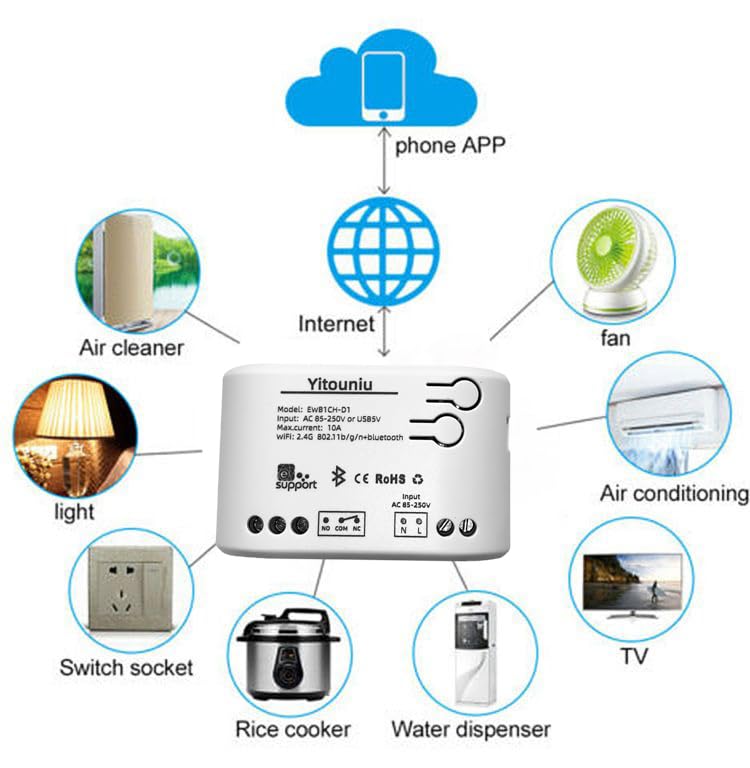
Image 5.1: Diagram illustrating the connectivity of the Yitouniu EWeLink Smart WiFi Switch Relay to various household appliances like lights, fans, and air conditioners, all controlled via a phone app and the internet.
5.2 Aplikazioaren deskarga eta parekatzea
- Deskargatu eWeLink aplikazioa Apple App Store edo Google Play Store-tik.
- Erregistratu kontu bat eta hasi saioa.
- Power on the Smart WiFi Switch Relay.
- Open the eWeLink app, tap the '+' icon to add a device.
- Follow the on-screen instructions to connect the device to your 2.4GHz WiFi network.

Image 5.2: Screenshots of the eWeLink app interface, showing controls for a garage door (ON/OFF) and a scheduling function for setting specific times.
6. Funtzionamendu moduak
The device supports three operating modes: self-locking, interlocking, and inching (micromotion). These modes can typically be configured within the eWeLink app or via physical buttons on the device, depending on the specific model variant.
- Autoblokeatzeko modua: Each channel operates independently. Pressing the button (or app control) turns the relay ON, pressing it again turns it OFF.
- Elkarri lotzeko modua: When one channel is turned ON, all other channels are automatically turned OFF. This is useful for applications where only one device should be active at a time.
- Inching (Micromotion) Mode: The relay turns ON for a set duration (e.g., 0.5 seconds to 1 hour) and then automatically turns OFF. This is suitable for momentary actions like garage door openers or pulse controls.
7. Aplikazioen kontrola eta ahots-kontrola
7.1 eWeLink App Features
The eWeLink app provides comprehensive control over your Smart WiFi Switch Relay:
- Urruneko piztu/desaktibatu: Control connected devices from anywhere with an internet connection.
- Denbora funtzioak: Set schedules, countdowns, or recurring timers for automatic on/off operations.
- Kontrol independentea: Each of the two channels can be controlled independently.
- Gailua partekatzea: Share control of your devices with family members.
- Taldearen kontrola: Organize multiple smart devices into groups for simultaneous control.

Image 7.1: A user remotely controlling home lighting via the eWeLink mobile application, demonstrating the convenience of app-based control.

Image 7.2: Illustration of the eWeLink app's group control and sharing functions, allowing multiple users to manage devices across different rooms.

Image 7.3: The timing function interface within the eWeLink app, enabling users to set specific on/off times for connected appliances.
7.2 Ahots-kontrolaren integrazioa
The Yitouniu Smart WiFi Switch Relay is compatible with popular voice assistants, including Amazon Alexa and Google Home/Nest. To enable voice control:
- Ensure your Smart WiFi Switch Relay is successfully paired with the eWeLink app.
- Ireki Alexa edo Google Home aplikazioa.
- Joan 'Trebetasunak' edo 'Google-rekin funtzionatzen du' atalera.
- Bilatu and enable the 'eWeLink Smart Home' skill/service.
- Lotu zure eWeLink kontua eskatzen zaizunean.
- Discover devices. Your Smart WiFi Switch Relay should now be controllable via voice commands.
Example komandoak:
- "Alexa, piztu egongelako argia."
- "Hey Google, itzali haizagailua."

Image 7.4: A user interacting with voice assistants like Amazon Alexa and Google Home to control smart devices, highlighting the voice control capability of the relay.
8. Mantentzea
The Yitouniu Smart WiFi Switch Relay requires minimal maintenance. Follow these guidelines:
- Garbiketa: Wipe the device with a dry, soft cloth. Do not use liquid cleaners or solvents.
- Konexioaren egiaztapena: Periodically inspect wiring connections to ensure they remain secure.
- Firmware eguneraketak: Keep the eWeLink app updated to receive the latest firmware for the device, which may include performance improvements and new features.
9. Arazoak
- Gailua ez da WiFira konektatzen:
- Ziurtatu zure WiFi sarea 2.4 GHz-koa dela. Gailuak ez ditu 5 GHz-ko sareak onartzen.
- Check if the WiFi password entered in the app is correct.
- Move the device closer to your WiFi router.
- Restart the device and your router.
- Device offline in app:
- Verify your home internet connection is active.
- Egiaztatu gailuak energia baduen.
- Berrabiarazi gailua.
- Ahots-kontrola ez dabil:
- Confirm the eWeLink skill/service is enabled and linked in your Alexa or Google Home app.
- Ensure the device is named clearly in the eWeLink app and discovered by your voice assistant.
- Egiaztatu Interneteko konexioa.
- Device not responding to RF remote:
- Ensure the RF remote is paired with the switch. Refer to the RF pairing instructions (if applicable to your specific remote).
- Check the battery in the RF remote.
10. Zer dago kutxan
Produktuaren ontzia irekitzean, elementu hauek aurkitu beharko zenituzke:
- 1 x Yitouniu Wifi 2-Channel Relay Switch
- 1 x Argibide eskuliburua (dokumentu hau)
11. Bermea eta Laguntza
This product comes with a standard manufacturer's warranty. For specific warranty terms, conditions, and duration, please refer to the documentation included with your purchase or contact Yitouniu customer support. For technical assistance or further inquiries, please visit the official Yitouniu webgunea edo jarri harremanetan haien bezeroarentzako arreta-zerbitzuko kanalekin.