
Hiseeu WK-4HS03-AT
Hiseeu Wireless Security Camera System
Model: WK-4HS03-AT
Sarrera
This manual provides detailed instructions for the installation, operation, and maintenance of your Hiseeu Wireless Security Camera System. Please read this manual thoroughly before using the product to ensure proper functionality and safety. This system offers advanced motion detection, color night vision, and customizable alerts for enhanced security. Experience a complete, all-in-one solution featuring motion detection, two-way communication, and real-time alarm alerts for unmatched peace of mind. The dual-lens design expands the field of view, providing broader coverage for larger areas.

Image: The Hiseeu Wireless Security Camera System, including the NVR and four dual-lens cameras, along with a 1TB hard drive.
Kutxan dagoena
Egiaztatu osagai guztiak zure paketean daudela:
- 16CH WiFi NVR (Network Video Recorder) x 1
- Security Camera (Dual Lens PTZ) x 4
- 12V 2A Power Supply for NVR x 1
- 12V 1A Power Supply for Camera x 4
- Sagua x 1
- HDMI kablea x 1
- Ethernet kablea x 1
- Erabiltzailearen eskuliburua x 1
- Warning Stickers x 2
- Torlojuak poltsa x 4

Irudia: Produktuaren paketean sartutako elementu guztien irudikapen bisuala.
Produktua amaituview
The Hiseeu Wireless Security Camera System features advanced technology for comprehensive surveillance. Key features include:
- Zabalagoa View: One fixed camera and one PTZ (Pan-Tilt-Zoom) camera provide extensive coverage, ensuring no details are missed.
- Instalazio erraza: Designed for straightforward setup, even for beginners.
- Konexio egonkorra: Upgraded WiFi Pro technology supports both 2.4G and 5G WiFi for stable and smooth signal transmission up to 60ft.
- Smart Motion Detection & Tracking: Built-in PIR motion sensor accurately captures motion, triggering alerts and enabling the PTZ camera to automatically track individuals.
- Clear Color Night Vision: Offers infrared mode, full-color night vision, and intelligent adjustment for clear viewargi gutxitan aritzea.
- IP65 Iragazgaitza: Designed for outdoor use, resistant to rain and snow.
- 24/7 Grabaketa: Supports continuous recording with a built-in 1TB HDD, eliminating monthly fees.
- Sistema zabalgarria: The NVR supports up to 16 channels (only 8 WS03 cameras can be connected), allowing for future expansion.

Image: An outdoor camera demonstrating its IP65 waterproof design, suitable for various weather conditions.
Konfigurazio Gida
1. NVR konfigurazioa
- Connect the NVR to a power source using the provided 12V 2A power supply.
- Connect the NVR to your monitor or TV using the HDMI cable.
- Connect the provided mouse to the NVR's USB port.
- For initial setup and remote access, connect the NVR to your router using the Ethernet cable.
2. Camera Installation and Power
- Mount the cameras in desired outdoor locations, ensuring they are within range of the NVR's Wi-Fi signal. Consider the 60ft extended connecting range.
- Connect each camera to its dedicated 12V 1A power supply. The cameras are plug-in powered for continuous operation.

Image: A Hiseeu camera connected to its power adapter, illustrating the plug-in power feature.
3. Wi-Fi konexioa
The cameras are pre-paired with the NVR for easy plug-and-play setup. The system supports both 2.4GHz and 5GHz Wi-Fi for reliable connectivity.
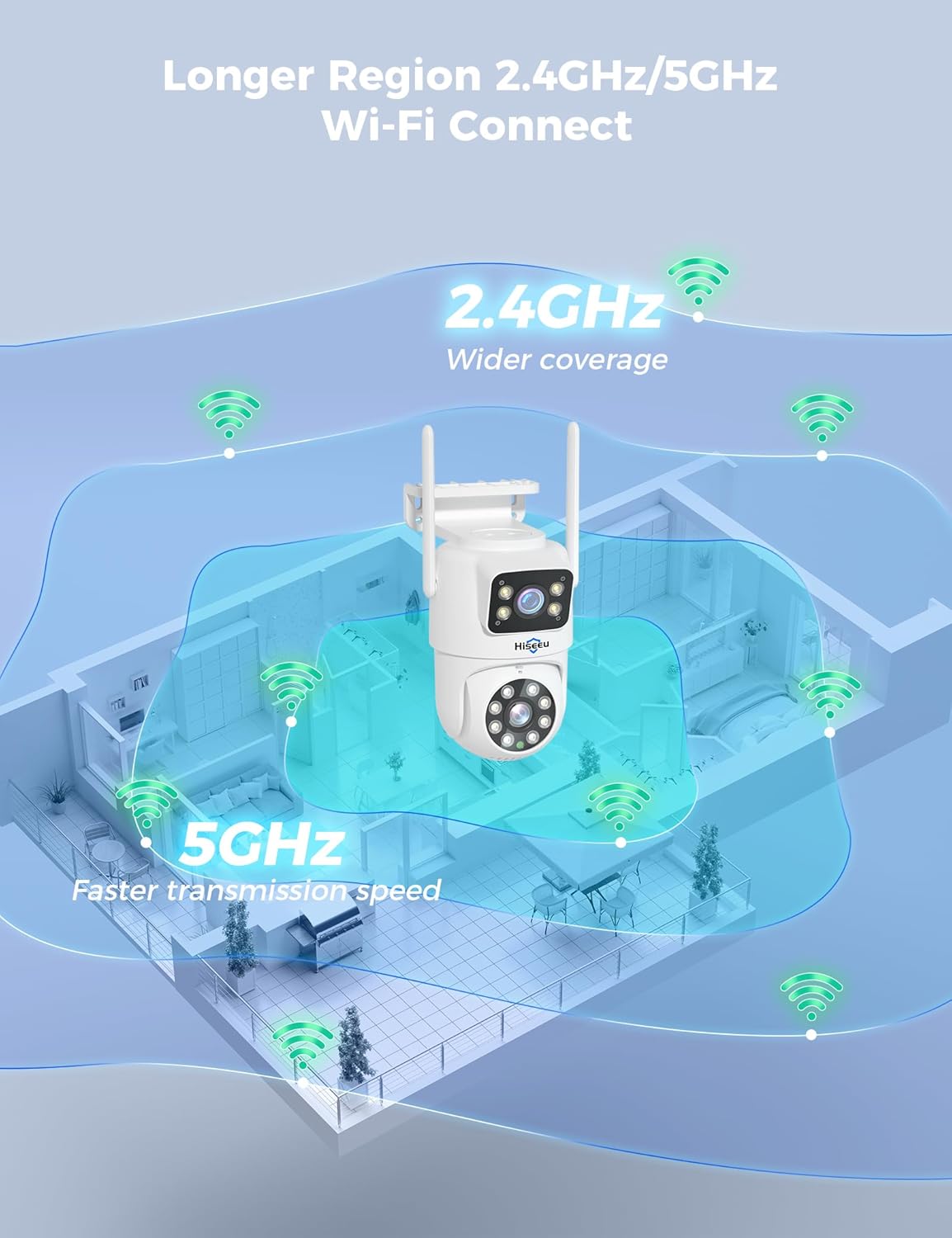
Image: Diagram illustrating the wider coverage of 2.4GHz Wi-Fi and faster transmission speed of 5GHz Wi-Fi for the camera system.
4. App Setup (Eseecloud)
- Download the Eseecloud app from your smartphone's app store.
- Erregistratu kontu bat eta hasi saioa.
- Add your NVR system by scanning the QR code on the NVR or manually entering its ID.
- Jarraitu aplikazioko argibideei konfigurazioa osatzeko.
Funtzionamendu-argibideak
Zuzenean Viewerreprodukzioa eta erreprodukzioa
Behin konfiguratuta, egin dezakezu view live feeds from all cameras on your connected monitor or through the Eseecloud app. The NVR supports 24/7 continuous recording to the built-in 1TB HDD. You can also view 8-channel playback simultaneously.

Image: A monitor and a smartphone displaying multiple camera feeds simultaneously, highlighting the 8-screen display capability.
Pan & Tilt (PTZ) Control
The PTZ cameras offer 360° pan and tilt capabilities. Use the Eseecloud app to remotely control the camera's direction and zoom. The dual-lens design provides two distinct viewing angles simultaneously.

Image: A Hiseeu dual-lens camera demonstrating its 360-degree pan and tilt capabilities, showing two simultaneous viewangeluak.
Smart Motion Detection & Auto-Tracking
The built-in PIR motion sensor detects human movement, triggering alerts and initiating auto-tracking. The PTZ camera will follow the detected individual, while the fixed camera maintains its original view.

Image: An illustration of the auto-tracking technology, showing the camera focusing on and following a moving person.
Kolore Gaueko Ikusmena
The cameras feature built-in LED lights for enhanced night vision. You can select from three recording modes: infrared mode (black and white), full-color night vision mode, or intelligent adjustment of color night vision.

Image: A split image showing the difference between standard night vision (left) and 4MP Super HD color night vision (right) from a Hiseeu camera.
Bi norabideko audio komunikazioa
Speak directly to family members or visitors, or deter intruders using the clear, real-time two-way audio feature accessible through your mobile device.

Image: A person interacting with someone via the camera's two-way audio feature on their smartphone.
Urrunekoa Viewpartekatzea eta partekatzea
Access your camera feeds remotely from anywhere using the Eseecloud app. You can also share access to the system with family members.

Image: A smartphone displaying live camera feeds, with a map overlay indicating remote viewing capabilities from various locations.
Activity Zones and Preset Positions
Define specific activity zones to receive alerts only for relevant areas, reducing false notifications. You can also set preset positions for the PTZ cameras to quickly monitor key locations.

Image: A yard with four marked preset positions, illustrating how users can define key monitoring areas for the camera.
Alexa-rekin funtzionatzen du
Integrate your Hiseeu system with Alexa for convenient voice control and viewpantaila adimendun bateragarrietan funtzionatzen.

Image: A smart display showing a live camera feed, with a speech bubble indicating Alexa integration for convenient viewing.
Mantentzea
- Ohiko garbiketa: Garbitu kameraren lenteak aldian-aldian zapi leun eta lehor batekinamp oihal bat irudiaren kalitate garbia bermatzeko.
- Firmware eguneraketak: Check the Eseecloud app or Hiseeu's official webwebgunea eskuragarri dauden firmware eguneratzeetarako, errendimendu eta segurtasun optimoa bermatzeko.
- Elikatze-iturria: Ziurtatu konexio elektriko guztiak ondo daudela eta kalterik gabe.
- Disko gogorraren kudeaketa: 1 TB-ko HDD-ak eskaintzen du ample storage. The system will automatically overwrite older footage when full. You can back up important recordings as needed.
Arazoak konpontzea
| Arazoa | Kausa posiblea | Irtenbidea |
|---|---|---|
| Ez dago irudirik monitorean/aplikazioan | Power issue, loose cable, NVR/camera not connected. | Check power connections for NVR and cameras. Ensure HDMI/Ethernet cables are securely connected. Restart NVR. |
| Poor Wi-Fi signal/connection | Camera too far from NVR, interference. | Relocate camera closer to NVR. Ensure no major obstructions. Consider a Wi-Fi repeater if cameras are more than 30 feet from the NVR. |
| App is slow or unresponsive | Network congestion, app bug, outdated app version. | Check your internet connection speed. Restart the app. Ensure the app is updated to the latest version. |
| Mugimendu faltsuen alertak | Sensitivity too high, environmental factors (e.g., moving branches). | Adjust motion detection sensitivity in the app. Set up activity zones to exclude irrelevant areas. |
Zehaztapenak
- Marka: Hiseeu
- Modelo zenbakia: WK-4HS03-AT
- Konektibitate Teknologia: Haririk gabekoa
- Bideoa ateratzeko ebazpena: 1920p (3MP)
- Ezaugarri bereziak: App Control, Human Detection, Motion Sensor, Privacy Masking, Two-Way Audio
- Kanal kopurua: 4 (expandable up to 16 channels for WS03 cameras)
- Kolorea: Zuria
- Energia iturria: Kable elektrikoa
- Elementuaren neurriak (L x W x H): 5 x 8 x 10 hazbete
- Gomendatutako erabilerak: Kanpoan
- Gailu bateragarriak: Smartphoneak
- Seinalearen formatua: Digitala
- Kameraren beste ezaugarri batzuk: Dome-shaped cameras with dual 3MP lenses and 5MP PTZ capabilities
- Argi gutxiko teknologia: Gaueko Ikusmena
- Antena mota: Barnekoa
- Fotograma-tasa: 30 FPS
- Grabaketa modua: Continuous motion detection
- Sentsore optikoen teknologia: CMOS
- Hardware Interfazea: 802.11 ac/b/g/n
- Lente mota: Finkoa
- Bideoaren sarrera: RJ45
- ViewAngelua: 360 gradu
- Elementuaren pisua: 8.68 kilo
Bermea eta Laguntza
Hiseeu offers a 12-month warranty period for this product. For any technical assistance or support, please contact Hiseeu customer service. They provide 24/7 fast response support via email or phone call.

Image: A customer service representative with a headset, symbolizing high-quality response and considerate service.
Ask a question about this manual
Ask about setup, troubleshooting, compatibility, parts, safety, or missing instructions. Manuals+ will review the question and use this page’s manual context to help answer it.